Tag Archives: IPv6

🌐 IP Addressing

Image
Image
Image
Image

📘 1. Introduction to IP Addressing

IP Addressing is a fundamental concept in computer networking that enables devices to identify and communicate with each other over a network such as the Internet.

Every device connected to a network—whether it’s a smartphone, laptop, server, or IoT device—requires a unique IP address.


🔹 Definition

An IP address (Internet Protocol Address) is:

A unique numerical label assigned to each device connected to a network that uses the Internet Protocol for communication.


🔹 Purpose of IP Addressing

  • Identifies devices uniquely
  • Enables data routing
  • Supports communication between networks
  • Helps locate devices globally

🧠 2. How IP Addressing Works


🔹 Basic Concept

When data is sent over a network:

  1. Source device has an IP address
  2. Destination device has an IP address
  3. Data is broken into packets
  4. Packets travel through routers using IP addresses

🔹 Example

  • Sender IP → 192.168.1.10
  • Receiver IP → 8.8.8.8

🏗️ 3. Structure of an IP Address
Image
Image
Image
Image

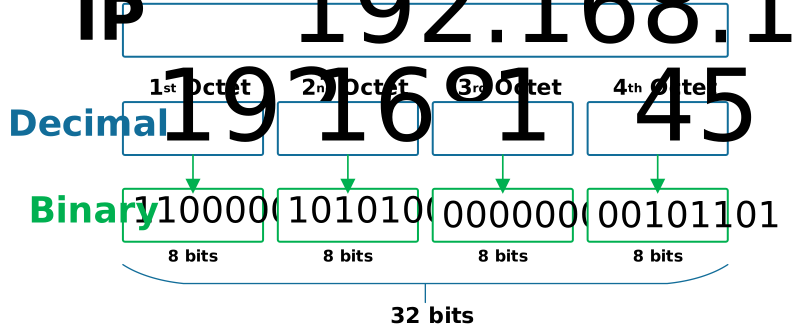
🔹 IPv4 Structure

  • 32-bit address
  • Divided into 4 octets

Example:

192.168.1.1

🔹 Binary Representation

11000000.10101000.00000001.00000001

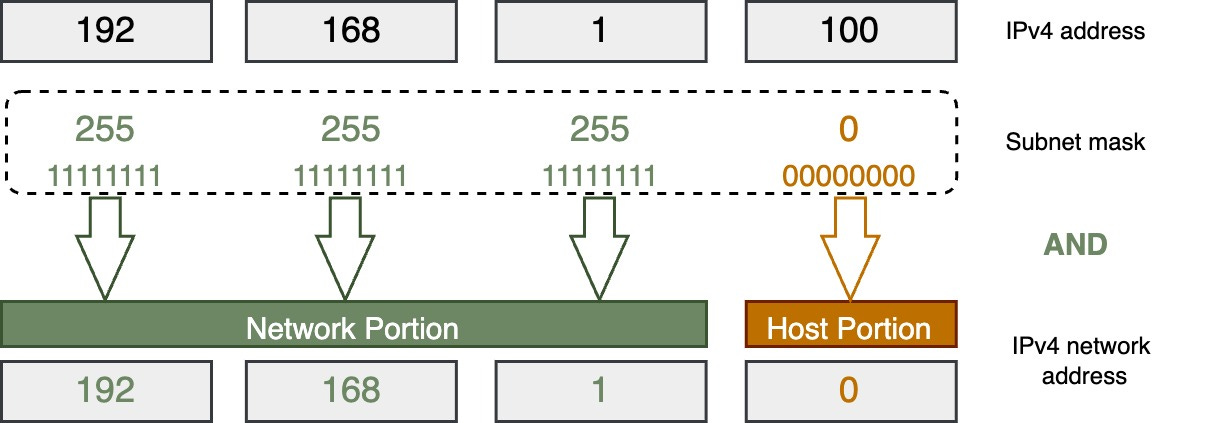
🔹 Network vs Host Portion

  • Network → identifies network
  • Host → identifies device

🌐 4. Types of IP Addresses


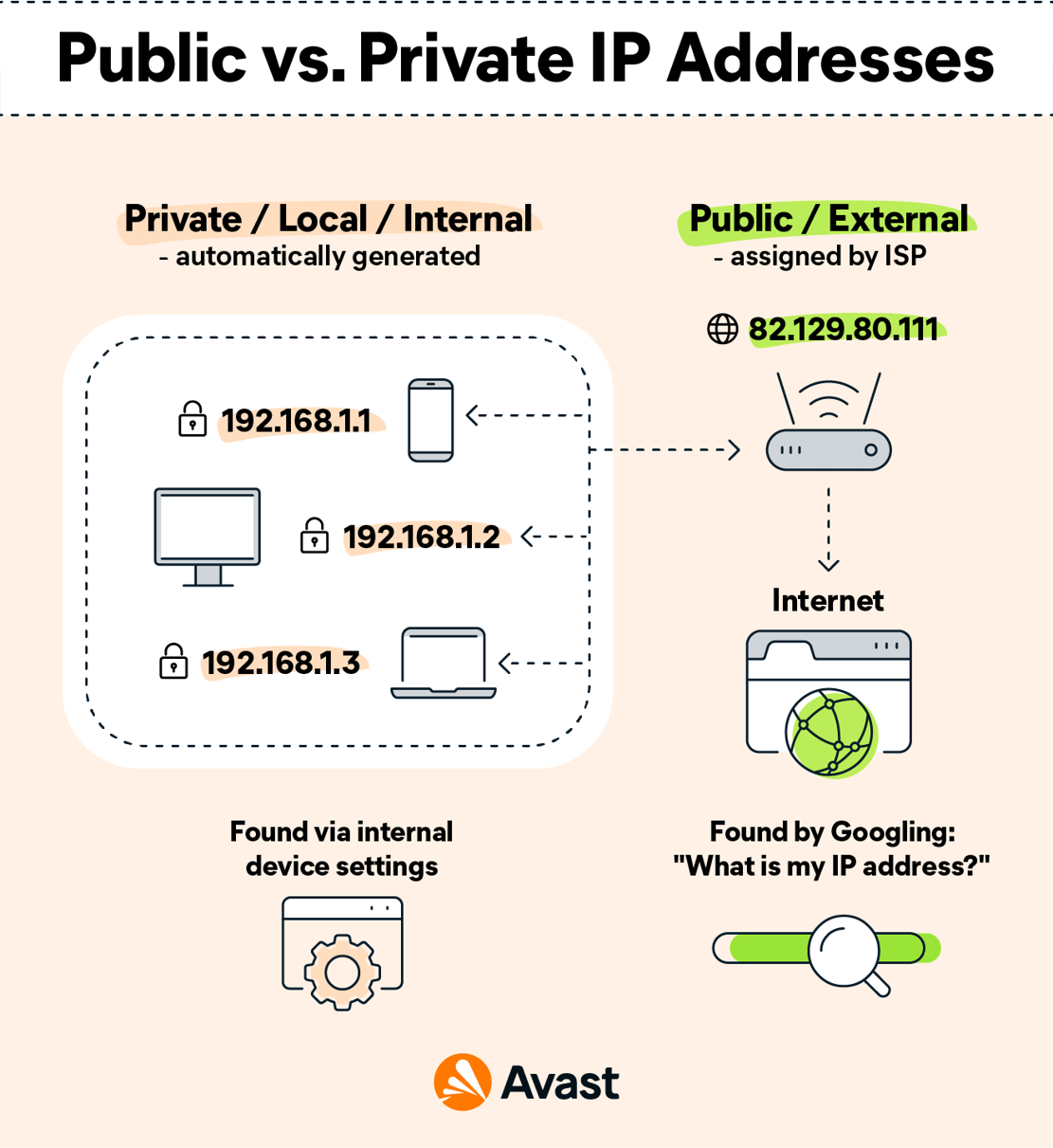
🔹 1. Public IP Address

  • Assigned by ISP
  • Accessible over the internet

🔹 2. Private IP Address

  • Used within local networks

Ranges:

  • 192.168.x.x
  • 10.x.x.x
  • 172.16.x.x

🔹 3. Static IP

  • Fixed address

🔹 4. Dynamic IP

  • Assigned automatically (DHCP)

🔢 5. IPv4 Address Classes
Image
Image
Image
Image

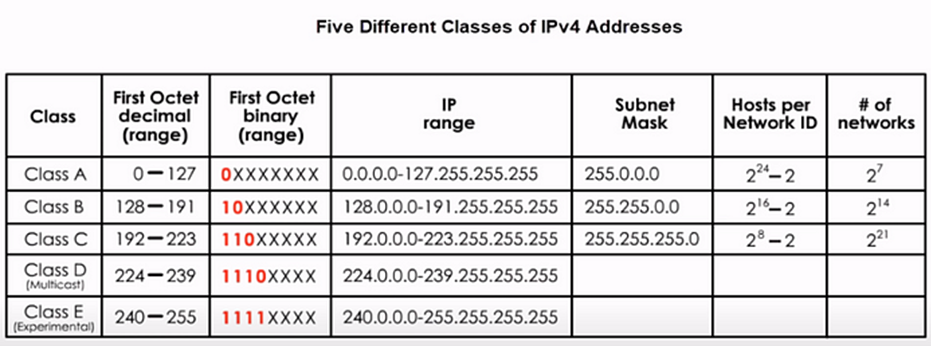
🔹 Classes

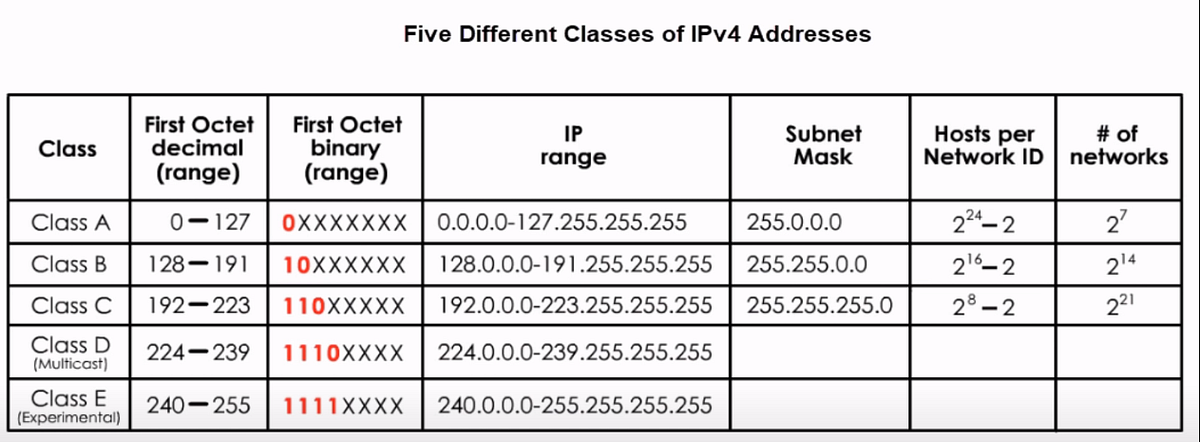
ClassRangeUsage
A1–126Large networks
B128–191Medium
C192–223Small
D224–239Multicast
E240–255Experimental

⚡ 6. Subnetting

Image
Image
Image
Image

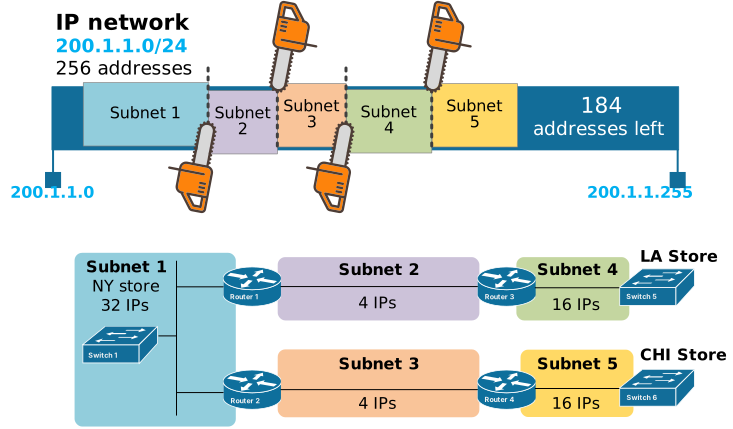
🔹 What is Subnetting?

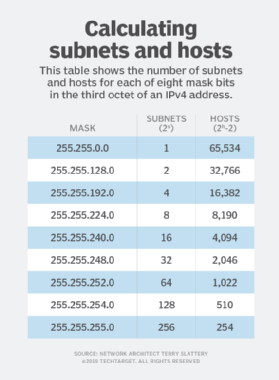
Dividing a network into smaller networks.


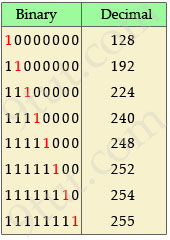
🔹 Subnet Mask

Defines network and host portions.

Example:

255.255.255.0

🔹 CIDR Notation

192.168.1.0/24

🔄 7. IPv6 Addressing
Image
Image
Image
Image

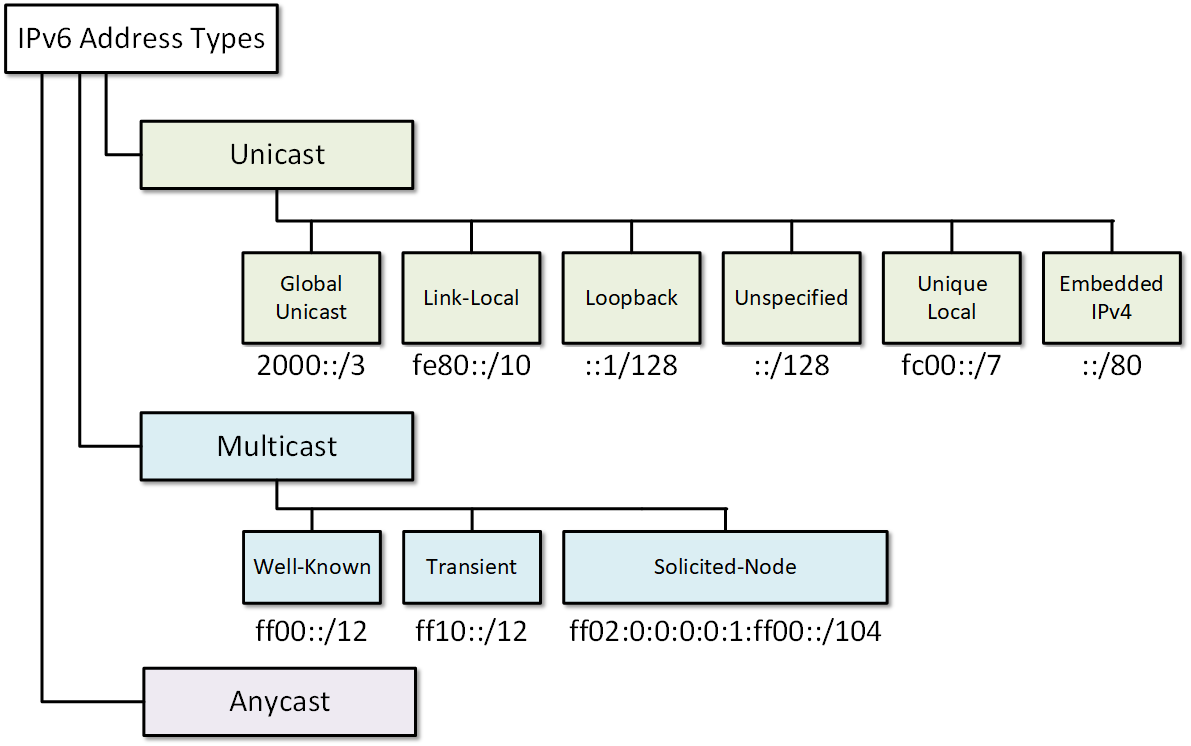
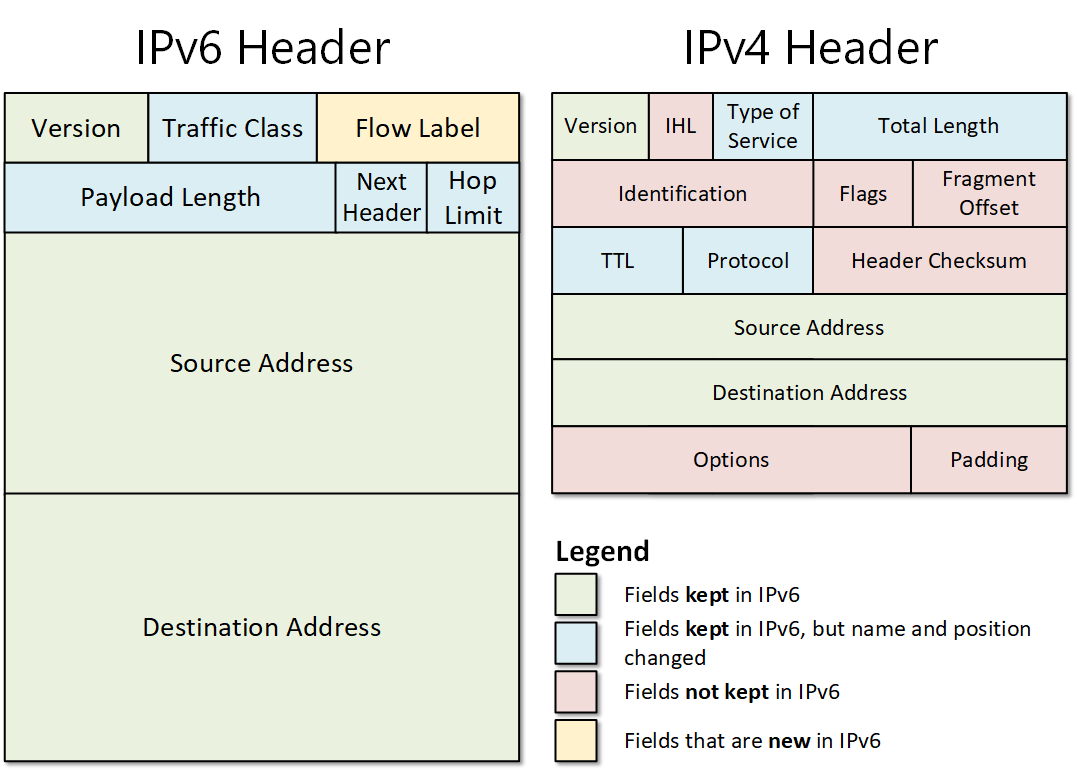
🔹 Why IPv6?

  • IPv4 exhaustion
  • Need for more addresses

🔹 Features

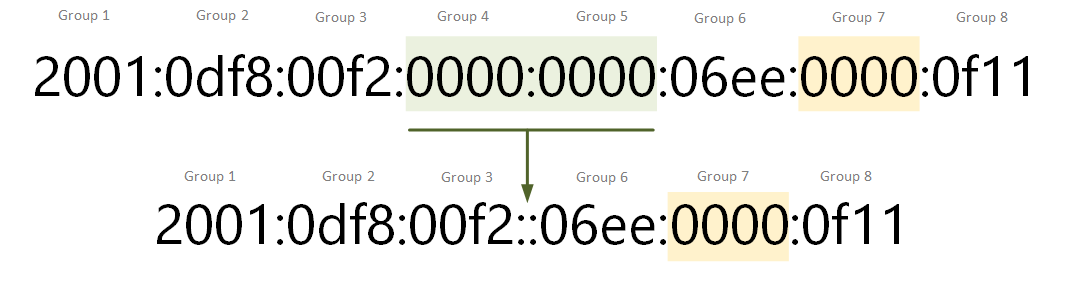
  • 128-bit address
  • Hexadecimal format
  • Larger address space

Example:

2001:0db8:85a3:0000:0000:8a2e:0370:7334

🔐 8. Special IP Addresses


🔹 Loopback Address

  • 127.0.0.1

🔹 Broadcast Address

  • Sends to all devices

🔹 Multicast Address

  • Sends to group

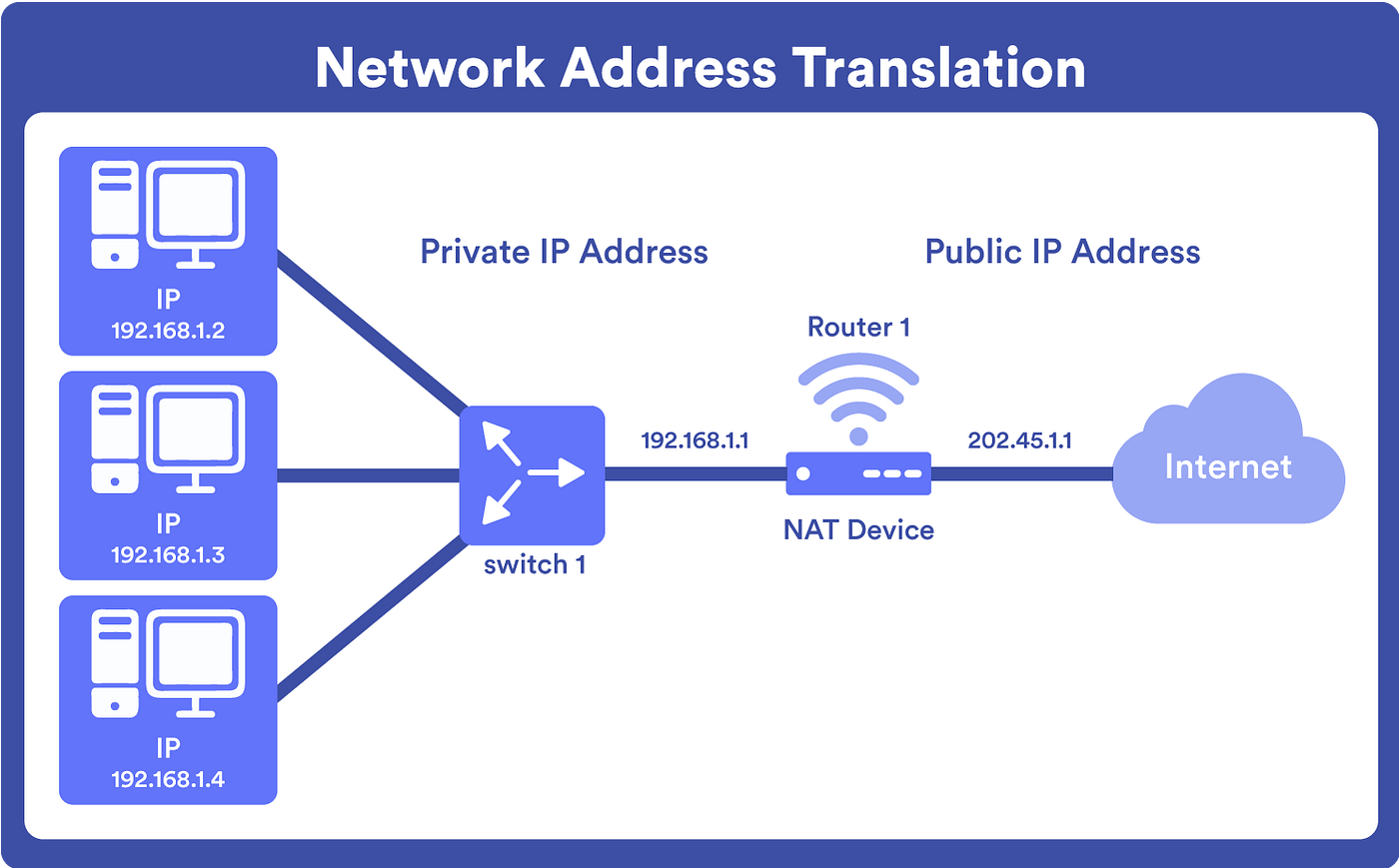
🔄 9. NAT (Network Address Translation)
Image
Image
Image
Image

🔹 Purpose

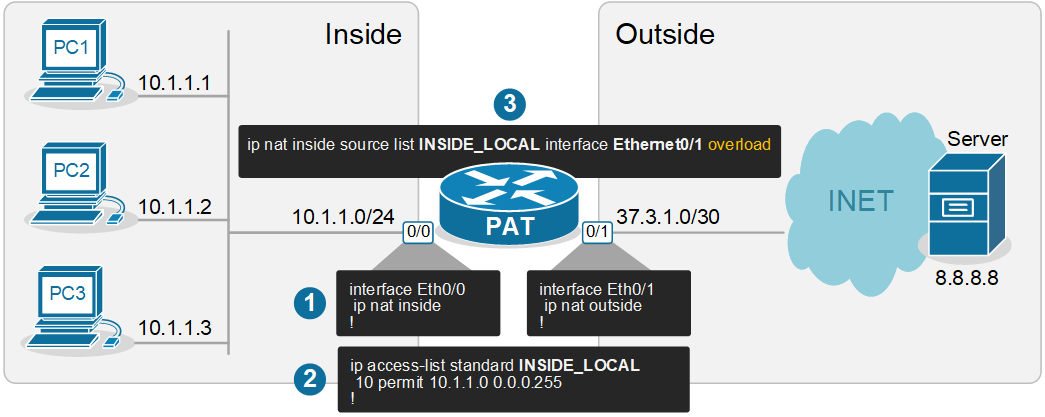
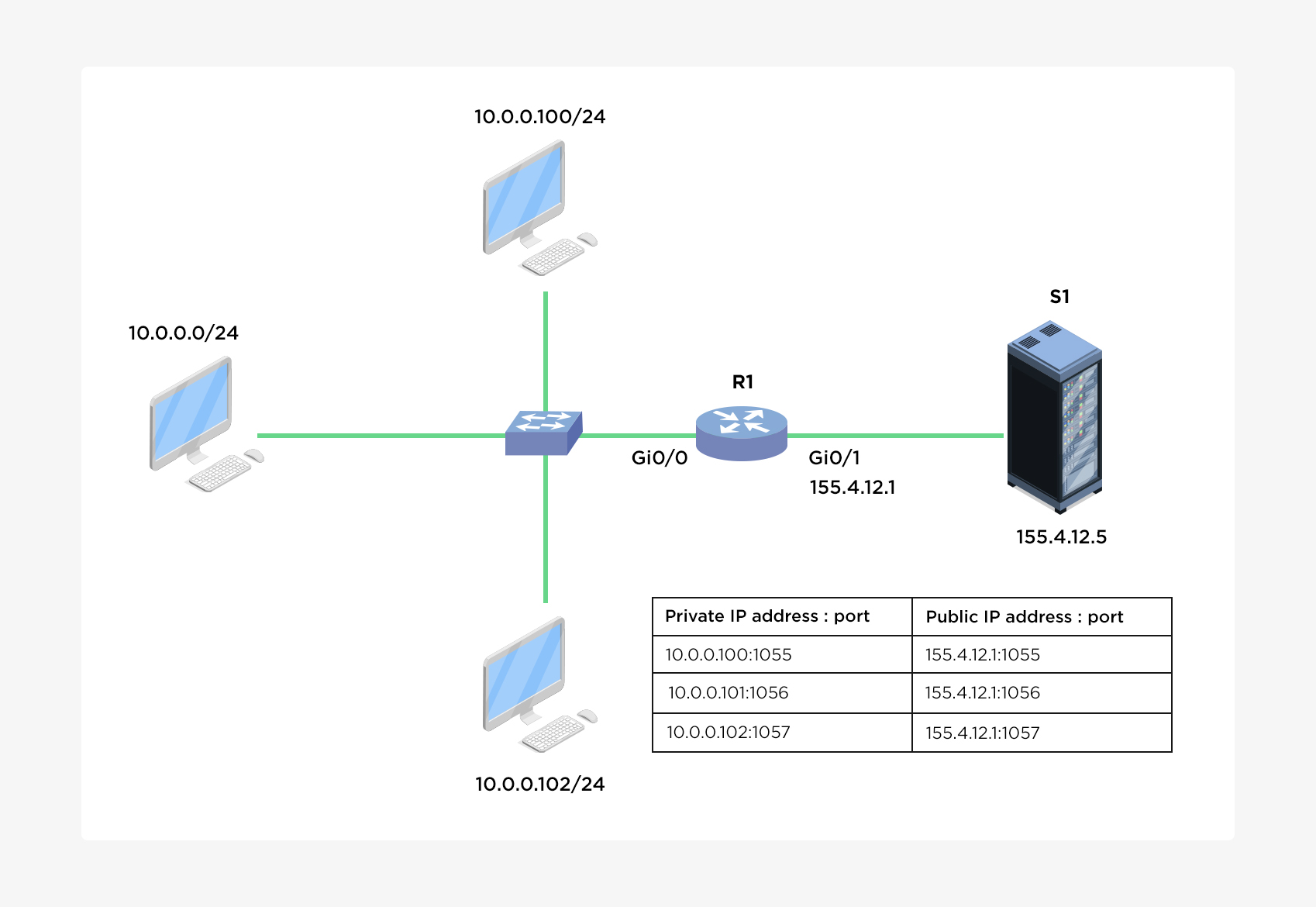
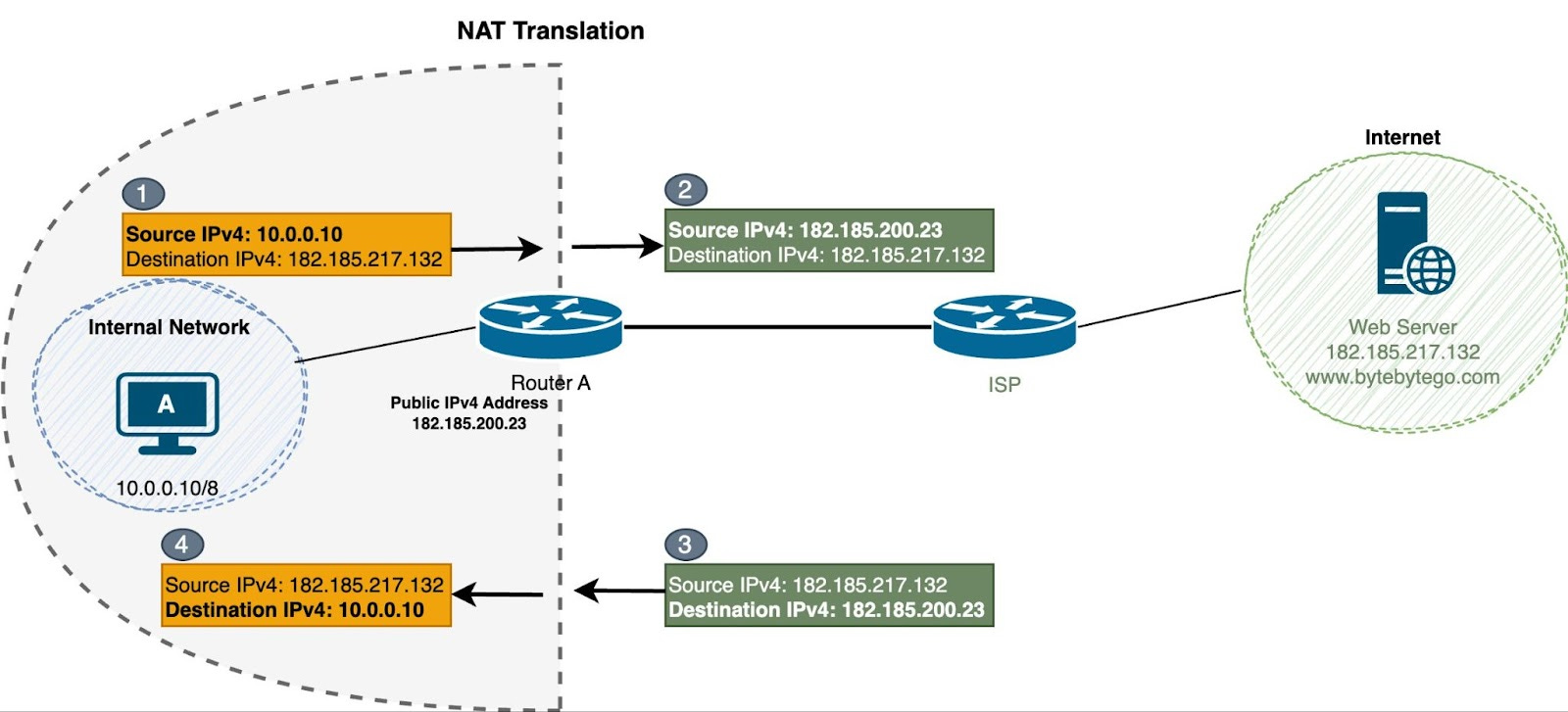
  • Converts private IP to public IP

🔹 Types

  • Static NAT
  • Dynamic NAT
  • PAT (Port Address Translation)

⚙️ 10. DHCP (Dynamic Host Configuration Protocol)


🔹 Function

  • Automatically assigns IP addresses

🔹 Process

  1. Discover
  2. Offer
  3. Request
  4. Acknowledge

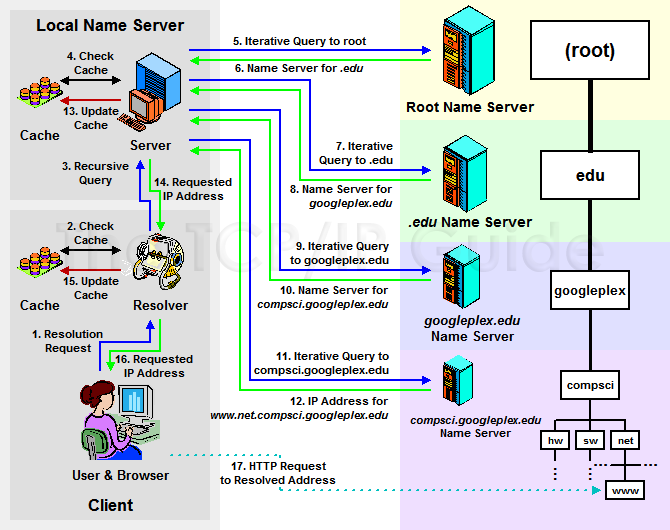
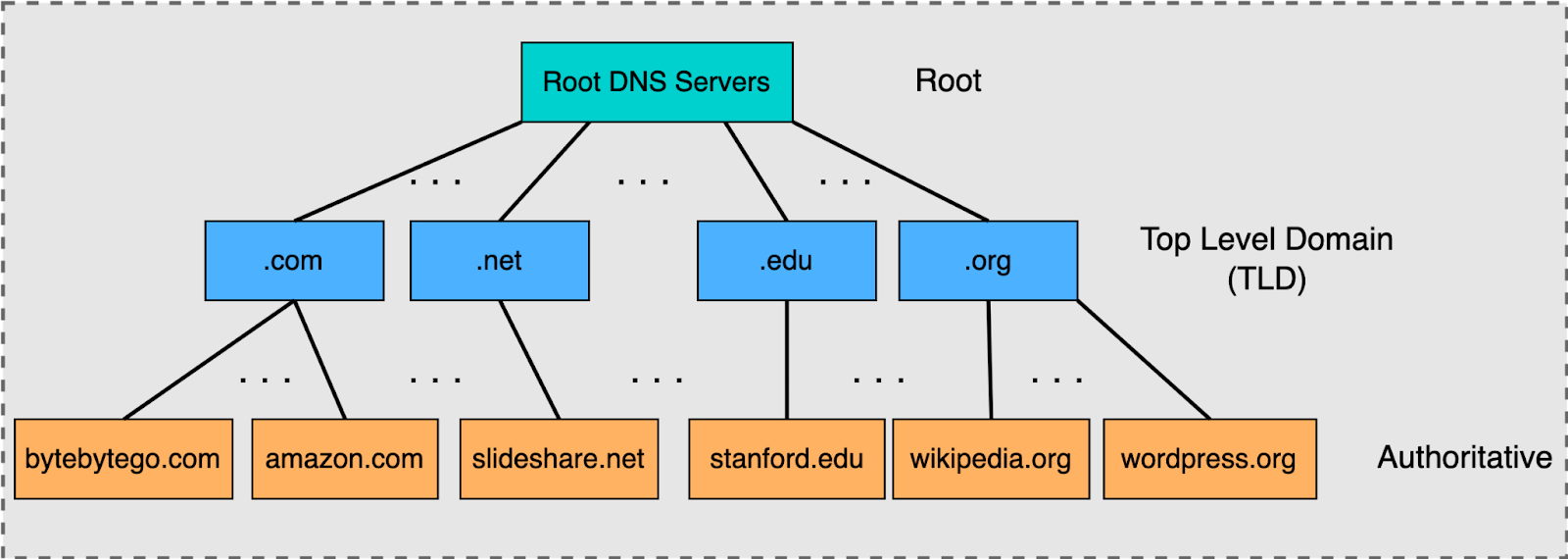
🌐 11. DNS and IP Addressing


🔹 Role

  • Converts domain names to IP

🔹 Example

  • google.com → IP address

🧠 12. Routing and IP Addressing


🔹 Routers

  • Use IP addresses to forward packets

🔹 Routing Tables

  • Store path information

⚡ 13. Address Resolution Protocol (ARP)


🔹 Function

  • Maps IP to MAC address

🔄 14. ICMP Protocol


🔹 Uses

  • Error reporting
  • Diagnostics

Example: ping command


🔐 15. Security in IP Addressing


🔹 Threats

  • IP spoofing
  • DDoS attacks

🔹 Solutions

  • Firewalls
  • Encryption

🧩 16. Advanced Concepts


  • VLSM (Variable Length Subnet Masking)
  • Supernetting
  • Anycast addressing

📊 17. Real-World Applications


  • Internet communication
  • Cloud networking
  • IoT systems
  • Enterprise networks

⚖️ 18. Advantages of IP Addressing


  • Unique identification
  • Scalable
  • Standardized

⚠️ 19. Limitations


  • IPv4 exhaustion
  • Security concerns

🔮 20. Future of IP Addressing


  • IPv6 adoption
  • Smart networks
  • IoT expansion

🏁 Conclusion

IP addressing is the foundation of all network communication, enabling billions of devices to connect and exchange data. Understanding IP addressing is essential for networking, cybersecurity, and modern computing systems.


🏷️ Tags

🌐 TCP/IP Protocol

Image
Image
Image
Image

📘 1. Introduction to TCP/IP

TCP/IP (Transmission Control Protocol / Internet Protocol) is the fundamental communication protocol suite that enables devices to connect and communicate over the internet and other networks.

It is the backbone of:

  • The Internet 🌍
  • Local networks (LANs)
  • Wide Area Networks (WANs)

🔹 Definition

TCP/IP is a set of communication protocols used to:

  • Transmit data between devices
  • Ensure reliable delivery
  • Route data across networks

🔹 Why TCP/IP is Important

  • Enables global communication
  • Supports web browsing, email, streaming
  • Provides standardized networking

🧠 2. History of TCP/IP


🔹 Development

  • Developed in the 1970s
  • Funded by the U.S. Department of Defense (ARPANET project)

🔹 Key Milestones

  • 1983 → TCP/IP adopted as ARPANET standard
  • Became foundation of modern internet

🏗️ 3. TCP/IP Model Layers

Image
Image
Image
Image

🔹 Four Layers of TCP/IP Model


1. Application Layer

  • Interface for user applications
  • Protocols:
    • HTTP
    • FTP
    • SMTP
    • DNS

2. Transport Layer

  • End-to-end communication
  • Protocols:
    • TCP
    • UDP

3. Internet Layer

  • Logical addressing and routing
  • Protocol:
    • IP

4. Network Access Layer

  • Physical transmission
  • Includes Ethernet, Wi-Fi

🔄 4. Data Encapsulation Process

Image
Image
Image
Image

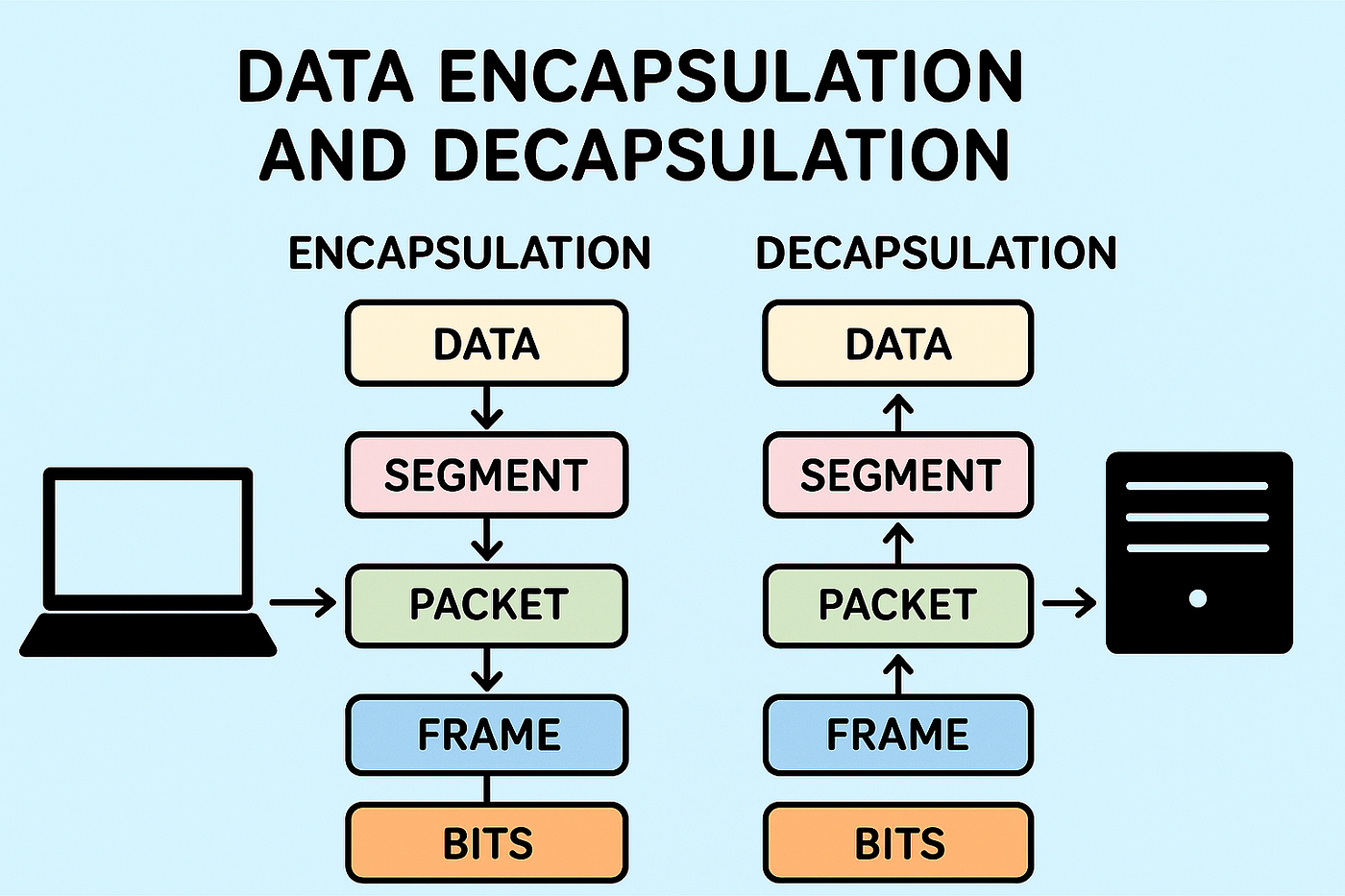
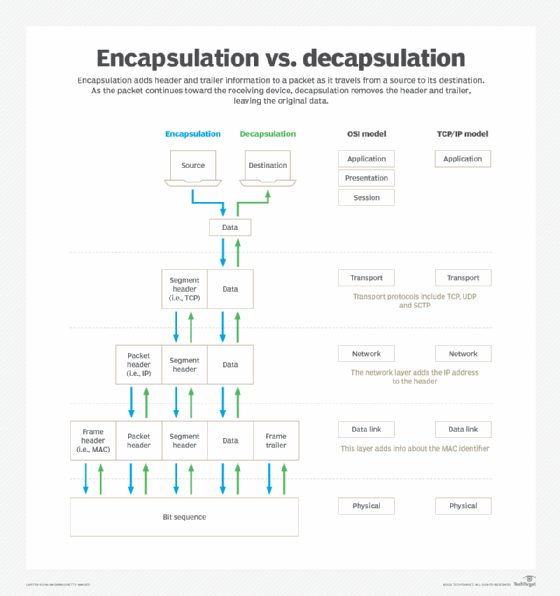
🔹 Steps

  1. Application layer creates data
  2. Transport layer adds header → Segment
  3. Internet layer adds IP header → Packet
  4. Network layer adds frame

🔑 5. Internet Protocol (IP)


🔹 Role of IP

  • Provides addressing
  • Routes packets

🔹 IP Address

Unique identifier for devices.

Types:

  • IPv4 → 32-bit
  • IPv6 → 128-bit

🔹 Example IPv4

192.168.1.1

🔄 6. Transmission Control Protocol (TCP)

Image
Image
Image
Image

🔹 Features of TCP

  • Connection-oriented
  • Reliable
  • Ordered delivery
  • Error checking

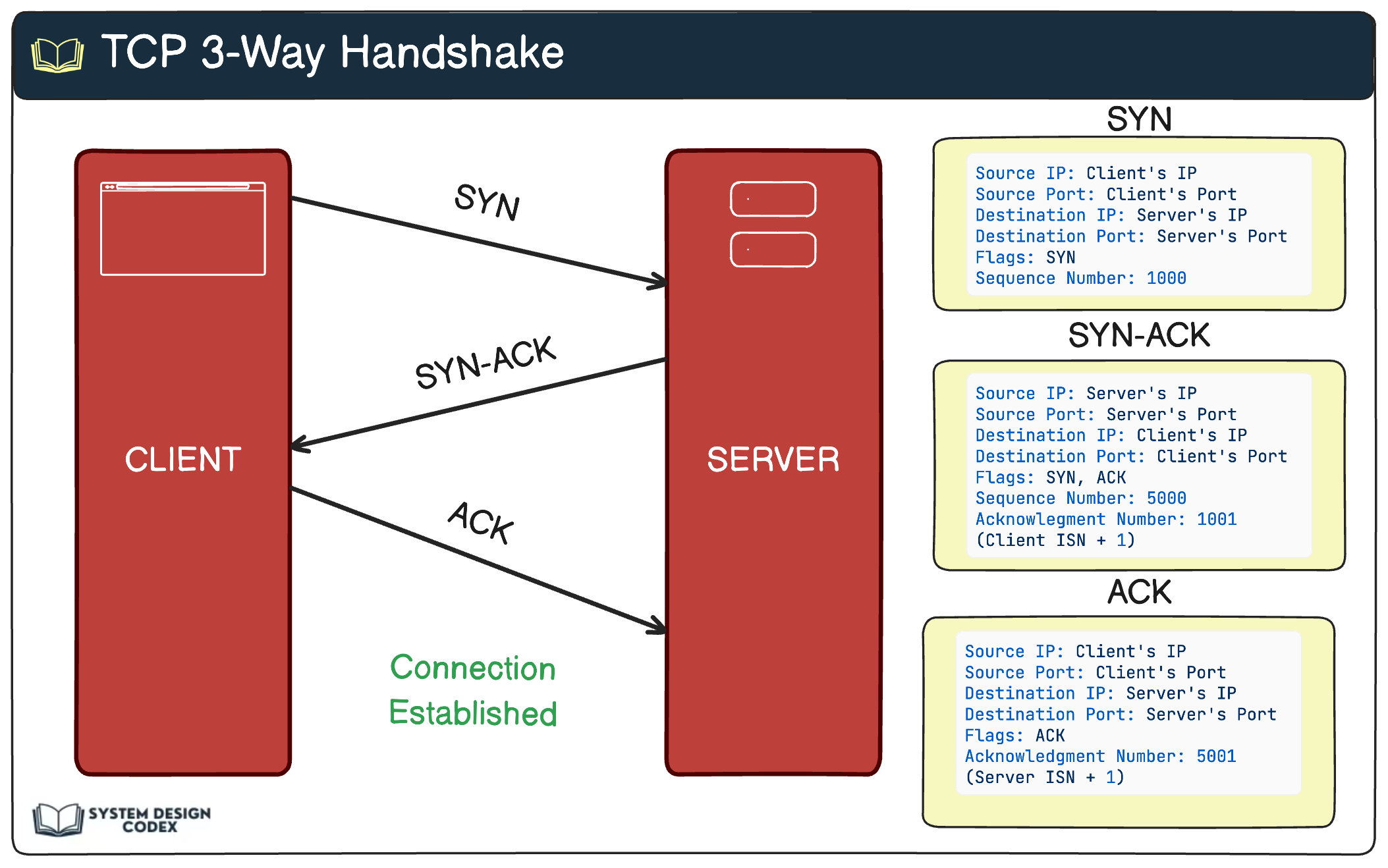
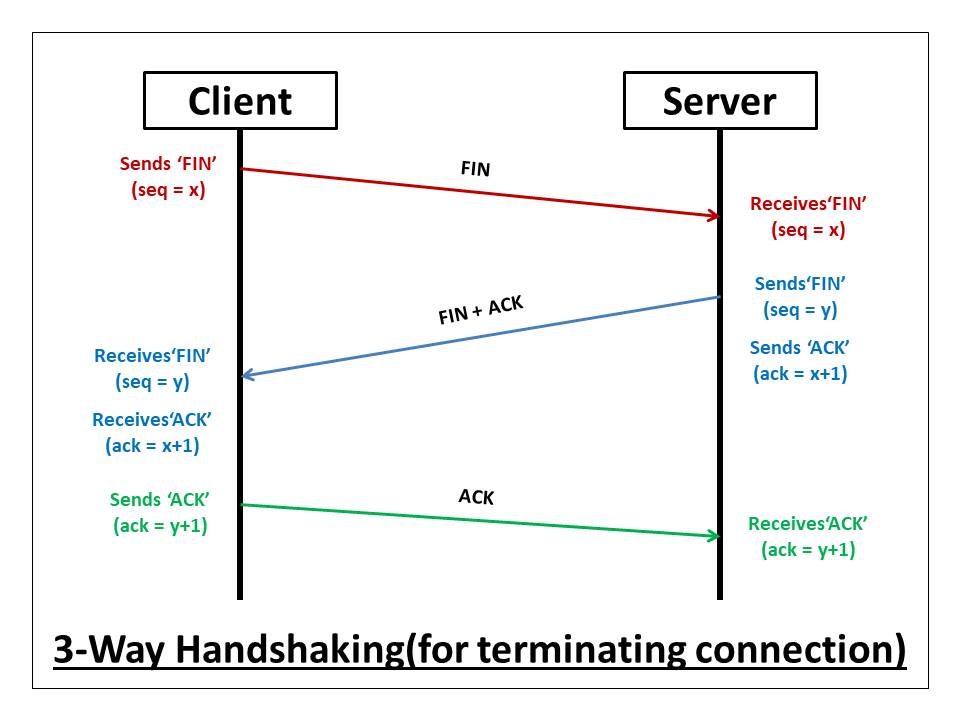
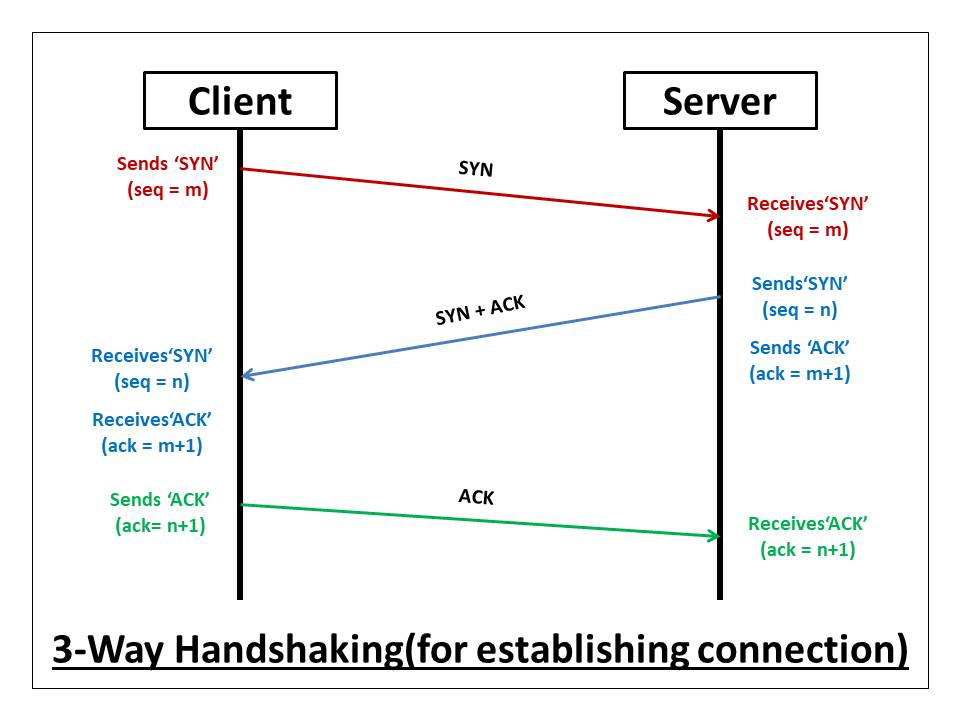
🔹 Three-Way Handshake

  1. SYN
  2. SYN-ACK
  3. ACK

🔹 Flow Control

  • Sliding window mechanism

🔹 Congestion Control

  • Avoids network overload

⚡ 7. User Datagram Protocol (UDP)


🔹 Features

  • Connectionless
  • Faster
  • No guarantee of delivery

🔹 Use Cases

  • Video streaming
  • Online gaming
  • DNS

🧠 8. TCP vs UDP


FeatureTCPUDP
ReliabilityHighLow
SpeedSlowerFaster
ConnectionYesNo

🔐 9. Ports and Sockets


🔹 Port Numbers

  • Identify applications

Examples:

  • HTTP → 80
  • HTTPS → 443

🔹 Socket

Combination of:

  • IP address
  • Port number

🌐 10. DNS (Domain Name System)

Image
Image
Image
Image

🔹 Function

  • Converts domain names to IP addresses

🔄 11. Routing


🔹 Routers

  • Forward packets

🔹 Routing Protocols

  • OSPF
  • BGP

🔐 12. Security in TCP/IP


🔹 Common Threats

  • IP spoofing
  • Man-in-the-middle attacks

🔹 Security Measures

  • Firewalls
  • Encryption (TLS/SSL)

⚡ 13. Performance Optimization


🔹 Techniques

  • Load balancing
  • Congestion control
  • Caching

🧪 14. Packet Structure


🔹 Components

  • Header
  • Payload

🌐 15. Real-World Applications


  • Web browsing
  • Email
  • Streaming
  • Cloud services

🧠 16. Advanced Concepts


  • NAT (Network Address Translation)
  • Subnetting
  • QoS (Quality of Service)

🔄 17. TCP/IP vs OSI Model


TCP/IPOSI
4 layers7 layers

⚖️ 18. Advantages of TCP/IP


  • Scalable
  • Reliable
  • Standardized

⚠️ 19. Limitations


  • Complexity
  • Security vulnerabilities

🔮 20. Future of TCP/IP


  • IPv6 adoption
  • IoT networking
  • 5G integration

🏁 Conclusion

TCP/IP is the foundation of modern networking, enabling seamless communication across the globe. Understanding TCP/IP is essential for anyone working in networking, cybersecurity, or software development.


🏷️ Tags