Category Archives: Technology and Computing

🌐 IP Addressing

Image
Image
Image
Image

📘 1. Introduction to IP Addressing

IP Addressing is a fundamental concept in computer networking that enables devices to identify and communicate with each other over a network such as the Internet.

Every device connected to a network—whether it’s a smartphone, laptop, server, or IoT device—requires a unique IP address.


🔹 Definition

An IP address (Internet Protocol Address) is:

A unique numerical label assigned to each device connected to a network that uses the Internet Protocol for communication.


🔹 Purpose of IP Addressing

  • Identifies devices uniquely
  • Enables data routing
  • Supports communication between networks
  • Helps locate devices globally

🧠 2. How IP Addressing Works


🔹 Basic Concept

When data is sent over a network:

  1. Source device has an IP address
  2. Destination device has an IP address
  3. Data is broken into packets
  4. Packets travel through routers using IP addresses

🔹 Example

  • Sender IP → 192.168.1.10
  • Receiver IP → 8.8.8.8

🏗️ 3. Structure of an IP Address
Image
Image
Image
Image

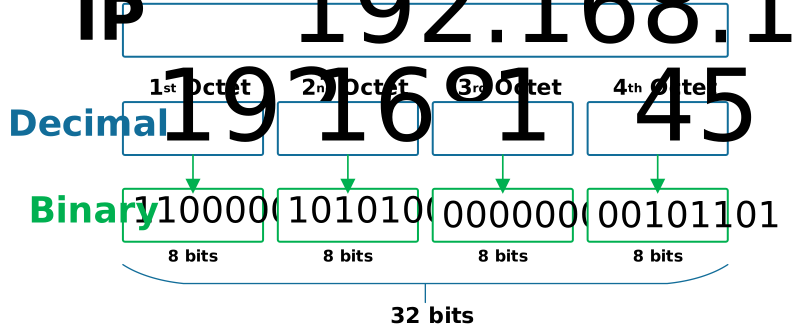
🔹 IPv4 Structure

  • 32-bit address
  • Divided into 4 octets

Example:

192.168.1.1

🔹 Binary Representation

11000000.10101000.00000001.00000001

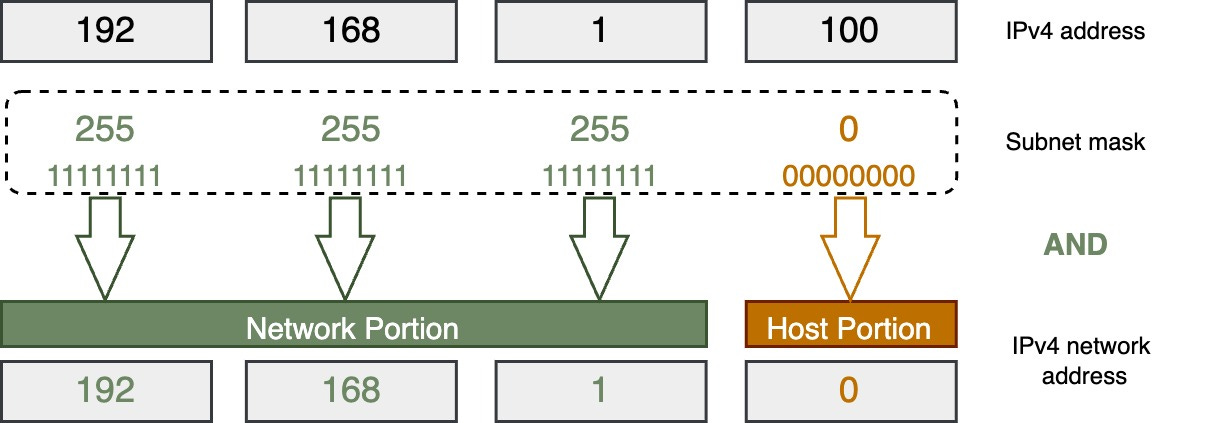
🔹 Network vs Host Portion

  • Network → identifies network
  • Host → identifies device

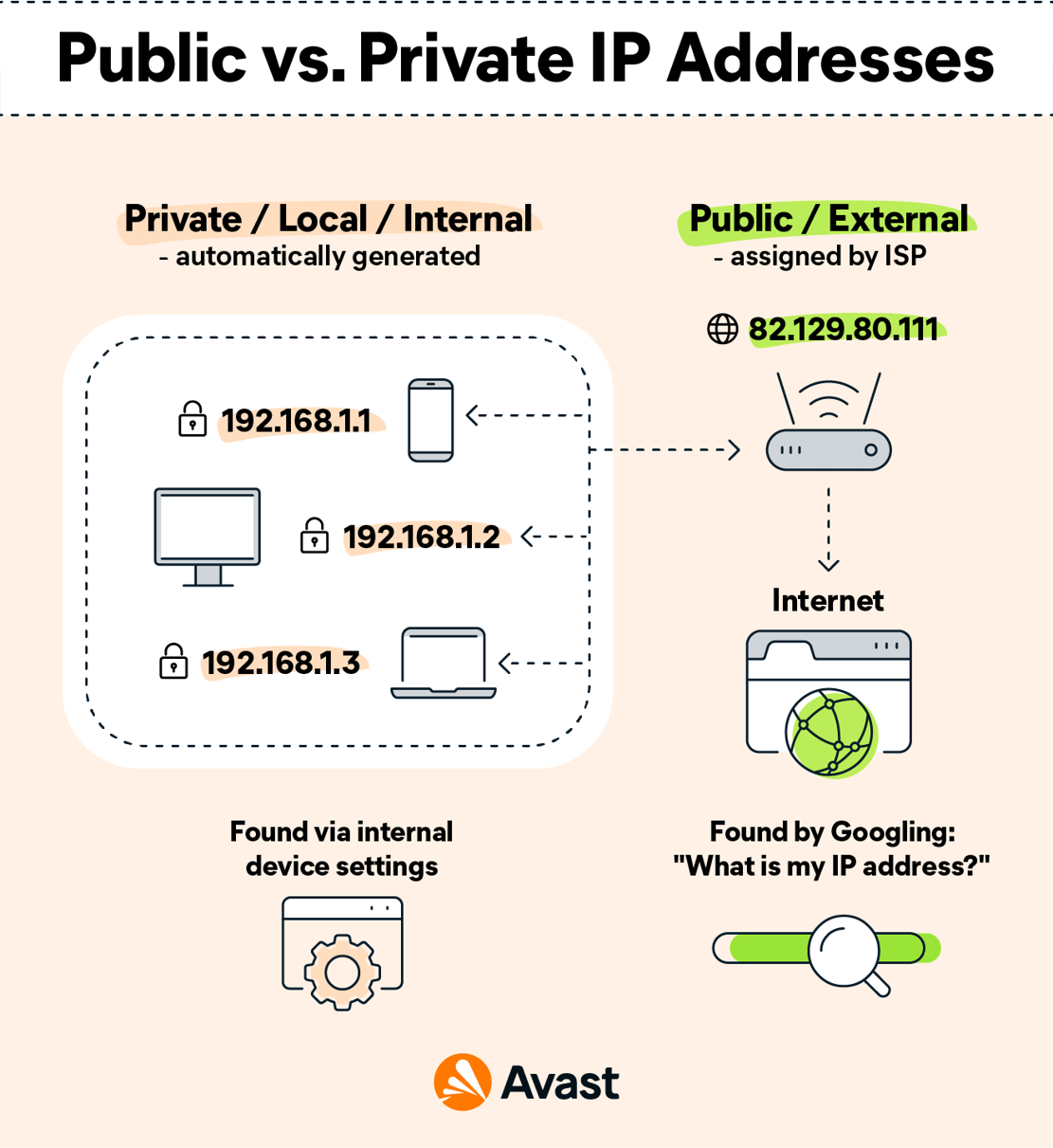
🌐 4. Types of IP Addresses


🔹 1. Public IP Address

  • Assigned by ISP
  • Accessible over the internet

🔹 2. Private IP Address

  • Used within local networks

Ranges:

  • 192.168.x.x
  • 10.x.x.x
  • 172.16.x.x

🔹 3. Static IP

  • Fixed address

🔹 4. Dynamic IP

  • Assigned automatically (DHCP)

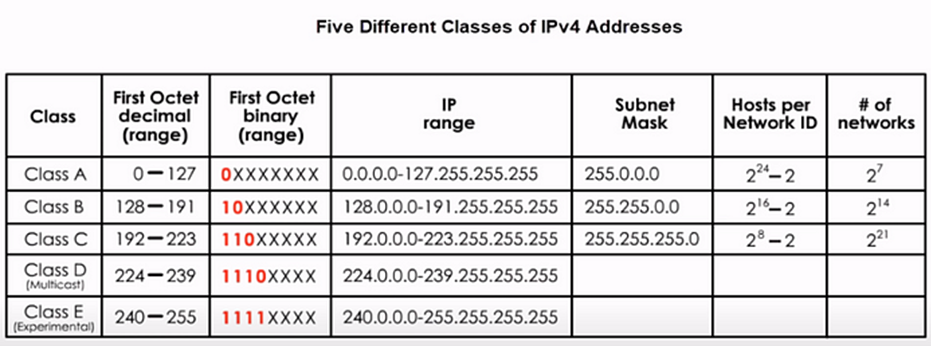
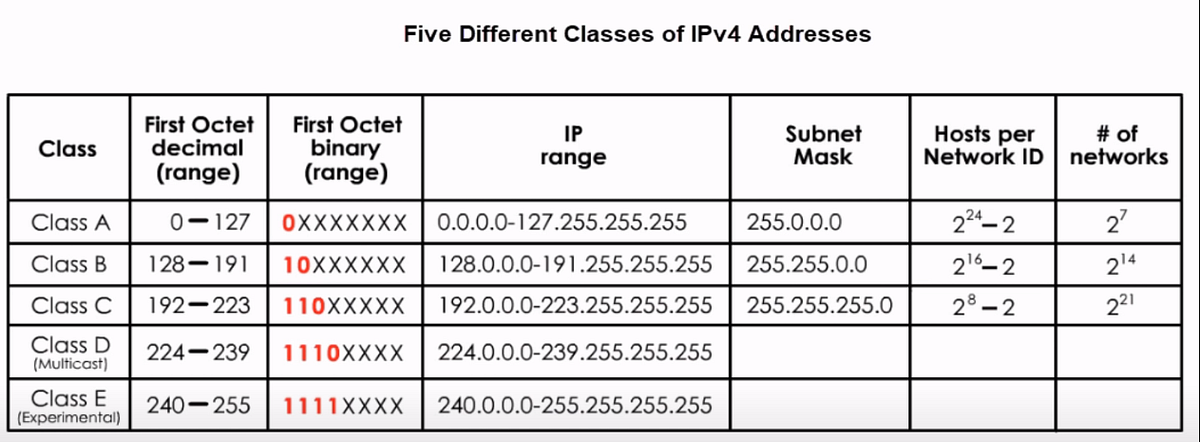
🔢 5. IPv4 Address Classes
Image
Image
Image
Image

🔹 Classes

ClassRangeUsage
A1–126Large networks
B128–191Medium
C192–223Small
D224–239Multicast
E240–255Experimental

⚡ 6. Subnetting

Image
Image
Image
Image

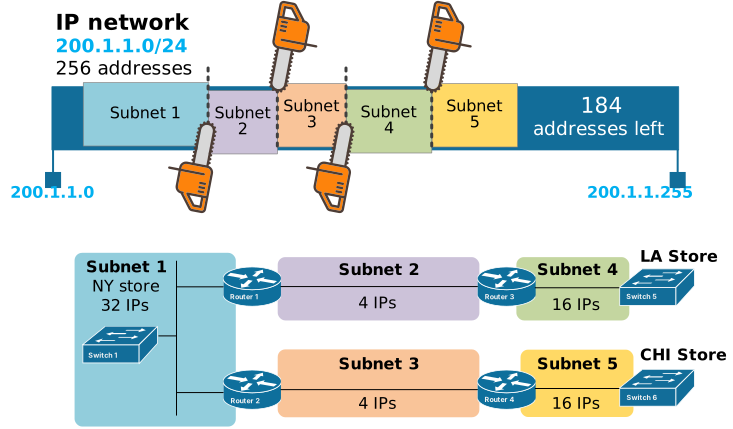
🔹 What is Subnetting?

Dividing a network into smaller networks.


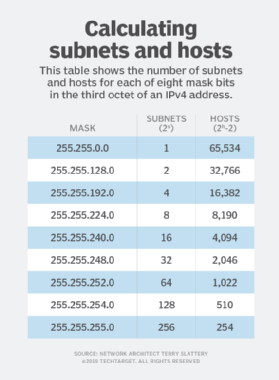
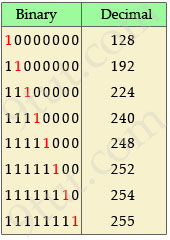
🔹 Subnet Mask

Defines network and host portions.

Example:

255.255.255.0

🔹 CIDR Notation

192.168.1.0/24

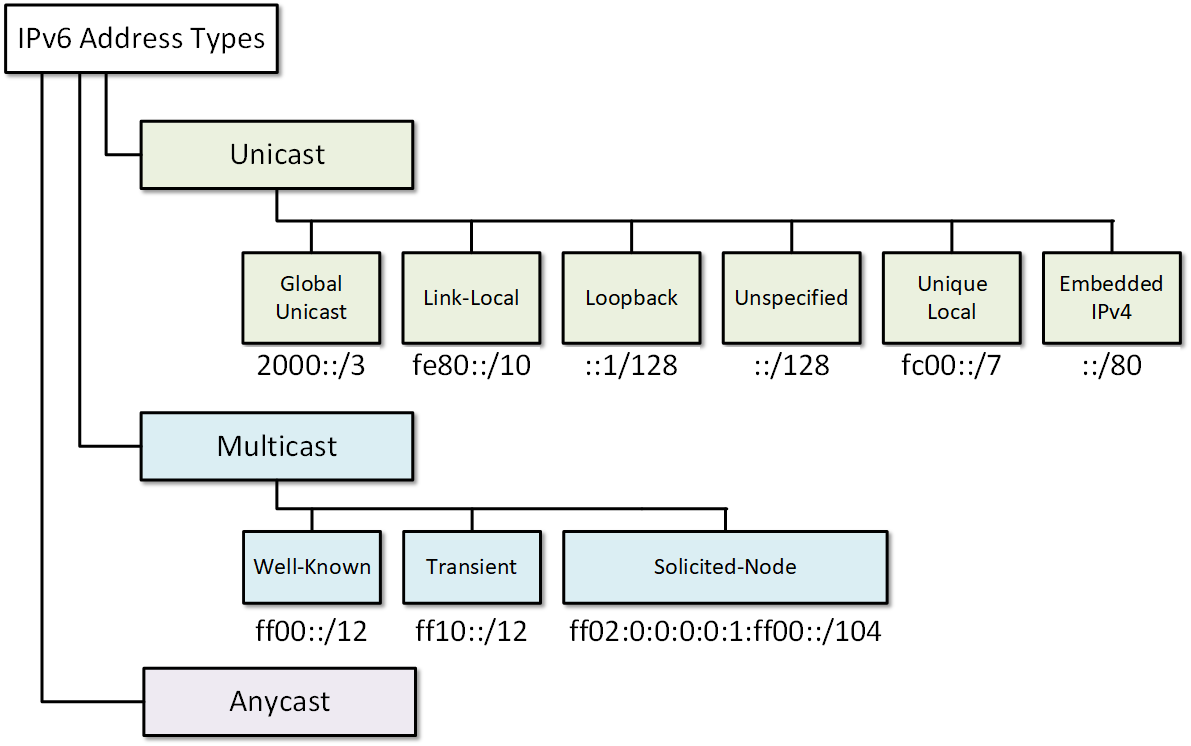
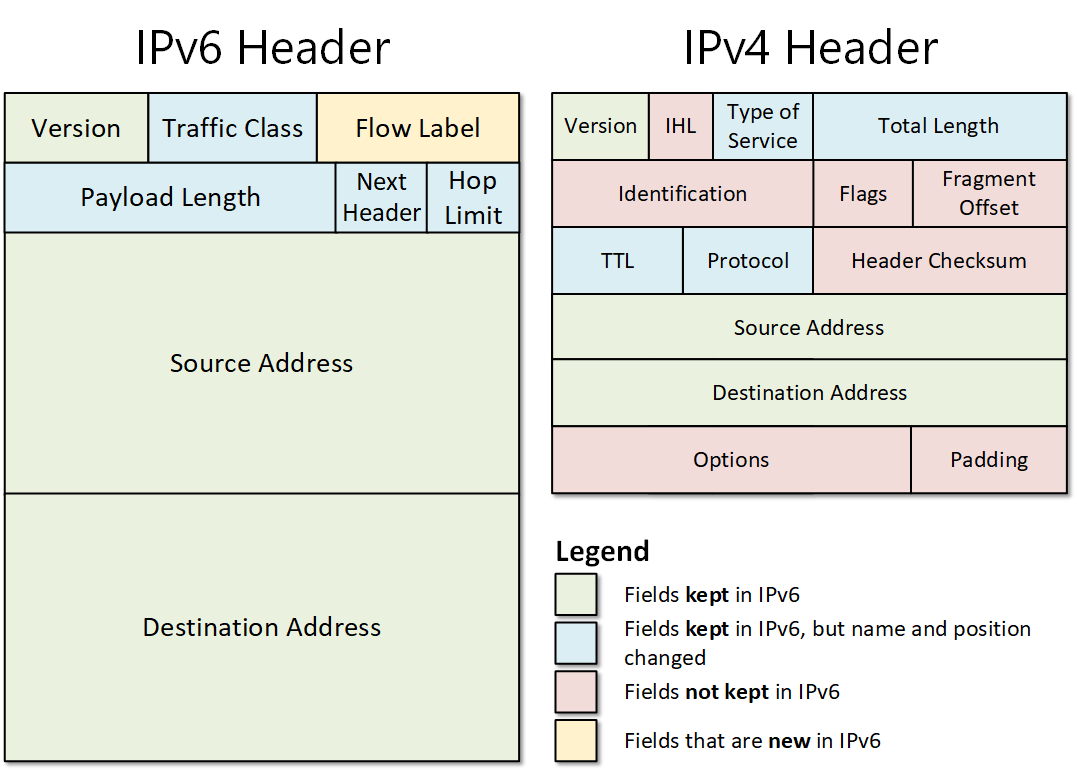
🔄 7. IPv6 Addressing
Image
Image
Image
Image

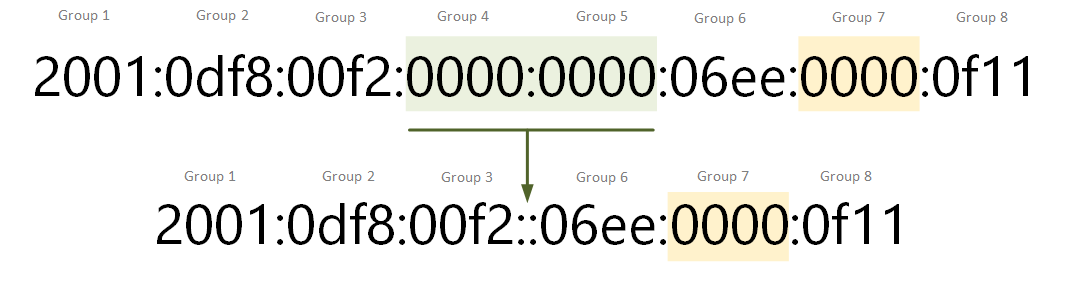
🔹 Why IPv6?

  • IPv4 exhaustion
  • Need for more addresses

🔹 Features

  • 128-bit address
  • Hexadecimal format
  • Larger address space

Example:

2001:0db8:85a3:0000:0000:8a2e:0370:7334

🔐 8. Special IP Addresses


🔹 Loopback Address

  • 127.0.0.1

🔹 Broadcast Address

  • Sends to all devices

🔹 Multicast Address

  • Sends to group

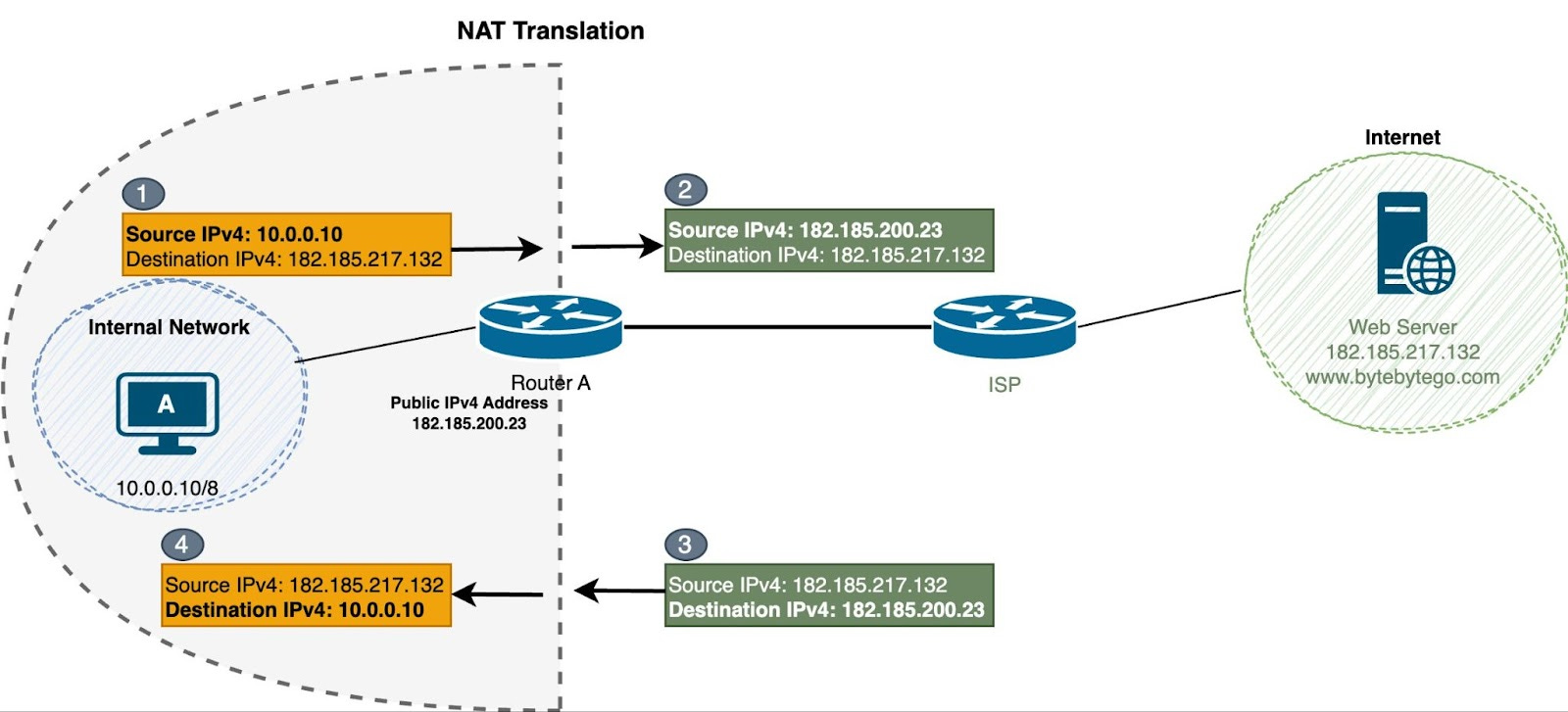
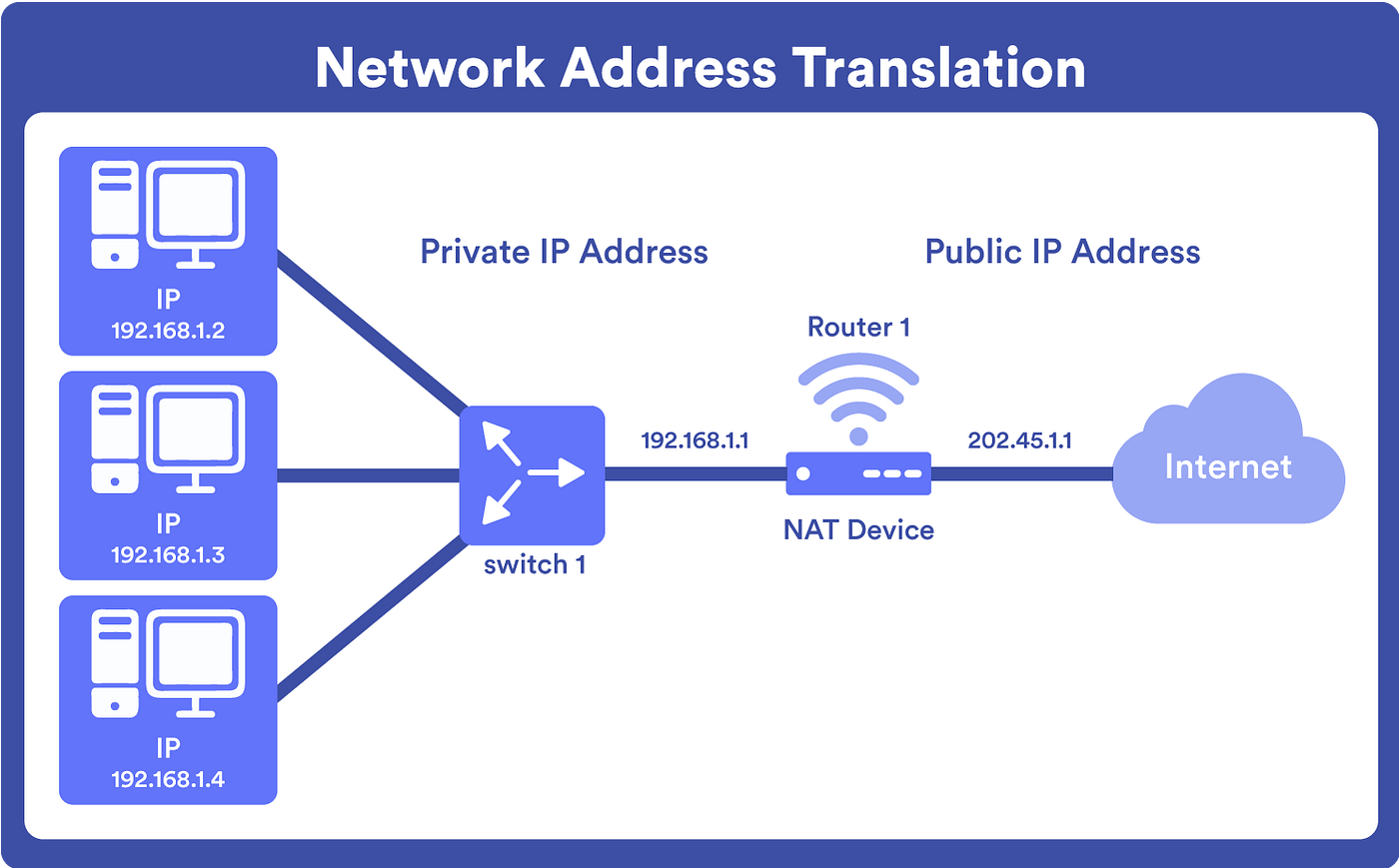
🔄 9. NAT (Network Address Translation)
Image
Image
Image
Image

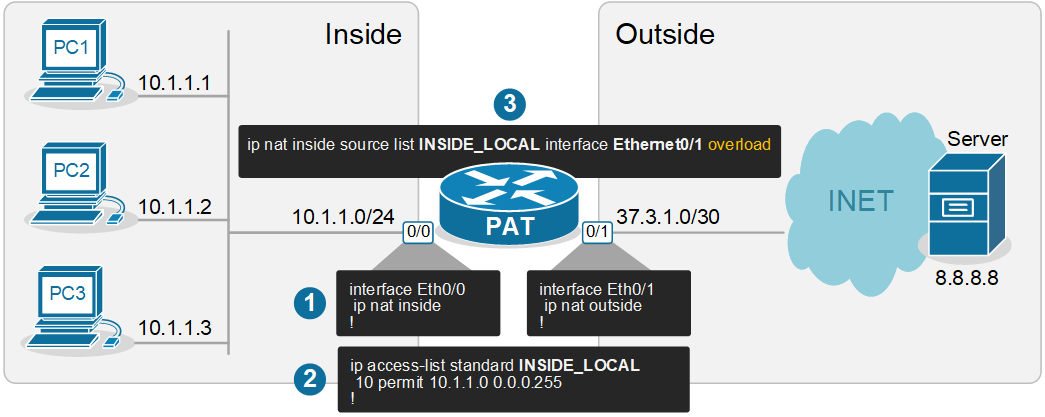
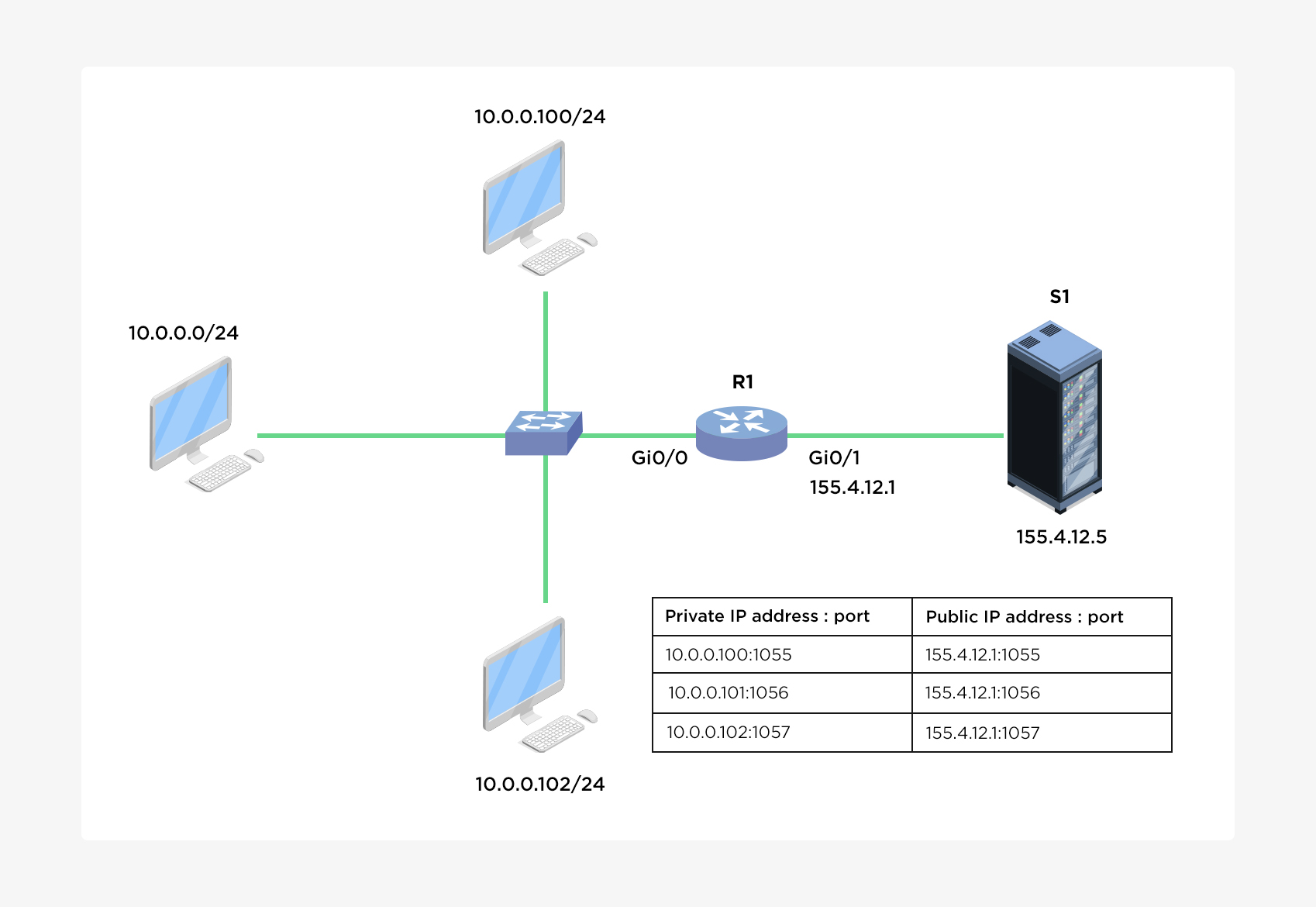
🔹 Purpose

  • Converts private IP to public IP

🔹 Types

  • Static NAT
  • Dynamic NAT
  • PAT (Port Address Translation)

⚙️ 10. DHCP (Dynamic Host Configuration Protocol)


🔹 Function

  • Automatically assigns IP addresses

🔹 Process

  1. Discover
  2. Offer
  3. Request
  4. Acknowledge

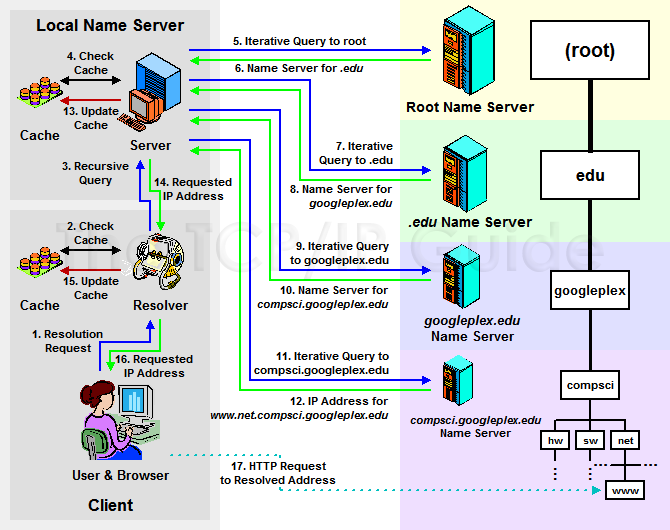
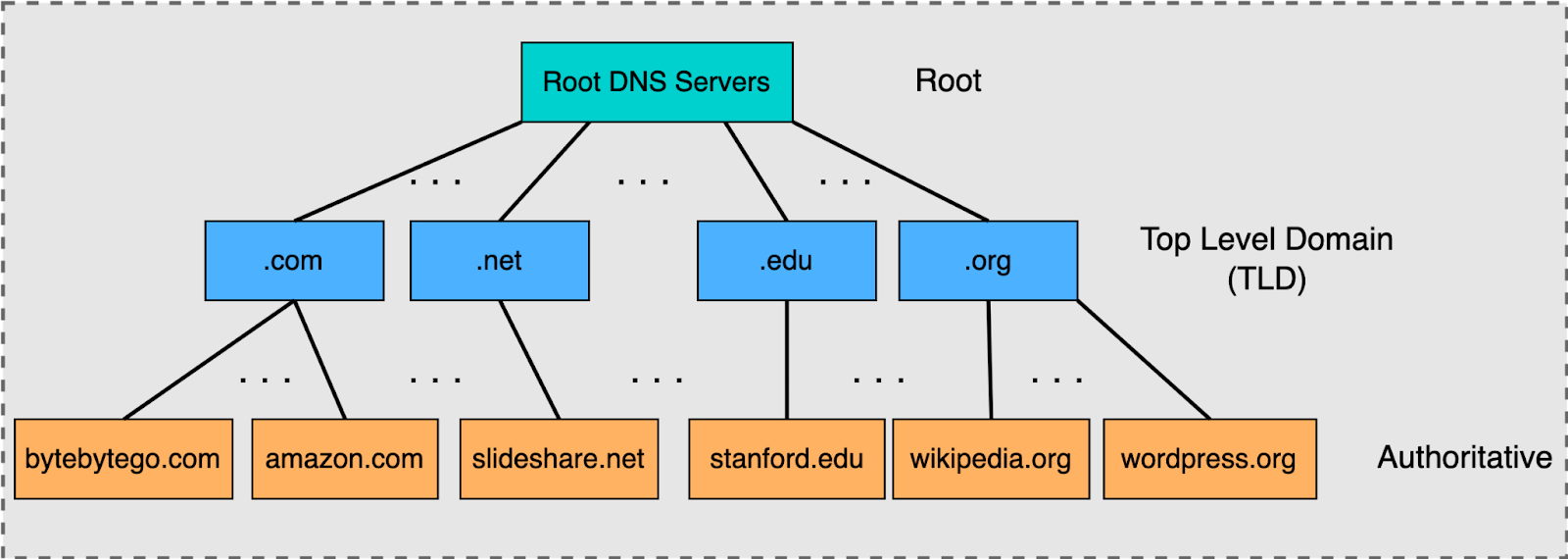
🌐 11. DNS and IP Addressing


🔹 Role

  • Converts domain names to IP

🔹 Example

  • google.com → IP address

🧠 12. Routing and IP Addressing


🔹 Routers

  • Use IP addresses to forward packets

🔹 Routing Tables

  • Store path information

⚡ 13. Address Resolution Protocol (ARP)


🔹 Function

  • Maps IP to MAC address

🔄 14. ICMP Protocol


🔹 Uses

  • Error reporting
  • Diagnostics

Example: ping command


🔐 15. Security in IP Addressing


🔹 Threats

  • IP spoofing
  • DDoS attacks

🔹 Solutions

  • Firewalls
  • Encryption

🧩 16. Advanced Concepts


  • VLSM (Variable Length Subnet Masking)
  • Supernetting
  • Anycast addressing

📊 17. Real-World Applications


  • Internet communication
  • Cloud networking
  • IoT systems
  • Enterprise networks

⚖️ 18. Advantages of IP Addressing


  • Unique identification
  • Scalable
  • Standardized

⚠️ 19. Limitations


  • IPv4 exhaustion
  • Security concerns

🔮 20. Future of IP Addressing


  • IPv6 adoption
  • Smart networks
  • IoT expansion

🏁 Conclusion

IP addressing is the foundation of all network communication, enabling billions of devices to connect and exchange data. Understanding IP addressing is essential for networking, cybersecurity, and modern computing systems.


🏷️ Tags

🌐 TCP/IP Protocol

Image
Image
Image
Image

📘 1. Introduction to TCP/IP

TCP/IP (Transmission Control Protocol / Internet Protocol) is the fundamental communication protocol suite that enables devices to connect and communicate over the internet and other networks.

It is the backbone of:

  • The Internet 🌍
  • Local networks (LANs)
  • Wide Area Networks (WANs)

🔹 Definition

TCP/IP is a set of communication protocols used to:

  • Transmit data between devices
  • Ensure reliable delivery
  • Route data across networks

🔹 Why TCP/IP is Important

  • Enables global communication
  • Supports web browsing, email, streaming
  • Provides standardized networking

🧠 2. History of TCP/IP


🔹 Development

  • Developed in the 1970s
  • Funded by the U.S. Department of Defense (ARPANET project)

🔹 Key Milestones

  • 1983 → TCP/IP adopted as ARPANET standard
  • Became foundation of modern internet

🏗️ 3. TCP/IP Model Layers

Image
Image
Image
Image

🔹 Four Layers of TCP/IP Model


1. Application Layer

  • Interface for user applications
  • Protocols:
    • HTTP
    • FTP
    • SMTP
    • DNS

2. Transport Layer

  • End-to-end communication
  • Protocols:
    • TCP
    • UDP

3. Internet Layer

  • Logical addressing and routing
  • Protocol:
    • IP

4. Network Access Layer

  • Physical transmission
  • Includes Ethernet, Wi-Fi

🔄 4. Data Encapsulation Process

Image
Image
Image
Image

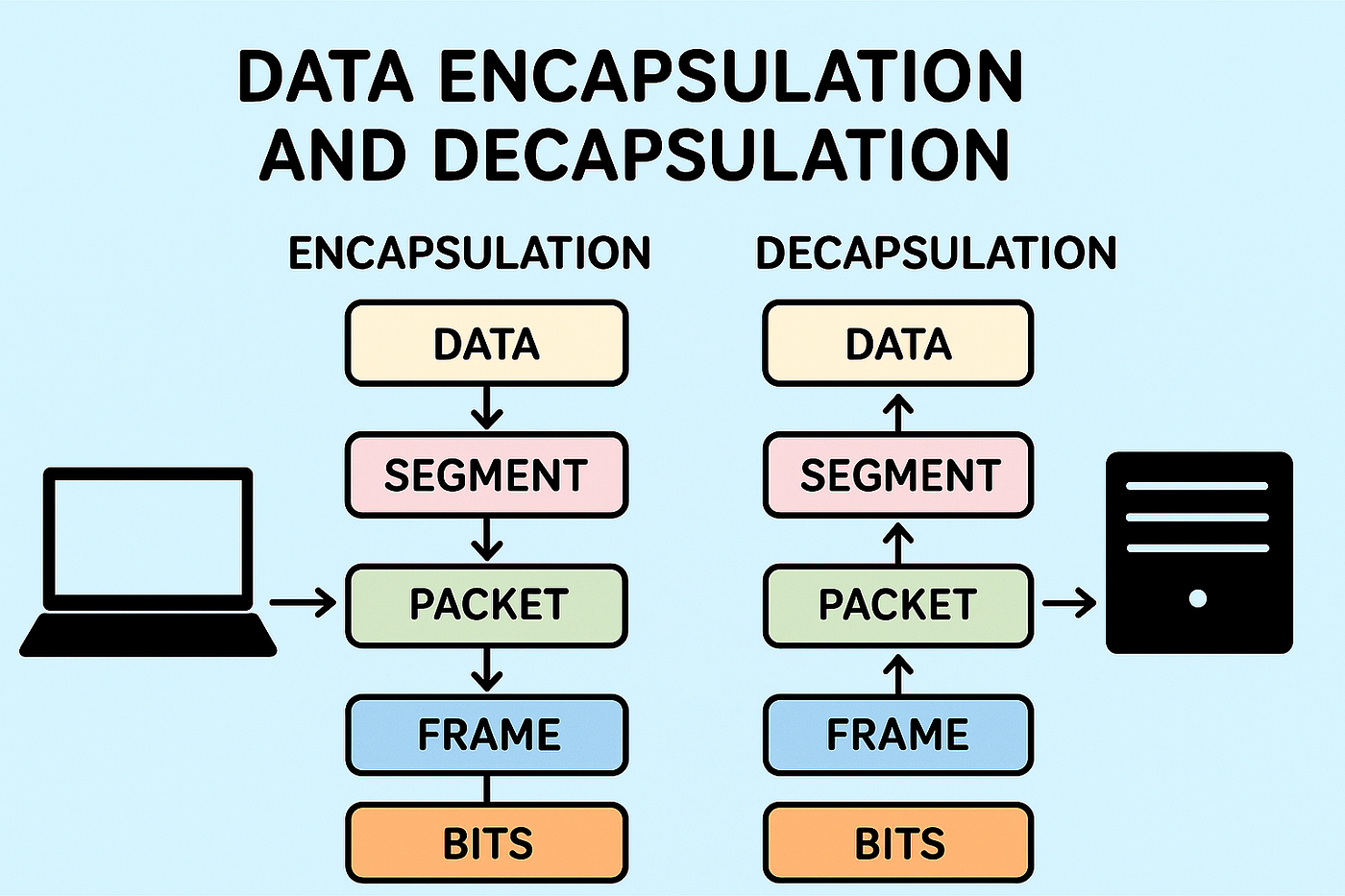
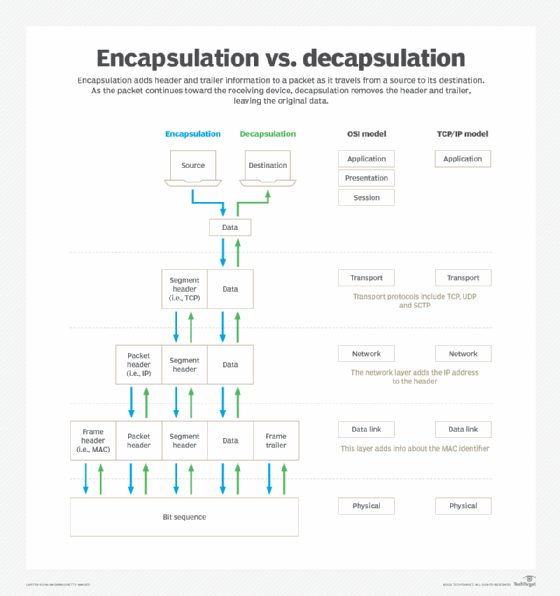
🔹 Steps

  1. Application layer creates data
  2. Transport layer adds header → Segment
  3. Internet layer adds IP header → Packet
  4. Network layer adds frame

🔑 5. Internet Protocol (IP)


🔹 Role of IP

  • Provides addressing
  • Routes packets

🔹 IP Address

Unique identifier for devices.

Types:

  • IPv4 → 32-bit
  • IPv6 → 128-bit

🔹 Example IPv4

192.168.1.1

🔄 6. Transmission Control Protocol (TCP)

Image
Image
Image
Image

🔹 Features of TCP

  • Connection-oriented
  • Reliable
  • Ordered delivery
  • Error checking

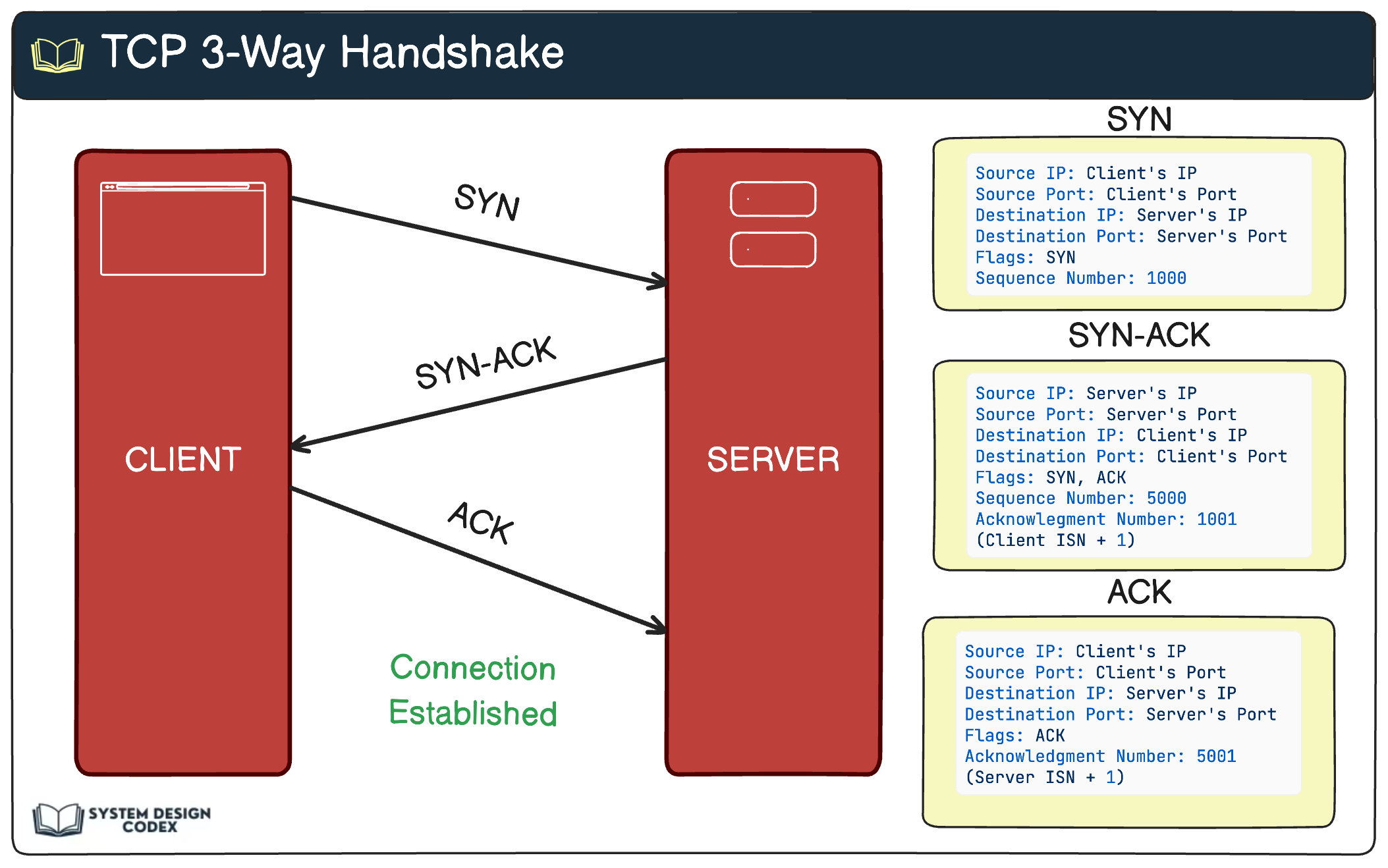
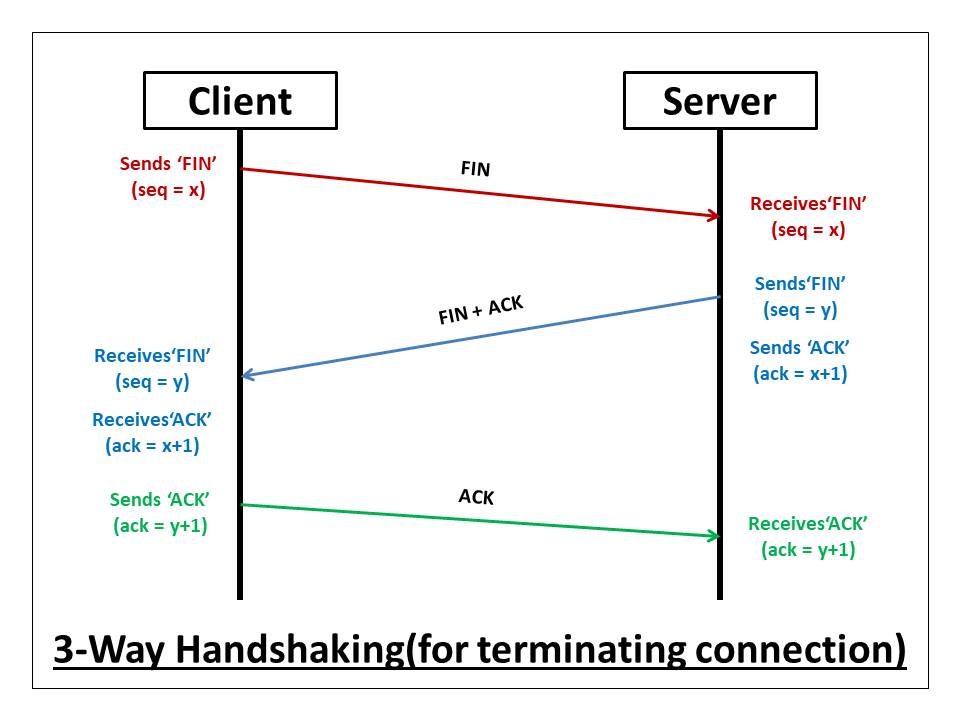
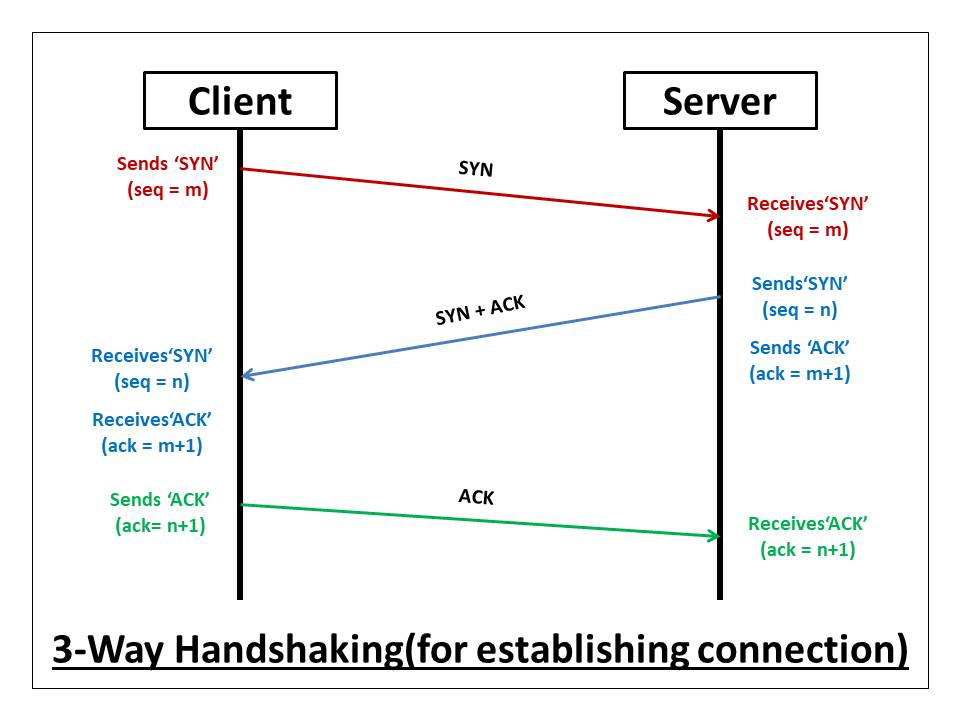
🔹 Three-Way Handshake

  1. SYN
  2. SYN-ACK
  3. ACK

🔹 Flow Control

  • Sliding window mechanism

🔹 Congestion Control

  • Avoids network overload

⚡ 7. User Datagram Protocol (UDP)


🔹 Features

  • Connectionless
  • Faster
  • No guarantee of delivery

🔹 Use Cases

  • Video streaming
  • Online gaming
  • DNS

🧠 8. TCP vs UDP


FeatureTCPUDP
ReliabilityHighLow
SpeedSlowerFaster
ConnectionYesNo

🔐 9. Ports and Sockets


🔹 Port Numbers

  • Identify applications

Examples:

  • HTTP → 80
  • HTTPS → 443

🔹 Socket

Combination of:

  • IP address
  • Port number

🌐 10. DNS (Domain Name System)

Image
Image
Image
Image

🔹 Function

  • Converts domain names to IP addresses

🔄 11. Routing


🔹 Routers

  • Forward packets

🔹 Routing Protocols

  • OSPF
  • BGP

🔐 12. Security in TCP/IP


🔹 Common Threats

  • IP spoofing
  • Man-in-the-middle attacks

🔹 Security Measures

  • Firewalls
  • Encryption (TLS/SSL)

⚡ 13. Performance Optimization


🔹 Techniques

  • Load balancing
  • Congestion control
  • Caching

🧪 14. Packet Structure


🔹 Components

  • Header
  • Payload

🌐 15. Real-World Applications


  • Web browsing
  • Email
  • Streaming
  • Cloud services

🧠 16. Advanced Concepts


  • NAT (Network Address Translation)
  • Subnetting
  • QoS (Quality of Service)

🔄 17. TCP/IP vs OSI Model


TCP/IPOSI
4 layers7 layers

⚖️ 18. Advantages of TCP/IP


  • Scalable
  • Reliable
  • Standardized

⚠️ 19. Limitations


  • Complexity
  • Security vulnerabilities

🔮 20. Future of TCP/IP


  • IPv6 adoption
  • IoT networking
  • 5G integration

🏁 Conclusion

TCP/IP is the foundation of modern networking, enabling seamless communication across the globe. Understanding TCP/IP is essential for anyone working in networking, cybersecurity, or software development.


🏷️ Tags

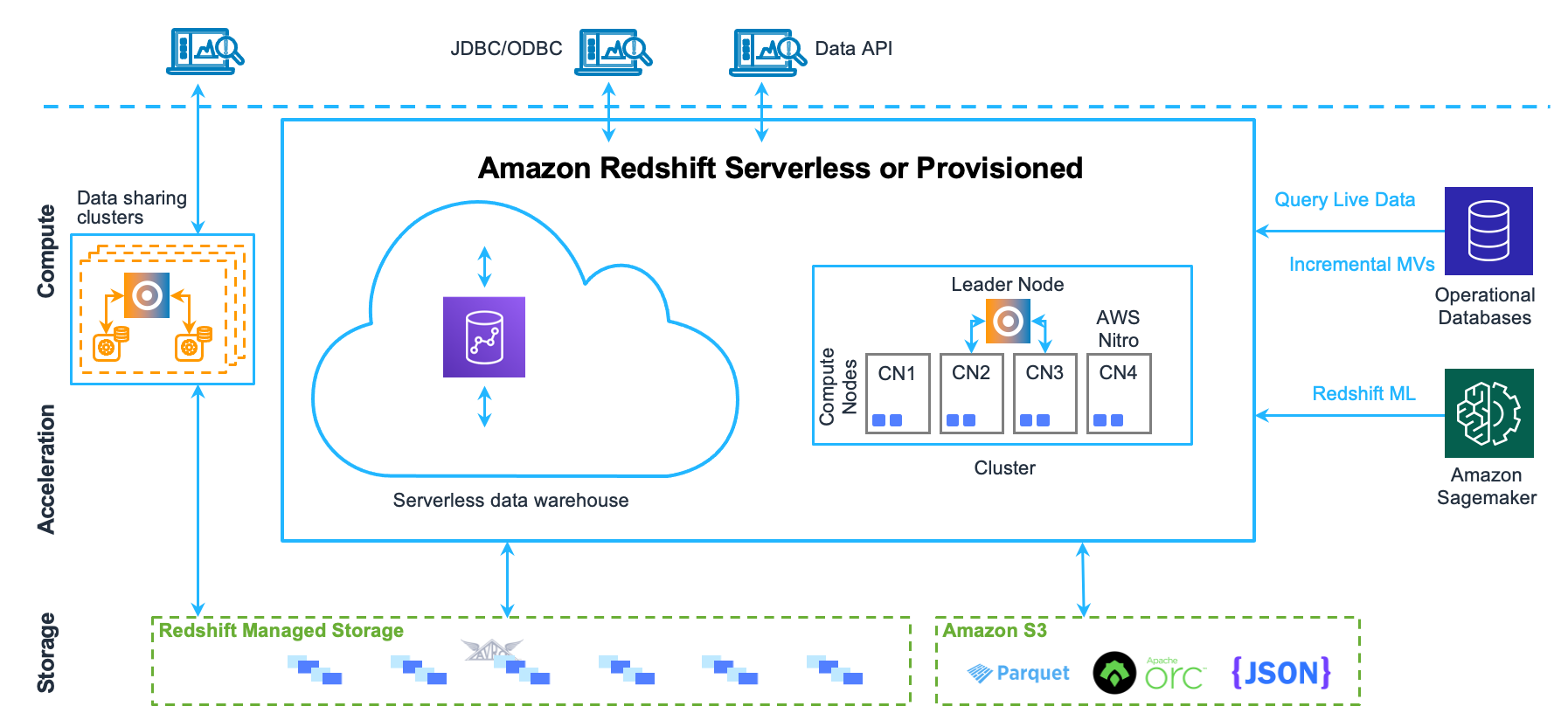
🏢 Data Warehousing

Image
Image
Image
Image

📘 1. Introduction to Data Warehousing

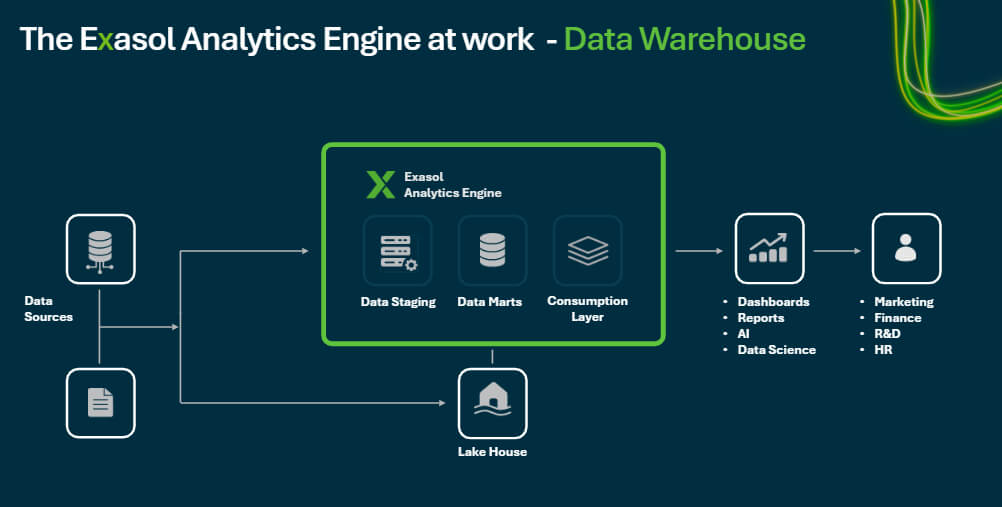
A Data Warehouse is a centralized repository designed to store large volumes of structured data collected from multiple sources for the purpose of analysis, reporting, and decision-making.

Unlike operational databases (OLTP systems), which handle day-to-day transactions, data warehouses are optimized for analytical processing (OLAP).


🔹 Definition

A data warehouse is:

A subject-oriented, integrated, time-variant, and non-volatile collection of data that supports decision-making.


🔹 Key Characteristics

  • Subject-Oriented → Organized around business topics (sales, customers)
  • Integrated → Combines data from multiple sources
  • Time-Variant → Stores historical data
  • Non-Volatile → Data is stable (read-heavy, not frequently updated)

🧠 2. Why Data Warehousing is Important


🔹 Business Benefits

  • Better decision-making
  • Historical trend analysis
  • Improved reporting
  • Data consistency across organization

🔹 Problems It Solves

  • Data scattered across systems
  • Inconsistent formats
  • Slow reporting queries
  • Lack of historical insights

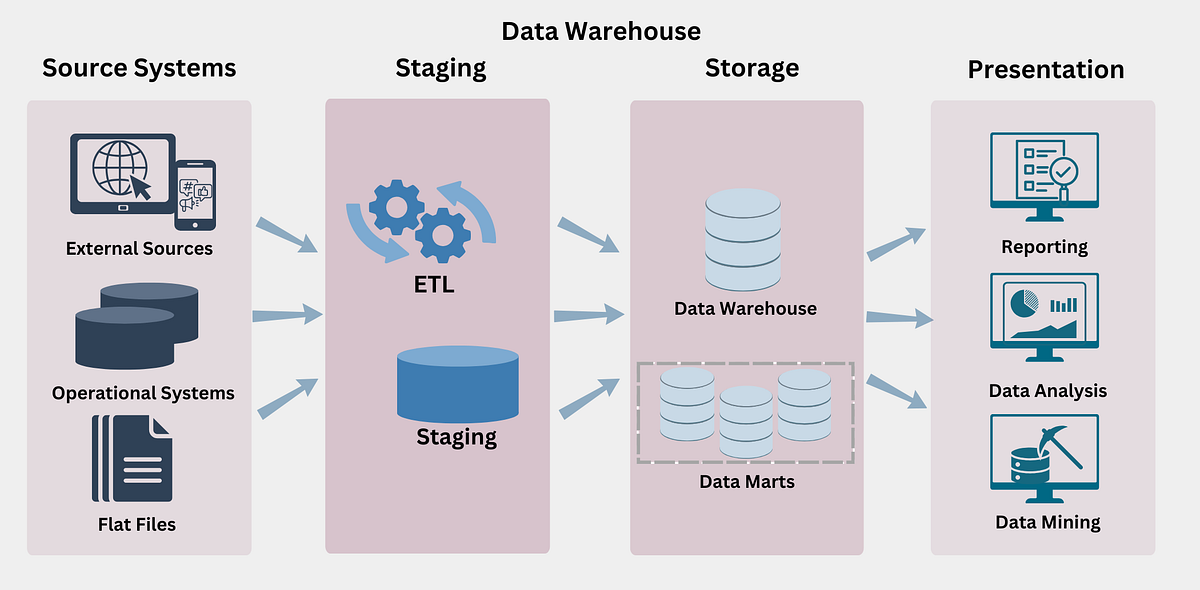
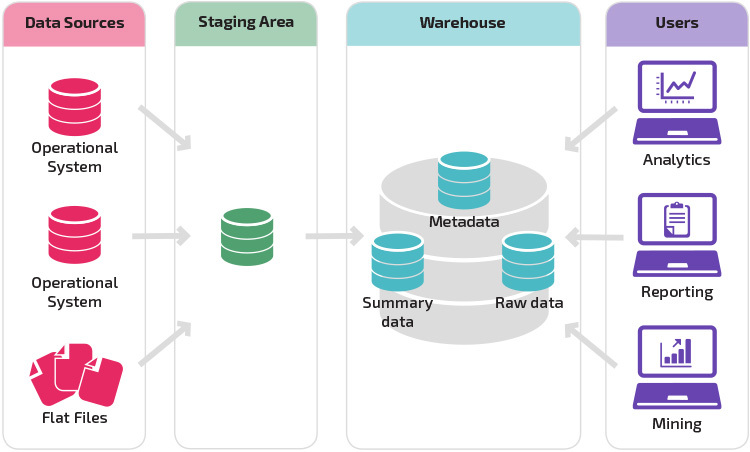
🏗️ 3. Data Warehouse Architecture

Image
Image
Image
Image

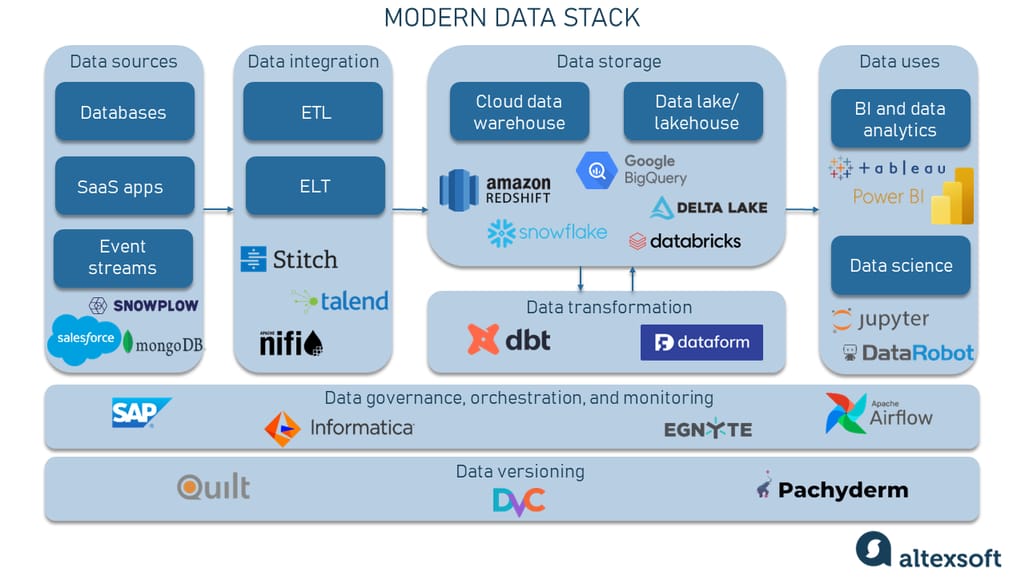
🔹 Three-Tier Architecture

1. Bottom Tier – Data Sources

  • Operational databases
  • APIs
  • Logs
  • External data

2. Middle Tier – Data Warehouse Server

  • ETL processing
  • Storage
  • Data integration

3. Top Tier – Front-End Tools

  • Reporting tools
  • Dashboards
  • BI tools

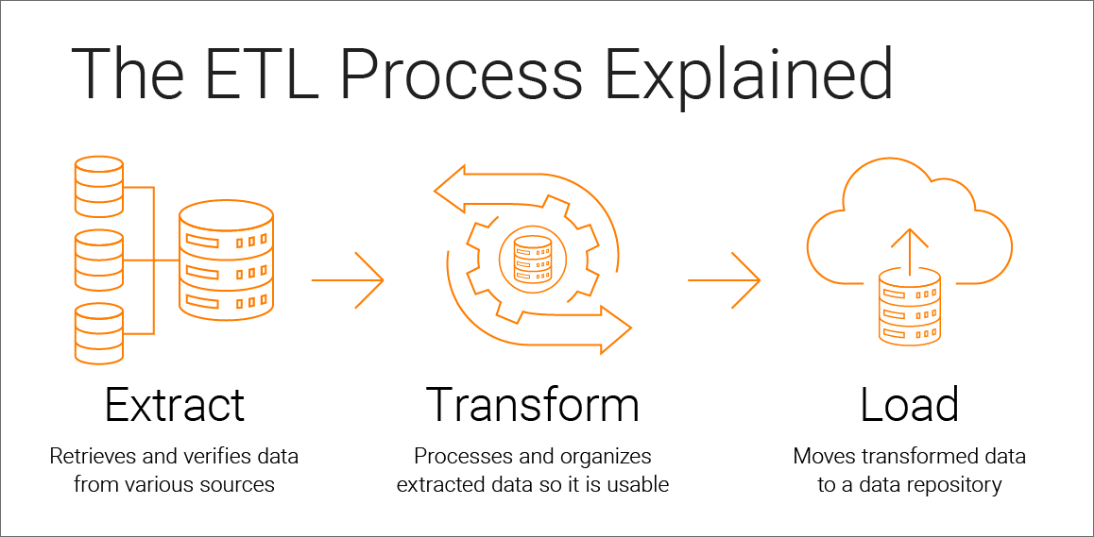
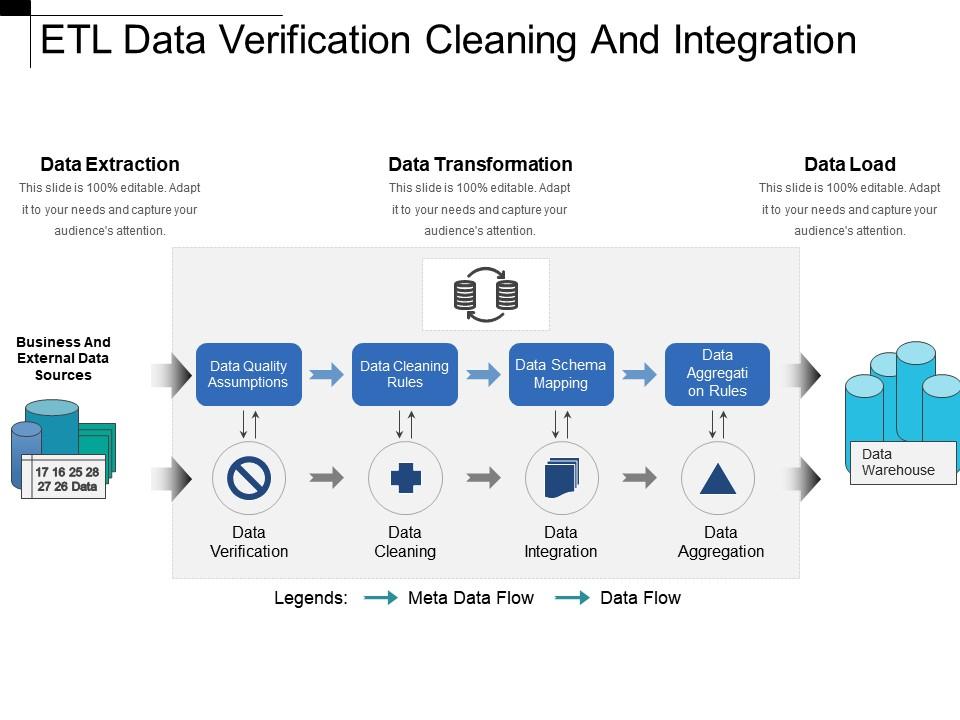
🔄 4. ETL Process (Extract, Transform, Load)

Image
Image
Image
Image

🔹 1. Extract

  • Collect data from sources
  • Structured and unstructured

🔹 2. Transform

  • Clean data
  • Normalize formats
  • Apply business rules

🔹 3. Load

  • Store data into warehouse

🔹 ELT (Modern Approach)

  • Load first, transform later

🧩 5. Data Modeling in Warehousing

Image
Image
Image
Image

🔹 Types of Models

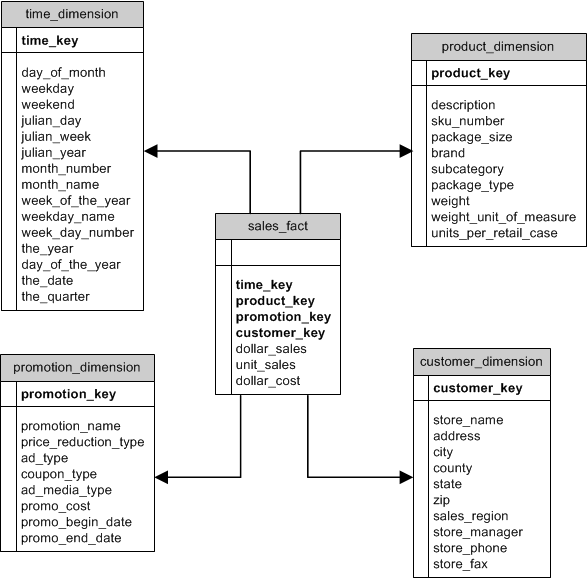
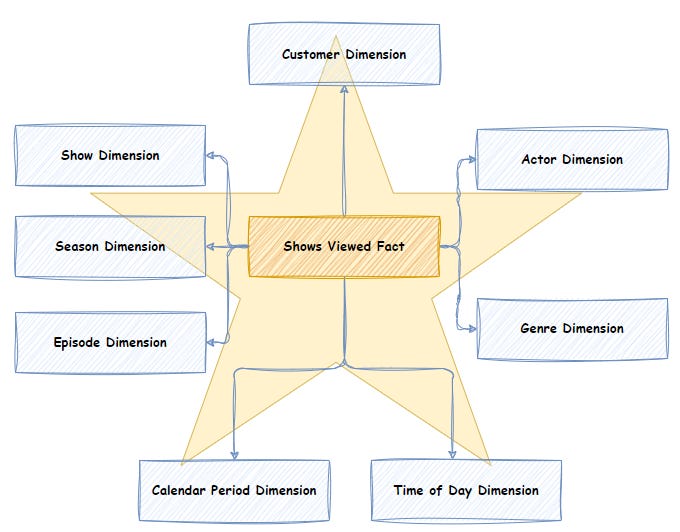
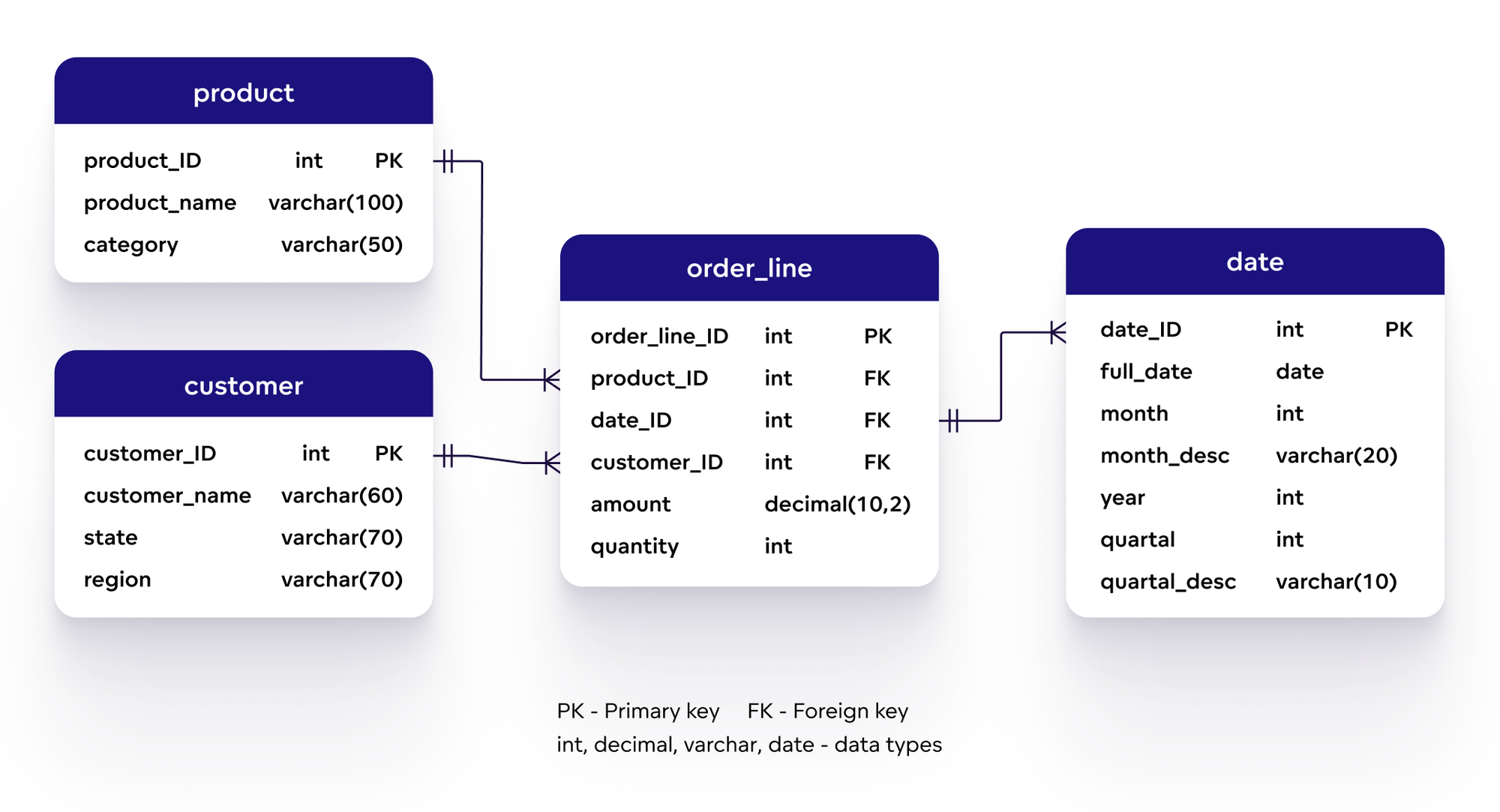
1. Star Schema ⭐

  • Central fact table
  • Connected dimension tables

2. Snowflake Schema ❄️

  • Normalized dimensions
  • More complex

3. Galaxy Schema 🌌

  • Multiple fact tables

🔹 Fact vs Dimension Tables

Fact TableDimension Table
Quantitative dataDescriptive data
Sales amountCustomer info

📊 6. OLTP vs OLAP


FeatureOLTPOLAP
PurposeTransactionsAnalysis
DataCurrentHistorical
QueriesSimpleComplex

🔹 OLAP Operations

  • Roll-up
  • Drill-down
  • Slice
  • Dice

🧠 7. Data Marts


🔹 Definition

A data mart is a subset of a data warehouse focused on a specific department.


🔹 Types

  • Dependent
  • Independent
  • Hybrid

⚡ 8. Data Warehouse Design Approaches


🔹 Top-Down (Inmon)

  • Build enterprise warehouse first

🔹 Bottom-Up (Kimball)

  • Build data marts first

🔐 9. Data Quality and Governance


🔹 Data Quality

  • Accuracy
  • Completeness
  • Consistency

🔹 Governance

  • Policies
  • Standards
  • Data ownership

🔄 10. Data Integration


🔹 Methods

  • ETL
  • ELT
  • Data virtualization

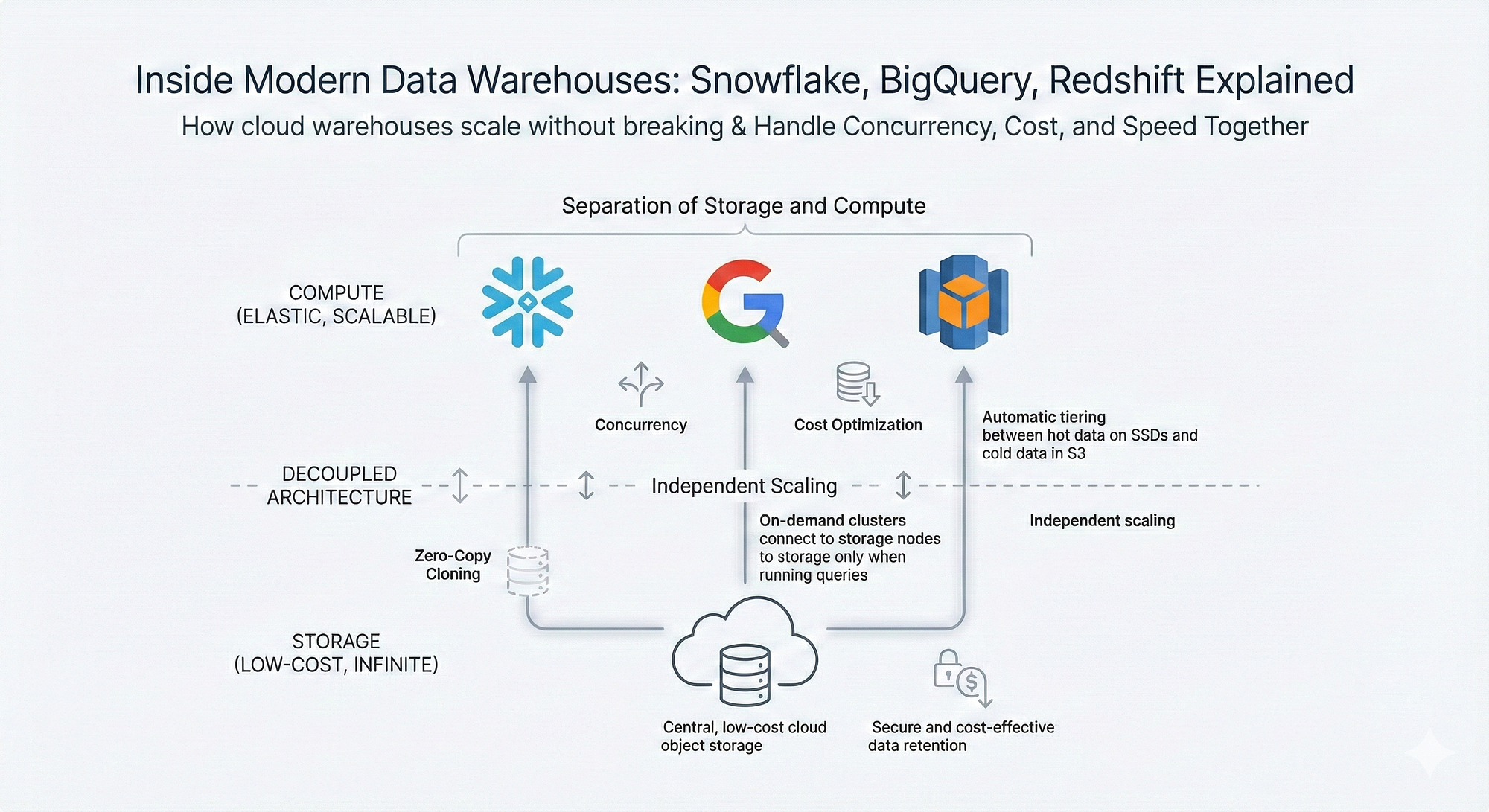
🌐 11. Data Warehousing in Cloud

Image
Image
Image
Image

🔹 Features

  • Scalability
  • Cost efficiency
  • Managed services

🔹 Examples

  • Cloud warehouses
  • Serverless systems

🧪 12. Data Warehouse Tools


  • ETL tools
  • BI tools
  • Data modeling tools

📈 13. Performance Optimization


🔹 Techniques

  • Indexing
  • Partitioning
  • Materialized views

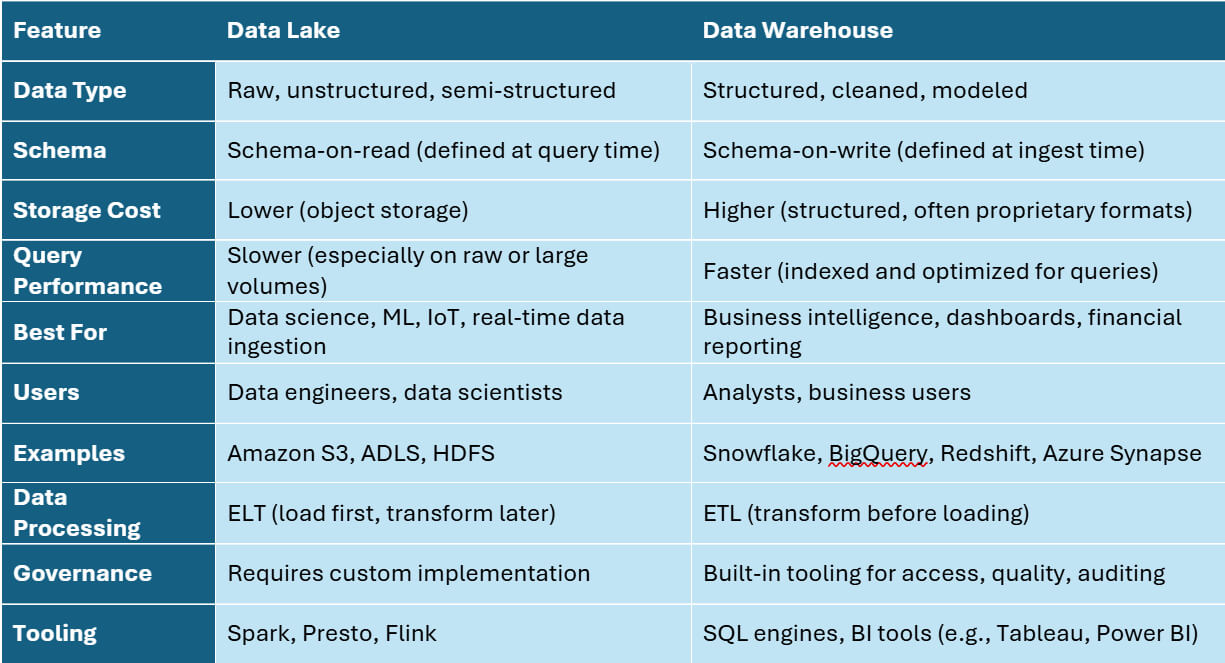
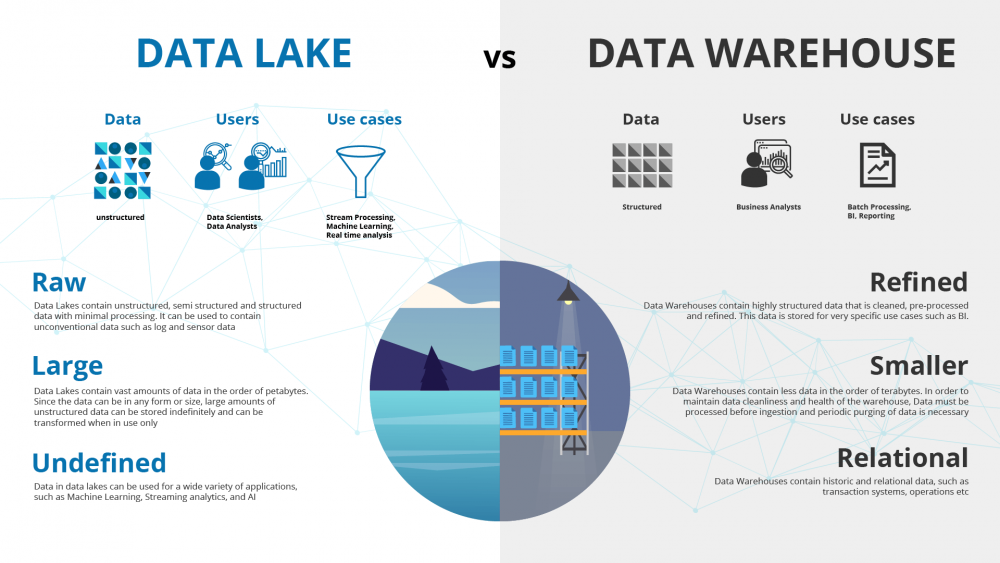
🧩 14. Data Warehouse vs Data Lake


FeatureData WarehouseData Lake
DataStructuredRaw
SchemaFixedFlexible

🔄 15. Data Pipeline


🔹 Components

  • Ingestion
  • Processing
  • Storage
  • Visualization

🧠 16. Big Data and Warehousing


  • Integration with Hadoop
  • Spark processing
  • Real-time analytics

🔐 17. Security in Data Warehousing


  • Encryption
  • Access control
  • Auditing

📊 18. Real-World Applications


🔹 Retail

  • Sales analysis

🔹 Banking

  • Risk analysis

🔹 Healthcare

  • Patient analytics

🔹 Marketing

  • Customer insights

⚖️ 19. Advantages


  • Better analytics
  • Historical insights
  • Centralized data

⚠️ 20. Limitations


  • High cost
  • Complex setup
  • Maintenance required

🔮 21. Future Trends


  • AI-driven analytics
  • Real-time warehousing
  • Data lakehouse

🏁 Conclusion

Data warehousing is a core component of modern data ecosystems, enabling organizations to transform raw data into meaningful insights. It plays a critical role in business intelligence, analytics, and strategic decision-making.


🏷️ Tags

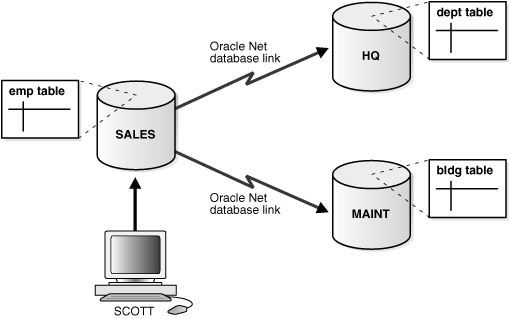
🌐 Distributed Databases – Complete In-Depth Guide

Image
Image
Image
Image

📘 1. Introduction to Distributed Databases

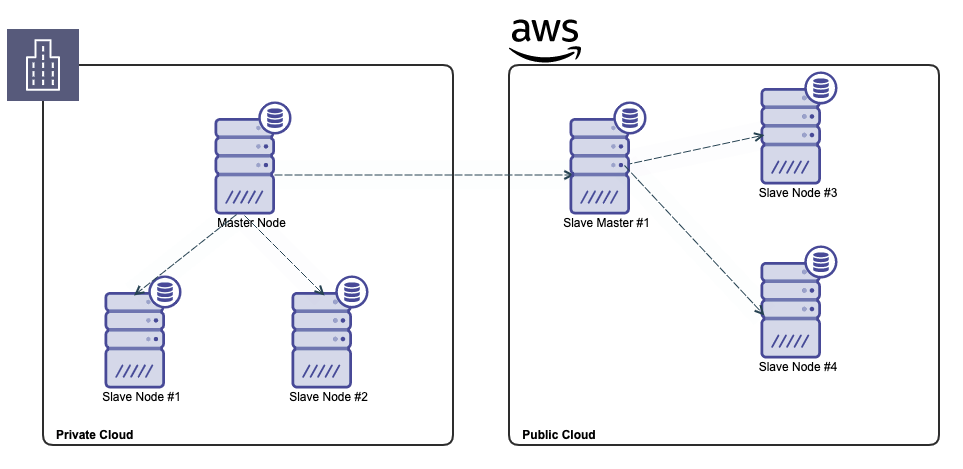
A Distributed Database is a collection of multiple interconnected databases spread across different physical locations but functioning as a single logical database system. These locations may include:

  • Different servers
  • Data centers
  • Geographic regions
  • Cloud environments

The key idea is:

👉 Data is distributed, but access is unified.


🔹 Definition

A distributed database system (DDBS) consists of:

  • Multiple databases located on different machines
  • A network connecting them
  • Software that manages distribution and transparency

🔹 Key Characteristics

  • Data stored across multiple nodes
  • Appears as a single database to users
  • Supports distributed processing
  • Enables high availability and scalability

🧠 2. Why Distributed Databases Are Needed


🔹 Limitations of Centralized Databases

  • Single point of failure
  • Limited scalability
  • High latency for distant users
  • Resource bottlenecks

🔹 Benefits of Distribution

  • Faster access (data closer to users)
  • Fault tolerance
  • Load balancing
  • Scalability

🔹 Real-World Examples

  • Banking systems
  • Social media platforms
  • E-commerce systems
  • Cloud-based applications

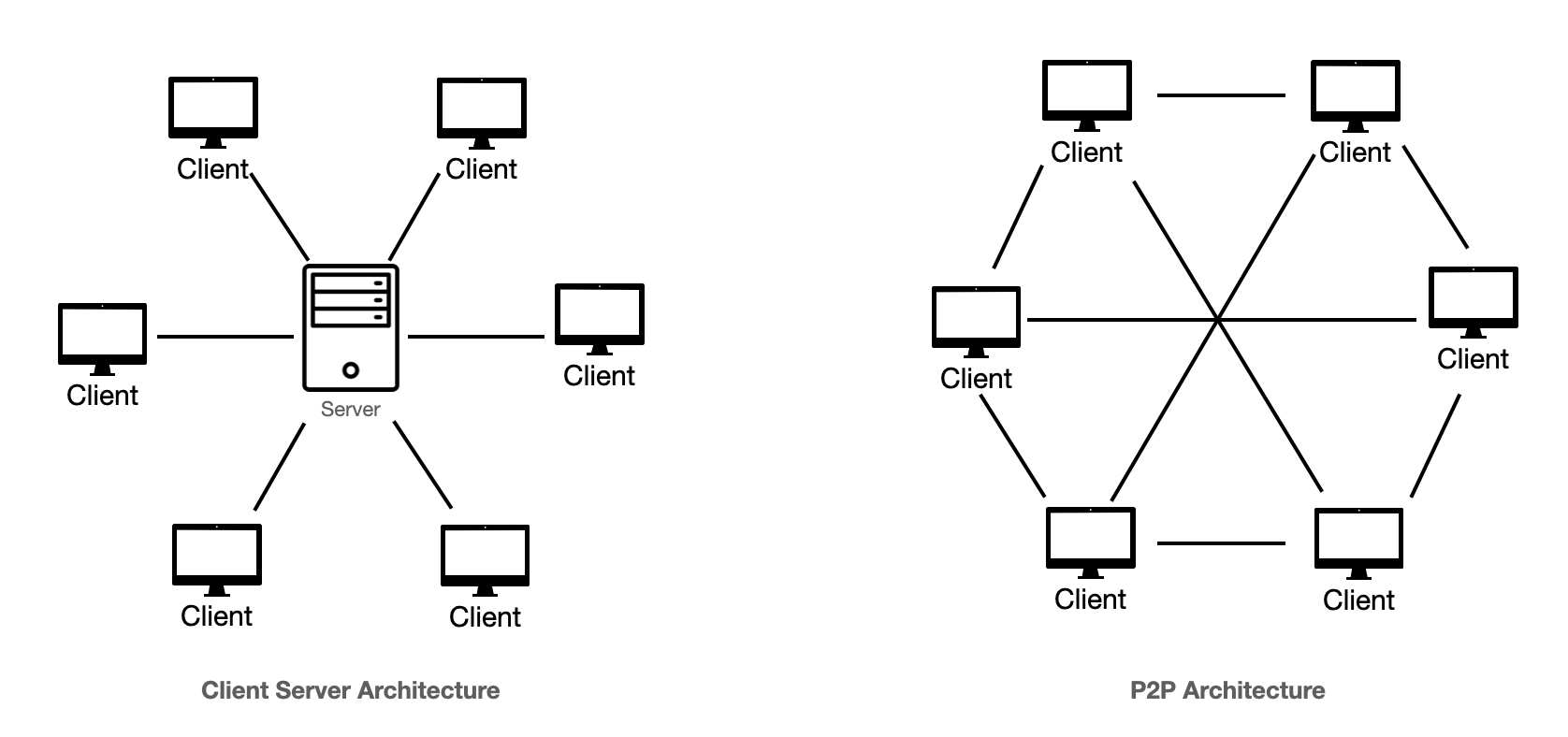
🏗️ 3. Architecture of Distributed Databases

Image
Image
Image
Image

🔹 Types of Architecture

1. Client-Server Architecture

  • Clients request data
  • Servers process queries

2. Peer-to-Peer Architecture

  • All nodes are equal
  • Each node can act as client and server

3. Multi-tier Architecture

  • Presentation layer
  • Application layer
  • Database layer

🔹 Shared-Nothing Architecture

  • Each node has its own memory and storage
  • No shared resources
  • Highly scalable

🧩 4. Types of Distributed Databases


🔹 1. Homogeneous Distributed Database

  • Same DBMS across all nodes
  • Easier to manage

🔹 2. Heterogeneous Distributed Database

  • Different DBMS systems
  • Complex integration

🔹 3. Federated Databases

  • Independent databases connected logically
  • Maintain autonomy

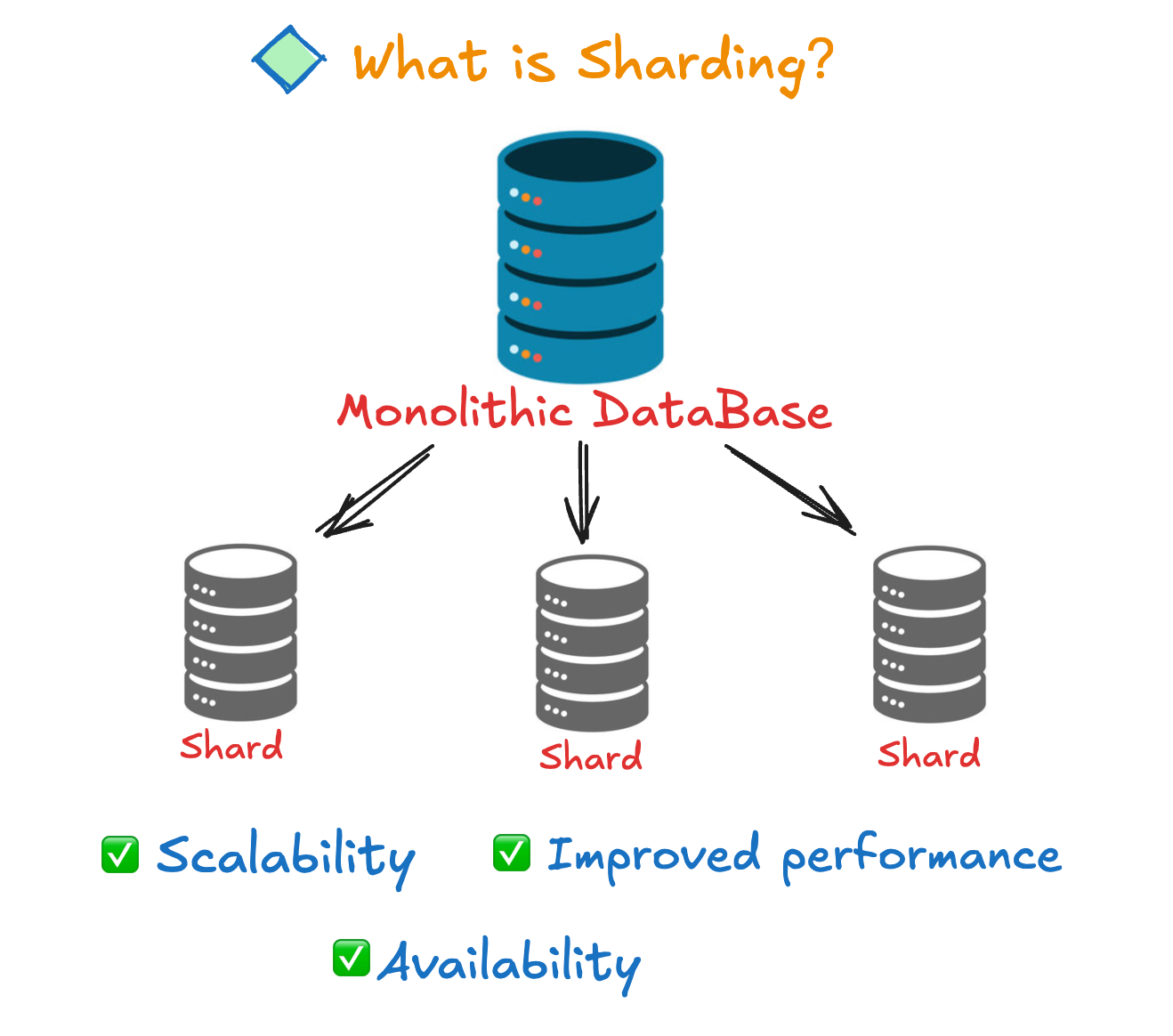
🔄 5. Data Distribution Techniques

Image
Image
Image
Image

🔹 1. Fragmentation

Types:

  • Horizontal Fragmentation → rows distributed
  • Vertical Fragmentation → columns distributed
  • Hybrid Fragmentation → combination

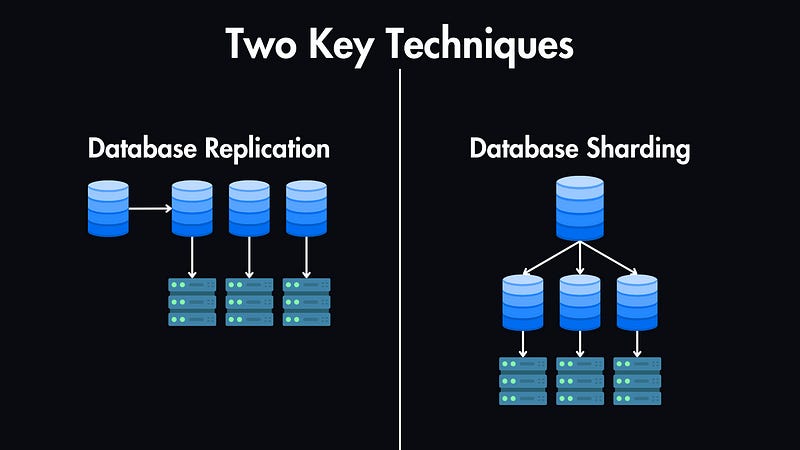
🔹 2. Replication

  • Copies data across multiple nodes

Types:

  • Full replication
  • Partial replication

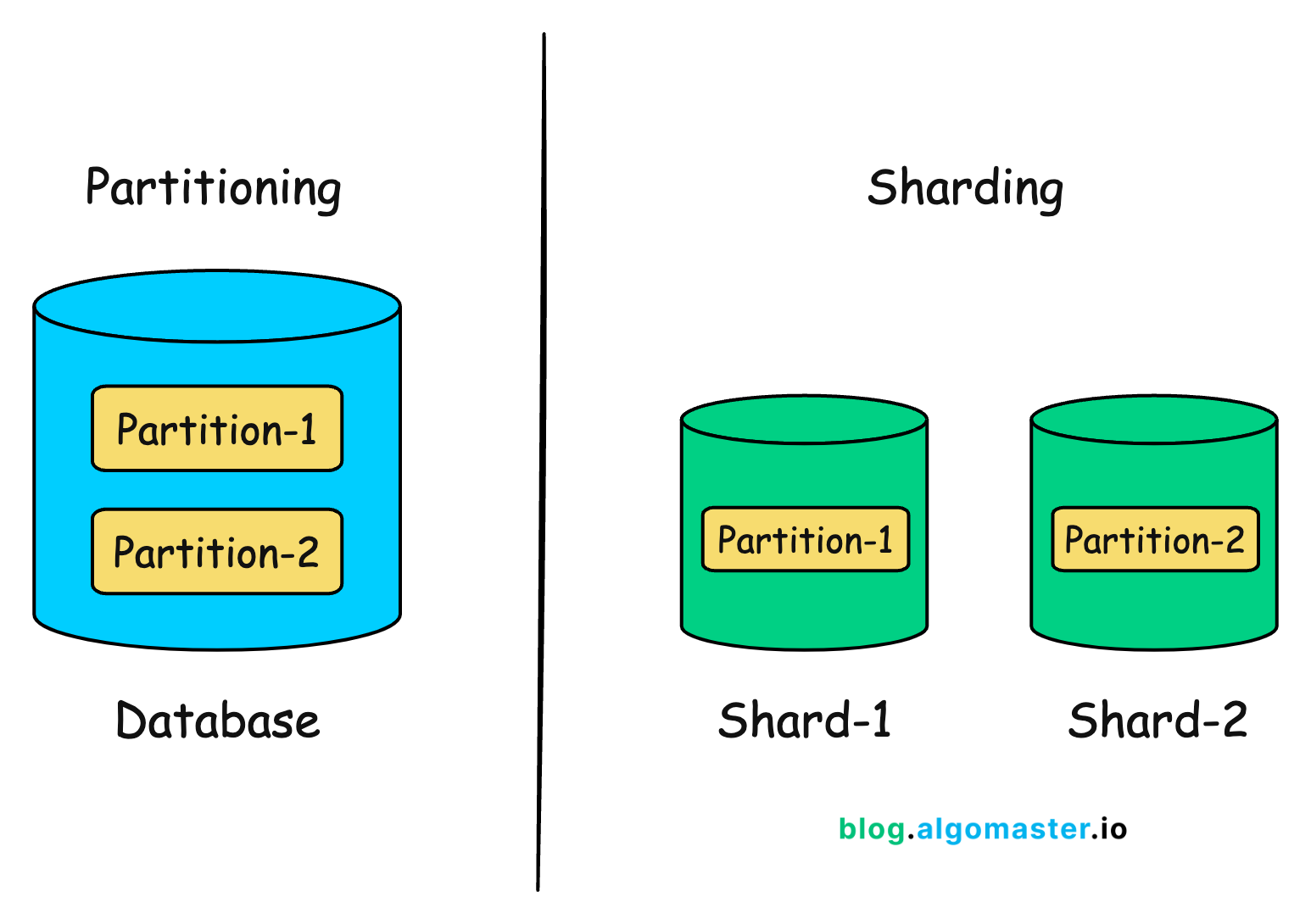
🔹 3. Sharding

  • Splitting data into smaller chunks (shards)

🔐 6. Transparency in Distributed Databases


🔹 Types of Transparency

  • Location transparency
  • Replication transparency
  • Fragmentation transparency
  • Naming transparency

👉 Users do not need to know where data is stored.


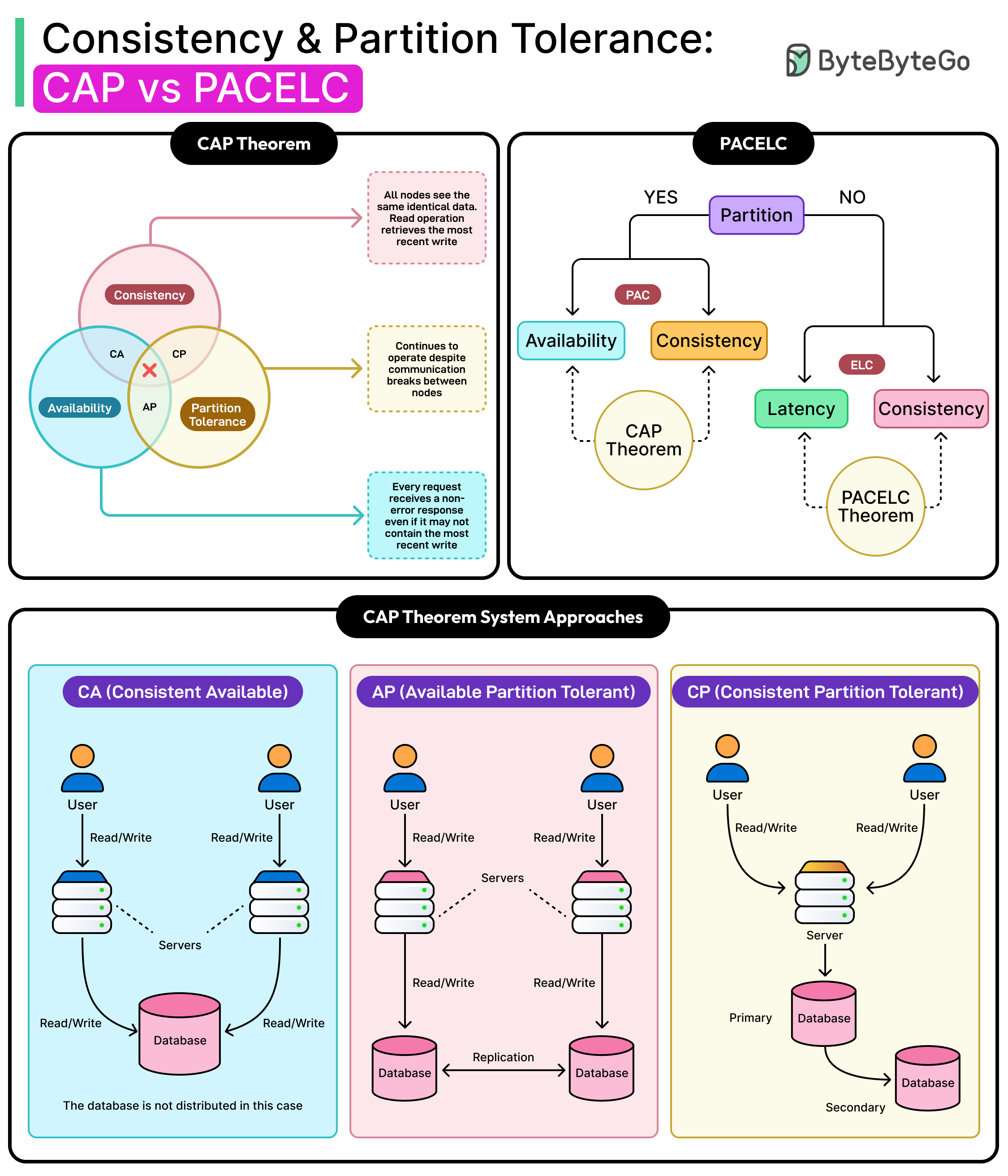
⚖️ 7. CAP Theorem

Image
Image
Image
Image

CAP theorem states that a distributed system can provide only two of:

  • Consistency
  • Availability
  • Partition tolerance

🔹 Trade-offs

  • CP systems → strong consistency
  • AP systems → high availability

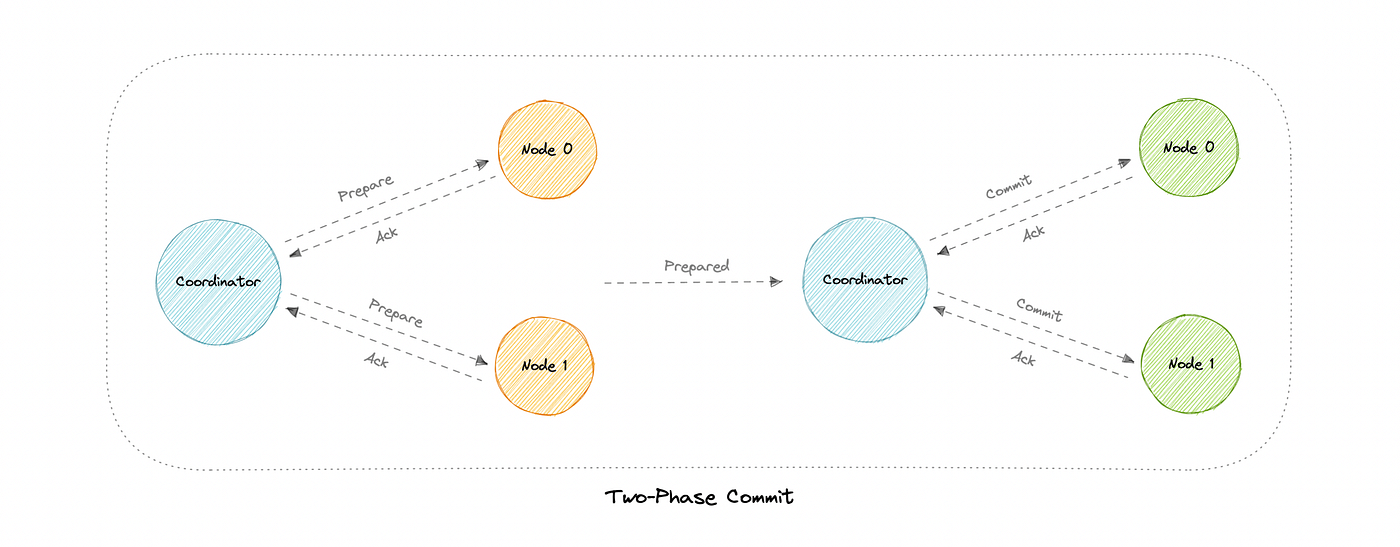
🔄 8. Distributed Transactions

Image
Image
Image
Image

🔹 Challenges

  • Maintaining consistency across nodes
  • Handling failures

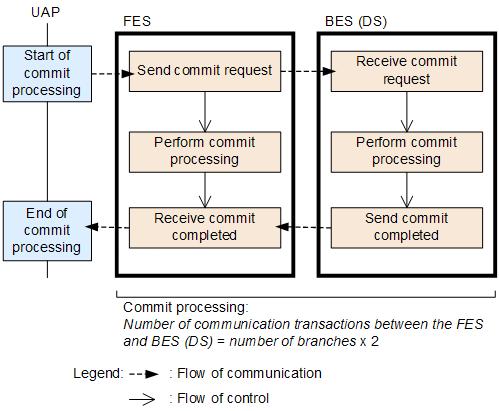
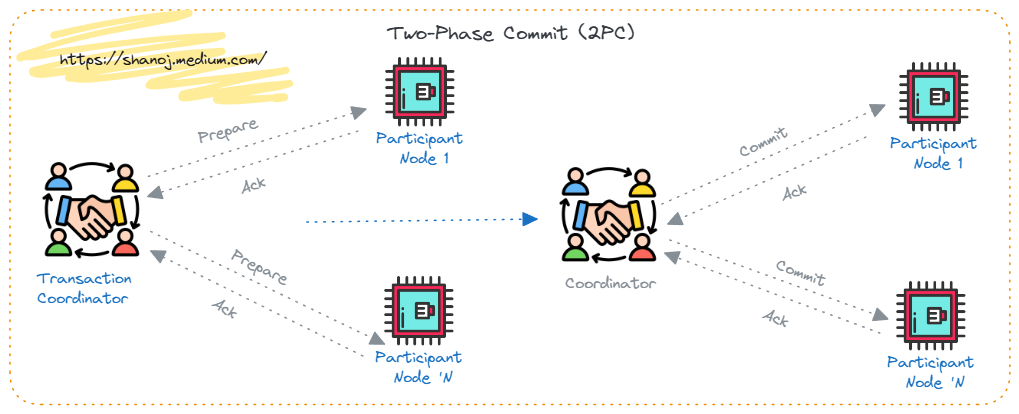
🔹 Two-Phase Commit (2PC)

Phase 1: Prepare

  • Nodes prepare to commit

Phase 2: Commit

  • All nodes commit or rollback

🔹 Three-Phase Commit (3PC)

  • Adds extra phase
  • Reduces blocking

🧠 9. Concurrency Control


🔹 Techniques

  • Distributed locking
  • Timestamp ordering
  • Optimistic concurrency

🔹 Challenges

  • Synchronization
  • Deadlocks

🔁 10. Data Consistency Models


🔹 Types

  • Strong consistency
  • Eventual consistency
  • Causal consistency

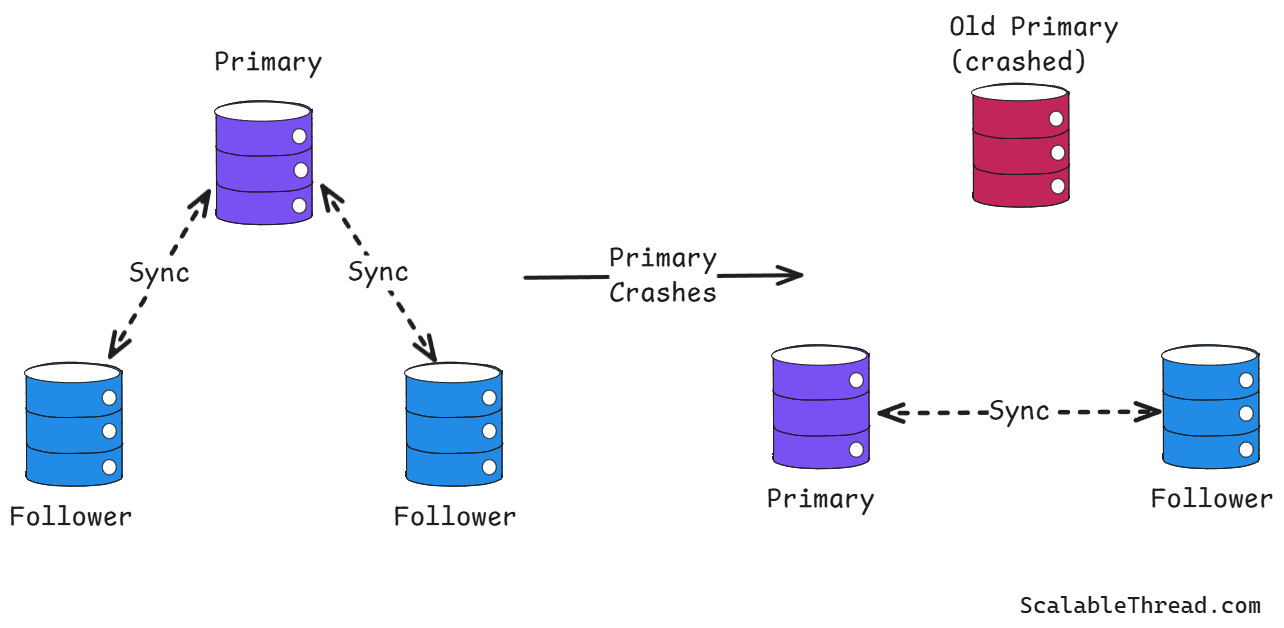
🔐 11. Fault Tolerance

Image
Image
Image
Image

🔹 Techniques

  • Replication
  • Failover mechanisms
  • Backup systems

⚡ 12. Performance Optimization


🔹 Techniques

  • Load balancing
  • Data locality
  • Query optimization

🌐 13. Distributed Query Processing


🔹 Steps

  1. Query decomposition
  2. Data localization
  3. Optimization
  4. Execution

🧩 14. Distributed Database Design


🔹 Design Considerations

  • Data distribution strategy
  • Network latency
  • Scalability

🧪 15. Security in Distributed Databases


🔹 Measures

  • Encryption
  • Authentication
  • Access control

📊 16. Real-World Applications


🔹 Banking Systems

  • Global transactions

🔹 Social Media

  • User data distribution

🔹 E-commerce

  • Global product catalogs

🔹 Cloud Services

  • Distributed storage

⚖️ 17. Advantages of Distributed Databases


  • High availability
  • Scalability
  • Fault tolerance
  • Performance

⚠️ 18. Disadvantages


  • Complexity
  • Security challenges
  • Data inconsistency risks

🧠 19. Distributed vs Centralized Databases

FeatureCentralizedDistributed
Data LocationSingleMultiple
ScalabilityLimitedHigh
Fault ToleranceLowHigh

🔄 20. Emerging Trends


  • Cloud-native distributed databases
  • Serverless databases
  • Edge computing

🏁 Conclusion

Distributed databases are the backbone of modern scalable systems. They enable organizations to handle massive data, global users, and high availability requirements.

While they introduce complexity, their benefits in scalability and performance make them essential for today’s applications.


🏷️ Tags

🌐 NoSQL Databases – Complete In-Depth Guide

Image
Image
Image
Image

📘 1. Introduction to NoSQL Databases

NoSQL (Not Only SQL) databases are a class of database systems designed to handle large volumes of unstructured, semi-structured, or rapidly changing data. Unlike traditional relational databases (RDBMS), NoSQL databases do not rely on fixed table schemas.

They emerged to address the limitations of relational databases in:

  • Big data environments
  • High scalability applications
  • Real-time systems
  • Distributed architectures

🔹 What Does “NoSQL” Mean?

  • “Not Only SQL” → supports SQL-like queries in some systems
  • Focus on flexibility and scalability
  • Designed for modern applications

🔹 Why NoSQL Was Created

Traditional SQL databases struggle with:

  • Horizontal scaling
  • Handling unstructured data
  • High-speed data ingestion
  • Distributed computing

NoSQL solves these issues by:

  • Distributing data across nodes
  • Using flexible schemas
  • Optimizing for specific use cases

🧠 2. Key Characteristics of NoSQL


🔹 1. Schema Flexibility

  • No fixed schema
  • Different records can have different structures

🔹 2. Horizontal Scalability

  • Data distributed across multiple servers
  • Easily scalable

🔹 3. High Performance

  • Optimized for speed and throughput

🔹 4. Distributed Architecture

  • Built for cloud and distributed systems

🔹 5. Eventual Consistency

  • Uses BASE model instead of strict ACID

⚖️ 3. NoSQL vs SQL

FeatureSQLNoSQL
SchemaFixedFlexible
Data TypeStructuredUnstructured
ScalingVerticalHorizontal
ConsistencyStrong (ACID)Eventual (BASE)
Query LanguageSQLVaries

🧩 4. Types of NoSQL Databases

Image
Image
Image
Image

NoSQL databases are categorized into four main types:


🔹 1. Key-Value Stores

Concept:

  • Data stored as key-value pairs

Example:

{
  "user123": "Rishan"
}

Features:

  • Extremely fast
  • Simple structure

Use Cases:

  • Caching
  • Session management

🔹 2. Document Databases

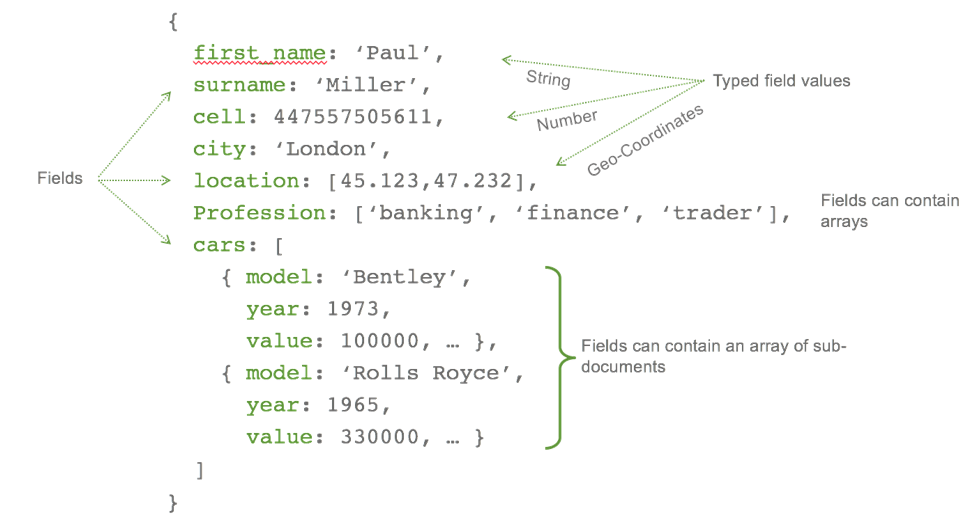
Concept:

  • Data stored in JSON-like documents

Example:

{
  "name": "Rishan",
  "age": 22,
  "skills": ["SQL", "Python"]
}

Features:

  • Flexible schema
  • Nested data

Use Cases:

  • Content management
  • Web applications

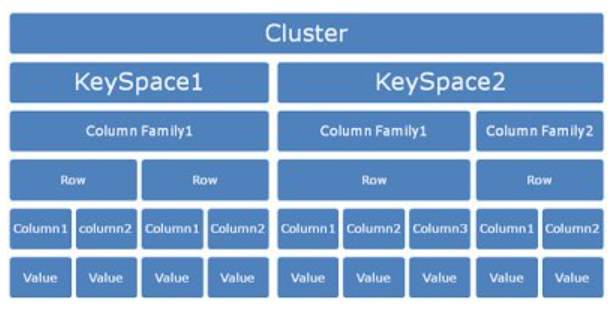
🔹 3. Column-Family Databases

Concept:

  • Data stored in columns instead of rows

Features:

  • High scalability
  • Efficient for large datasets

Use Cases:

  • Big data analytics

🔹 4. Graph Databases

Concept:

  • Data stored as nodes and edges

Features:

  • Efficient relationship handling

Use Cases:

  • Social networks
  • Recommendation systems

🏗️ 5. Data Modeling in NoSQL

Image
Image
Image
Image

🔹 Key Approaches

1. Embedding

  • Store related data together

2. Referencing

  • Use references between documents

🔹 Denormalization

  • Common in NoSQL
  • Improves performance
  • Reduces joins

⚡ 6. CAP Theorem

Image
Image
Image
Image

CAP theorem states that a distributed system can only guarantee two of:

  • Consistency
  • Availability
  • Partition Tolerance

🔹 Trade-offs

  • CP (Consistency + Partition Tolerance)
  • AP (Availability + Partition Tolerance)

🔄 7. BASE Model


🔹 BASE stands for:

  • Basically Available
  • Soft state
  • Eventually consistent

🔹 Comparison with ACID

  • Less strict consistency
  • Higher scalability

🧠 8. Consistency Models


🔹 Types

  • Strong consistency
  • Eventual consistency
  • Causal consistency

🔐 9. Replication and Sharding

Image
Image
Image
Image

🔹 Replication

  • Copies data across nodes

🔹 Sharding

  • Splits data into partitions

⚙️ 10. Query Mechanisms


🔹 Examples

  • Key-based retrieval
  • Document queries
  • Graph traversal

🧩 11. Indexing in NoSQL

  • Secondary indexes
  • Full-text indexes
  • Geospatial indexes

🧪 12. Transactions in NoSQL

  • Limited ACID support
  • Some databases support multi-document transactions

🌐 13. Popular NoSQL Databases


🔹 Examples

  • MongoDB (Document)
  • Cassandra (Column-family)
  • Redis (Key-value)
  • Neo4j (Graph)

📊 14. Real-World Applications


🔹 Social Media

  • User profiles
  • Feeds

🔹 E-commerce

  • Product catalogs
  • Recommendations

🔹 IoT Systems

  • Sensor data

🔹 Big Data Analytics

  • Large-scale processing

⚡ 15. Advantages of NoSQL


  • High scalability
  • Flexible schema
  • Fast performance
  • Handles big data

⚠️ 16. Limitations of NoSQL


  • Lack of standardization
  • Complex queries
  • Eventual consistency issues

🧠 17. When to Use NoSQL


  • Large-scale applications
  • Rapid development
  • Unstructured data

🏗️ 18. NoSQL in Cloud Computing


  • Managed services
  • Auto-scaling
  • High availability

🔄 19. Hybrid Databases


  • Combine SQL and NoSQL
  • Multi-model databases

🔮 20. Future of NoSQL


  • AI integration
  • Real-time analytics
  • Edge computing

🏁 Conclusion

NoSQL databases are essential for modern applications requiring scalability, flexibility, and performance. While they trade strict consistency for speed and scalability, they are ideal for handling big data and distributed systems.

Mastering NoSQL helps developers build high-performance, scalable, and resilient systems.


🏷️ Tags

🔄 Transactions & ACID Properties

Image
Image
Image
Image

📘 1. Introduction to Transactions

A transaction in database systems is a sequence of one or more operations performed as a single logical unit of work. These operations may include:

  • Reading data
  • Writing data
  • Updating records
  • Deleting records

The key idea is simple but powerful:

👉 Either all operations succeed, or none of them do.


🔹 Real-Life Example

Consider a bank transfer:

  1. Deduct ₹1000 from Account A
  2. Add ₹1000 to Account B

If step 1 succeeds but step 2 fails, the system becomes inconsistent. Transactions prevent this by ensuring all-or-nothing execution.


🔹 Formal Definition

A transaction is:

  • A logical unit of work
  • Executed completely or not at all
  • Ensures database consistency

🧠 2. Why Transactions Are Important

Transactions are critical for:

  • Data integrity
  • Reliability
  • Consistency across operations
  • Handling system failures
  • Concurrent access management

🔹 Without Transactions

  • Partial updates
  • Data corruption
  • Lost data
  • Inconsistent state

🏗️ 3. Transaction States

Image
Image
Image
Image

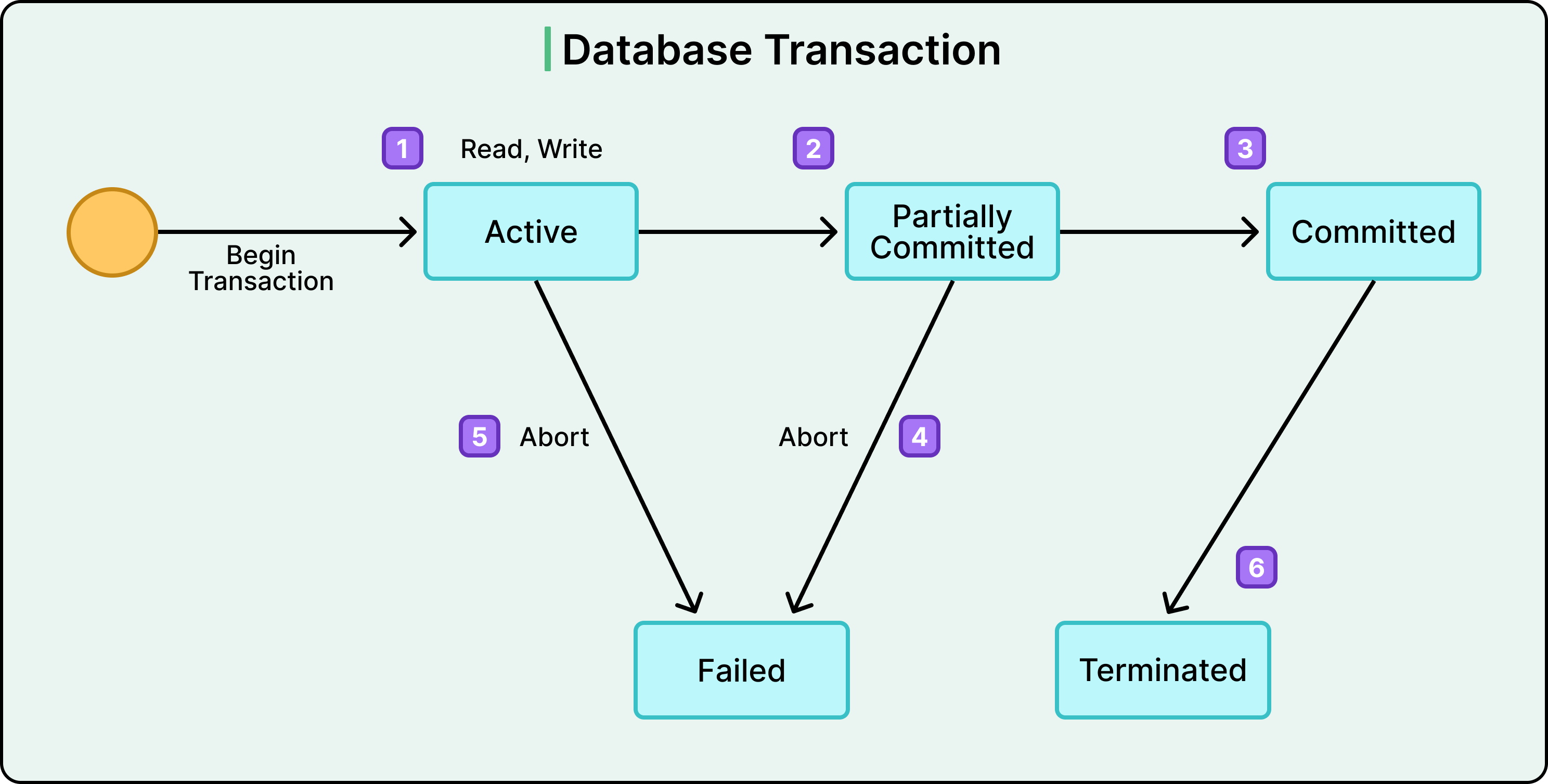
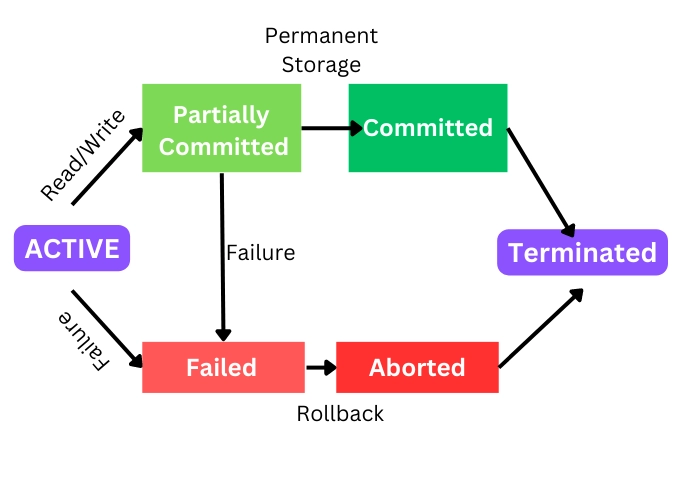
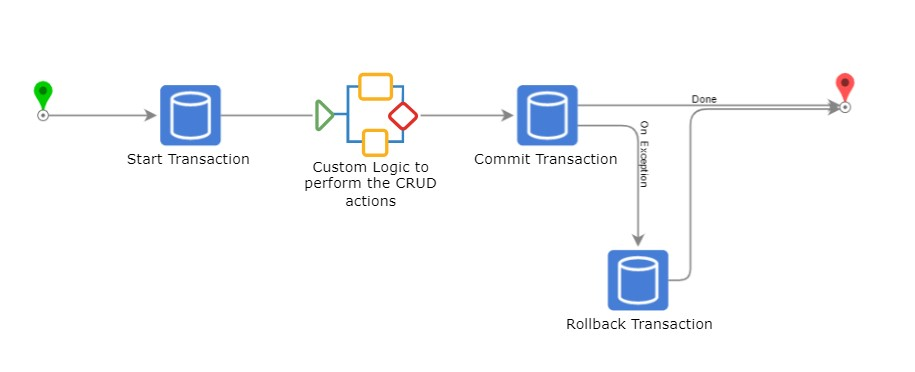
A transaction passes through several states:


🔹 1. Active

  • Transaction is executing

🔹 2. Partially Committed

  • All operations executed, waiting to commit

🔹 3. Committed

  • Changes permanently saved

🔹 4. Failed

  • Error occurs

🔹 5. Aborted

  • Rolled back to previous state

🔁 4. Transaction Operations


🔹 BEGIN TRANSACTION

Starts a transaction.

BEGIN;

🔹 COMMIT

Saves changes permanently.

COMMIT;

🔹 ROLLBACK

Reverts changes.

ROLLBACK;

🔹 SAVEPOINT

Creates checkpoints.

SAVEPOINT sp1;
ROLLBACK TO sp1;

⚖️ 5. ACID Properties

Image
Image
Image
Image

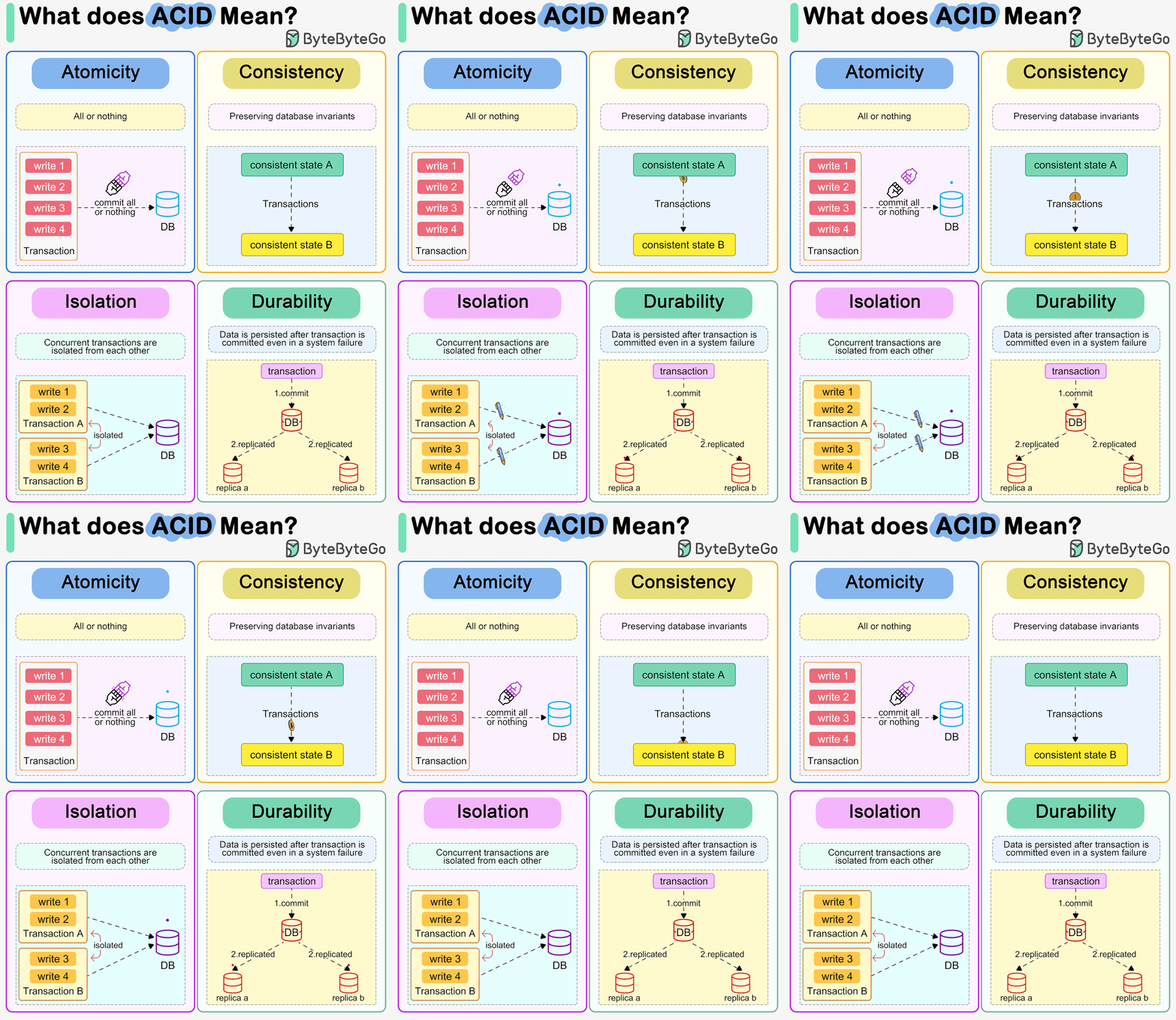
ACID properties ensure reliable transactions:


🔹 A – Atomicity

👉 All or nothing

  • If one operation fails → entire transaction fails
  • Ensures no partial updates

Example:

  • Money deducted but not added → rollback

🔹 C – Consistency

👉 Database remains valid

  • Enforces rules, constraints
  • Moves from one valid state to another

🔹 I – Isolation

👉 Transactions do not interfere

  • Concurrent transactions behave independently

🔹 D – Durability

👉 Changes are permanent

  • Even after crash, data persists

🔍 6. Atomicity in Detail

Atomicity ensures:

  • No partial execution
  • Rollback on failure

🔹 Implementation Techniques

  • Undo logs
  • Write-ahead logging (WAL)

🔹 Example

BEGIN;

UPDATE Accounts SET balance = balance - 1000 WHERE id = 1;
UPDATE Accounts SET balance = balance + 1000 WHERE id = 2;

COMMIT;

If second update fails → rollback entire transaction.


🧩 7. Consistency in Detail

Consistency ensures:

  • Constraints are maintained
  • Rules are enforced

🔹 Types of Constraints

  • Primary key
  • Foreign key
  • Check constraints

🔹 Example

  • Balance cannot be negative
  • Foreign key must exist

🔄 8. Isolation in Detail

Image
Image
Image
Image

Isolation prevents interference between transactions.


🔹 Problems Without Isolation

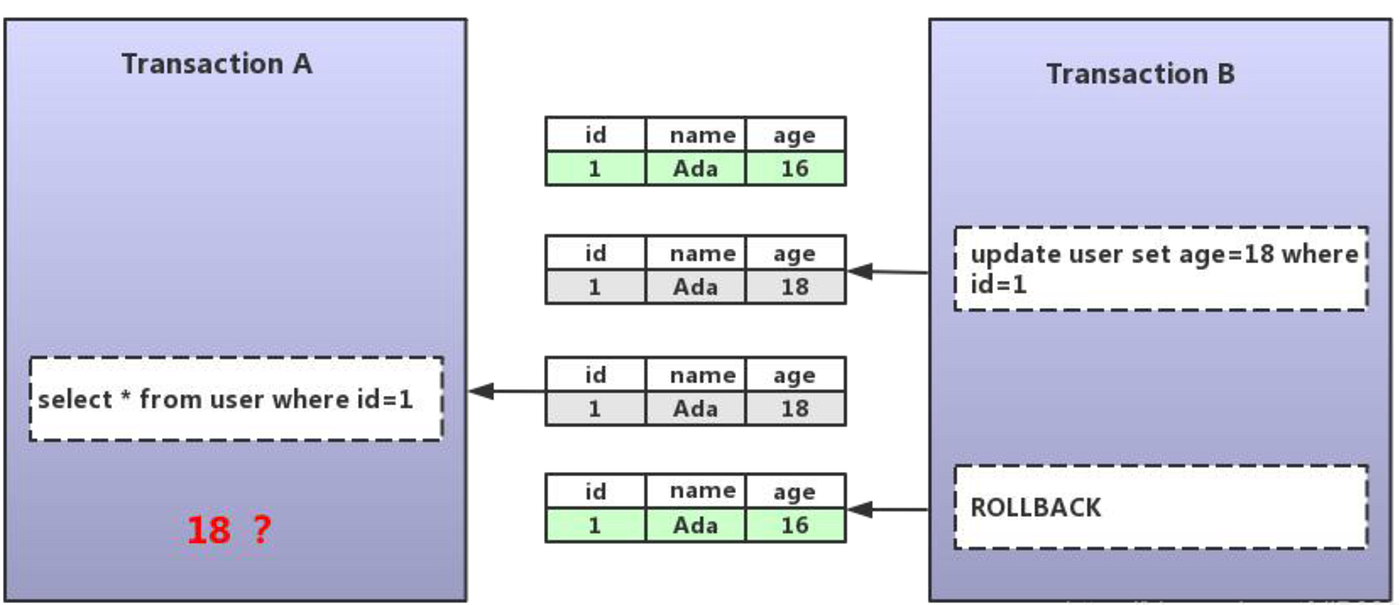
1. Dirty Read

Reading uncommitted data


2. Non-repeatable Read

Data changes between reads


3. Phantom Read

New rows appear unexpectedly


🔹 Isolation Levels

LevelDescription
Read UncommittedLowest isolation
Read CommittedPrevents dirty reads
Repeatable ReadPrevents non-repeatable reads
SerializableHighest isolation

🔐 9. Durability in Detail

Durability ensures:

  • Data survives crashes
  • Stored permanently

🔹 Implementation

  • Transaction logs
  • Disk storage
  • Backup systems

🔹 Example

After COMMIT:

  • Power failure occurs
  • Data still exists

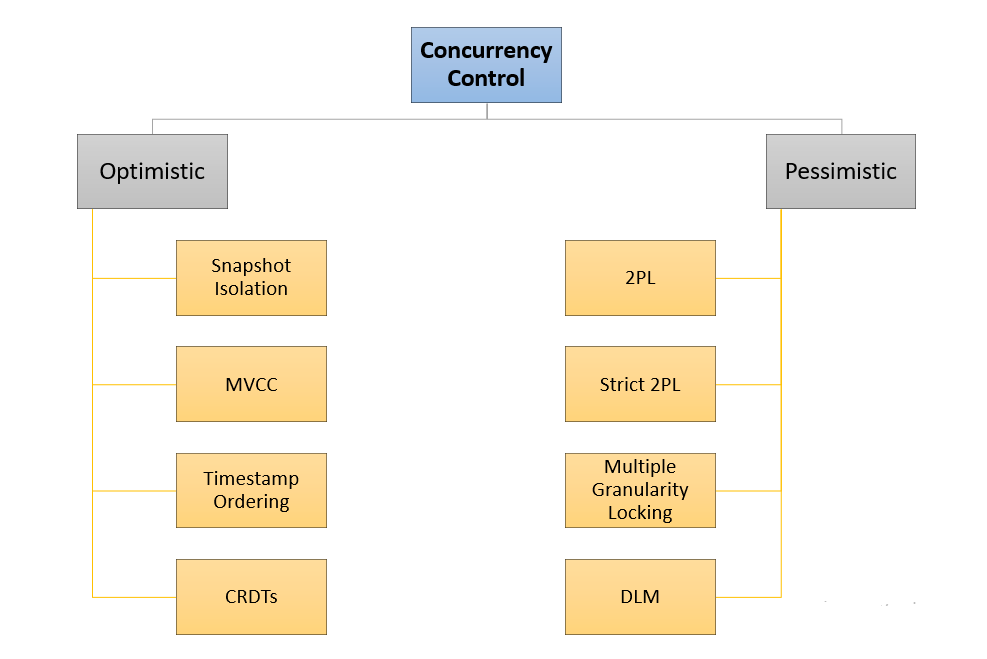
🧠 10. Concurrency Control

Image
Image
Image
Image

Concurrency control manages multiple transactions.


🔹 Techniques

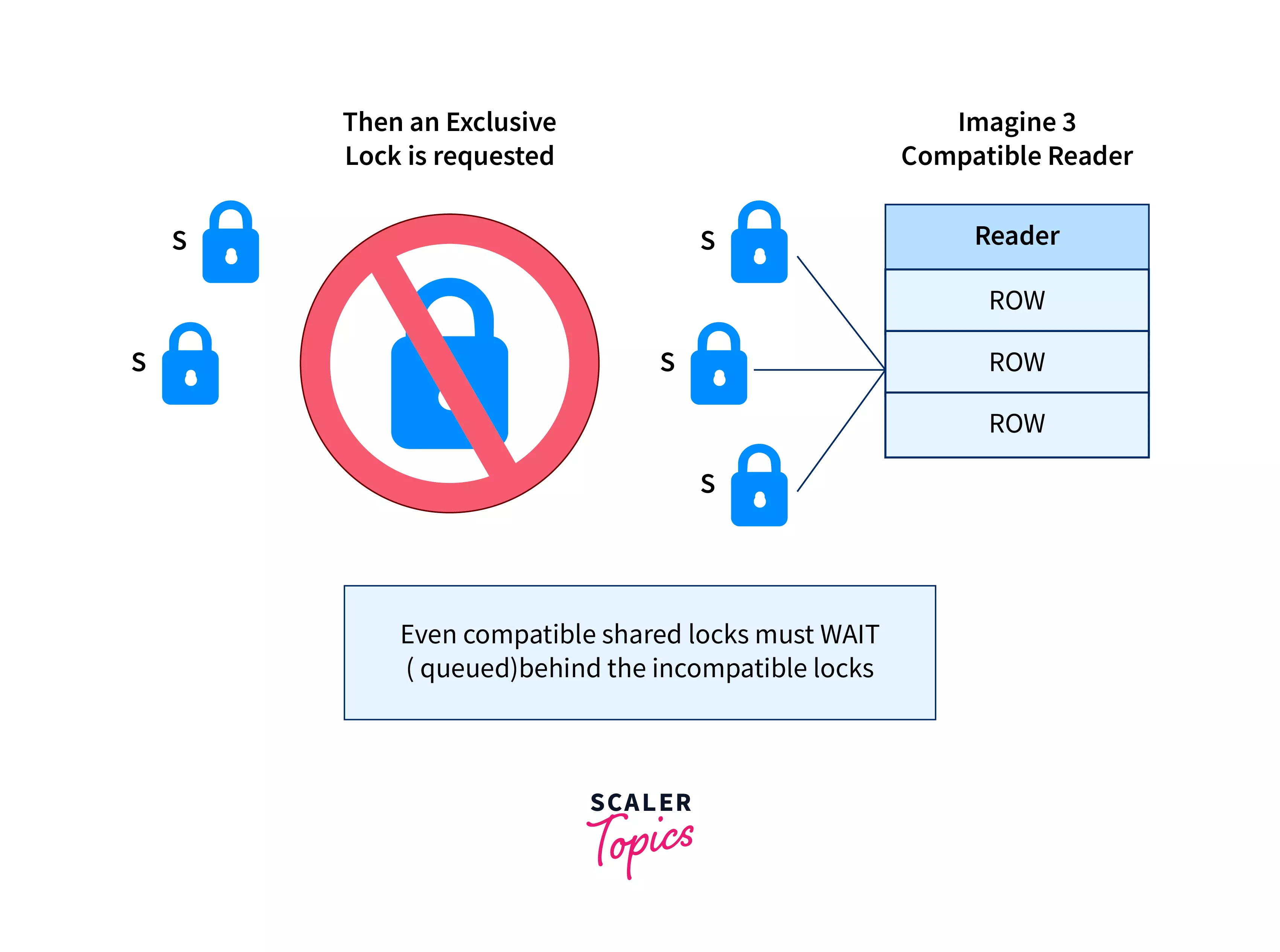
1. Locking

  • Shared lock (read)
  • Exclusive lock (write)

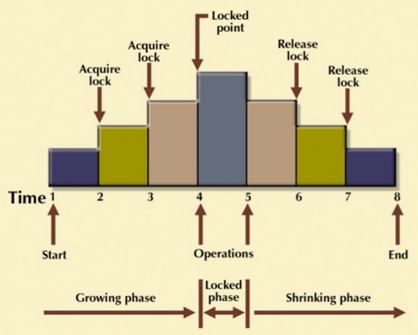
2. Two-Phase Locking (2PL)

  • Growing phase
  • Shrinking phase

3. Timestamp Ordering

  • Based on timestamps

4. MVCC (Multi-Version Concurrency Control)

  • Multiple versions of data

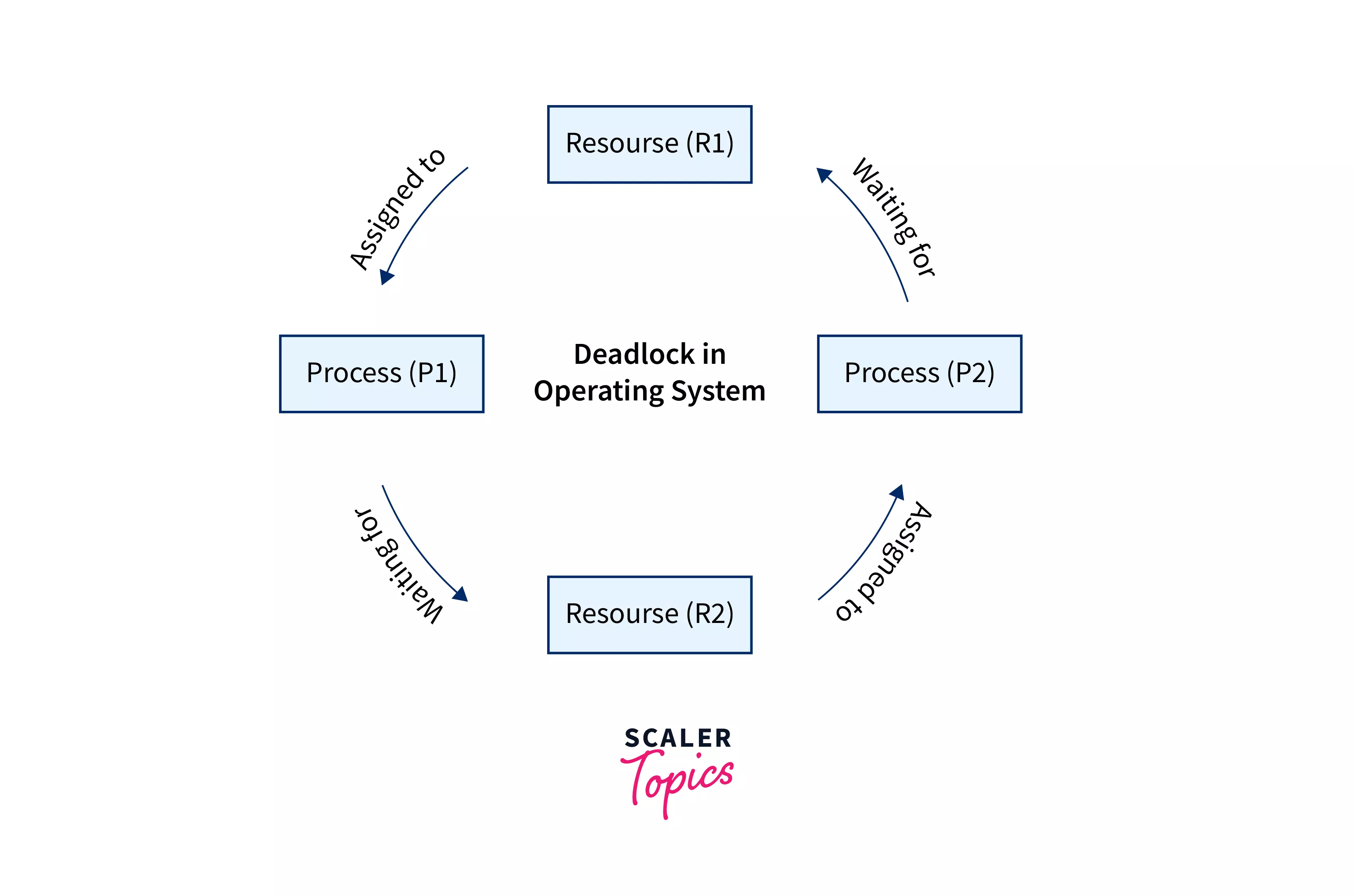
🔁 11. Deadlocks


🔹 What is Deadlock?

Two transactions wait for each other indefinitely.


🔹 Example

  • T1 locks A, needs B
  • T2 locks B, needs A

🔹 Handling Deadlocks

  • Detection
  • Prevention
  • Timeout

🧪 12. Logging and Recovery

Image
Image
Image
Image

🔹 Types of Logs

  • Undo log
  • Redo log

🔹 Recovery Techniques

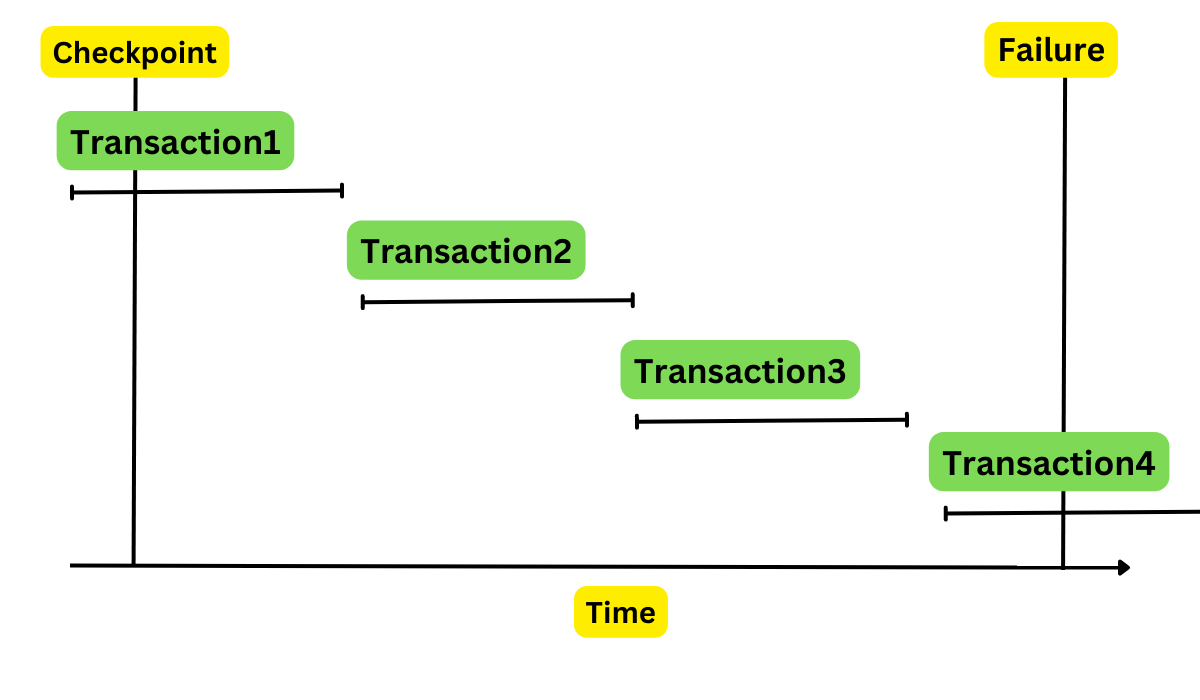
  • Checkpointing
  • Log-based recovery

📊 13. Distributed Transactions


🔹 Challenges

  • Network failures
  • Data consistency across nodes

🔹 Two-Phase Commit (2PC)

  1. Prepare phase
  2. Commit phase

🔹 Three-Phase Commit (3PC)

Improved version of 2PC


🌐 14. Transactions in Modern Databases


🔹 SQL Databases

  • Strong ACID compliance

🔹 NoSQL Databases

  • Often use BASE model
    • Basically Available
    • Soft state
    • Eventually consistent

⚖️ 15. ACID vs BASE

FeatureACIDBASE
ConsistencyStrongEventual
AvailabilityModerateHigh
Use CaseBankingSocial media

📈 16. Performance Considerations

  • High isolation → slower performance
  • Low isolation → faster but risky

🔹 Trade-offs

  • Consistency vs performance
  • Isolation vs concurrency

🧩 17. Real-World Applications


🔹 Banking Systems

  • Money transfer
  • Account updates

🔹 E-commerce

  • Order processing
  • Payment transactions

🔹 Airline Booking

  • Seat reservation

🧠 18. Advanced Topics

  • Nested transactions
  • Long-running transactions
  • Savepoints
  • Distributed consensus

🏗️ 19. Best Practices

  • Keep transactions short
  • Avoid unnecessary locks
  • Use proper isolation level
  • Monitor performance

⚠️ 20. Common Issues

  • Deadlocks
  • Blocking
  • Performance bottlenecks
  • Data inconsistency

🔮 21. Future Trends

  • Cloud-native transactions
  • Distributed ACID systems
  • New consistency models

🏁 Conclusion

Transactions and ACID properties form the core foundation of reliable database systems. They ensure that even in complex, concurrent, and failure-prone environments, data remains:

  • Accurate
  • Consistent
  • Safe
  • Durable

Mastering transactions is essential for building robust applications, especially in systems where correctness is critical.


🏷️ Tags

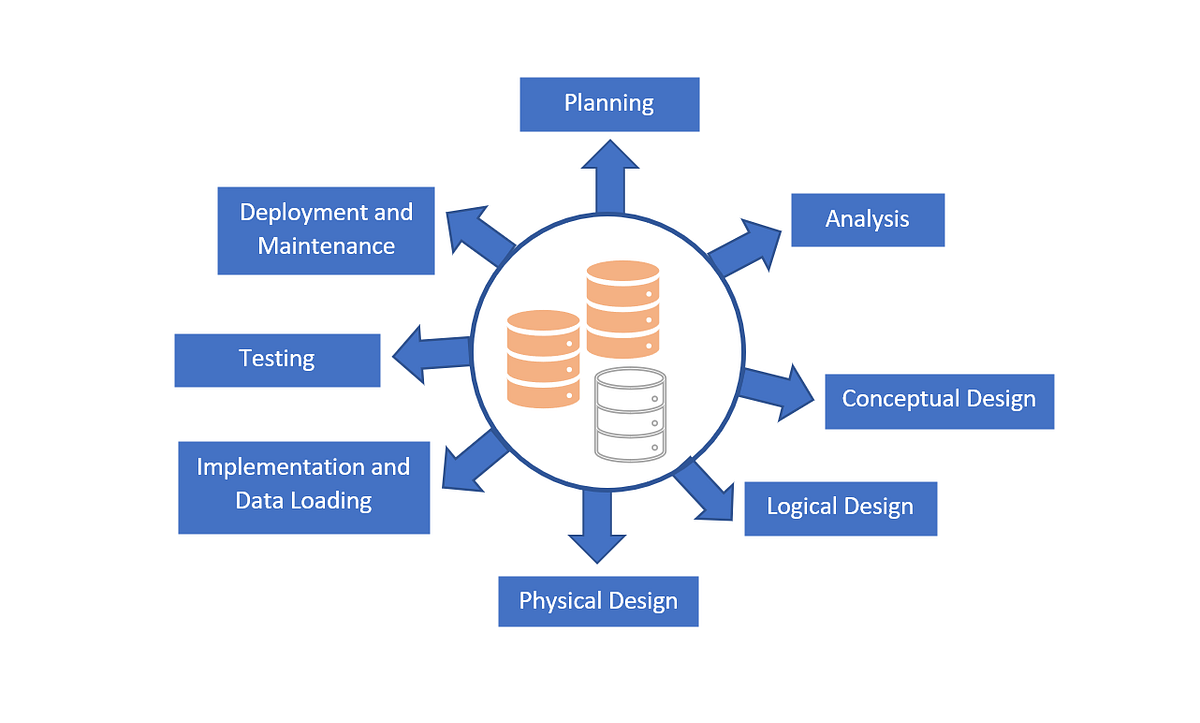
🏗️ Database Design

Image
Image
Image
Image

📘 1. Introduction to Database Design

Database Design is the structured process of organizing data into a model that efficiently supports storage, retrieval, and manipulation. It defines how data is stored, how different data elements relate to each other, and how users interact with the database.

A well-designed database ensures:

  • High performance ⚡
  • Data consistency ✔️
  • Scalability 📈
  • Security 🔐
  • Maintainability 🛠️

Database design is the foundation of all data-driven systems, including:

  • Web applications
  • Mobile apps
  • Enterprise software
  • Banking systems
  • AI and analytics platforms

🧠 2. Importance of Database Design

🔹 Why It Matters

Poor database design leads to:

  • Data redundancy
  • Inconsistent data
  • Slow queries
  • Difficult maintenance
  • Scalability issues

Good database design provides:

  • Efficient data access
  • Reduced duplication
  • Logical organization
  • Improved data integrity

🏛️ 3. Types of Database Design

Image
Image
Image
Image

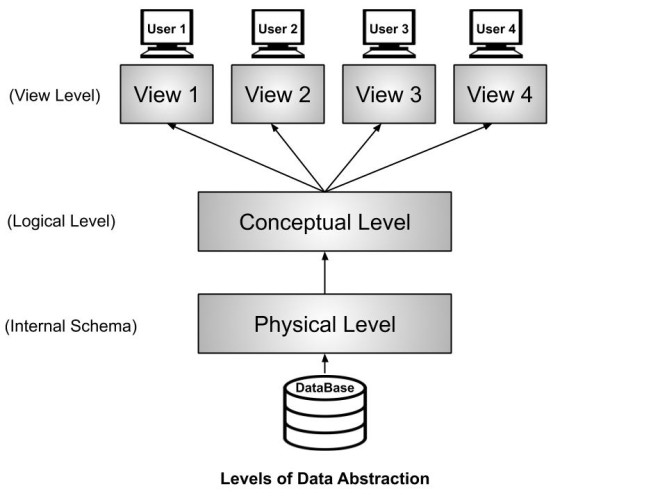
Database design is typically divided into three levels:


🔹 1. Conceptual Design

  • High-level design
  • Focuses on what data is needed
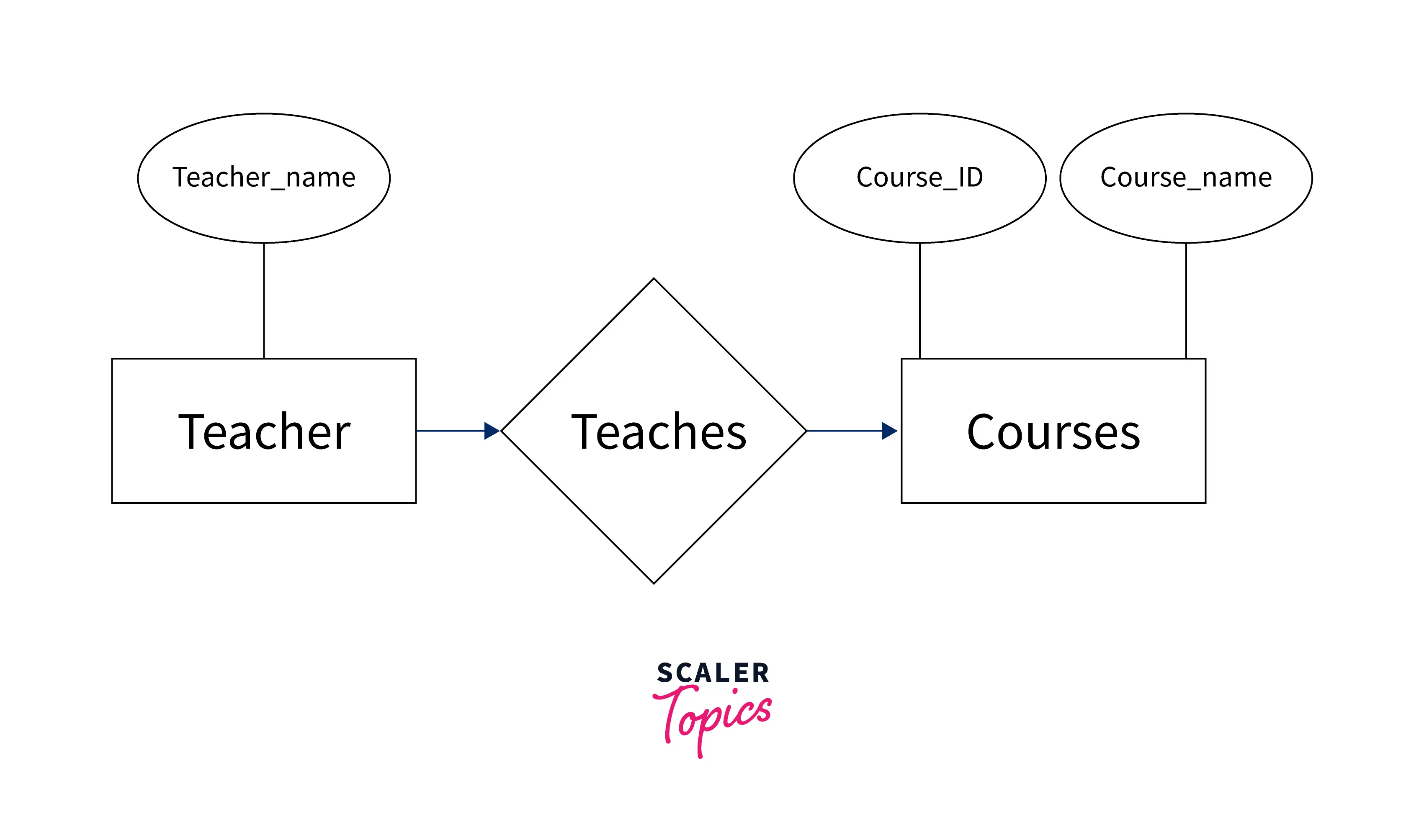
  • Uses Entity-Relationship Diagrams (ERD)

Example:

  • Entities: Student, Course
  • Relationship: Enrollment

🔹 2. Logical Design

  • Defines structure without implementation details
  • Includes tables, columns, keys

🔹 3. Physical Design

  • Actual implementation in DBMS
  • Includes indexing, storage, partitioning

🧩 4. Data Modeling

Image
Image
Image
Image

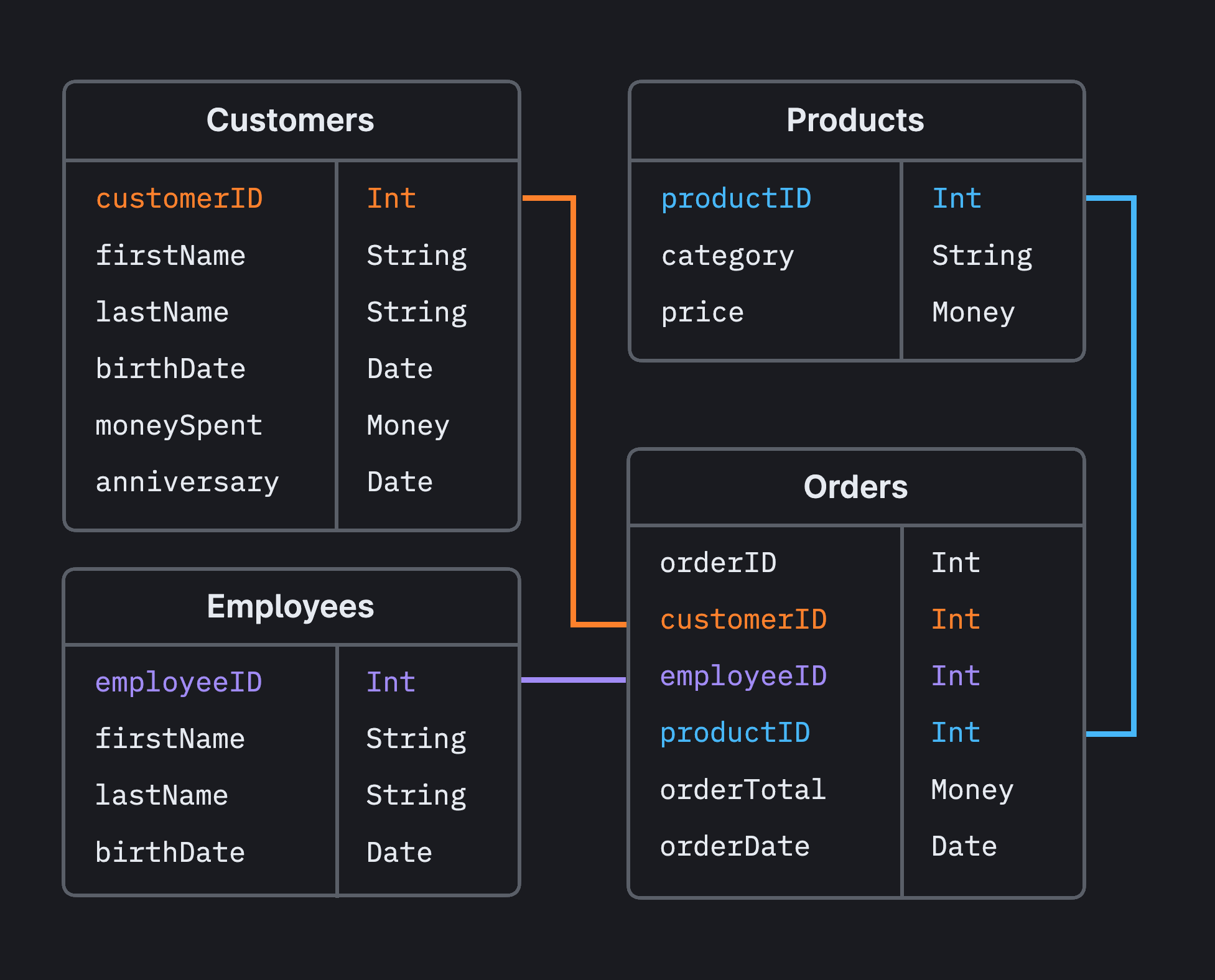
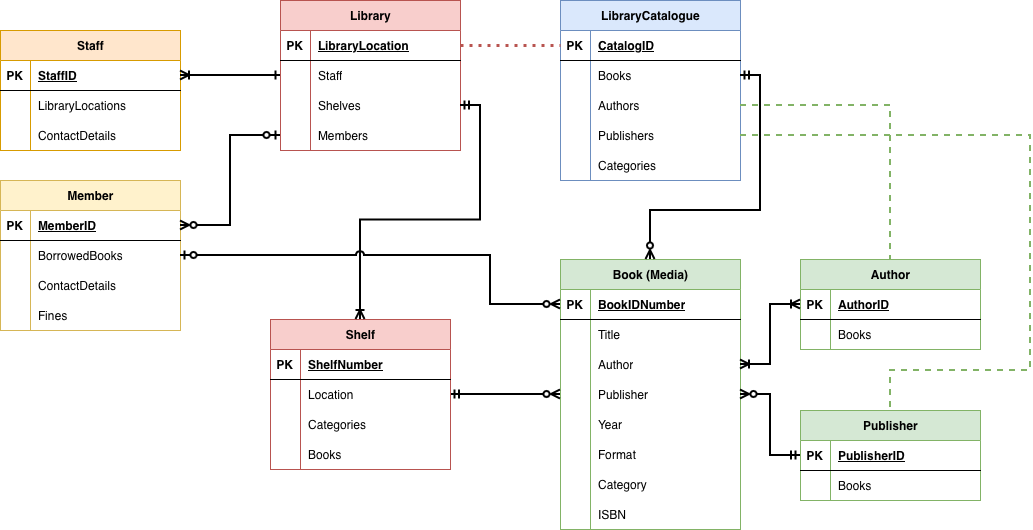
Data modeling is the process of creating a data structure.


🔹 Components of Data Modeling

1. Entities

Objects in the system (e.g., User, Product)

2. Attributes

Properties of entities (e.g., Name, Price)

3. Relationships

Connections between entities


🔹 Types of Relationships

  • One-to-One (1:1)
  • One-to-Many (1:N)
  • Many-to-Many (M:N)

🔑 5. Keys in Database Design

Keys uniquely identify records and define relationships.


🔹 Types of Keys

  • Primary Key – Unique identifier
  • Foreign Key – Links tables
  • Candidate Key – Possible primary keys
  • Composite Key – Combination of columns
  • Super Key – Set of attributes that uniquely identify

🧱 6. Normalization

Image
Image
Image
Image

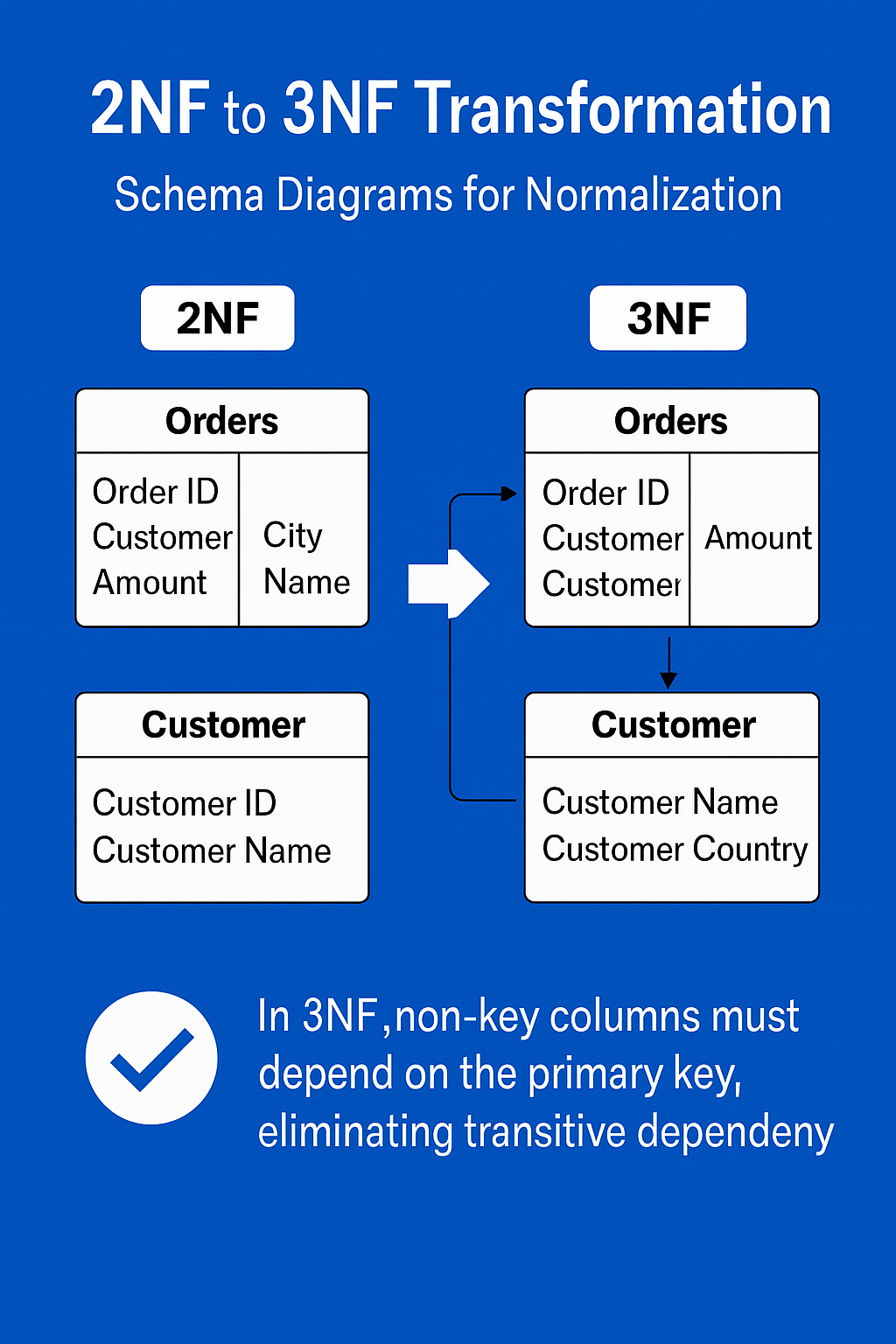
Normalization organizes data to reduce redundancy.


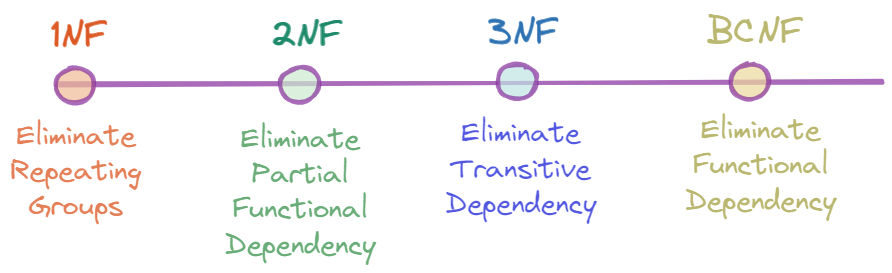
🔹 Normal Forms

1NF (First Normal Form)

  • Atomic values
  • No repeating groups

2NF (Second Normal Form)

  • Remove partial dependencies

3NF (Third Normal Form)

  • Remove transitive dependencies

BCNF (Boyce-Codd Normal Form)

  • Stronger version of 3NF

🔹 Benefits

  • Eliminates redundancy
  • Improves consistency
  • Simplifies updates

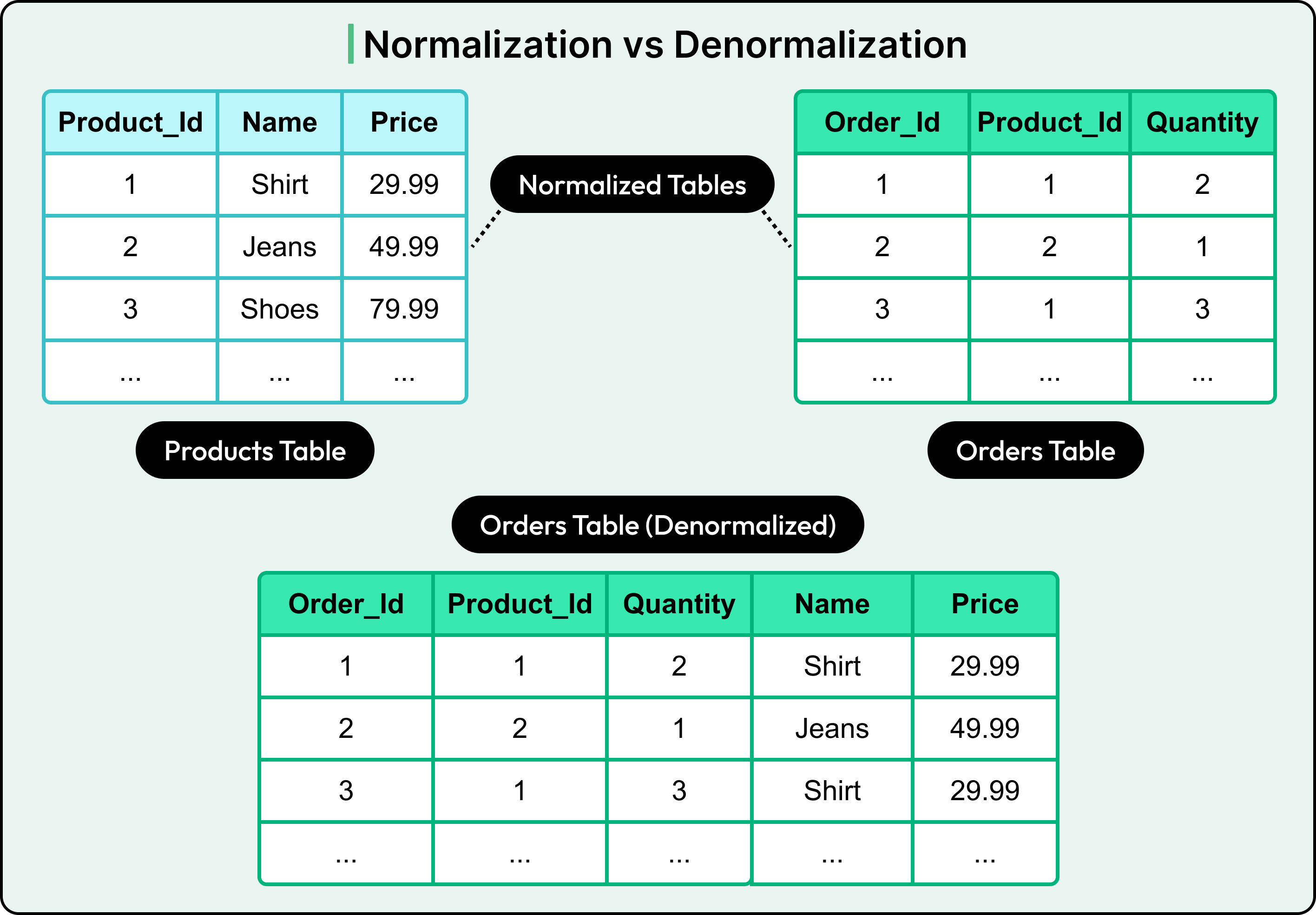
🔄 7. Denormalization

Sometimes normalization is reversed for performance.

🔹 Why Denormalize?

  • Faster reads
  • Reduced joins
  • Better performance in analytics

🔹 Trade-offs

  • Data redundancy
  • Increased storage
  • Complex updates

🧮 8. Constraints and Integrity

🔹 Types of Constraints

  • NOT NULL
  • UNIQUE
  • PRIMARY KEY
  • FOREIGN KEY
  • CHECK

🔹 Types of Integrity

  • Entity Integrity
  • Referential Integrity
  • Domain Integrity

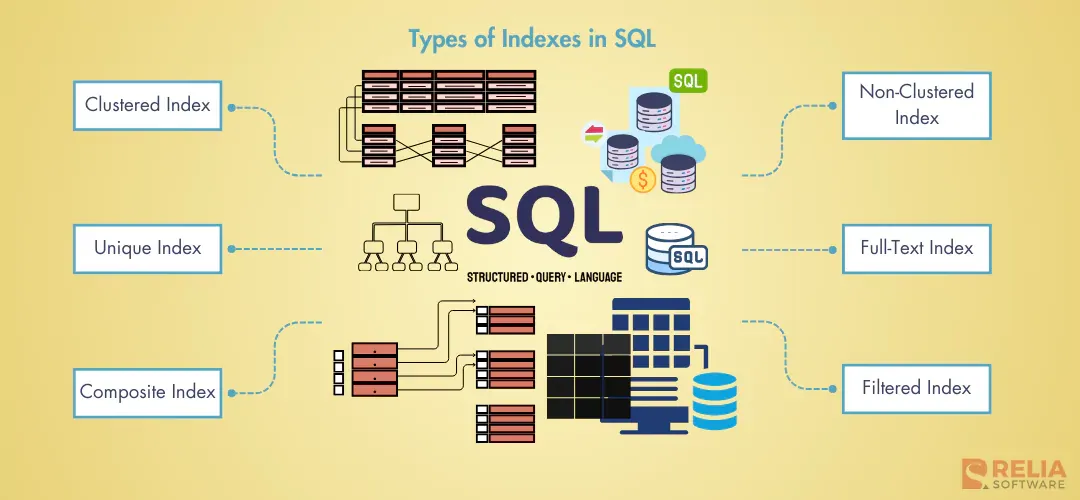
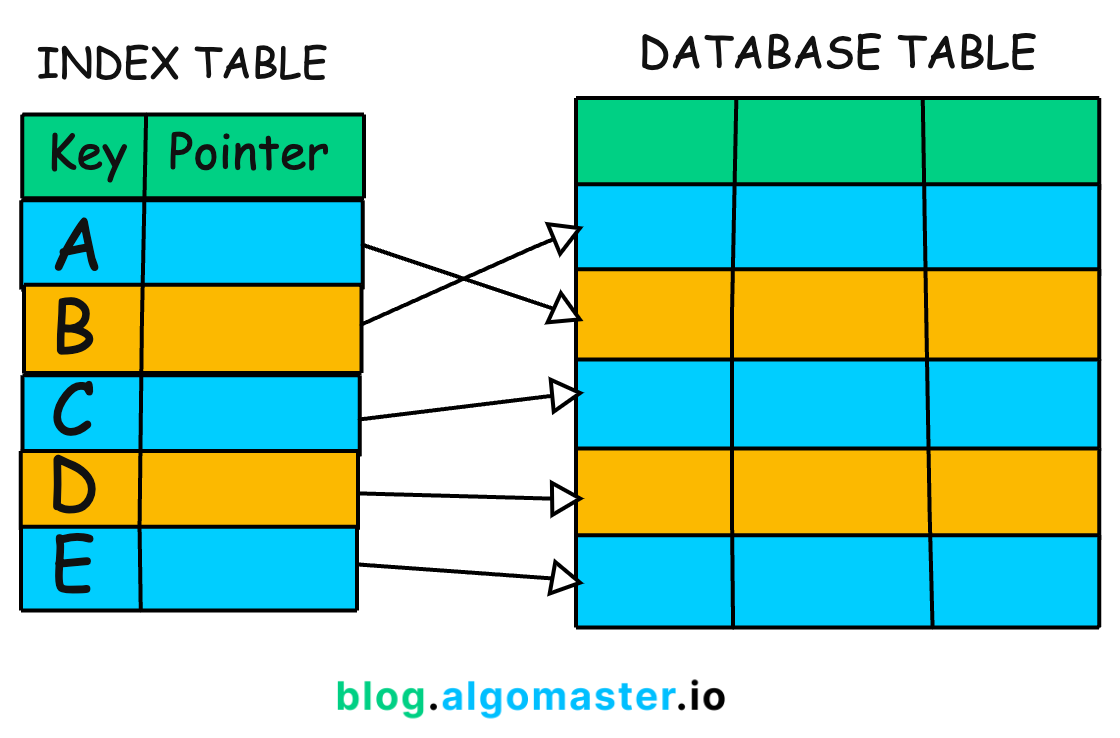
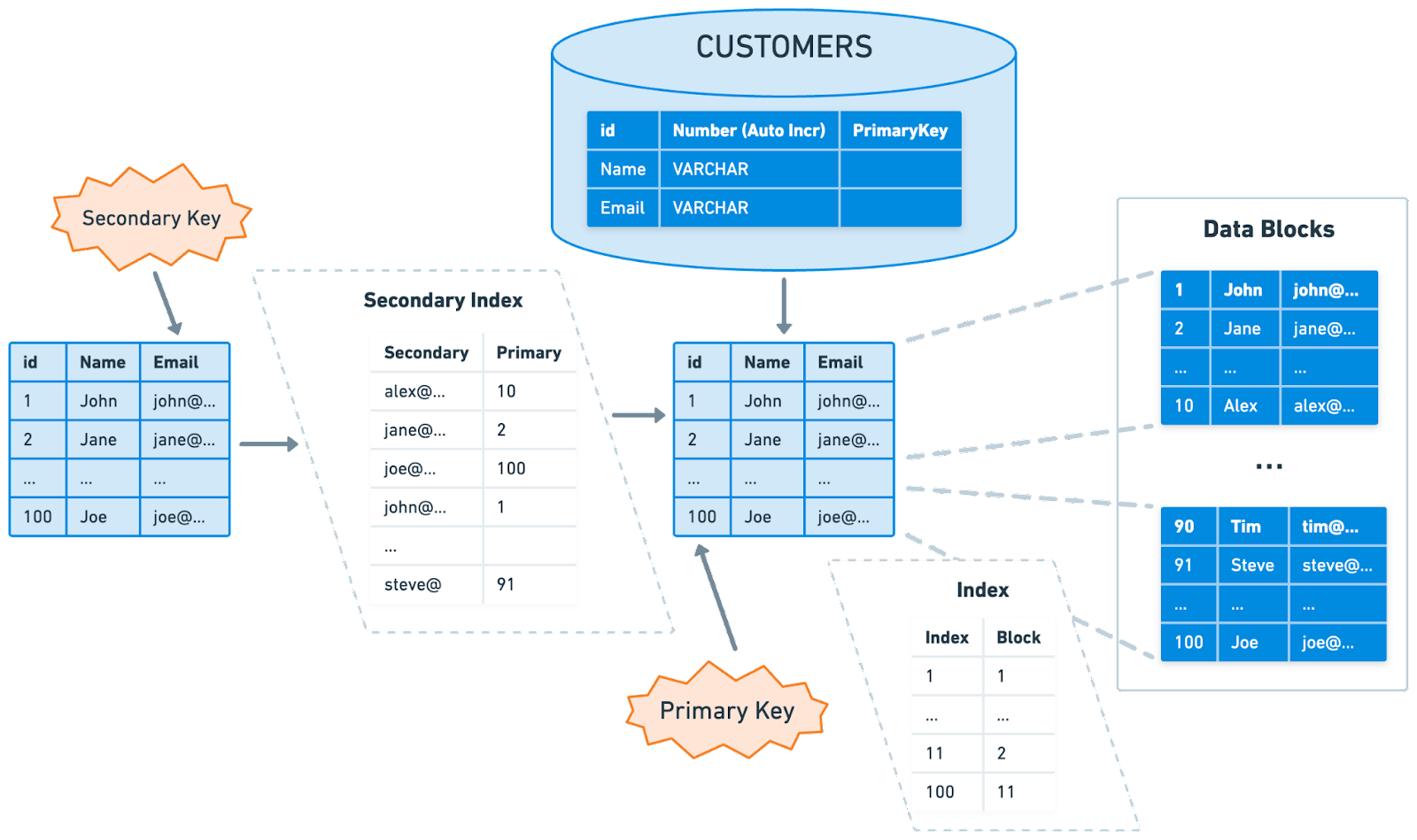
📊 9. Indexing

Image
Image
Image
Image

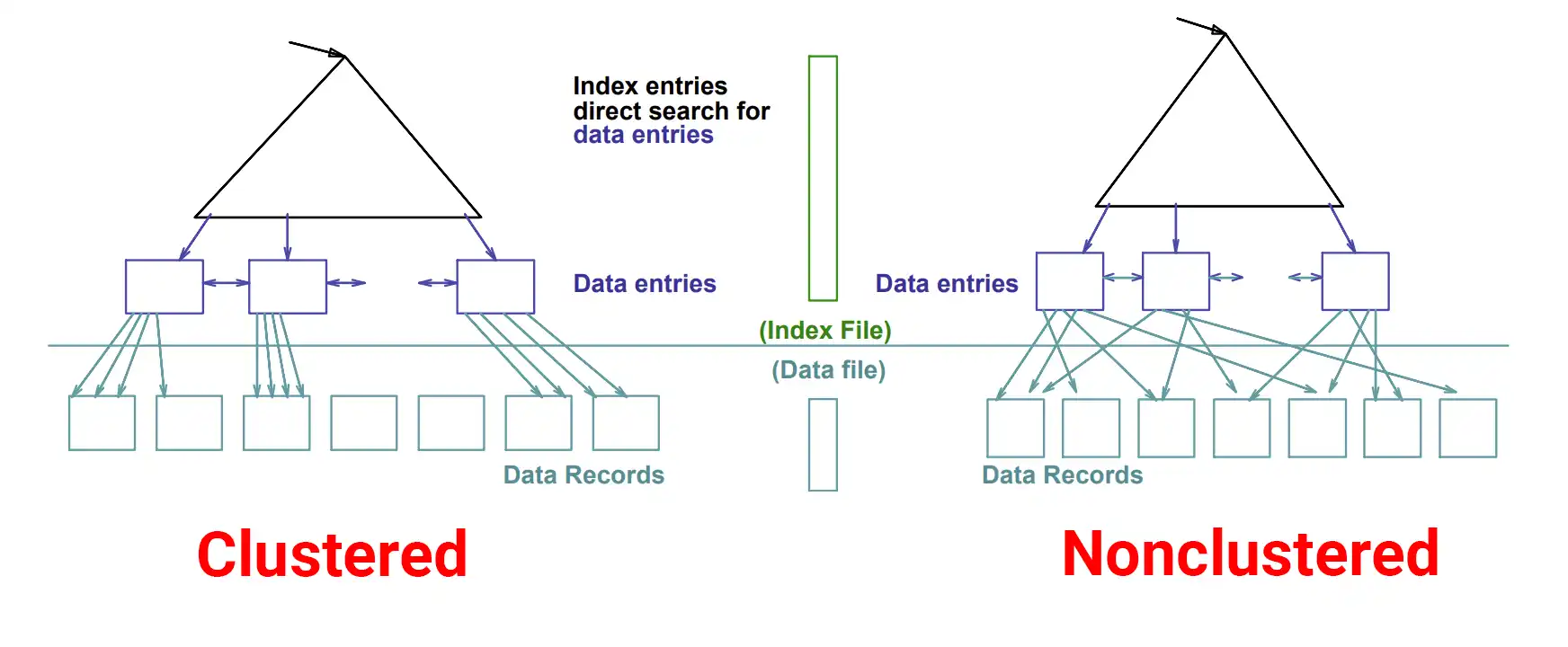
Indexes speed up data retrieval.


🔹 Types of Indexes

  • Clustered Index
  • Non-clustered Index
  • Composite Index
  • Unique Index

🔹 Advantages

  • Faster queries
  • Efficient searching

🔹 Disadvantages

  • Extra storage
  • Slower inserts/updates

🧠 10. Relationships in Depth

🔹 One-to-One

Example: User ↔ Profile

🔹 One-to-Many

Example: Customer → Orders

🔹 Many-to-Many

Example: Students ↔ Courses

Requires a junction table


🏗️ 11. Schema Design

A schema defines database structure.


🔹 Types of Schema

  • Star Schema ⭐
  • Snowflake Schema ❄️
  • Flat Schema

🔹 Star Schema

  • Central fact table
  • Connected dimension tables

🔹 Snowflake Schema

  • Normalized version of star schema

📦 12. Database Design Process

Image
Image
Image
Image

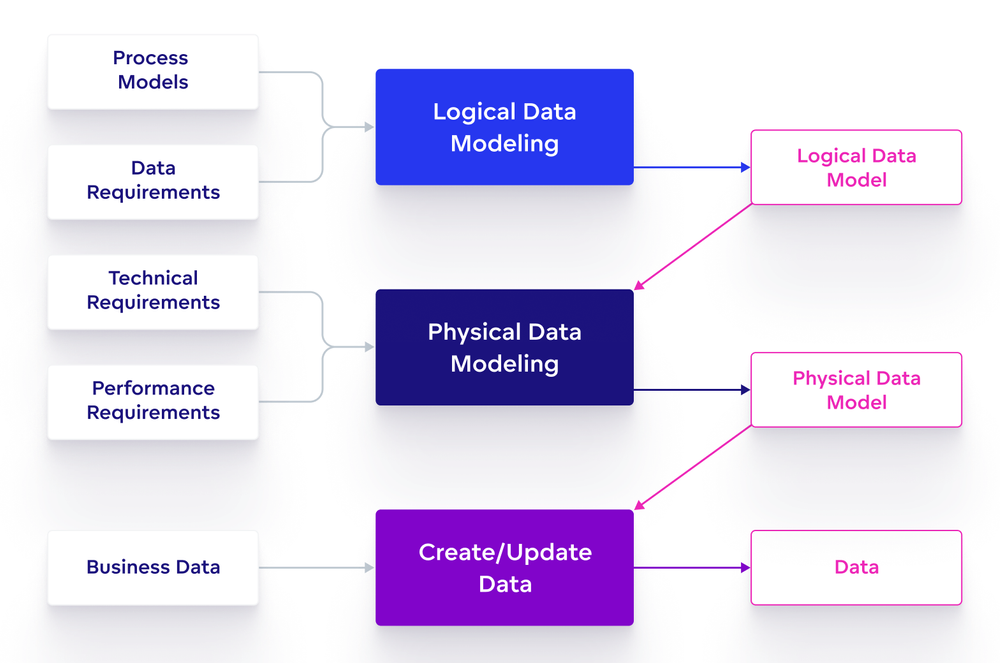
🔹 Steps

  1. Requirement Analysis
  2. Conceptual Design
  3. Logical Design
  4. Normalization
  5. Physical Design
  6. Implementation
  7. Testing
  8. Maintenance

🔐 13. Security in Database Design

  • Authentication
  • Authorization
  • Encryption
  • Data masking

🔹 Best Practices

  • Use least privilege
  • Encrypt sensitive data
  • Regular backups

⚡ 14. Performance Optimization

  • Proper indexing
  • Query optimization
  • Caching
  • Partitioning

🧩 15. Transactions and ACID

🔹 ACID Properties

  • Atomicity
  • Consistency
  • Isolation
  • Durability

🌐 16. Distributed Database Design

Image
Image
Image
Image

🔹 Techniques

  • Sharding
  • Replication
  • Partitioning

🔄 17. NoSQL vs Relational Design

FeatureRelationalNoSQL
SchemaFixedFlexible
ScalingVerticalHorizontal
Use CaseStructured dataBig data

🧪 18. Advanced Concepts

  • Data Warehousing
  • OLAP vs OLTP
  • Materialized Views
  • Event Sourcing
  • CQRS

📈 19. Real-World Example

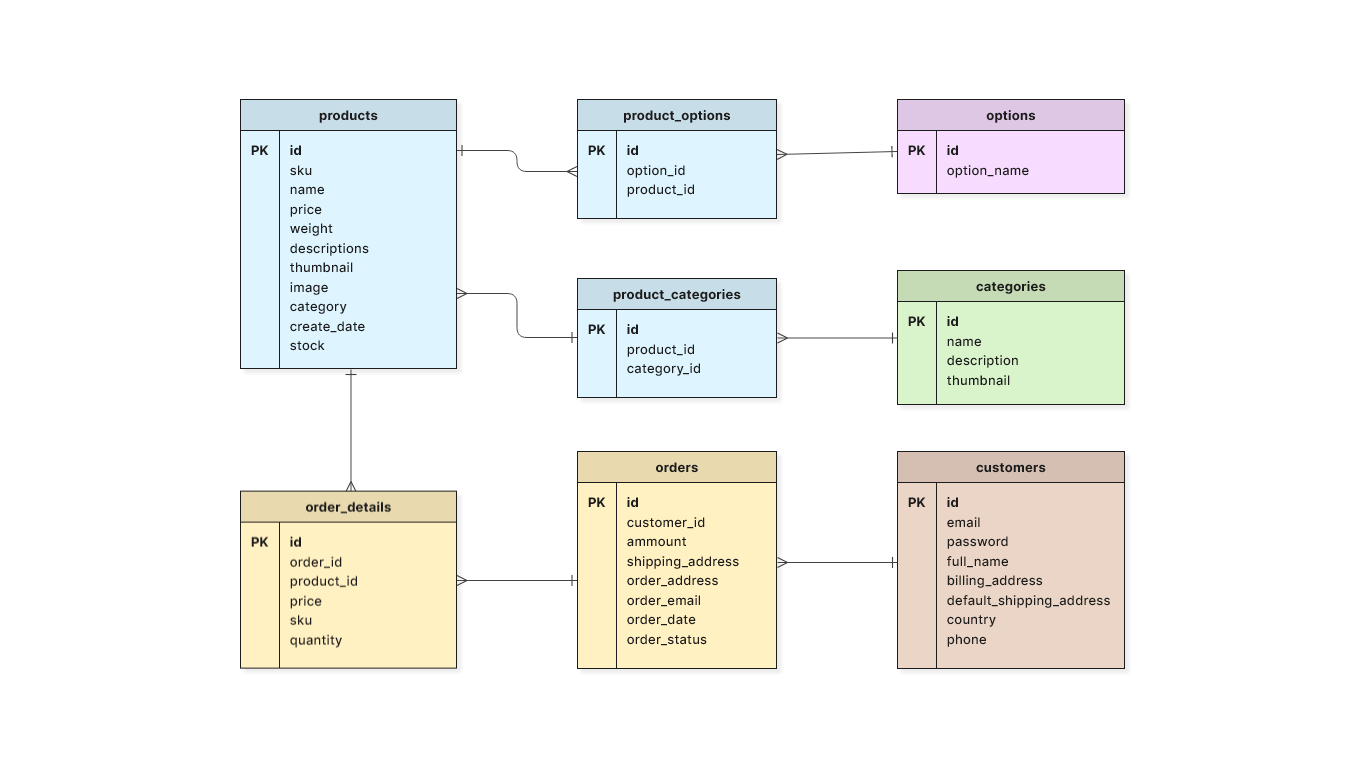
🔹 E-commerce Database

Tables:

  • Users
  • Products
  • Orders
  • Payments

Relationships:

  • User → Orders (1:N)
  • Orders → Products (M:N)

🧰 20. Tools for Database Design

  • ER modeling tools
  • SQL-based tools
  • Cloud DB tools

📚 21. Advantages of Good Design

  • Scalability
  • Performance
  • Data integrity
  • Flexibility

⚠️ 22. Common Mistakes

  • Poor normalization
  • Over-indexing
  • Ignoring scalability
  • Weak constraints

🔮 23. Future Trends

  • Cloud-native databases
  • AI-driven optimization
  • Serverless databases
  • Multi-model databases

🏁 Conclusion

Database design is a critical skill in modern computing. A well-designed database ensures that systems are efficient, scalable, and reliable. Whether you’re building a simple app or a complex enterprise system, mastering database design principles will help you create robust and high-performing solutions.


🏷️ Tags

🗄️ SQL (Structured Query Language)

Image
Image
Image
Image

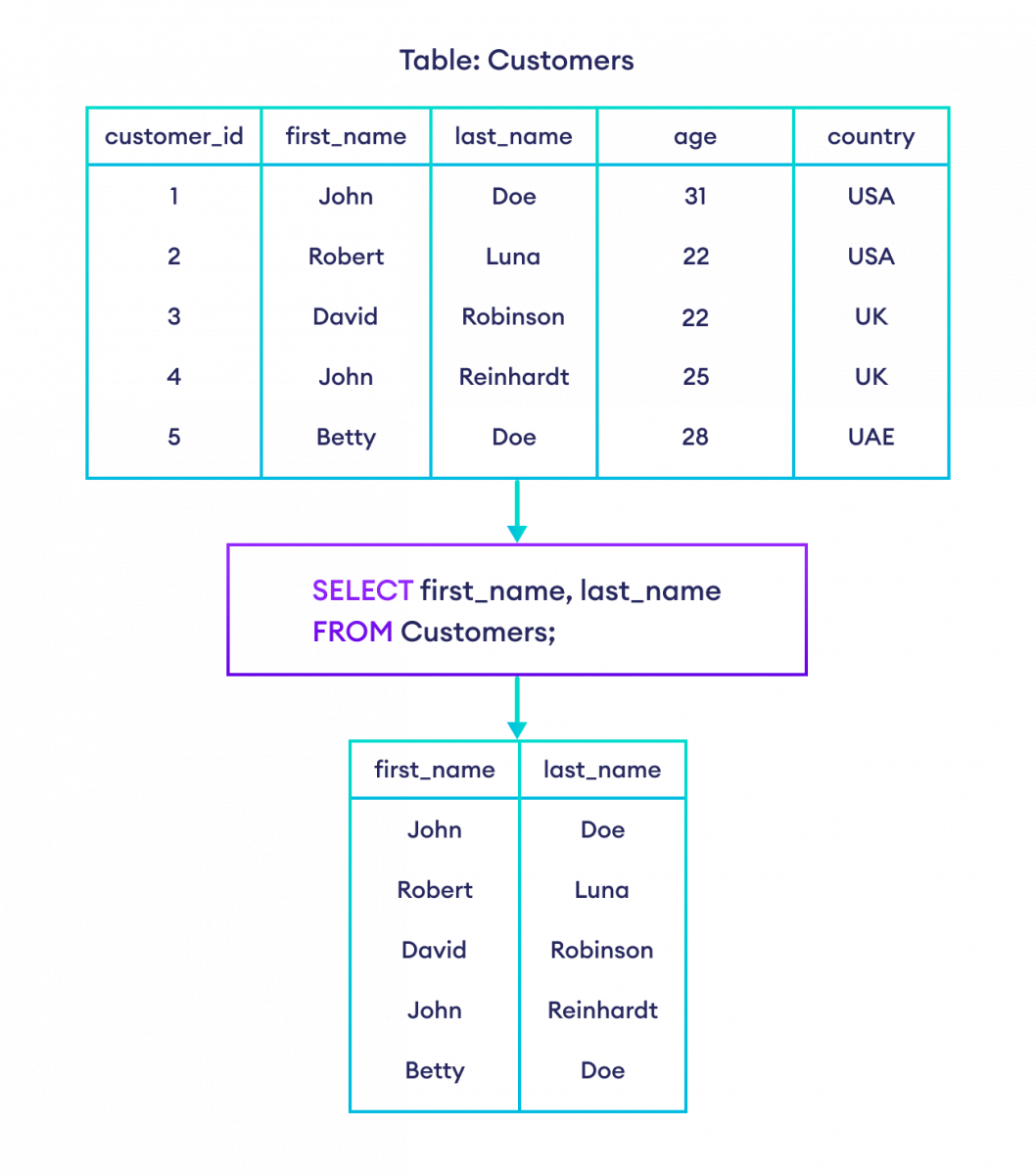
📘 1. Introduction to SQL

SQL (Structured Query Language) is a standard programming language used to store, manipulate, and retrieve data from relational databases. It is the backbone of modern data-driven applications and is widely used in industries such as finance, healthcare, e-commerce, education, and more.

SQL was developed in the 1970s at IBM by Donald D. Chamberlin and Raymond F. Boyce. Initially called SEQUEL (Structured English Query Language), it evolved into SQL and became an international standard (ANSI/ISO).


🔹 Why SQL is Important

  • Enables efficient data management
  • Used in web applications, mobile apps, enterprise systems
  • Supports data analysis and reporting
  • Works with major database systems like:
    • MySQL
    • PostgreSQL
    • Oracle Database
    • SQL Server
    • SQLite

🔹 Characteristics of SQL

  • Declarative language (focus on what to do, not how)
  • Supports complex queries
  • Standardized (ANSI SQL)
  • Integrates with multiple programming languages
  • Supports transactions and concurrency

🧱 2. Relational Database Fundamentals

Image
Image
Image

SQL works with Relational Database Management Systems (RDBMS).

🔹 Core Concepts

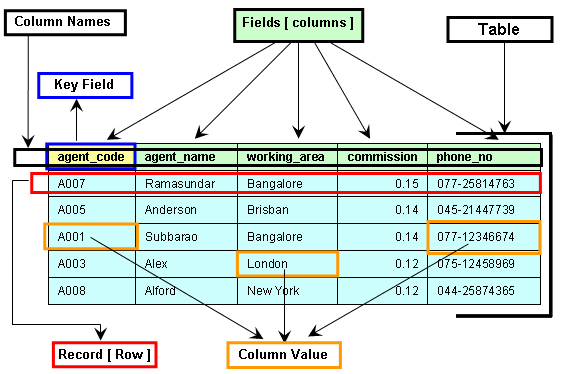
1. Table

A table is a collection of related data organized in rows and columns.

2. Row (Record)

Represents a single entry.

3. Column (Field)

Represents an attribute of the data.

4. Primary Key

  • Unique identifier for each record
  • Cannot be NULL

5. Foreign Key

  • Links two tables together
  • Maintains referential integrity

6. Schema

  • Structure of the database

🔹 Example Table

IDNameAge
1John25
2Sara30

🧮 3. Types of SQL Commands

SQL commands are divided into categories:


🔹 1. DDL (Data Definition Language)

Used to define database structure.

  • CREATE
  • ALTER
  • DROP
  • TRUNCATE

Example:

CREATE TABLE Students (
    ID INT PRIMARY KEY,
    Name VARCHAR(50),
    Age INT
);

🔹 2. DML (Data Manipulation Language)

Used to manipulate data.

  • INSERT
  • UPDATE
  • DELETE
INSERT INTO Students VALUES (1, 'John', 25);

UPDATE Students SET Age = 26 WHERE ID = 1;

DELETE FROM Students WHERE ID = 1;

🔹 3. DQL (Data Query Language)

  • SELECT
SELECT * FROM Students;

🔹 4. DCL (Data Control Language)

  • GRANT
  • REVOKE

🔹 5. TCL (Transaction Control Language)

  • COMMIT
  • ROLLBACK
  • SAVEPOINT

🔍 4. SQL Queries and Clauses

Image
Image
Image
Image

🔹 SELECT Statement

SELECT column1, column2 FROM table_name;

🔹 WHERE Clause

SELECT * FROM Students WHERE Age > 25;

🔹 ORDER BY

SELECT * FROM Students ORDER BY Age DESC;

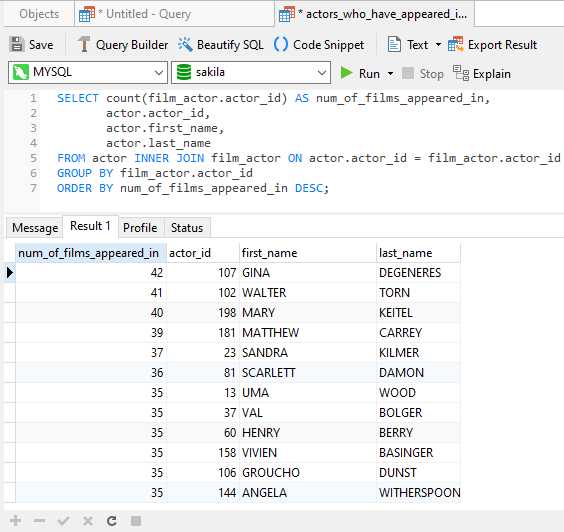
🔹 GROUP BY

SELECT Age, COUNT(*) FROM Students GROUP BY Age;

🔹 HAVING

SELECT Age, COUNT(*) 
FROM Students 
GROUP BY Age 
HAVING COUNT(*) > 1;

🔹 DISTINCT

SELECT DISTINCT Age FROM Students;

🔗 5. SQL Joins

Image
Image
Image
Image

Joins combine rows from multiple tables.


🔹 Types of Joins

1. INNER JOIN

Returns matching rows.

SELECT * FROM A INNER JOIN B ON A.id = B.id;

2. LEFT JOIN

Returns all rows from left table.


3. RIGHT JOIN

Returns all rows from right table.


4. FULL JOIN

Returns all rows from both tables.


🧠 6. SQL Functions

🔹 Aggregate Functions

  • COUNT()
  • SUM()
  • AVG()
  • MIN()
  • MAX()
SELECT AVG(Age) FROM Students;

🔹 String Functions

  • UPPER()
  • LOWER()
  • LENGTH()

🔹 Date Functions

  • NOW()
  • CURDATE()

🏗️ 7. Constraints in SQL

Constraints enforce rules on data.

  • NOT NULL
  • UNIQUE
  • PRIMARY KEY
  • FOREIGN KEY
  • CHECK
  • DEFAULT
CREATE TABLE Users (
    ID INT PRIMARY KEY,
    Email VARCHAR(100) UNIQUE
);

🔄 8. Normalization

Image
Image
Image
Image

Normalization reduces redundancy.

🔹 Types:

  • 1NF: Atomic values
  • 2NF: Remove partial dependency
  • 3NF: Remove transitive dependency

⚡ 9. Indexing

Indexes improve query performance.

CREATE INDEX idx_name ON Students(Name);

Types:

  • Single-column index
  • Composite index
  • Unique index

🔐 10. Transactions

A transaction is a unit of work.

Properties (ACID):

  • Atomicity
  • Consistency
  • Isolation
  • Durability

🔁 11. Subqueries

SELECT Name FROM Students
WHERE Age > (SELECT AVG(Age) FROM Students);

📊 12. Views

Virtual tables based on queries.

CREATE VIEW StudentView AS
SELECT Name FROM Students;

🧩 13. Stored Procedures

Reusable SQL code.

CREATE PROCEDURE GetStudents()
BEGIN
    SELECT * FROM Students;
END;

🔔 14. Triggers

Automatically executed events.

CREATE TRIGGER before_insert
BEFORE INSERT ON Students
FOR EACH ROW
SET NEW.Name = UPPER(NEW.Name);

🌐 15. SQL vs NoSQL

FeatureSQLNoSQL
StructureTable-basedFlexible
SchemaFixedDynamic
ScalabilityVerticalHorizontal

🧪 16. Advanced SQL Concepts

  • Window Functions (ROW_NUMBER(), RANK())
  • CTE (Common Table Expressions)
  • Recursive Queries
  • Partitioning
  • Query Optimization

📈 17. SQL Performance Optimization

  • Use indexes
  • Avoid SELECT *
  • Optimize joins
  • Use caching
  • Analyze execution plans

🧰 18. Popular SQL Databases

  • MySQL
  • PostgreSQL
  • Oracle
  • SQL Server
  • SQLite

🧑‍💻 19. Real-World Applications

  • Banking systems
  • E-commerce platforms
  • Social media
  • Data analytics
  • Inventory systems

📚 20. Advantages of SQL

  • Easy to learn
  • Powerful querying
  • High performance
  • Standardized

⚠️ 21. Limitations of SQL

  • Not ideal for unstructured data
  • Scaling challenges
  • Complex queries can be slow

🔮 22. Future of SQL

  • Integration with AI & Big Data
  • Cloud databases (AWS, Azure, GCP)
  • Real-time analytics
  • Hybrid SQL/NoSQL systems

🏁 Conclusion

SQL remains one of the most essential tools in computing. Whether you are a developer, data analyst, or engineer, mastering SQL enables you to handle data efficiently, build scalable systems, and extract meaningful insights.


🏷️ Tags

🔍 Searching Algorithms


🧩 What is Searching?

Image
Image
Image
Image

Searching is the process of locating a specific element (called a key) within a data structure such as an array, list, tree, or graph. It is one of the most fundamental operations in computer science and forms the backbone of data retrieval systems.

Example:

Array: [10, 25, 30, 45, 60]
Search Key: 30 → Found at index 2

Searching algorithms are designed to efficiently determine:

  • Whether an element exists
  • Where it is located
  • How quickly it can be found

🧠 Importance of Searching Algorithms

  • Essential for data retrieval systems
  • Used in databases and search engines
  • Helps in decision-making algorithms
  • Improves performance of applications

⚙️ Classification of Searching Algorithms

Searching algorithms can be categorized based on:

🔹 1. Based on Data Structure

  • Searching in arrays/lists
  • Searching in trees
  • Searching in graphs

🔹 2. Based on Technique

  • Sequential search
  • Divide and conquer
  • Hash-based search

🔹 3. Based on Data Order

  • Searching in unsorted data
  • Searching in sorted data

🔢 Linear Search

Image
Image
Image
Image

📌 Concept

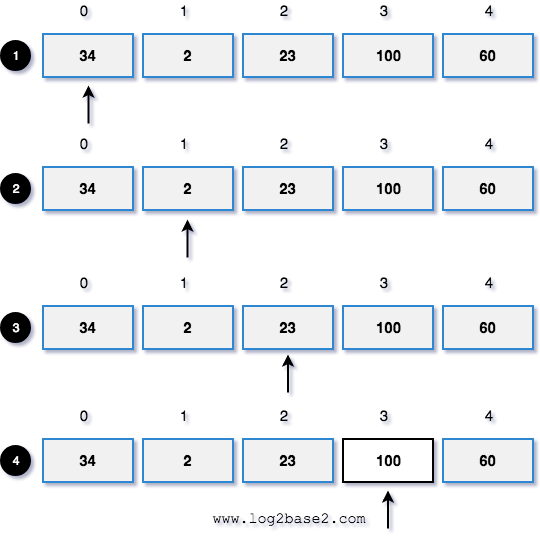
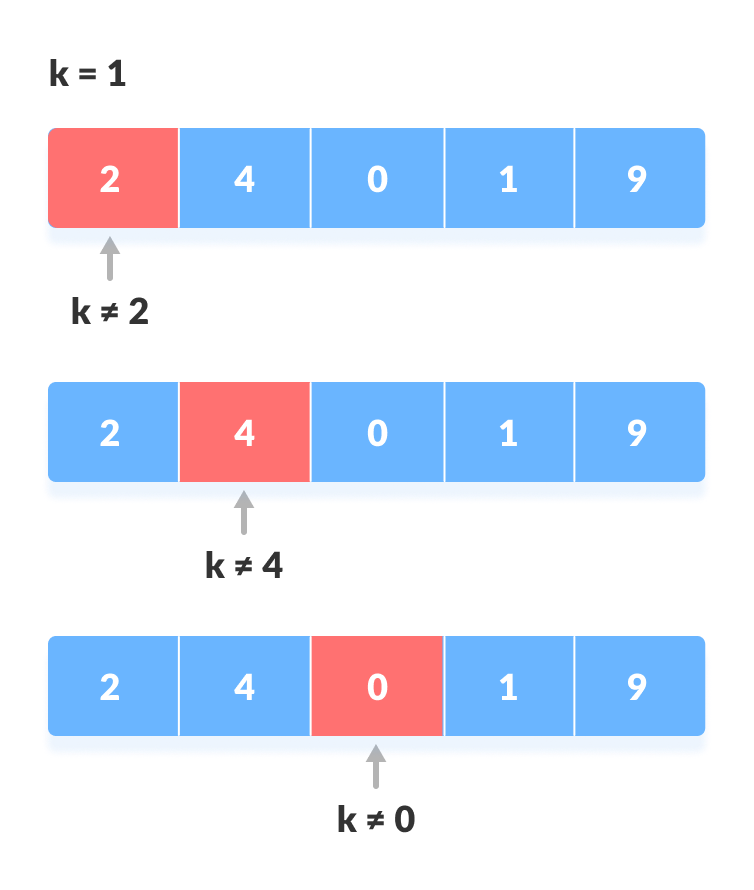
Linear search checks each element one by one until the target is found.

🧾 Algorithm

  1. Start from first element
  2. Compare with key
  3. Move to next element
  4. Repeat until found or end

💻 Code Example

def linear_search(arr, key):
    for i in range(len(arr)):
        if arr[i] == key:
            return i
    return -1

⏱️ Complexity

  • Best: O(1)
  • Average: O(n)
  • Worst: O(n)

✅ Advantages

  • Simple
  • Works on unsorted data

❌ Disadvantages

  • Slow for large datasets

🔍 Binary Search

Image
Image
Image
Image

📌 Concept

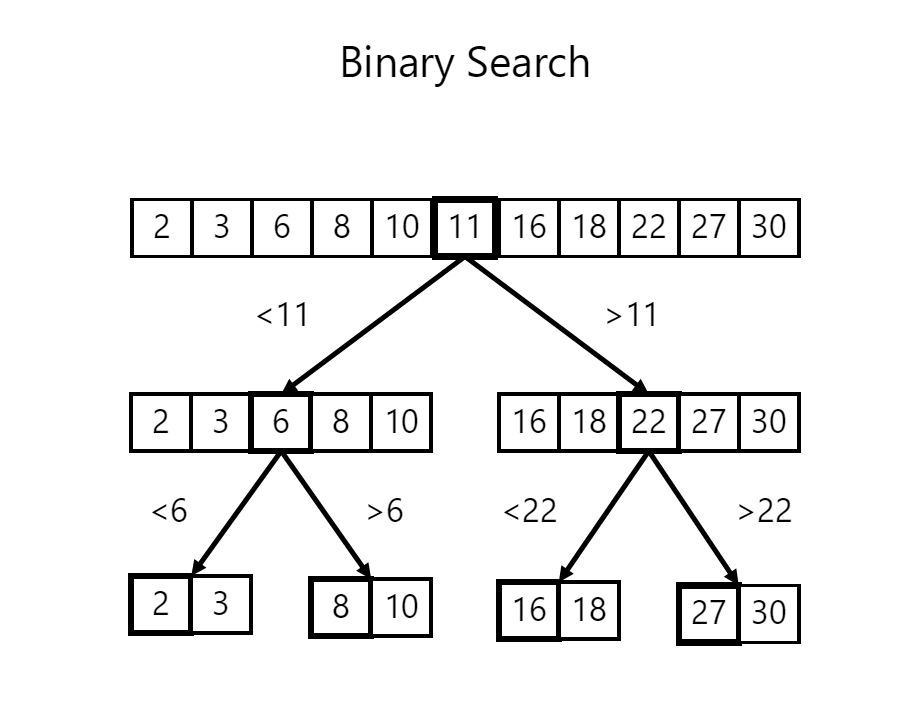
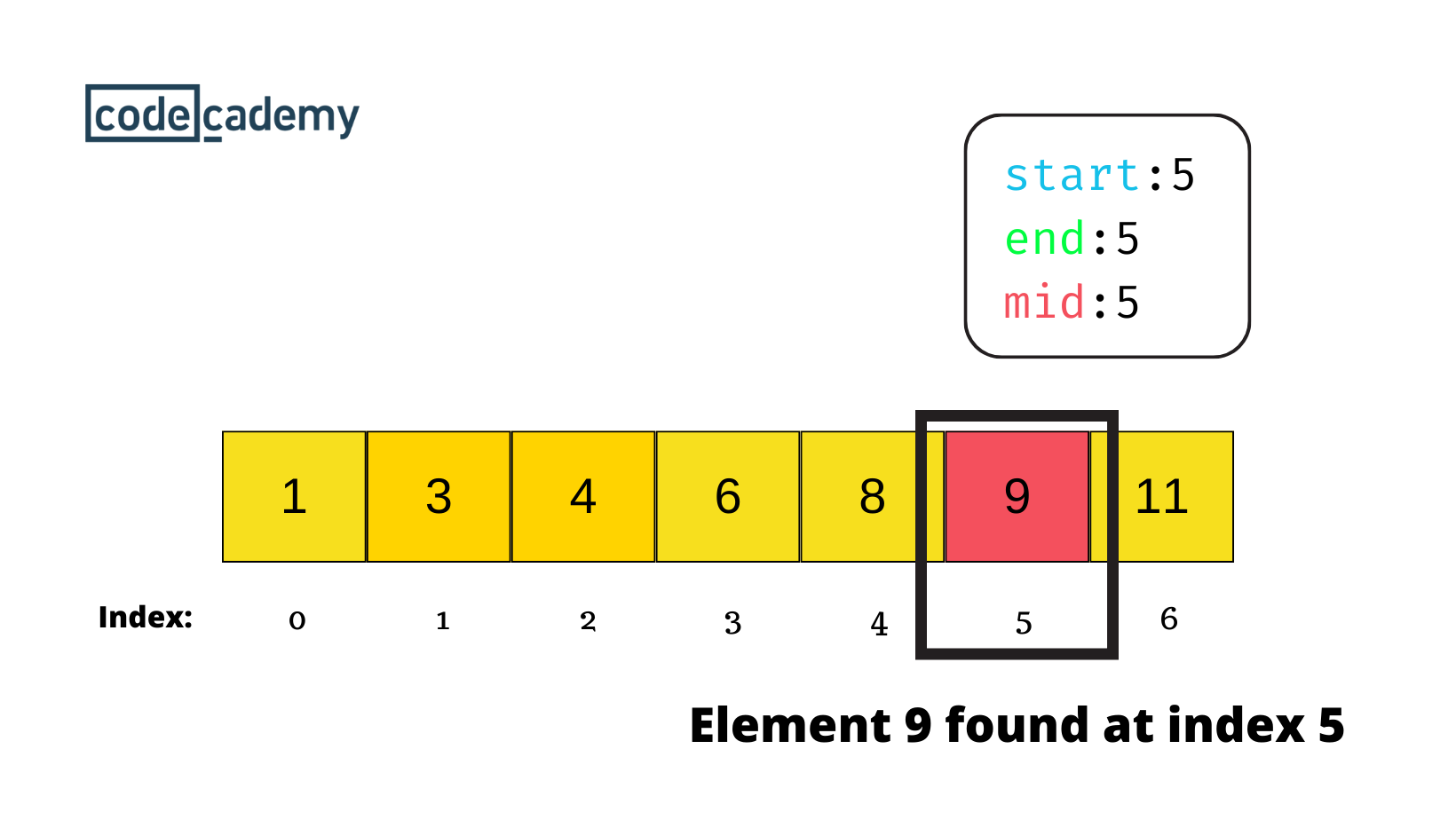
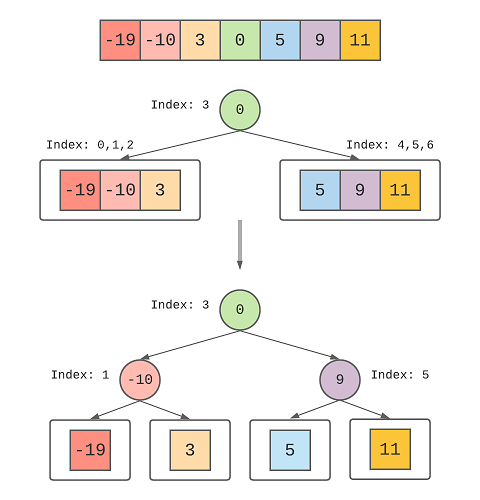
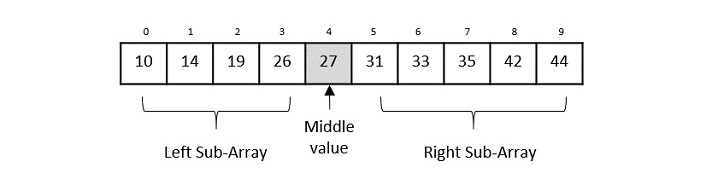
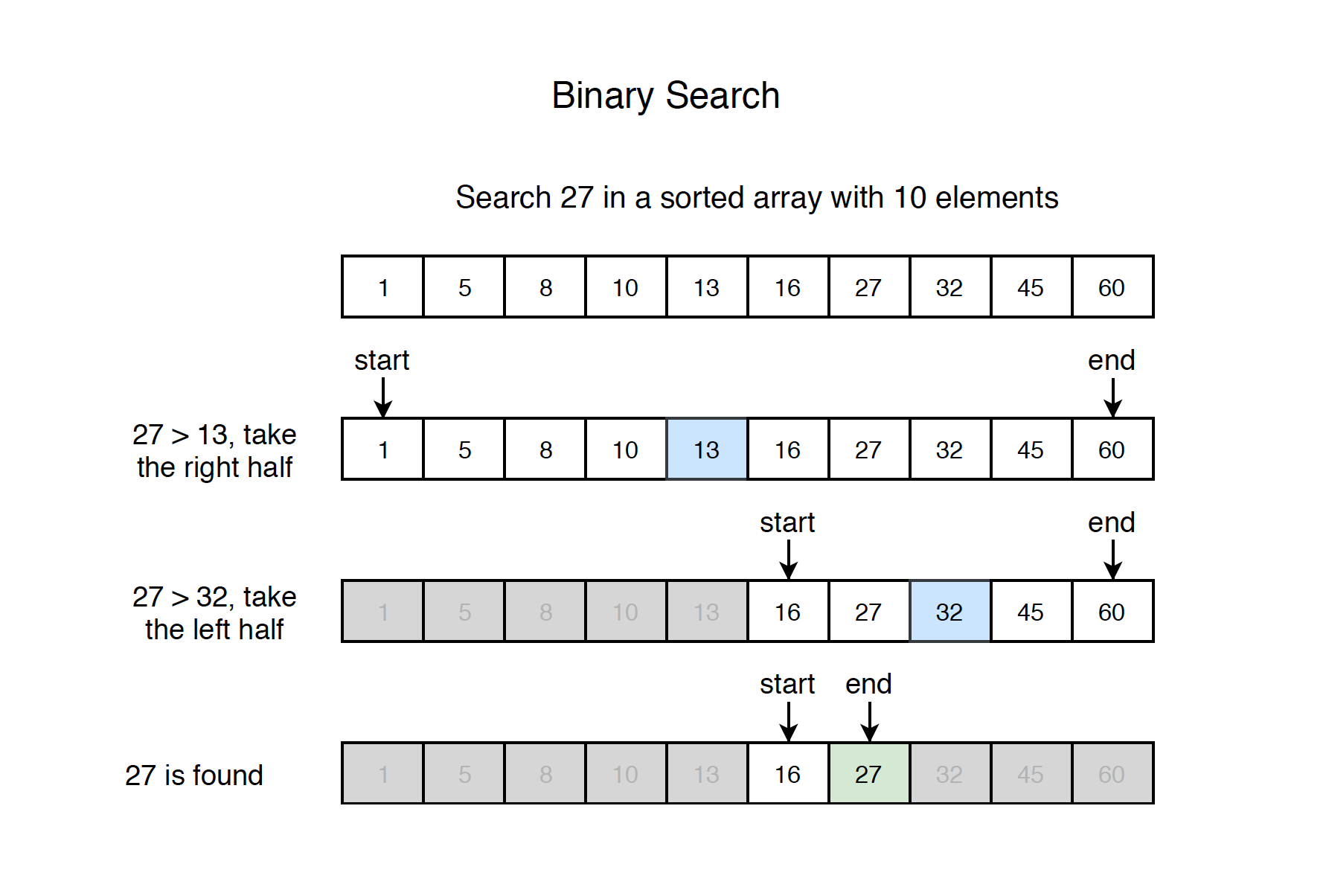
Binary search repeatedly divides a sorted array into halves.

🧾 Algorithm

  1. Find middle element
  2. Compare with key
  3. If equal → return
  4. If smaller → search left
  5. If larger → search right

💻 Code Example

def binary_search(arr, key):
    low, high = 0, len(arr)-1
    while low <= high:
        mid = (low + high) // 2
        if arr[mid] == key:
            return mid
        elif arr[mid] < key:
            low = mid + 1
        else:
            high = mid - 1
    return -1

⏱️ Complexity

  • Best: O(1)
  • Average: O(log n)
  • Worst: O(log n)

✅ Advantages

  • Very fast
  • Efficient for large datasets

❌ Disadvantages

  • Requires sorted data

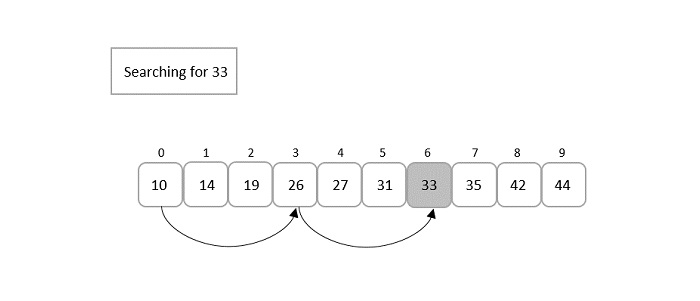
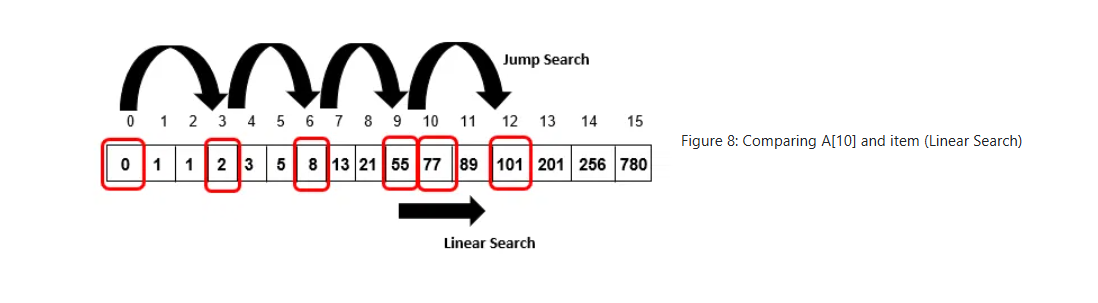
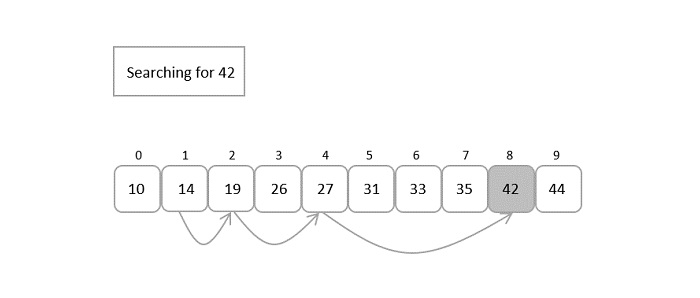
🧠 Jump Search

Image
Image
Image

📌 Concept

Jumps ahead by fixed steps and then performs linear search.

⏱️ Complexity

  • O(√n)

🔎 Interpolation Search

Image
Image

📌 Concept

Estimates position based on value distribution.

⏱️ Complexity

  • Best: O(log log n)
  • Worst: O(n)

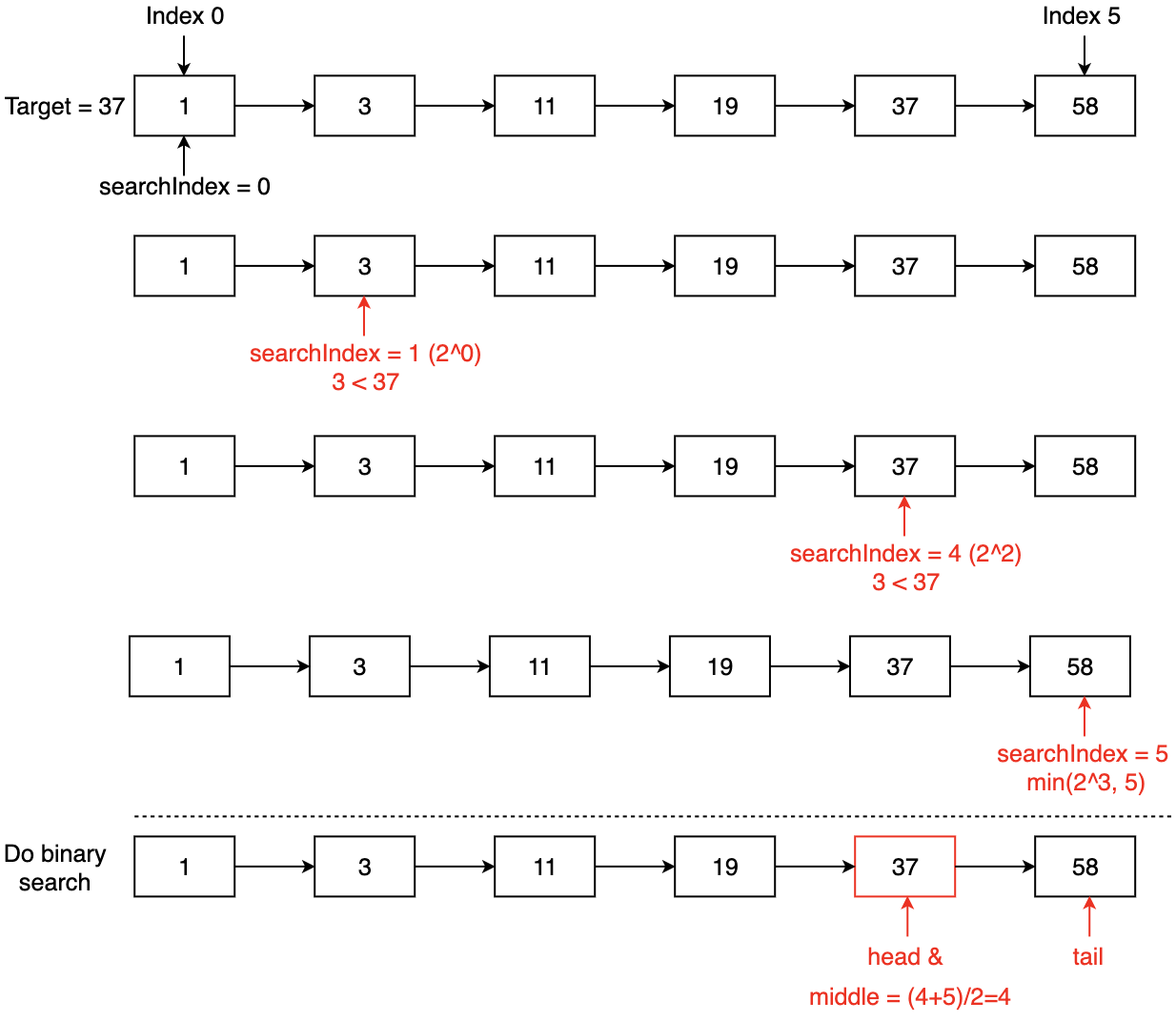
🧭 Exponential Search

Image
Image
Image

📌 Concept

Finds range first, then applies binary search.


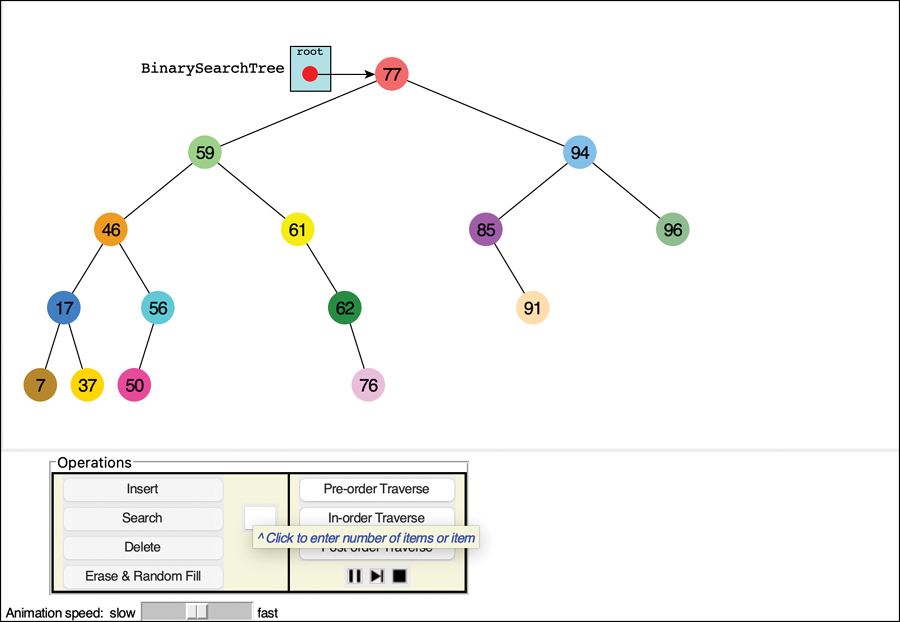
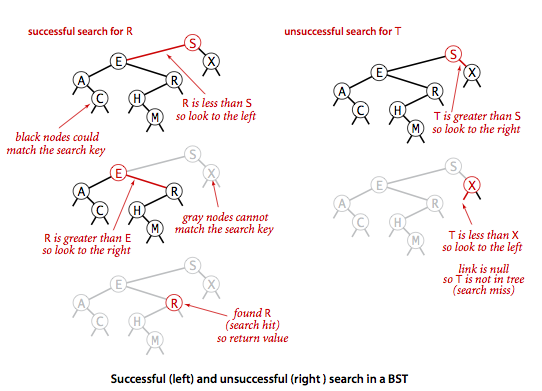
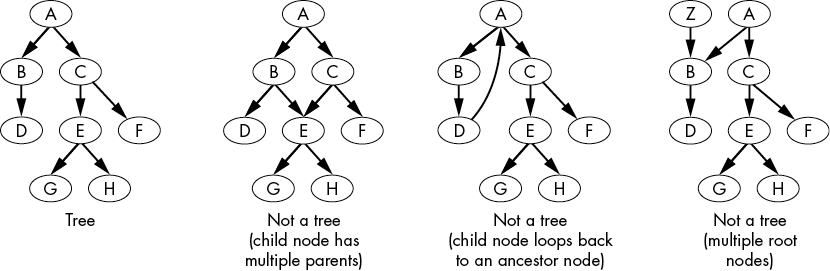
🌳 Searching in Trees

Image
Image
Image
Image

📌 Binary Search Tree (BST)

Search based on ordering:

  • Left < Root < Right

⏱️ Complexity

  • Average: O(log n)
  • Worst: O(n)

🌐 Searching in Graphs


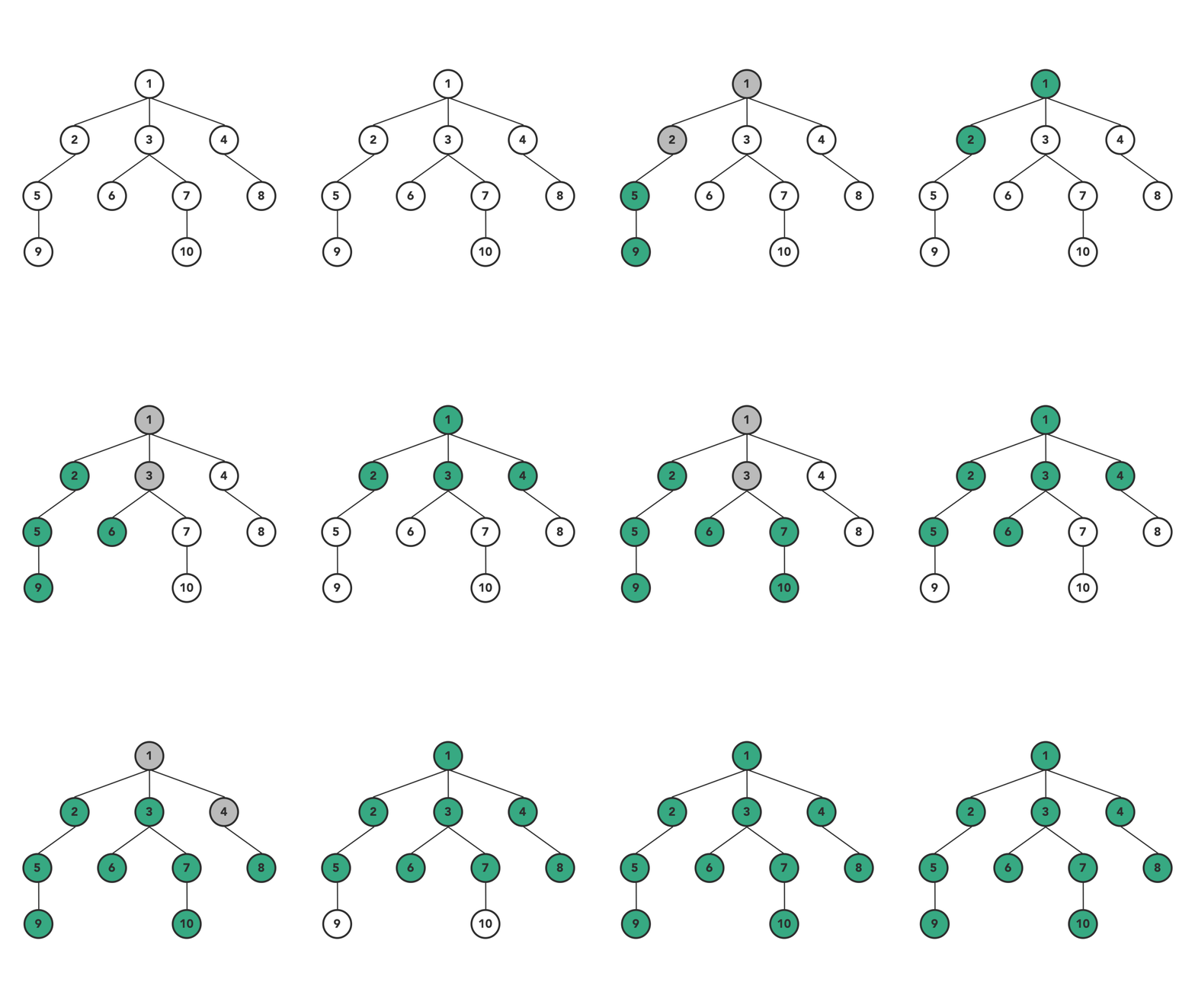
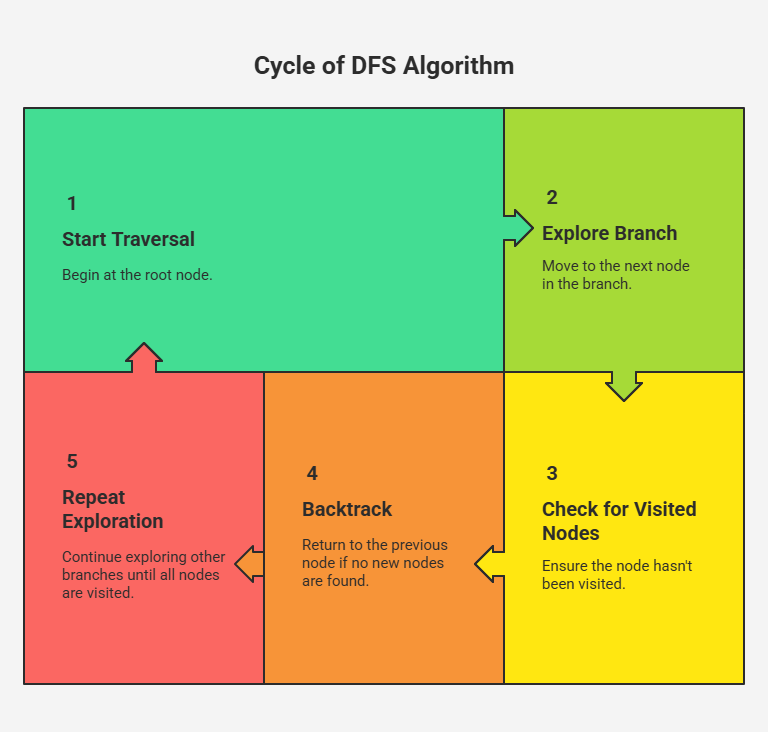
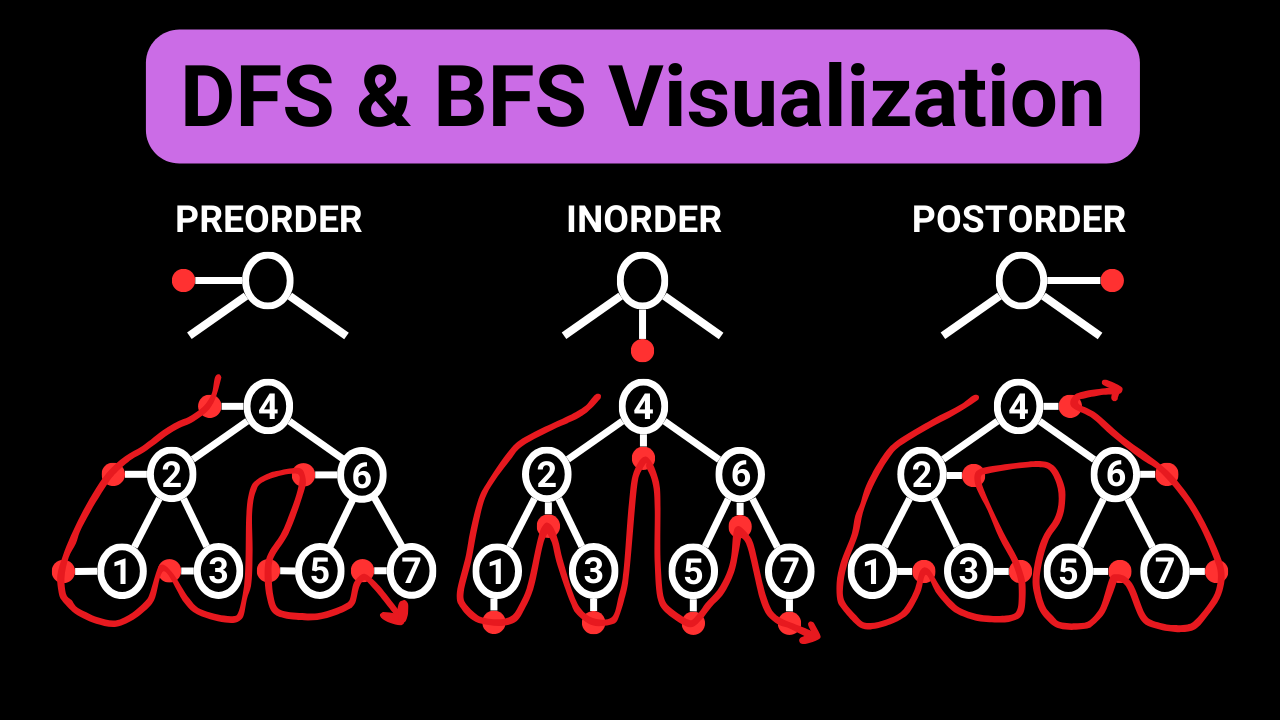
🔹 Depth First Search (DFS)

Image
Image
Image
  • Uses stack
  • Explores deeply

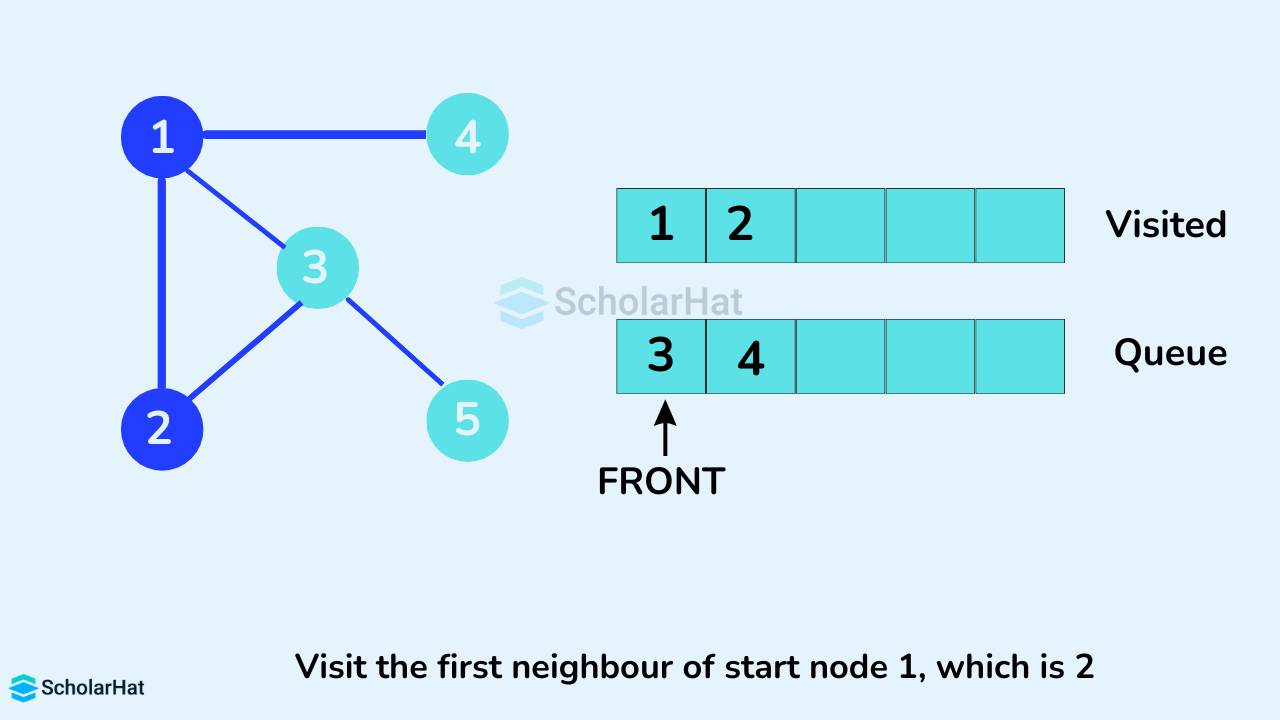
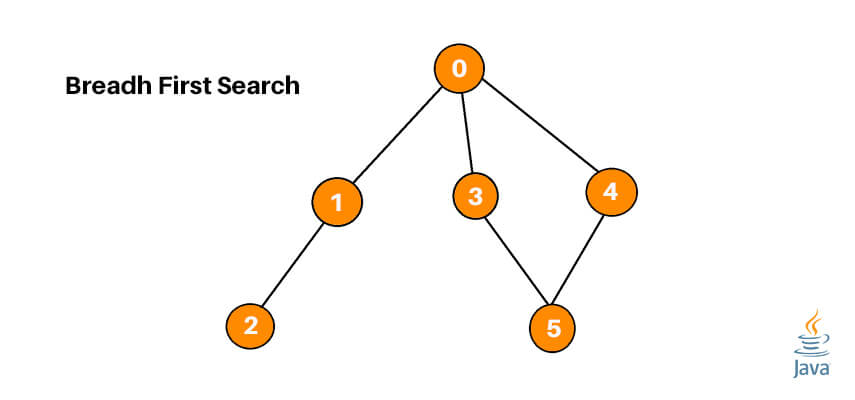
🔹 Breadth First Search (BFS)

Image
Image
Image
  • Uses queue
  • Explores level by level

🔑 Hash-Based Searching

Image
Image
Image
Image

📌 Concept

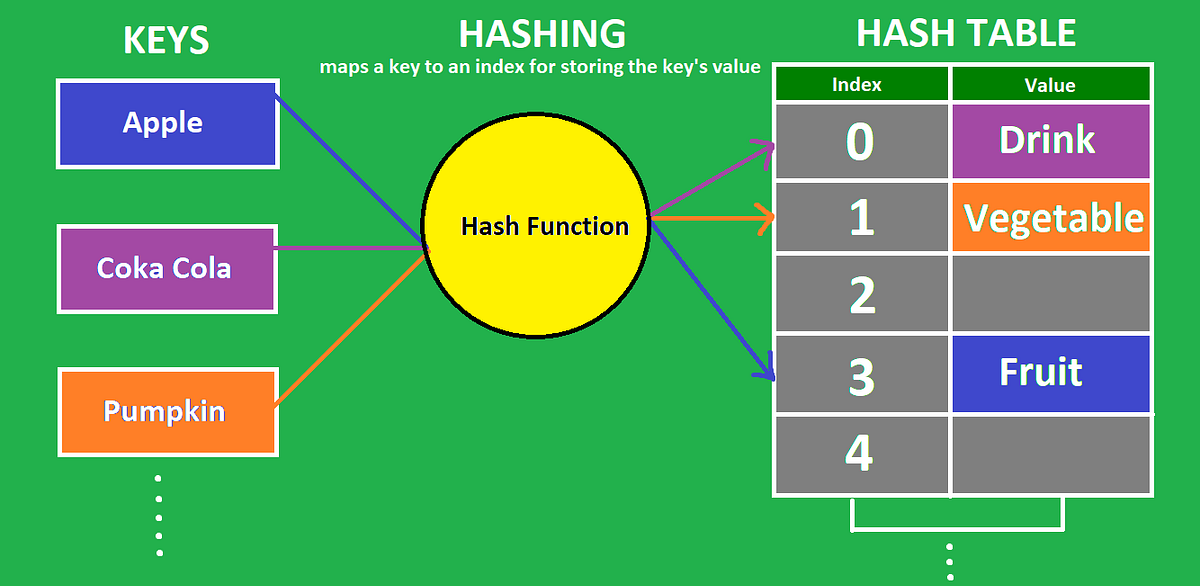
Uses hash functions to map keys to positions.

⏱️ Complexity

  • Average: O(1)
  • Worst: O(n)

🧮 Comparison Table

AlgorithmBest CaseAverageWorst Case
Linear SearchO(1)O(n)O(n)
Binary SearchO(1)O(log n)O(log n)
Jump SearchO(1)O(√n)O(√n)
InterpolationO(1)O(log log n)O(n)
ExponentialO(1)O(log n)O(log n)
HashingO(1)O(1)O(n)

⚡ Advantages of Searching Algorithms

  • Efficient data retrieval
  • Reduces computation time
  • Improves system performance

⚠️ Disadvantages

  • Some require sorted data
  • Complex implementation
  • Extra memory usage (hashing)

🧠 Advanced Searching Concepts


🔹 1. Ternary Search

Image
Image
Image

Divides array into three parts.


🔹 2. Fibonacci Search

Image
Image
Image
Image

Uses Fibonacci numbers.


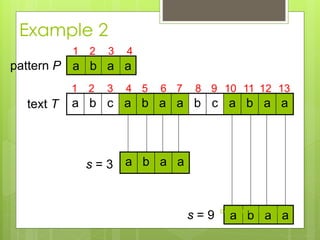
🔹 3. Pattern Searching

Image
Image
Image

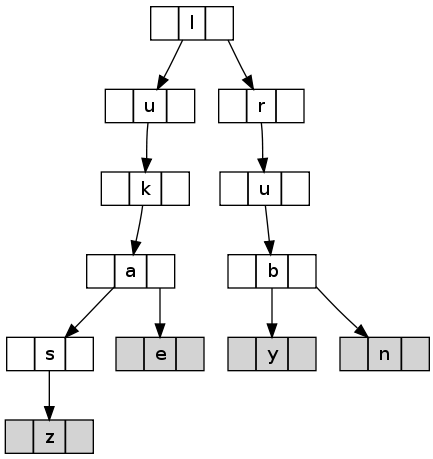
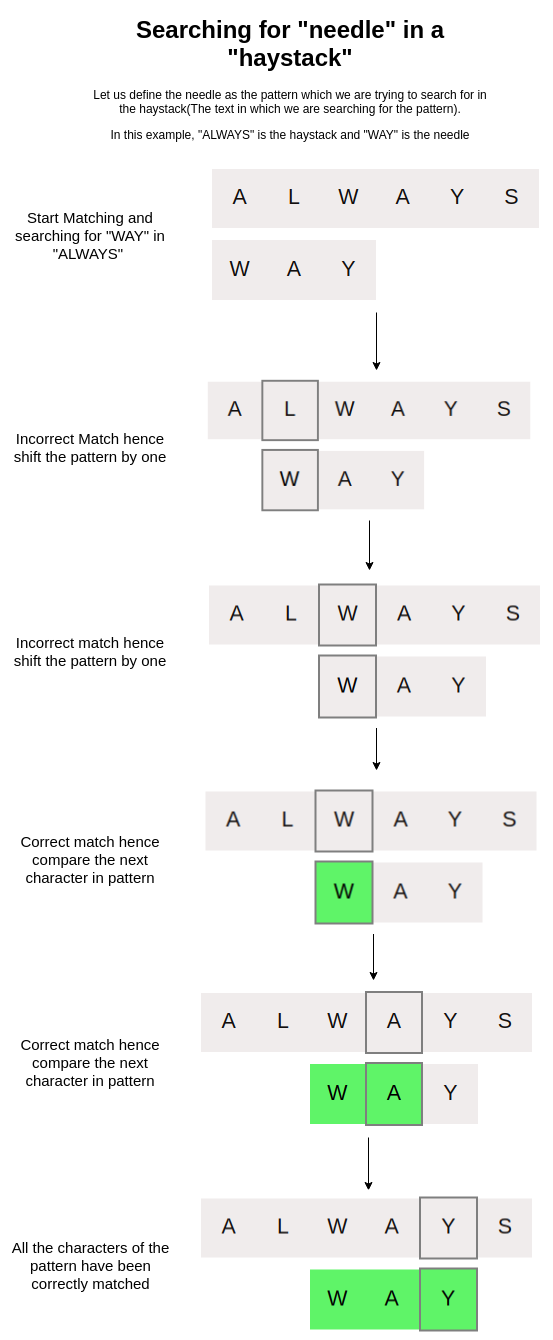
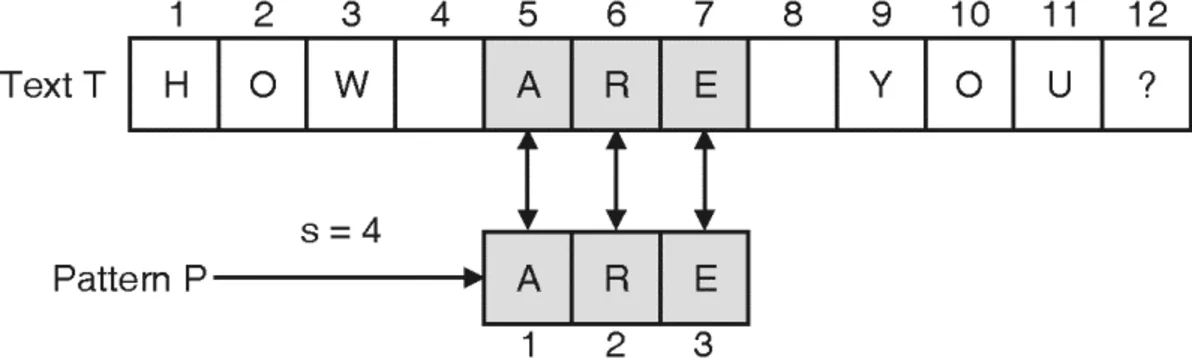
Used in strings:

  • KMP
  • Rabin-Karp

🔬 Applications of Searching


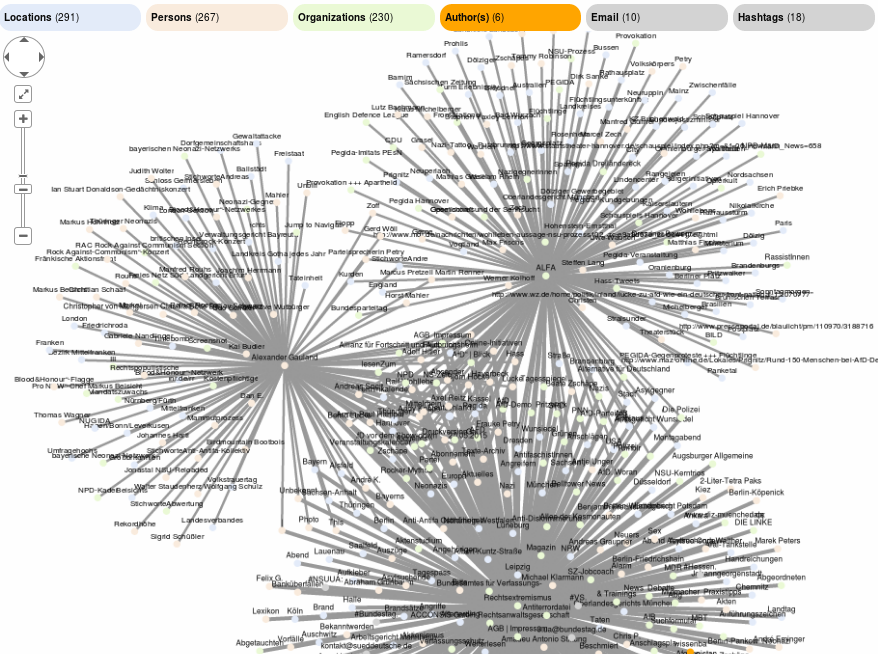
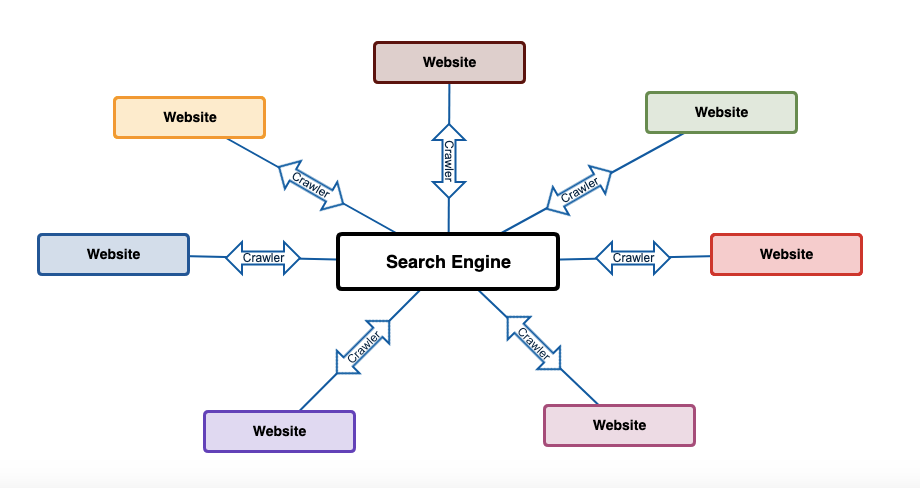
🌐 1. Search Engines

Image
Image
Image
Image

🧾 2. Databases

Image
Image
Image
Image

🧠 3. Artificial Intelligence

Image
Image
Image
Image

🎮 4. Games

Image
Image
Image
Image

📊 5. Data Analytics

Image
Image
Image
Image

🔁 Searching vs Sorting

FeatureSearchingSorting
PurposeFind elementArrange elements
DependencyOften needs sortingIndependent

🧪 Real-World Importance

Searching algorithms are essential in:

  • Web applications
  • Databases
  • Networking
  • AI systems
  • Cybersecurity

🧾 Conclusion

Searching algorithms are critical for efficient data handling and retrieval. From simple linear search to advanced hashing and AI-based search methods, they form the backbone of modern computing systems.

Mastering searching algorithms enables:

  • Faster problem solving
  • Efficient coding
  • Strong algorithmic thinking

🏷️ Tags

📊 Sorting Algorithms


🧩 What is Sorting?

Image
Image
Image
Image

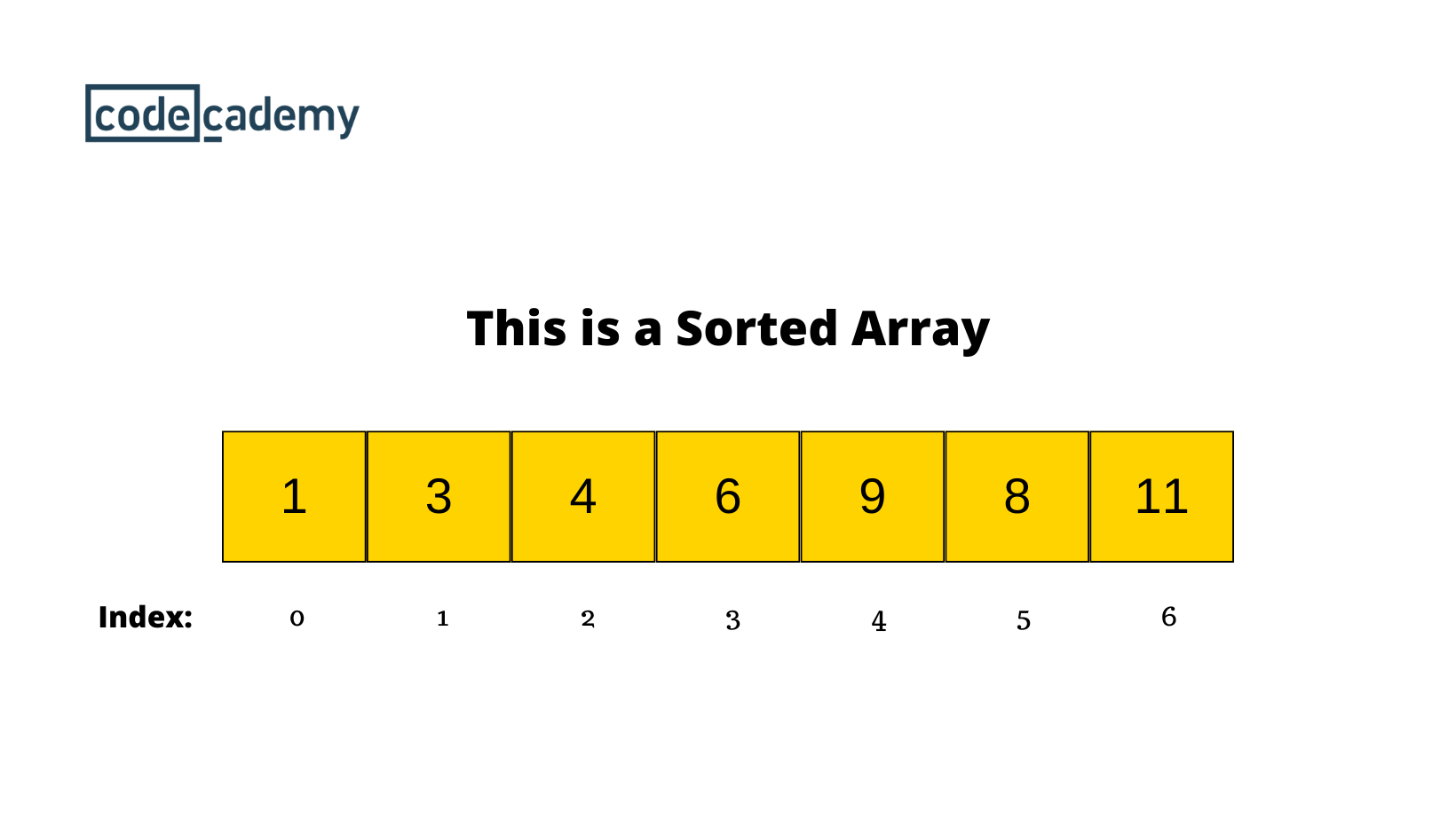
Sorting is the process of arranging data in a specific order, typically:

  • Ascending order (small → large)
  • Descending order (large → small)

Sorting is a fundamental operation in computer science and plays a crucial role in:

  • Searching algorithms
  • Data analysis
  • Database management
  • Optimization problems

Example:

Unsorted: [5, 2, 9, 1, 6]
Sorted:   [1, 2, 5, 6, 9]

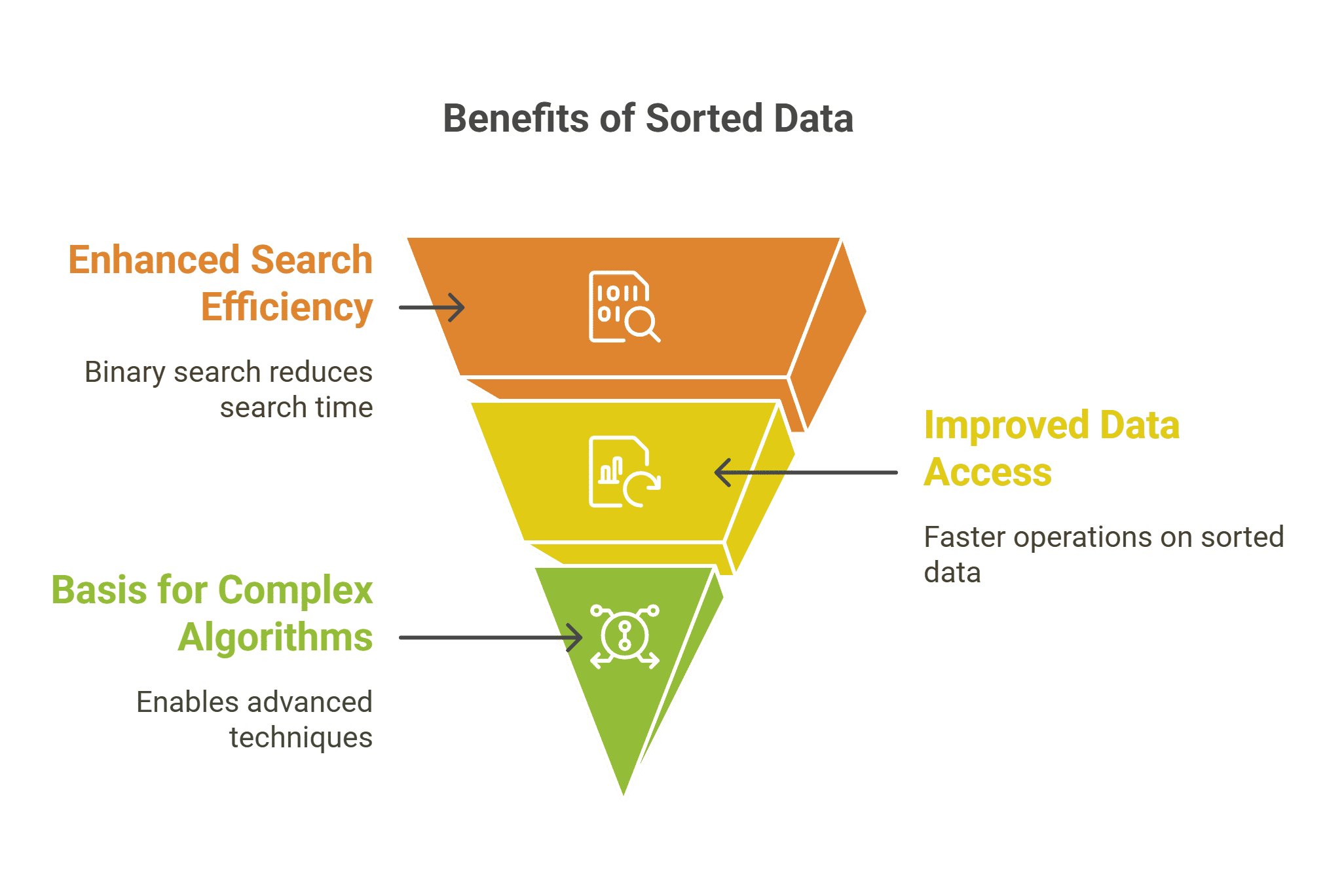
🧠 Why Sorting is Important

  • Improves efficiency of searching (e.g., Binary Search)
  • Enables easier data analysis
  • Helps in duplicate detection
  • Forms the backbone of many algorithms

⚙️ Classification of Sorting Algorithms

Sorting algorithms can be classified based on several criteria:

🔹 Based on Method

  • Comparison-based sorting
  • Non-comparison-based sorting

🔹 Based on Memory Usage

  • In-place sorting
  • Out-of-place sorting

🔹 Based on Stability

  • Stable sorting
  • Unstable sorting

🔢 Comparison-Based Sorting Algorithms


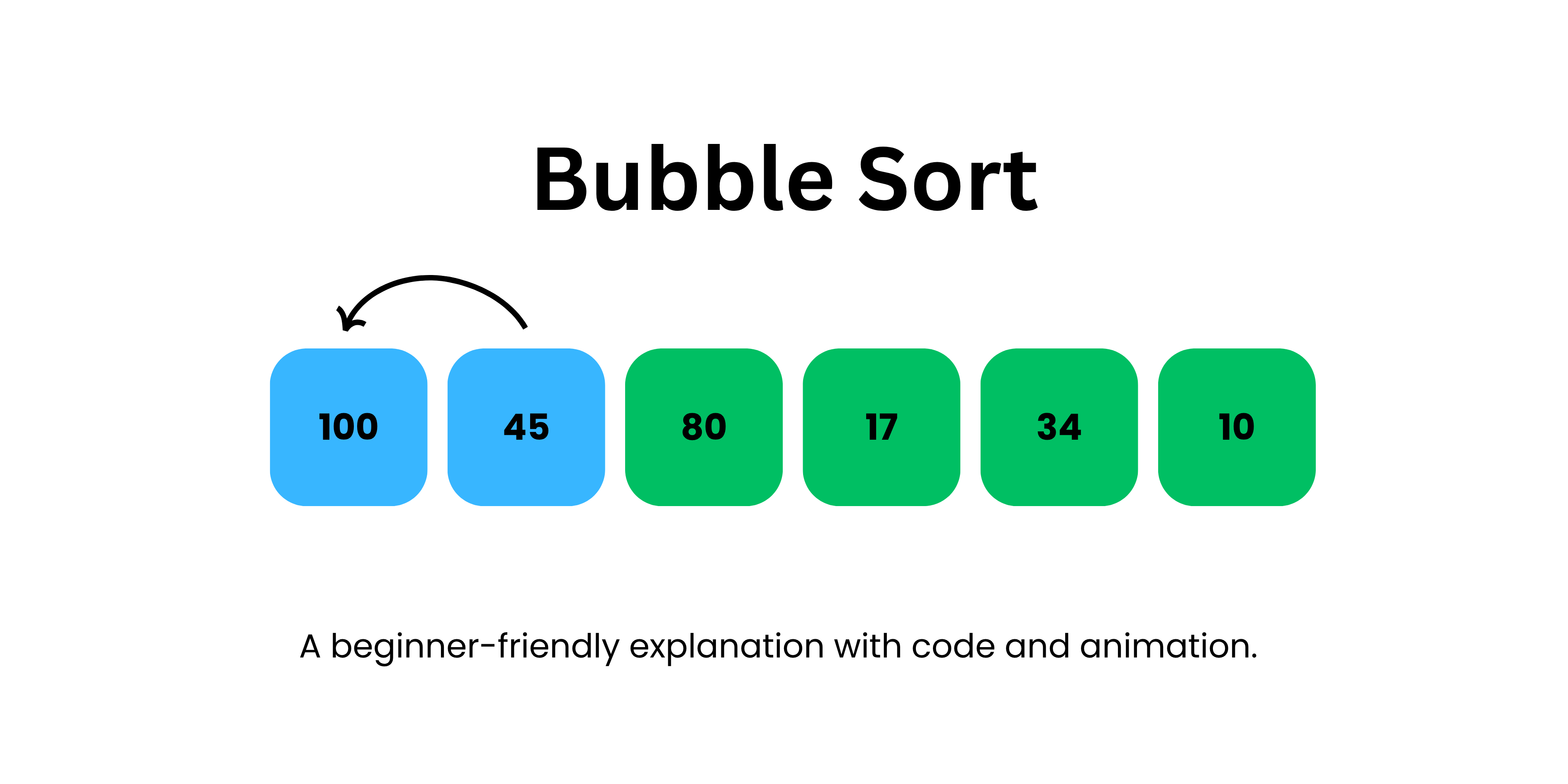
🔹 1. Bubble Sort

Image
Image
Image

📌 Concept:

Repeatedly compares adjacent elements and swaps them if they are in the wrong order.

🧾 Algorithm:

  1. Compare adjacent elements
  2. Swap if needed
  3. Repeat until sorted

💻 Example:

def bubble_sort(arr):
    n = len(arr)
    for i in range(n):
        for j in range(0, n-i-1):
            if arr[j] > arr[j+1]:
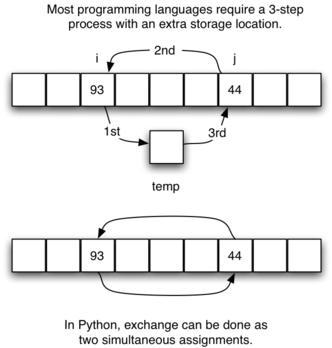
                arr[j], arr[j+1] = arr[j+1], arr[j]

⏱️ Complexity:

  • Best: O(n)
  • Average: O(n²)
  • Worst: O(n²)

✅ Pros:

  • Simple
  • Easy to understand

❌ Cons:

  • Very slow for large data

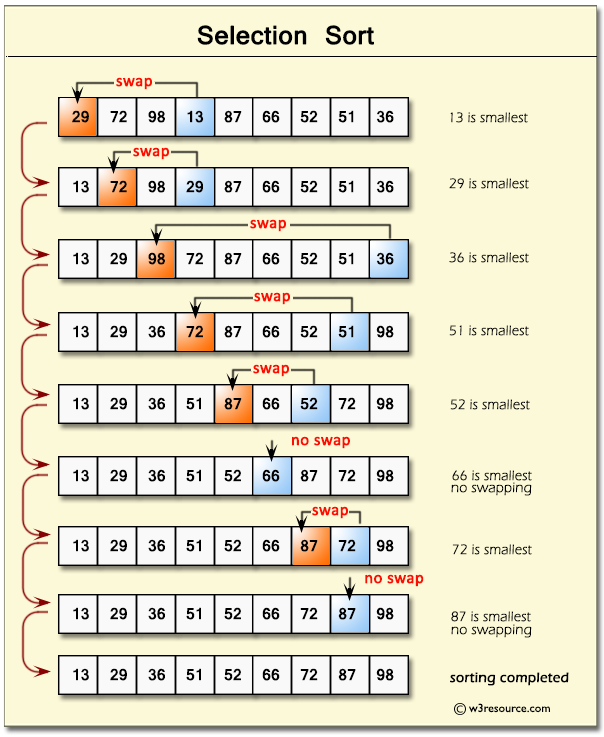
🔹 2. Selection Sort

Image
Image
Image

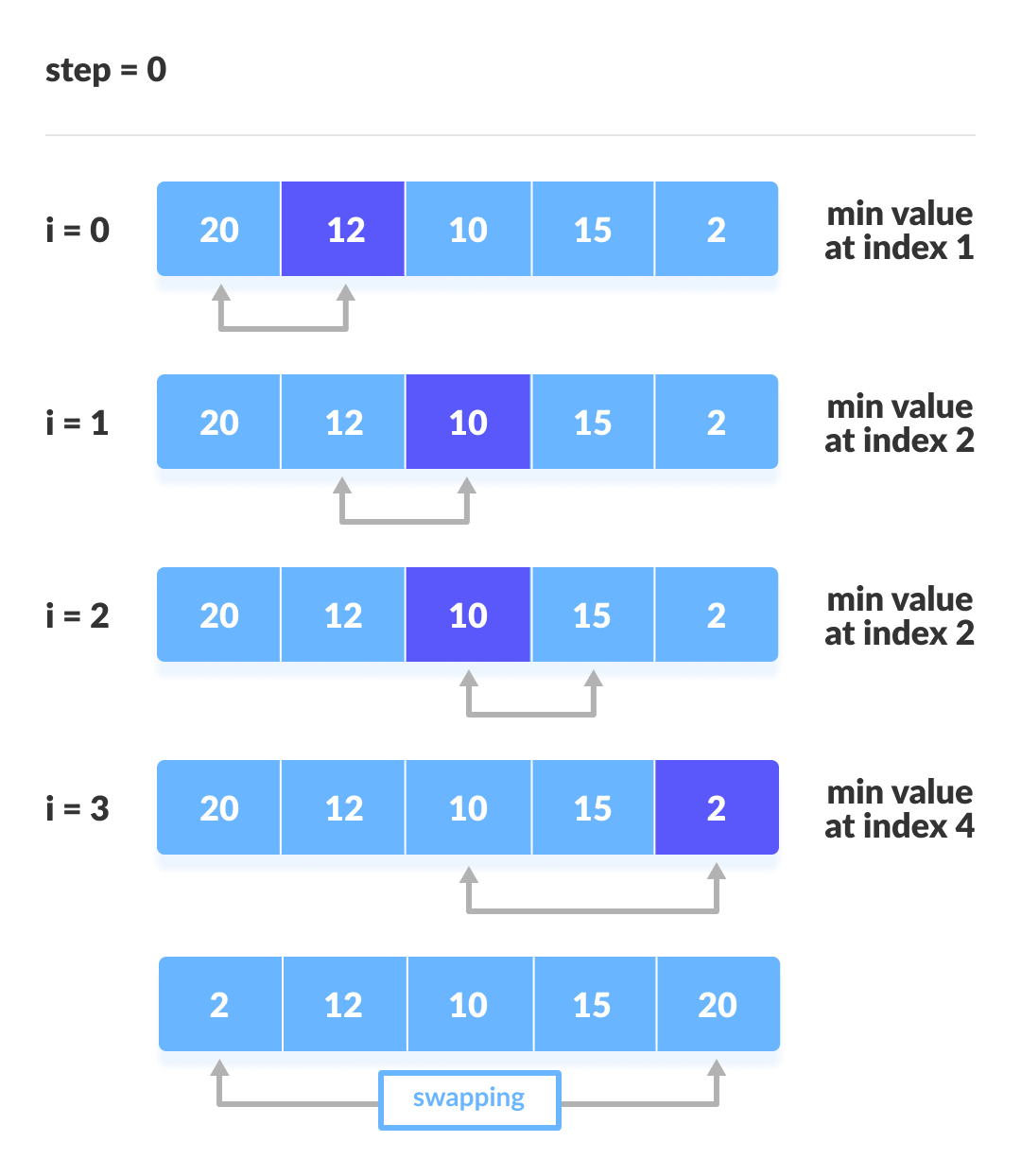
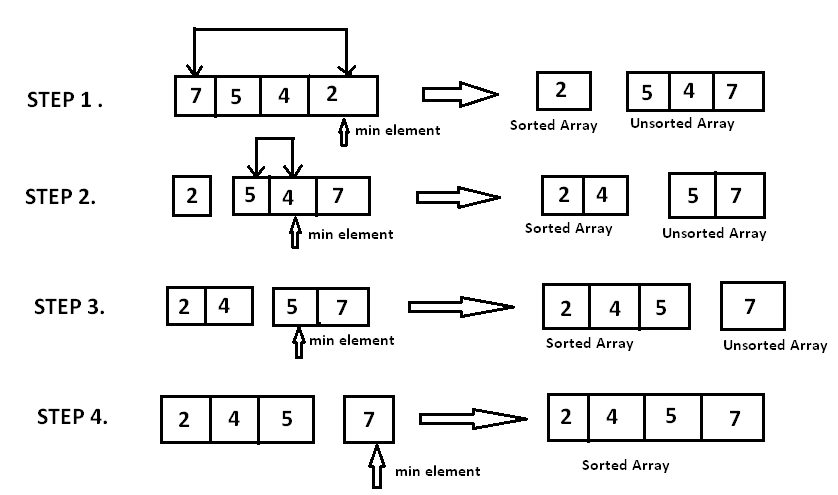
📌 Concept:

Selects the smallest element and places it in correct position.

⏱️ Complexity:

  • O(n²) for all cases

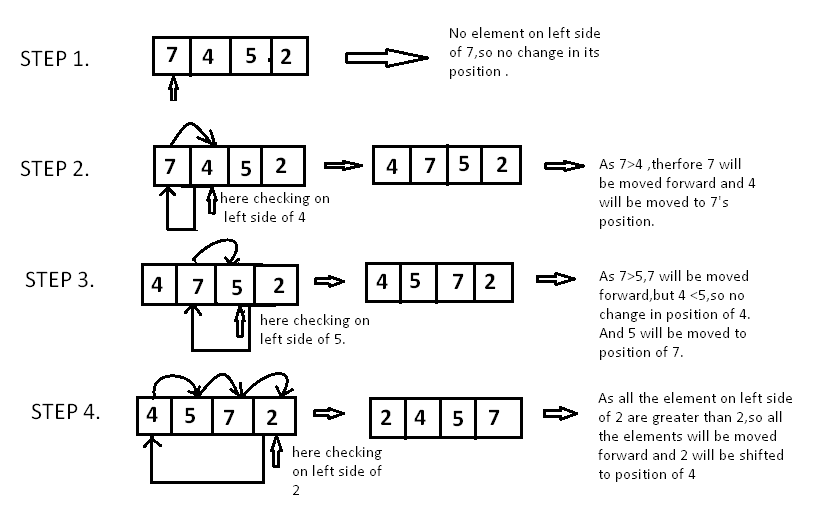
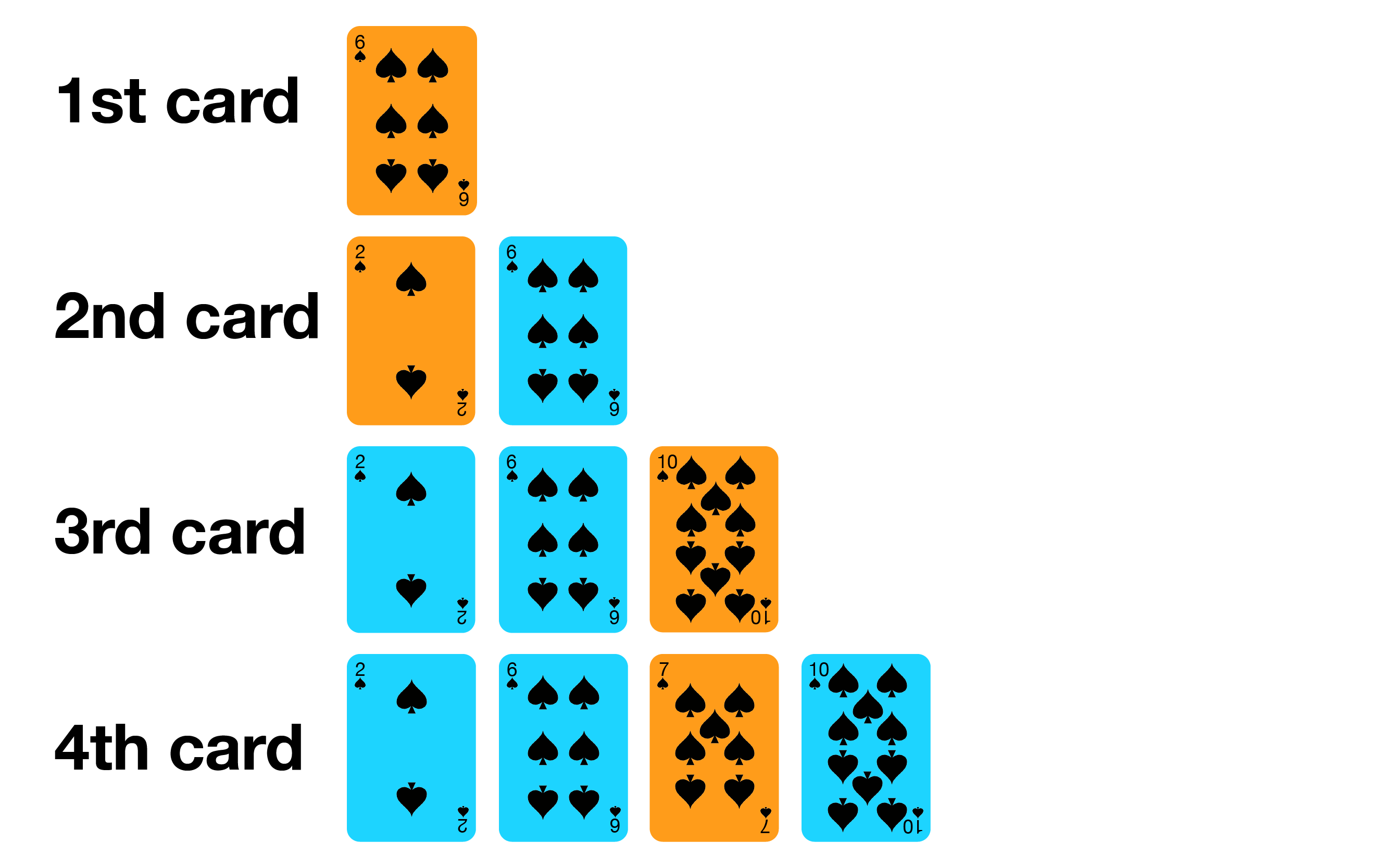
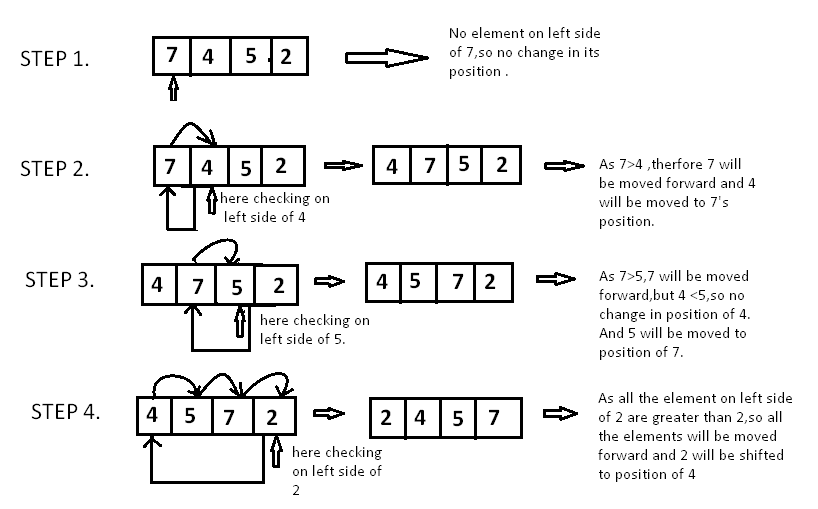
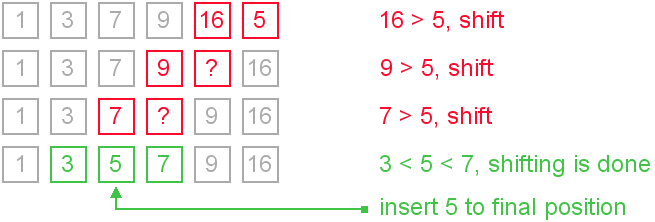
🔹 3. Insertion Sort

Image
Image
Image
Image

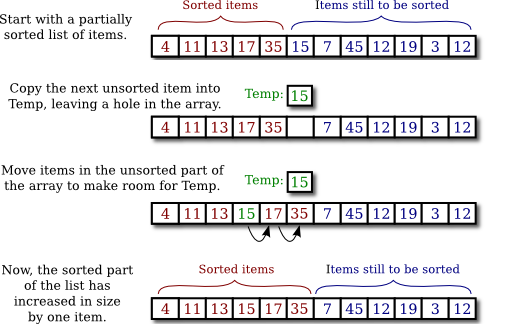
📌 Concept:

Builds sorted array one element at a time.

⏱️ Complexity:

  • Best: O(n)
  • Worst: O(n²)

📌 Use Case:

Small datasets


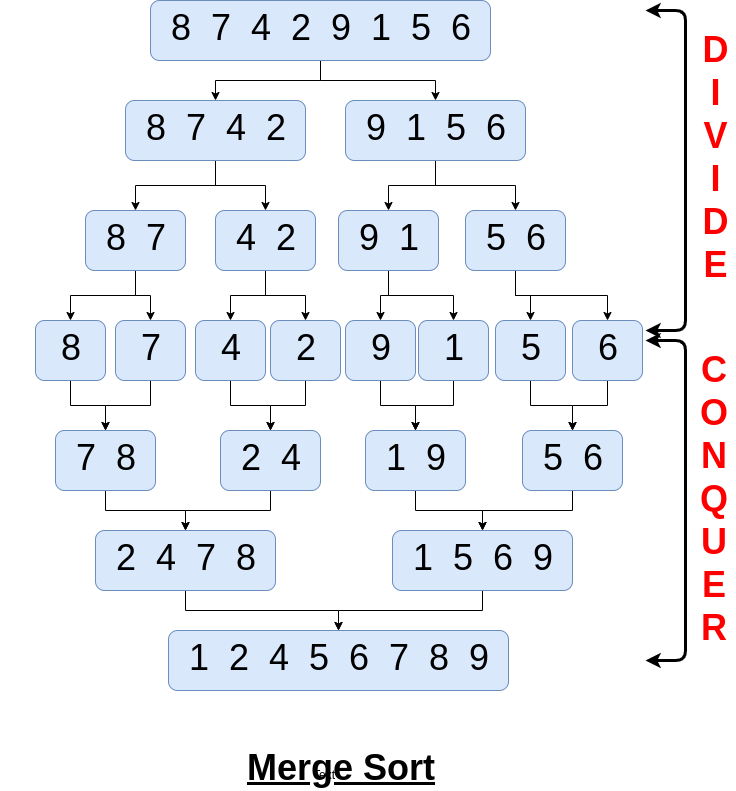
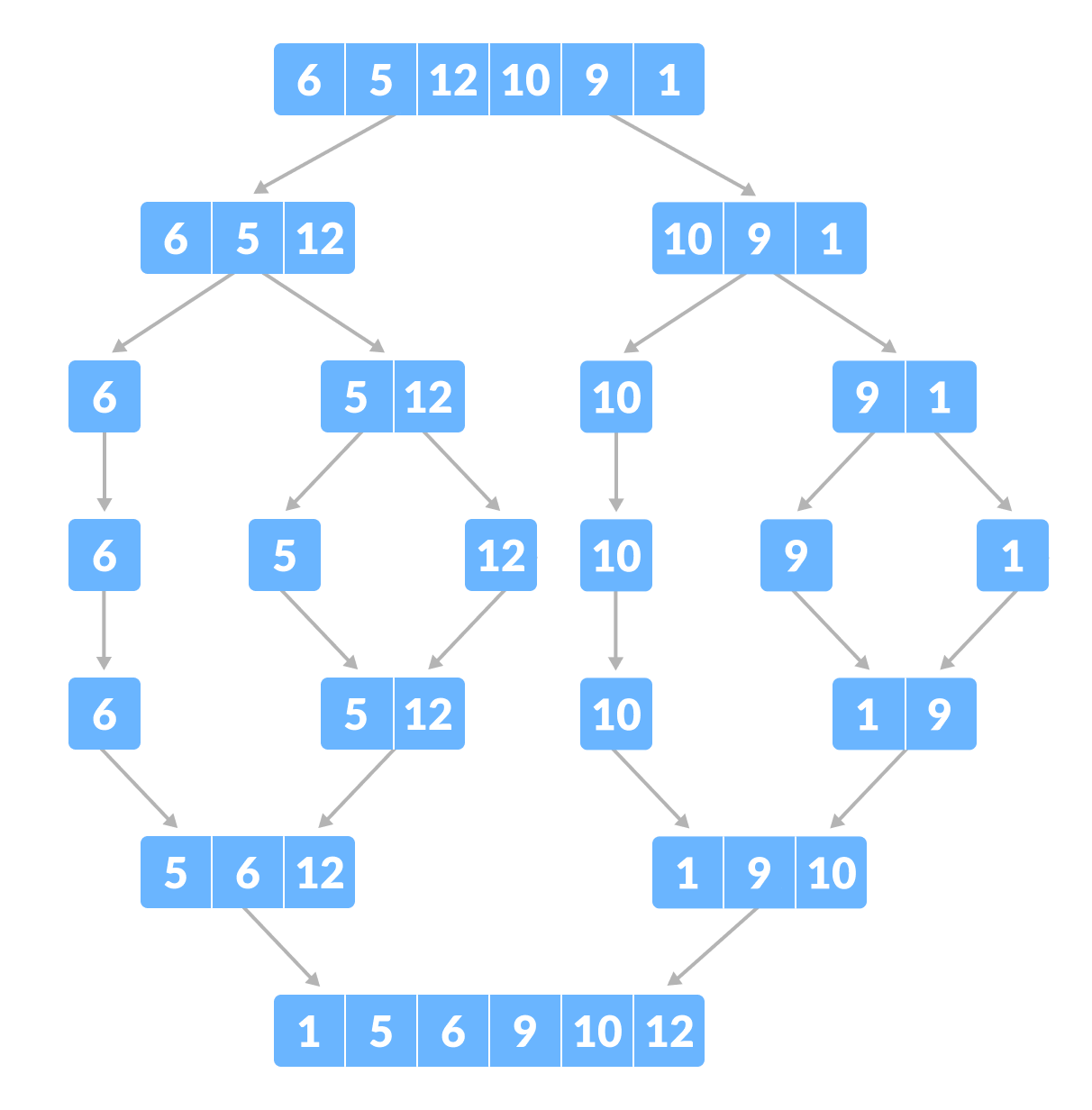
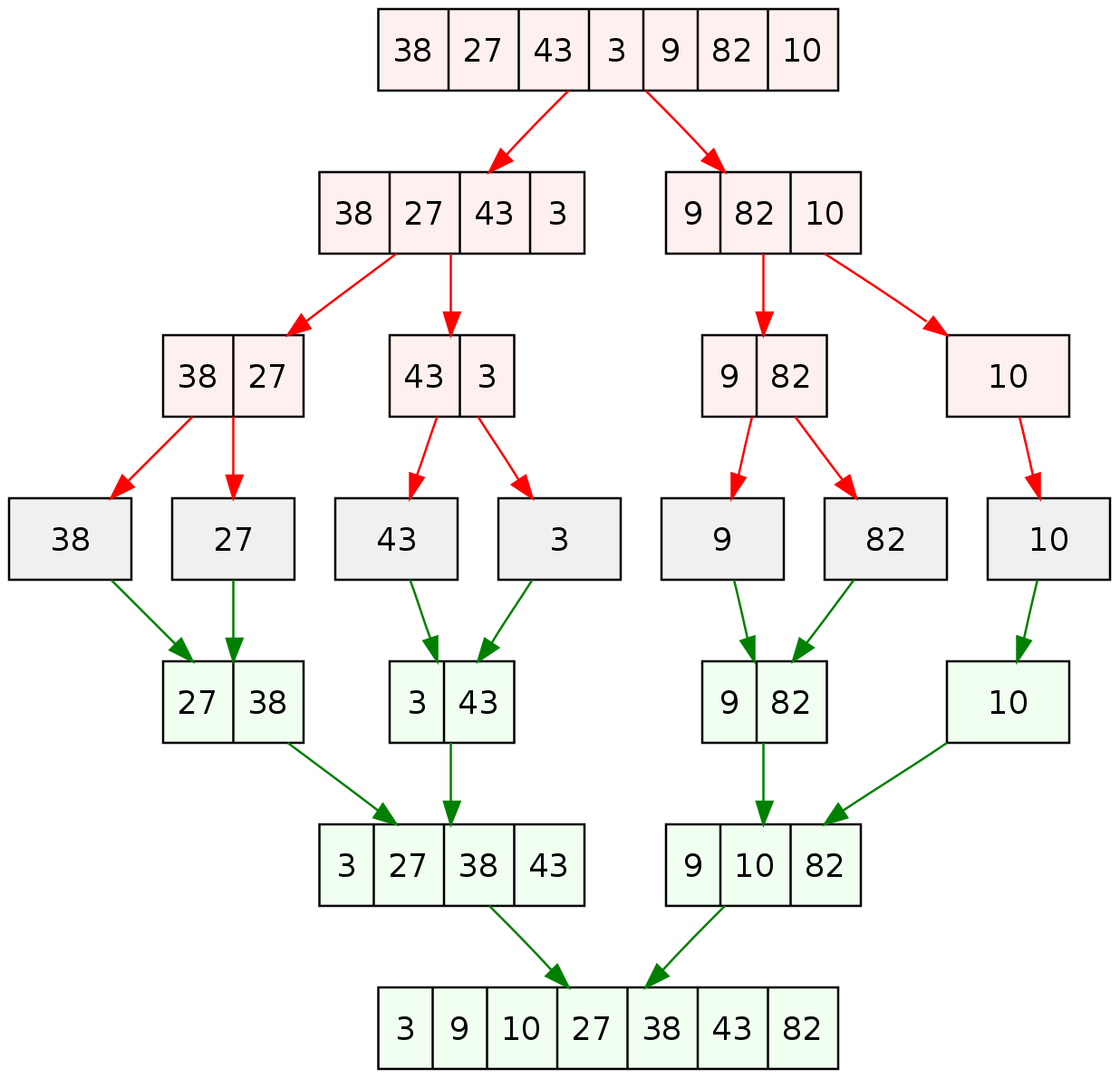
🔹 4. Merge Sort

Image
Image
Image
Image

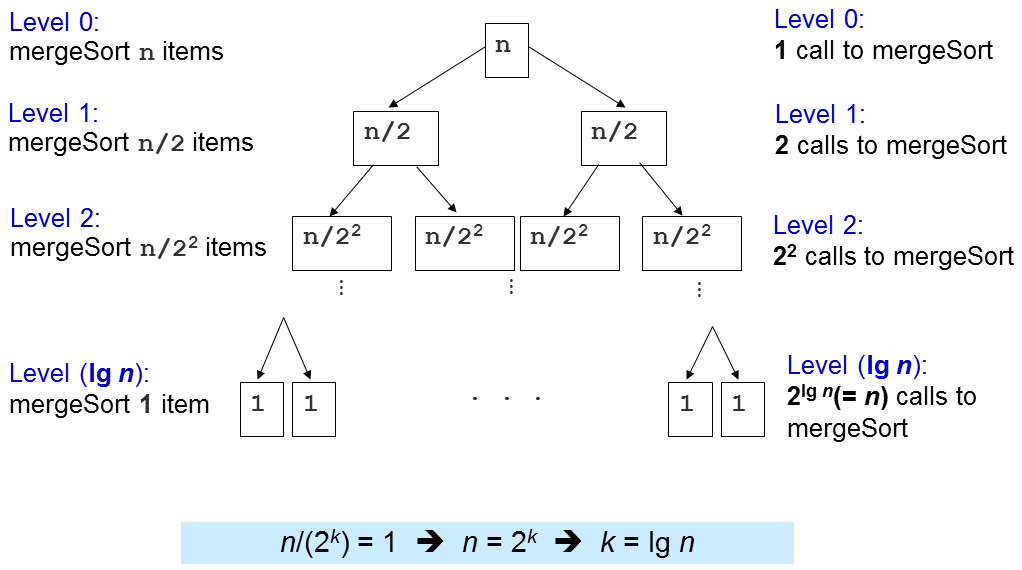
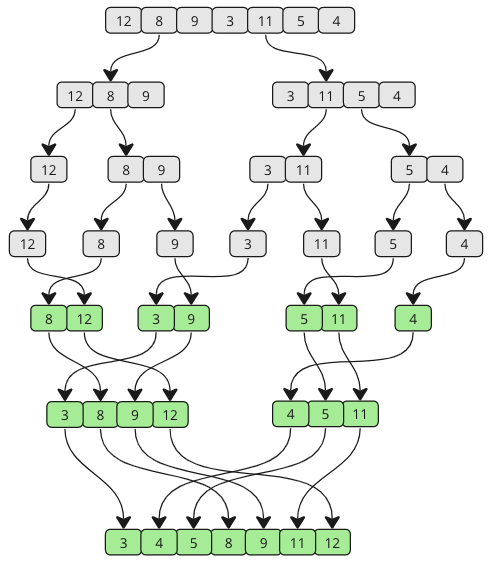
📌 Concept:

Divide and conquer algorithm.

Steps:

  1. Divide array into halves
  2. Sort each half
  3. Merge them

⏱️ Complexity:

  • O(n log n)

✅ Pros:

  • Stable
  • Efficient

❌ Cons:

  • Extra memory needed

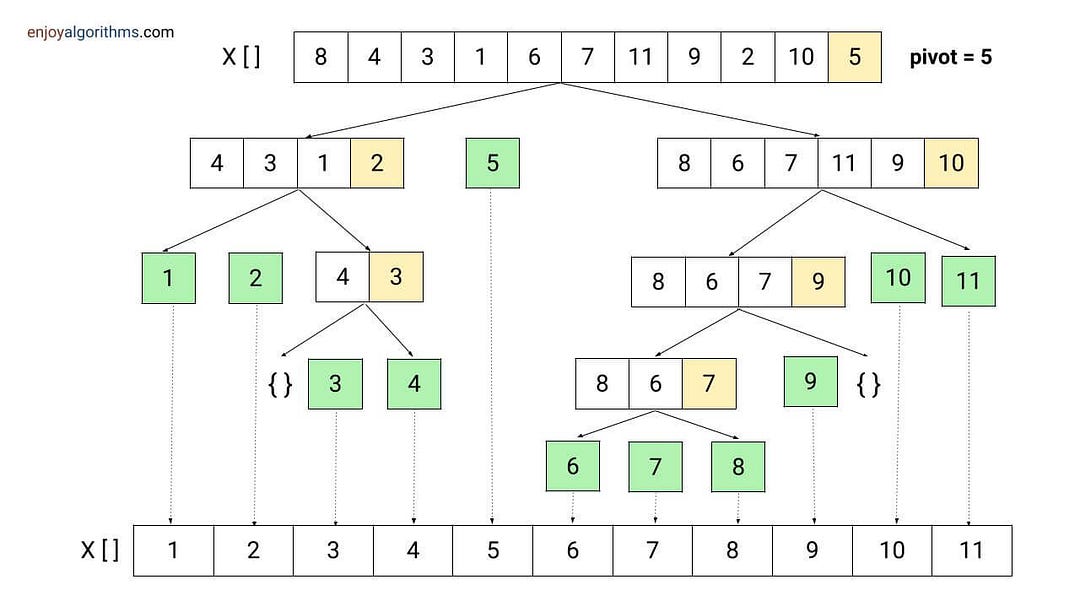
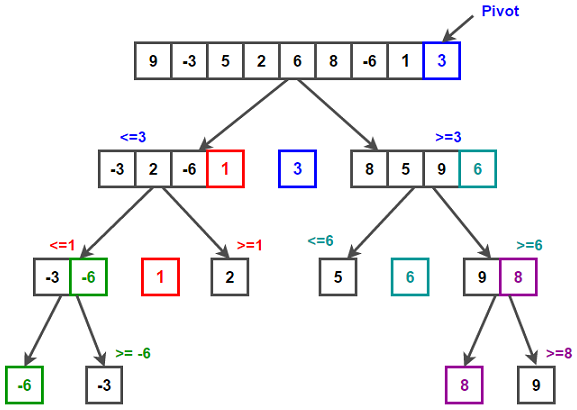
🔹 5. Quick Sort

Image
Image
Image
Image

📌 Concept:

Uses pivot to partition array.

⏱️ Complexity:

  • Best: O(n log n)
  • Worst: O(n²)

✅ Pros:

  • Fast in practice

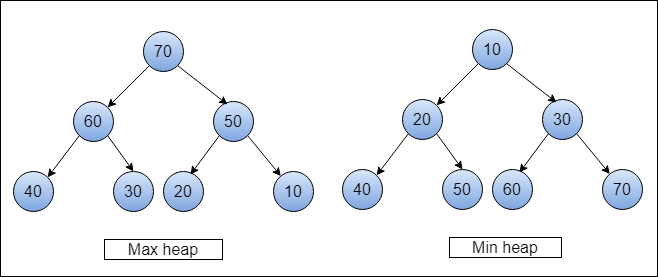
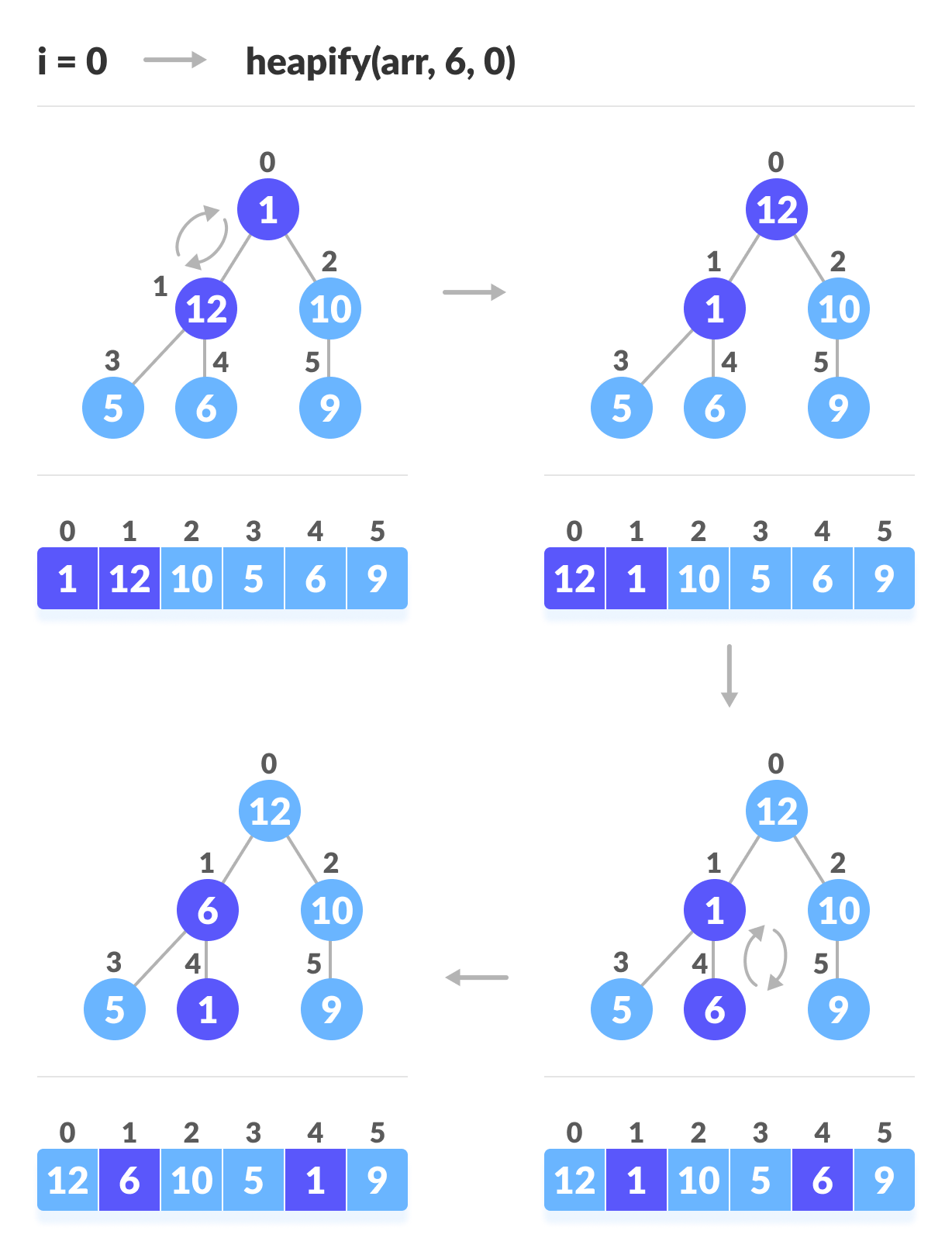
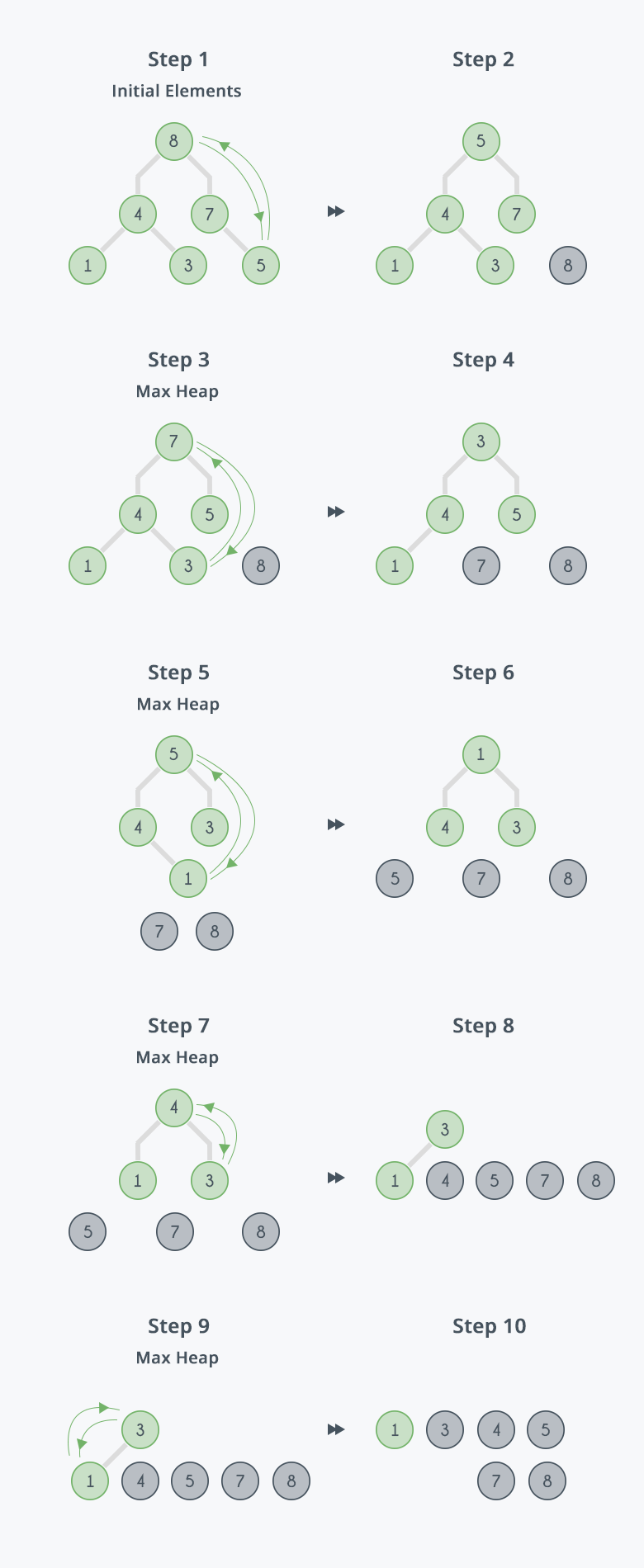
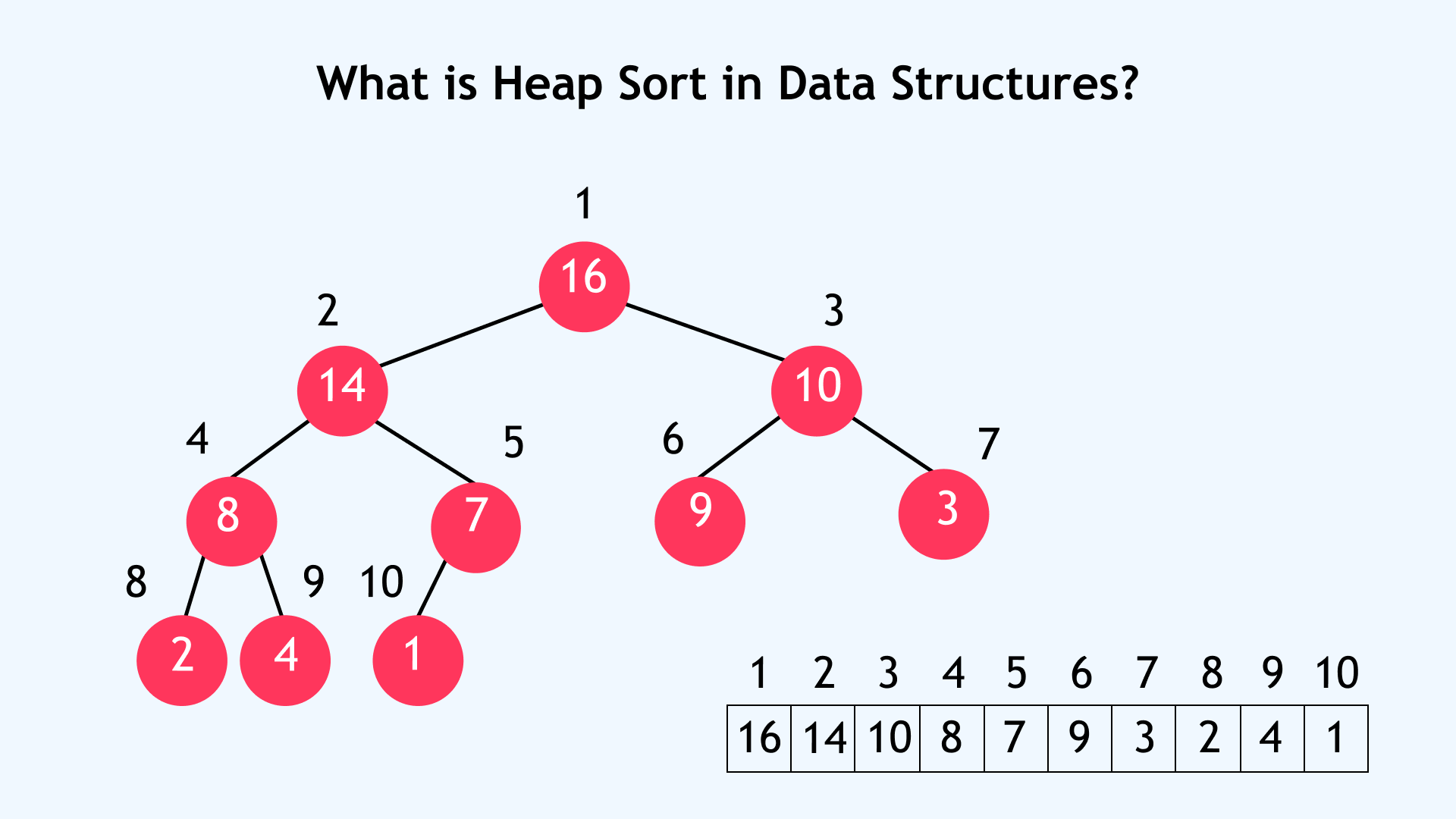
🔹 6. Heap Sort

Image
Image
Image
Image

📌 Concept:

Uses binary heap.

⏱️ Complexity:

  • O(n log n)

🔢 Non-Comparison Sorting Algorithms


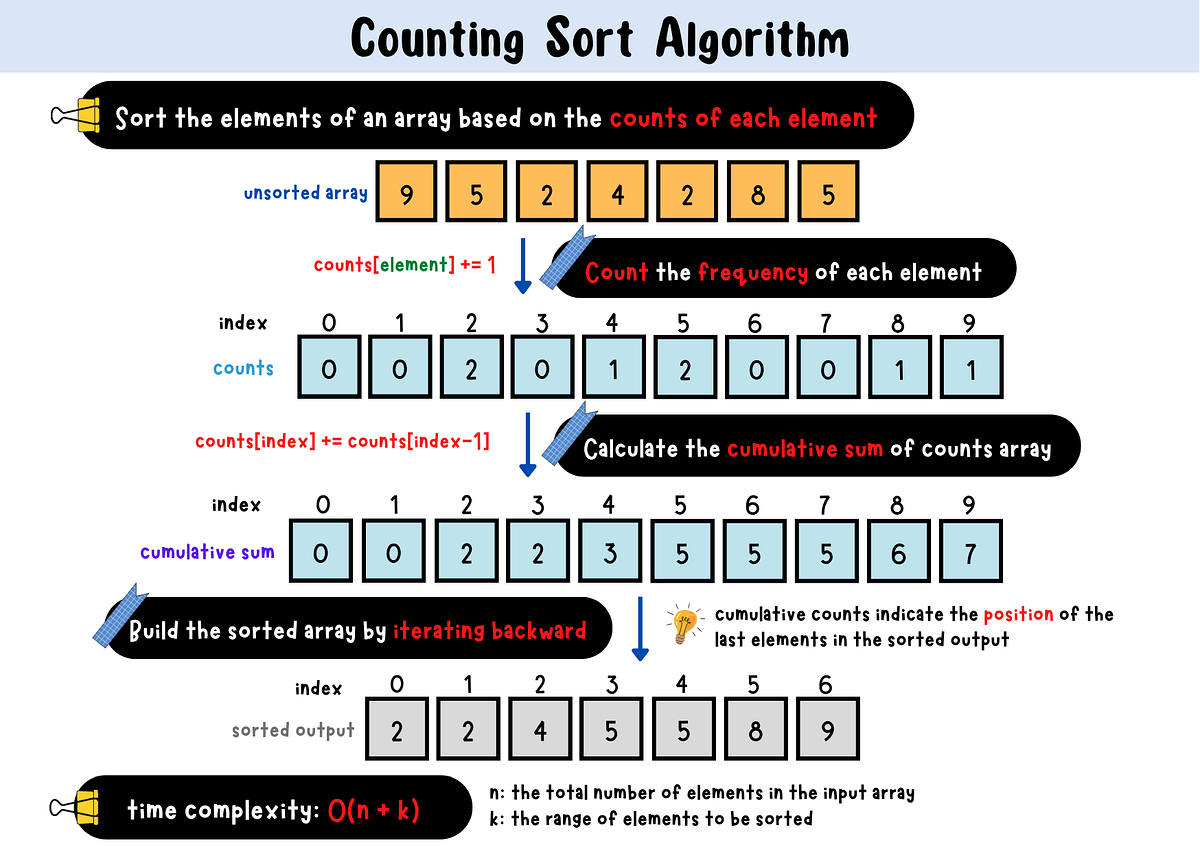
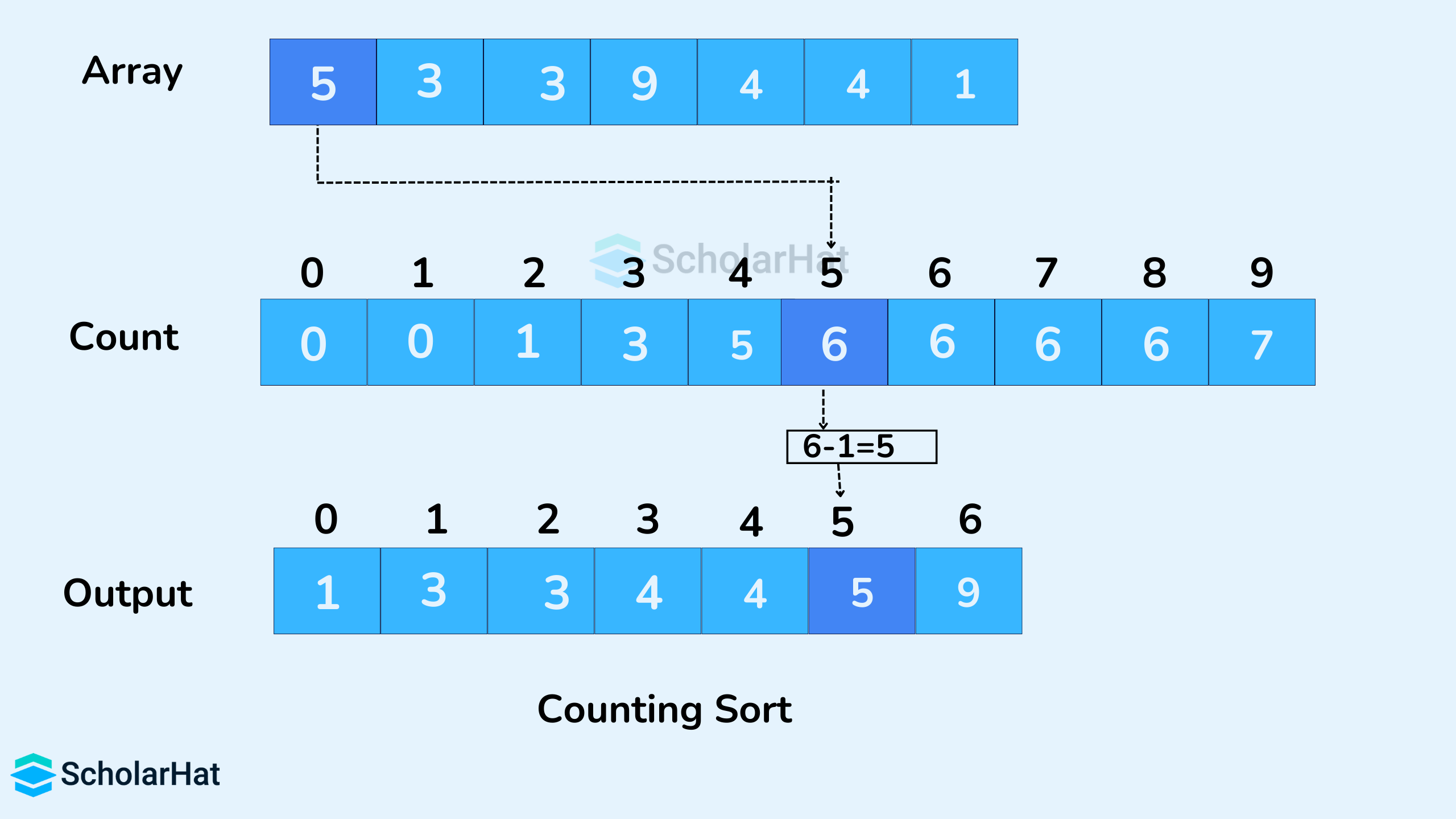
🔹 1. Counting Sort

Image
Image
Image
Image

📌 Concept:

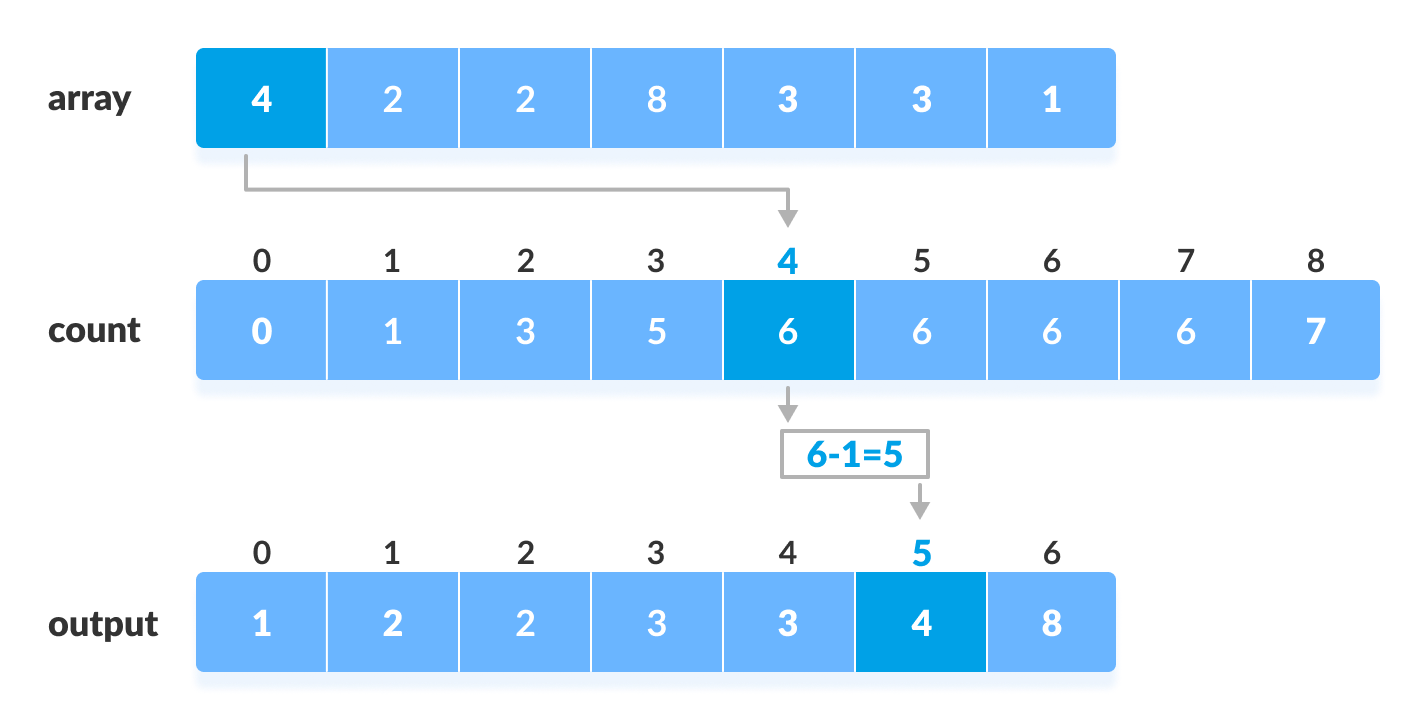
Counts occurrences of elements.
⏱️ Complexity:

  • O(n + k)

🔹 2. Radix Sort
Image
Image
Image
Image

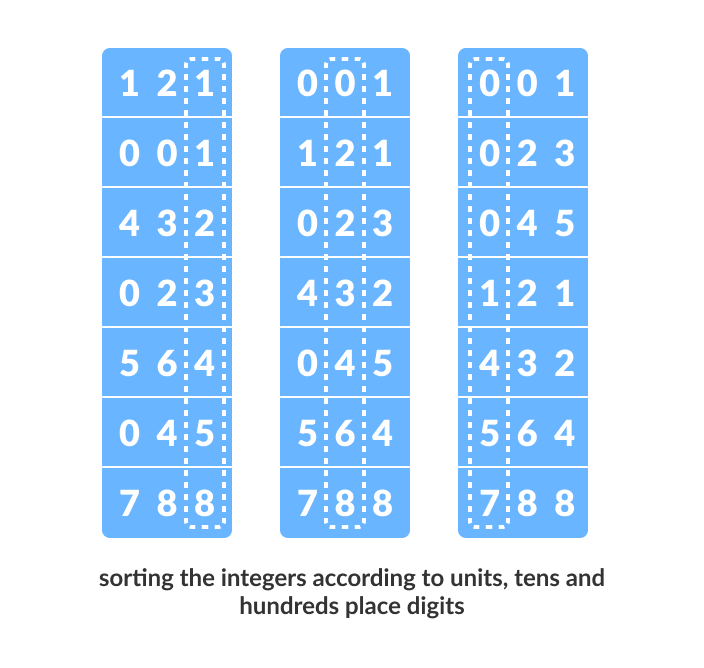
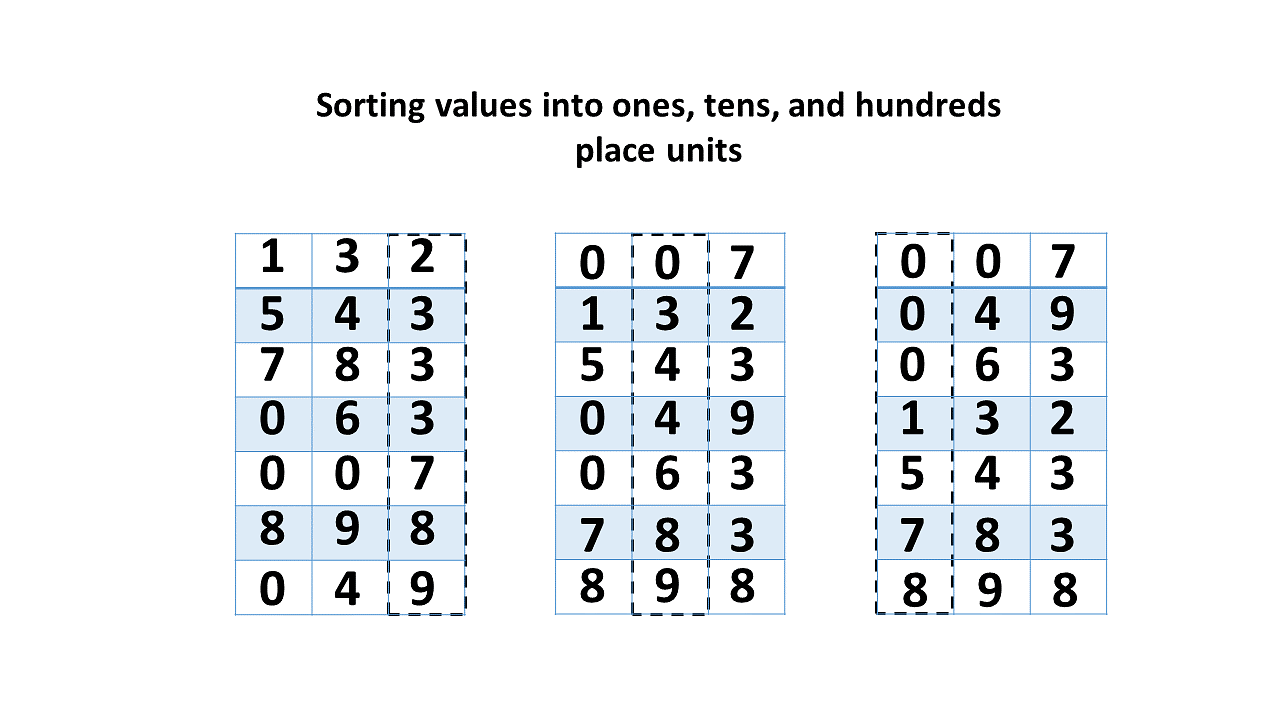
📌 Concept:

Sorts digits from least to most significant.


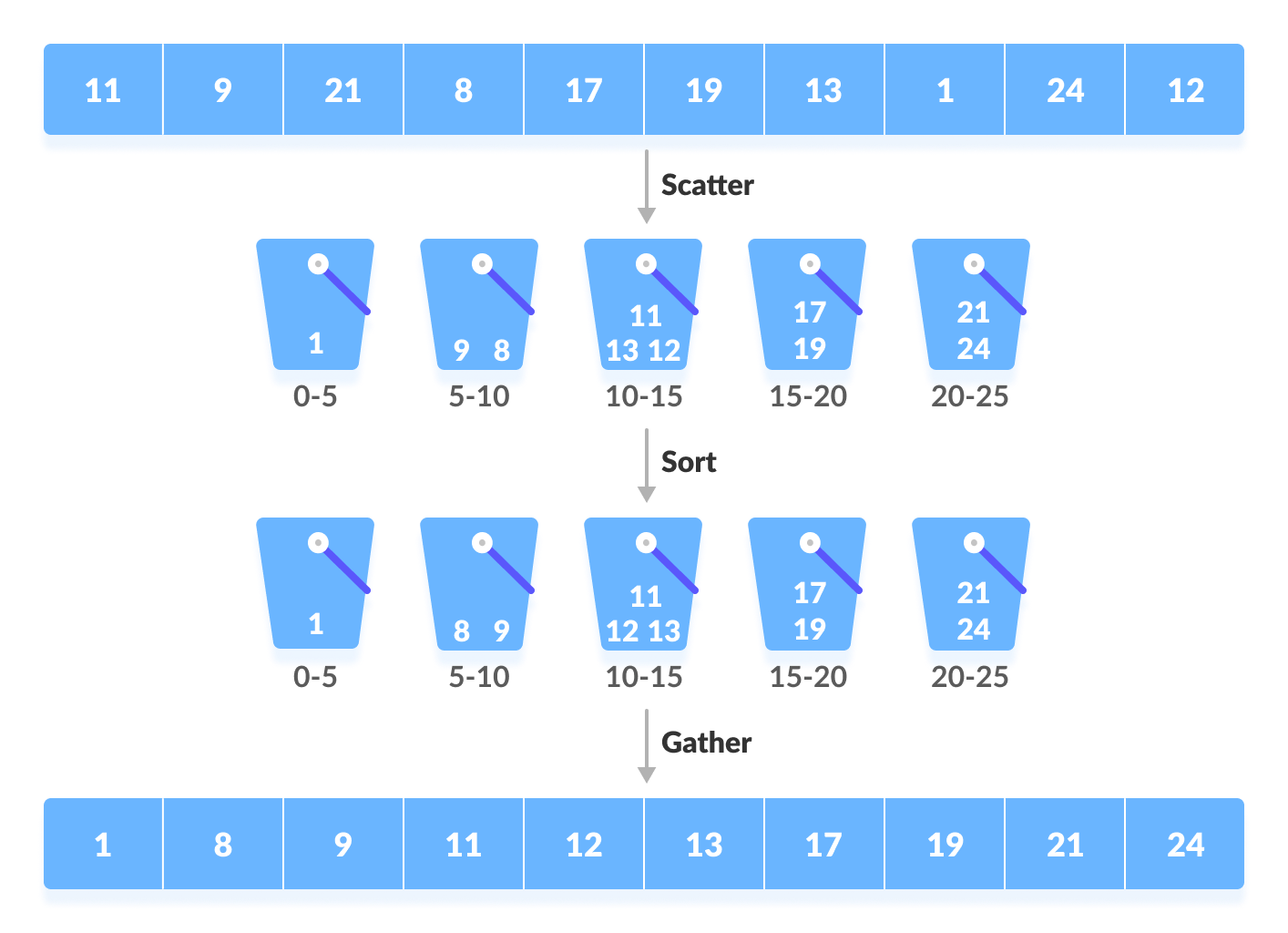
🔹 3. Bucket Sort

Image
Image
Image

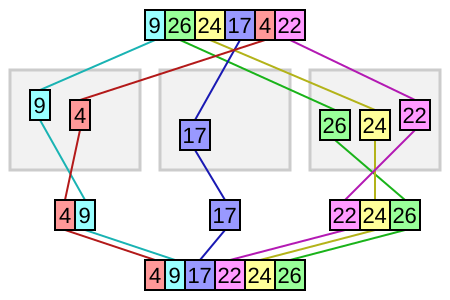
📌 Concept:

Distributes elements into buckets.


🧮 Time Complexity Comparison Table

AlgorithmBest CaseAverageWorst Case
Bubble SortO(n)O(n²)O(n²)
Selection SortO(n²)O(n²)O(n²)
Insertion SortO(n)O(n²)O(n²)
Merge SortO(n log n)O(n log n)O(n log n)
Quick SortO(n log n)O(n log n)O(n²)
Heap SortO(n log n)O(n log n)O(n log n)
Counting SortO(n+k)O(n+k)O(n+k)
Radix SortO(nk)O(nk)O(nk)

⚡ Stable vs Unstable Sorting

Stable Sorting:

Maintains order of equal elements.
  • Merge Sort
  • Insertion Sort

Unstable Sorting:

Does not preserve order.

  • Quick Sort
  • Heap Sort

🧠 Advanced Sorting Concepts


🔹 1. External Sorting

Image
Image
Image
Image

Used for data that doesn’t fit in memory.


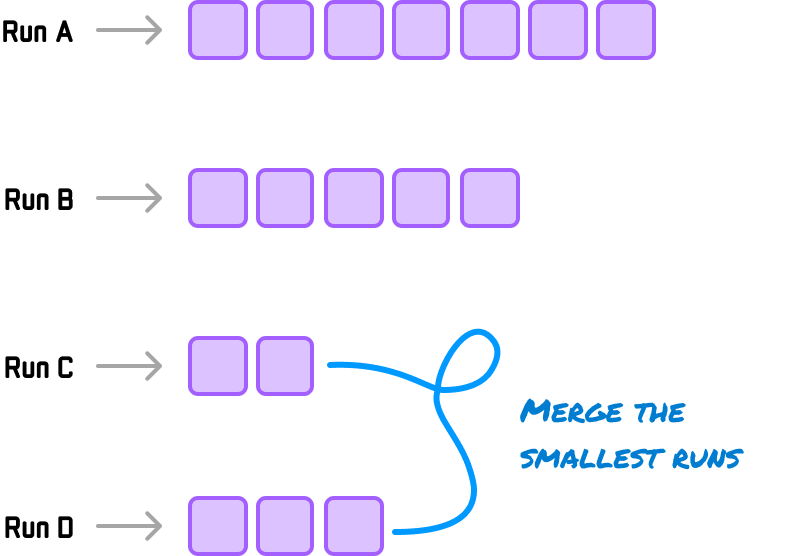
🔹 2. Tim Sort

Image
Image
Image
Image

Hybrid of merge and insertion sort.


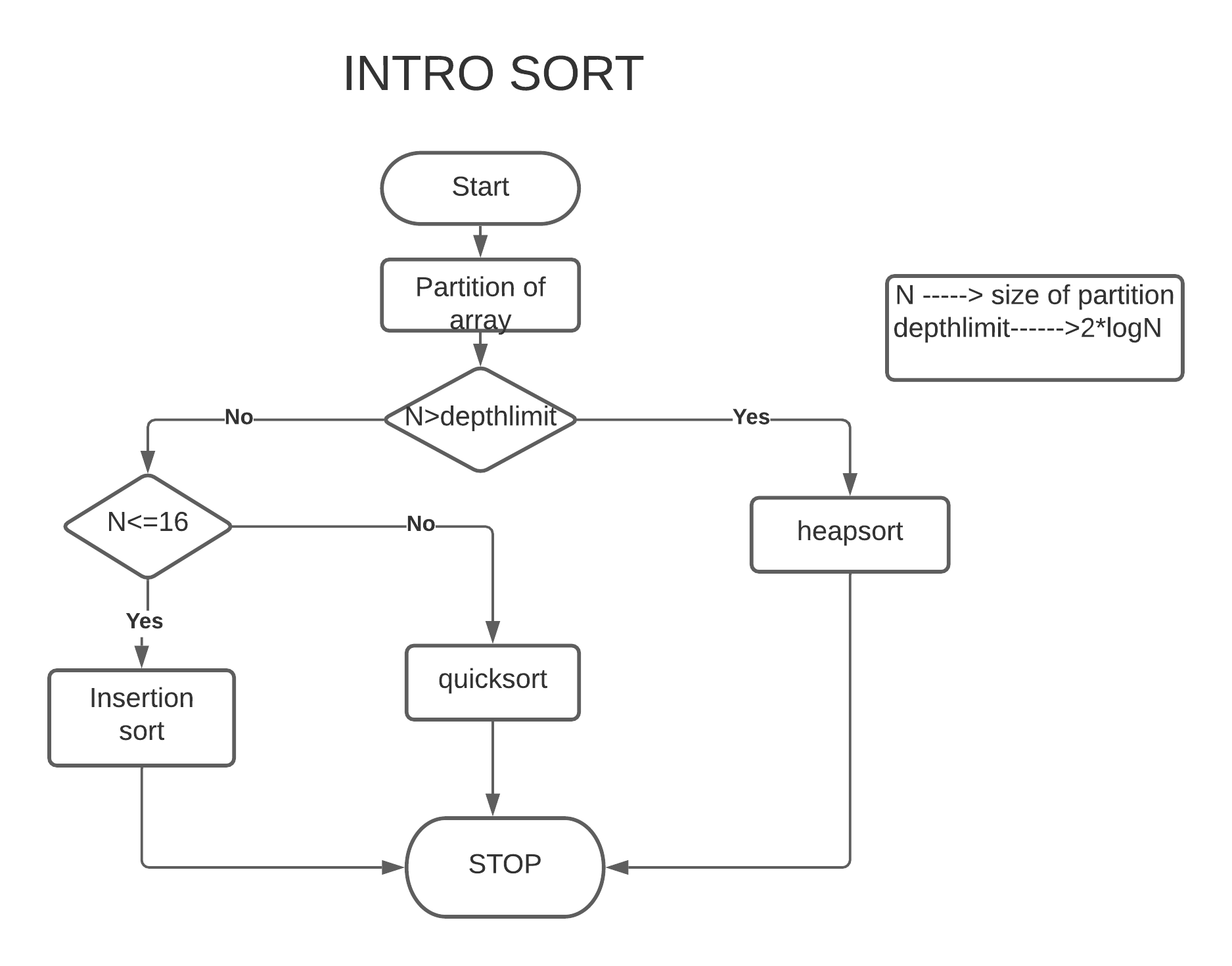
🔹 3. Intro Sort

Image
Image
Image
Image

Combines Quick + Heap sort.


🔬 Applications of Sorting


📊 1. Data Analysis

Image
Image
Image
Image

🌐 2. Search Optimization

Image
Image
Image
Image

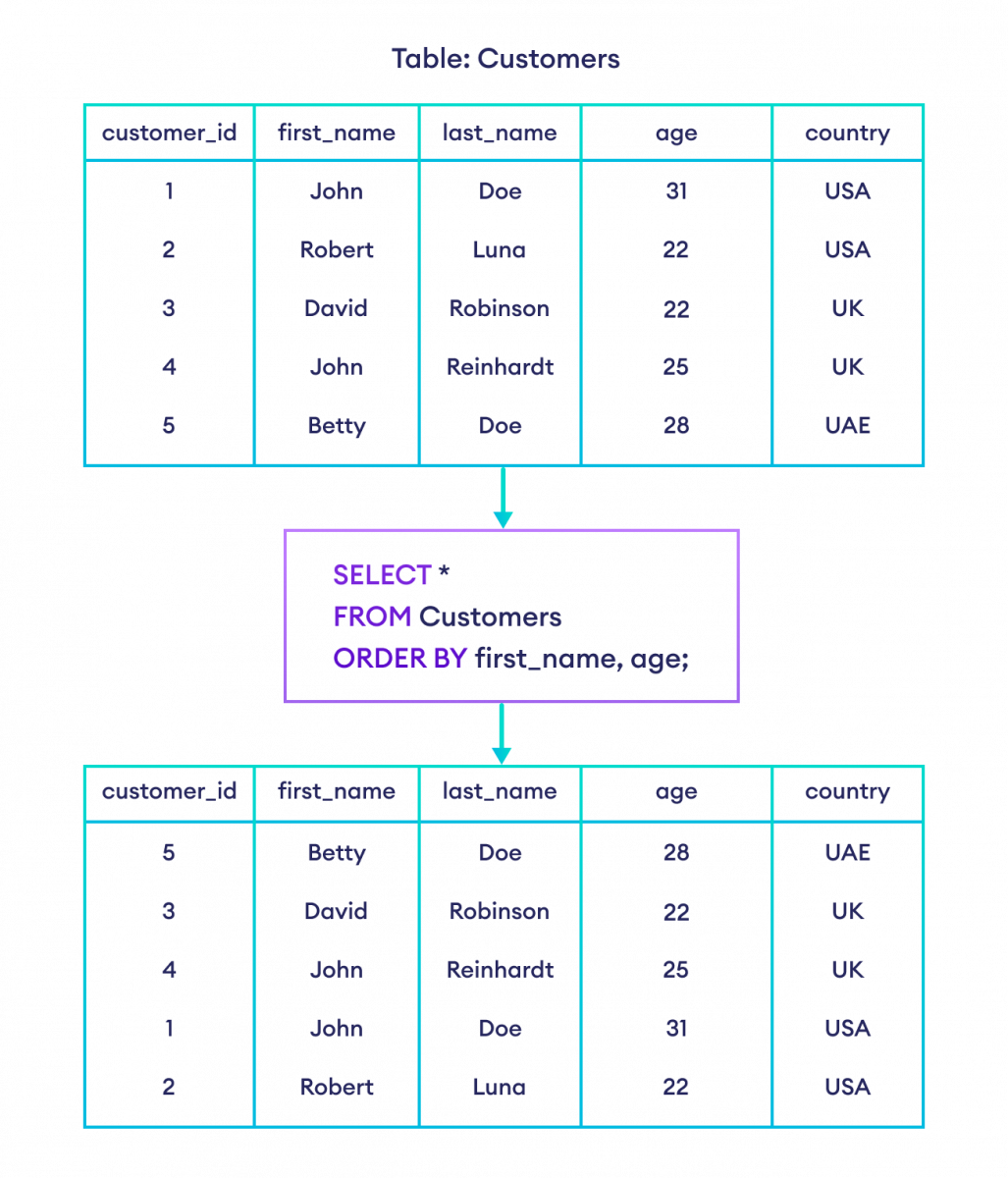
🧾 3. Database Systems

Image
Image
Image
Image

🎮 4. Game Development

Image
Image
Image
Image

🧠 5. Machine Learning

Image
Image
Image
Image

🔁 Choosing the Right Algorithm

ScenarioBest Algorithm
Small dataInsertion Sort
Large dataMerge / Quick Sort
Memory limitedHeap Sort
Integer range smallCounting Sort

🧪 In-Place vs Out-of-Place

  • In-place: Quick Sort, Heap Sort
  • Out-of-place: Merge Sort

🚀 Real-World Importance

Sorting is used in:

  • Operating systems
  • Databases
  • AI systems
  • Web applications
  • Financial systems

🧾 Conclusion

Sorting algorithms are essential tools in computer science that enable efficient data organization and processing. Each algorithm has its strengths and weaknesses, and choosing the right one depends on the specific problem.

Mastering sorting algorithms is crucial for:

  • Algorithm design
  • Competitive programming
  • Software engineering

🏷️ Tags