Tag Archives: Big Data

🏢 Data Warehousing

Image
Image
Image
Image

📘 1. Introduction to Data Warehousing

A Data Warehouse is a centralized repository designed to store large volumes of structured data collected from multiple sources for the purpose of analysis, reporting, and decision-making.

Unlike operational databases (OLTP systems), which handle day-to-day transactions, data warehouses are optimized for analytical processing (OLAP).


🔹 Definition

A data warehouse is:

A subject-oriented, integrated, time-variant, and non-volatile collection of data that supports decision-making.


🔹 Key Characteristics

  • Subject-Oriented → Organized around business topics (sales, customers)
  • Integrated → Combines data from multiple sources
  • Time-Variant → Stores historical data
  • Non-Volatile → Data is stable (read-heavy, not frequently updated)

🧠 2. Why Data Warehousing is Important


🔹 Business Benefits

  • Better decision-making
  • Historical trend analysis
  • Improved reporting
  • Data consistency across organization

🔹 Problems It Solves

  • Data scattered across systems
  • Inconsistent formats
  • Slow reporting queries
  • Lack of historical insights

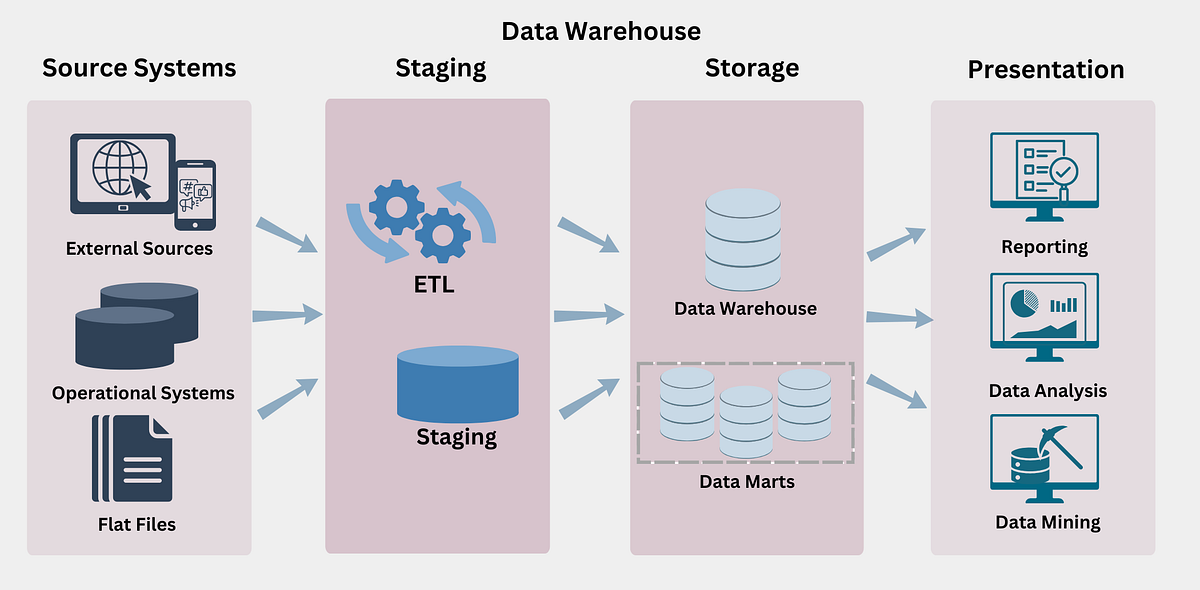
🏗️ 3. Data Warehouse Architecture

Image
Image
Image
Image

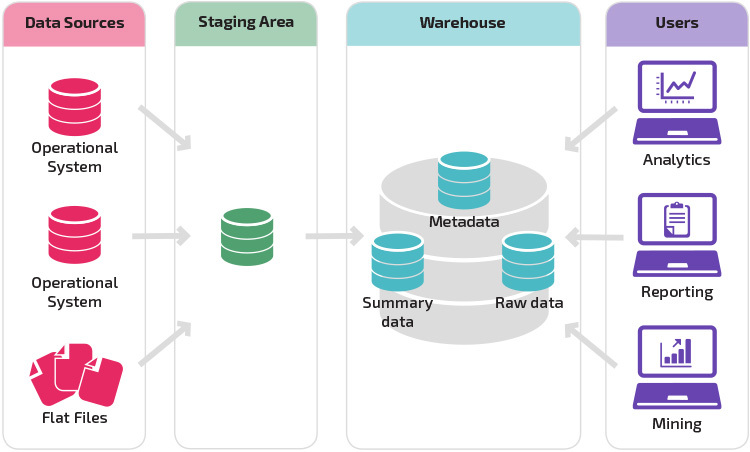
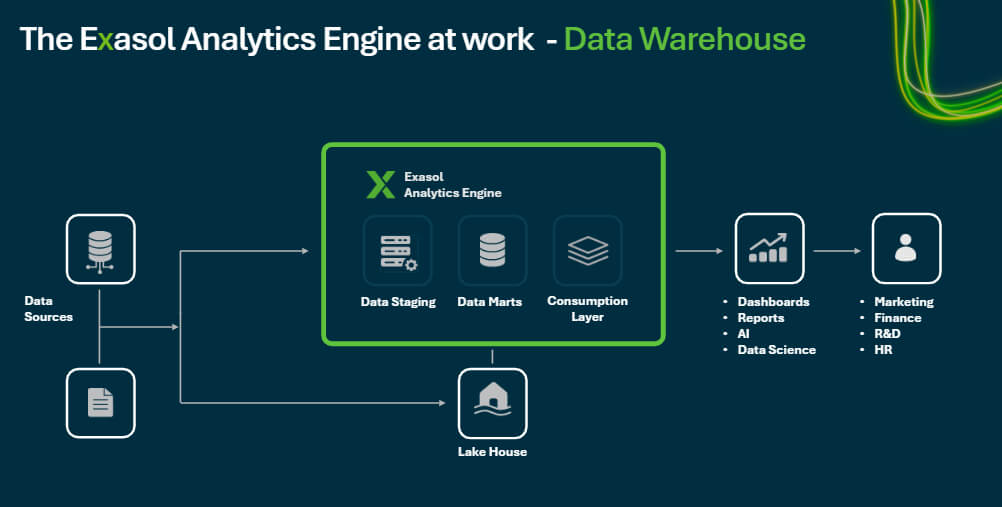
🔹 Three-Tier Architecture

1. Bottom Tier – Data Sources

  • Operational databases
  • APIs
  • Logs
  • External data

2. Middle Tier – Data Warehouse Server

  • ETL processing
  • Storage
  • Data integration

3. Top Tier – Front-End Tools

  • Reporting tools
  • Dashboards
  • BI tools

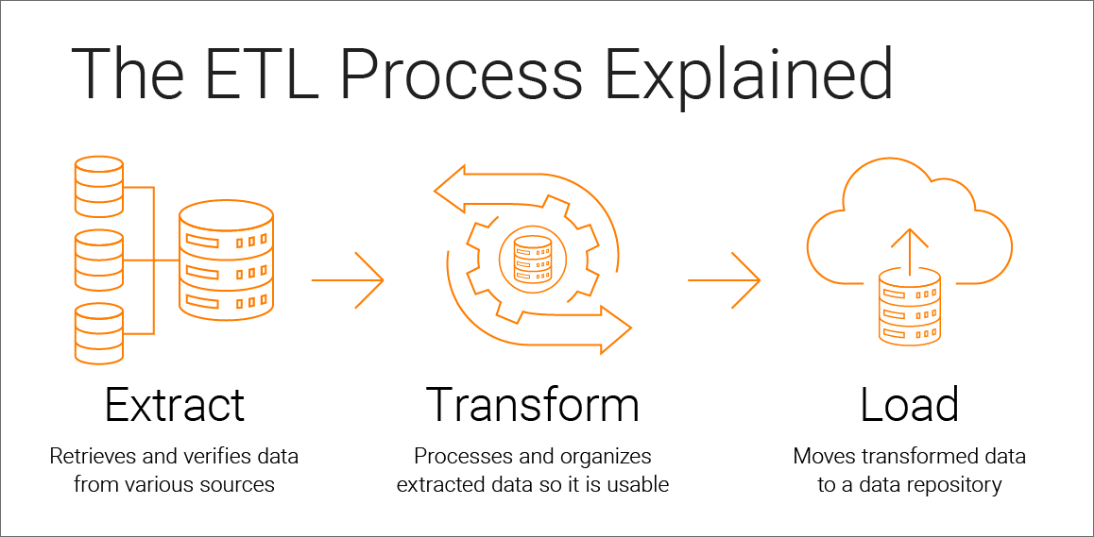
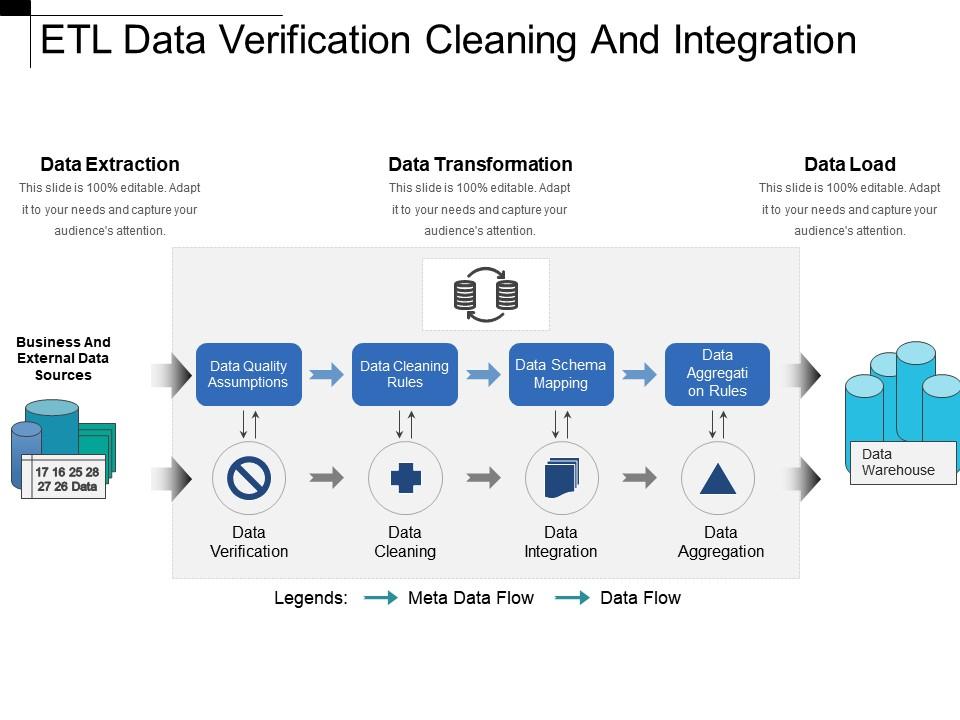
🔄 4. ETL Process (Extract, Transform, Load)

Image
Image
Image
Image

🔹 1. Extract

  • Collect data from sources
  • Structured and unstructured

🔹 2. Transform

  • Clean data
  • Normalize formats
  • Apply business rules

🔹 3. Load

  • Store data into warehouse

🔹 ELT (Modern Approach)

  • Load first, transform later

🧩 5. Data Modeling in Warehousing
Image
Image
Image
Image

🔹 Types of Models

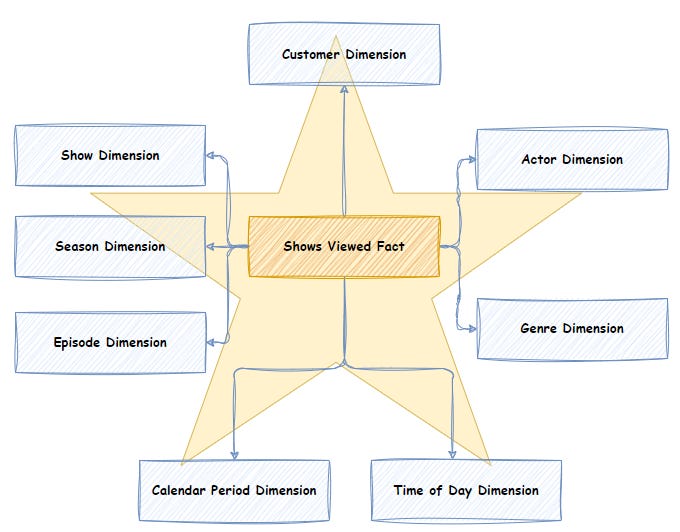
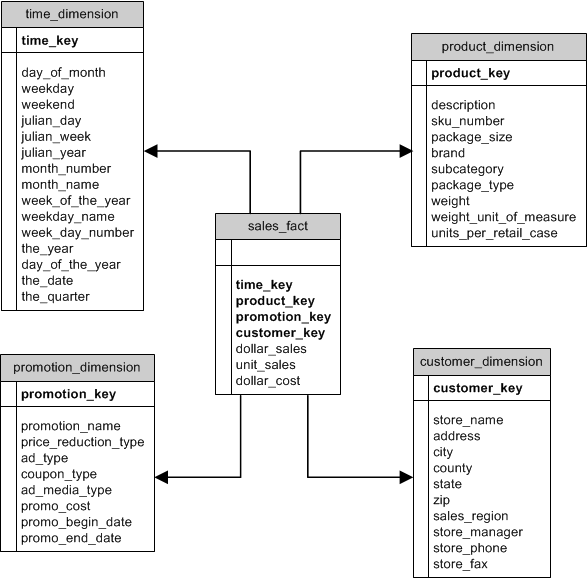
1. Star Schema ⭐

  • Central fact table
  • Connected dimension tables

2. Snowflake Schema ❄️

  • Normalized dimensions
  • More complex

3. Galaxy Schema 🌌

  • Multiple fact tables

🔹 Fact vs Dimension Tables

Fact TableDimension Table
Quantitative dataDescriptive data
Sales amountCustomer info

📊 6. OLTP vs OLAP


FeatureOLTPOLAP
PurposeTransactionsAnalysis
DataCurrentHistorical
QueriesSimpleComplex

🔹 OLAP Operations

  • Roll-up
  • Drill-down
  • Slice
  • Dice

🧠 7. Data Marts


🔹 Definition

A data mart is a subset of a data warehouse focused on a specific department.


🔹 Types

  • Dependent
  • Independent
  • Hybrid

⚡ 8. Data Warehouse Design Approaches


🔹 Top-Down (Inmon)

  • Build enterprise warehouse first

🔹 Bottom-Up (Kimball)

  • Build data marts first

🔐 9. Data Quality and Governance


🔹 Data Quality

  • Accuracy
  • Completeness
  • Consistency

🔹 Governance

  • Policies
  • Standards
  • Data ownership

🔄 10. Data Integration


🔹 Methods

  • ETL
  • ELT
  • Data virtualization

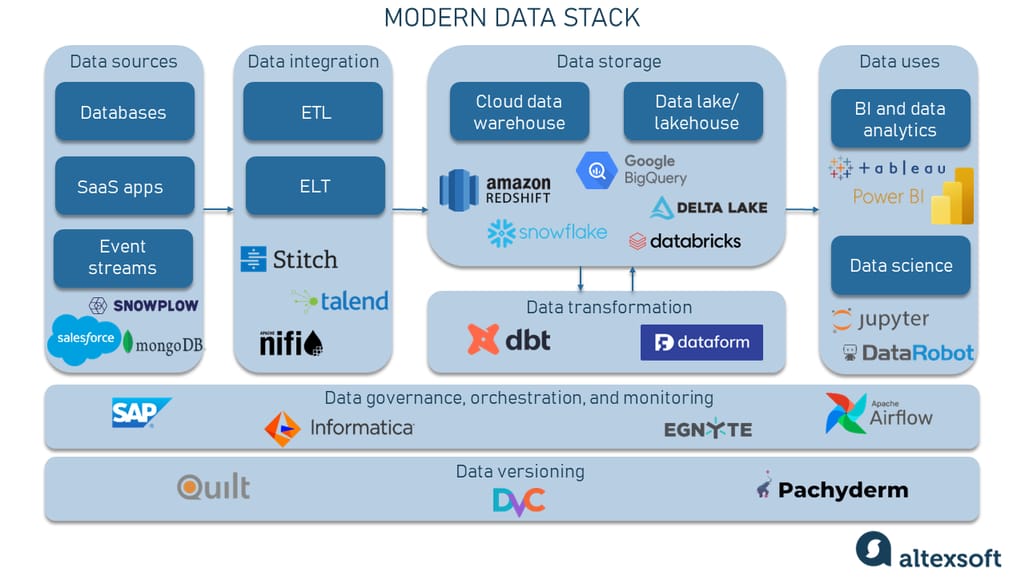
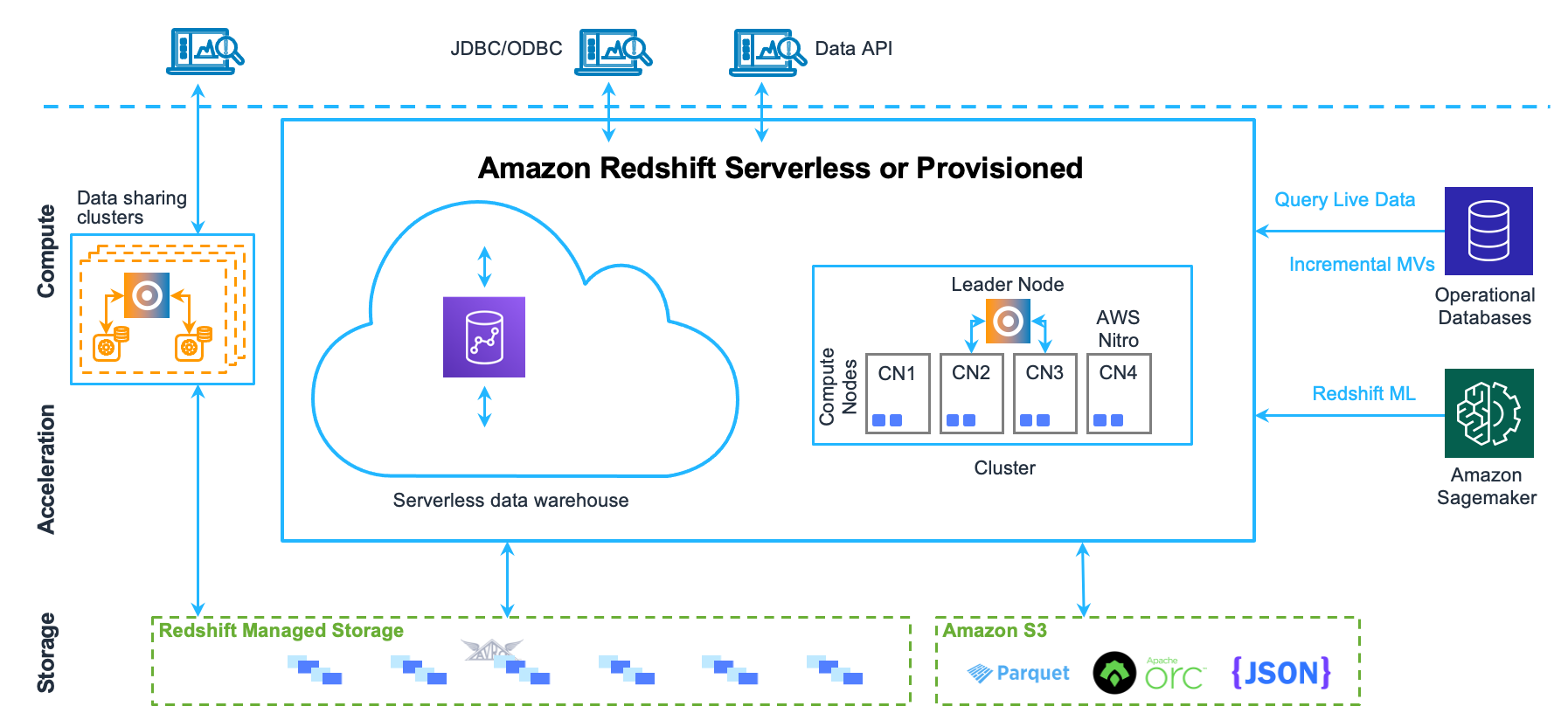
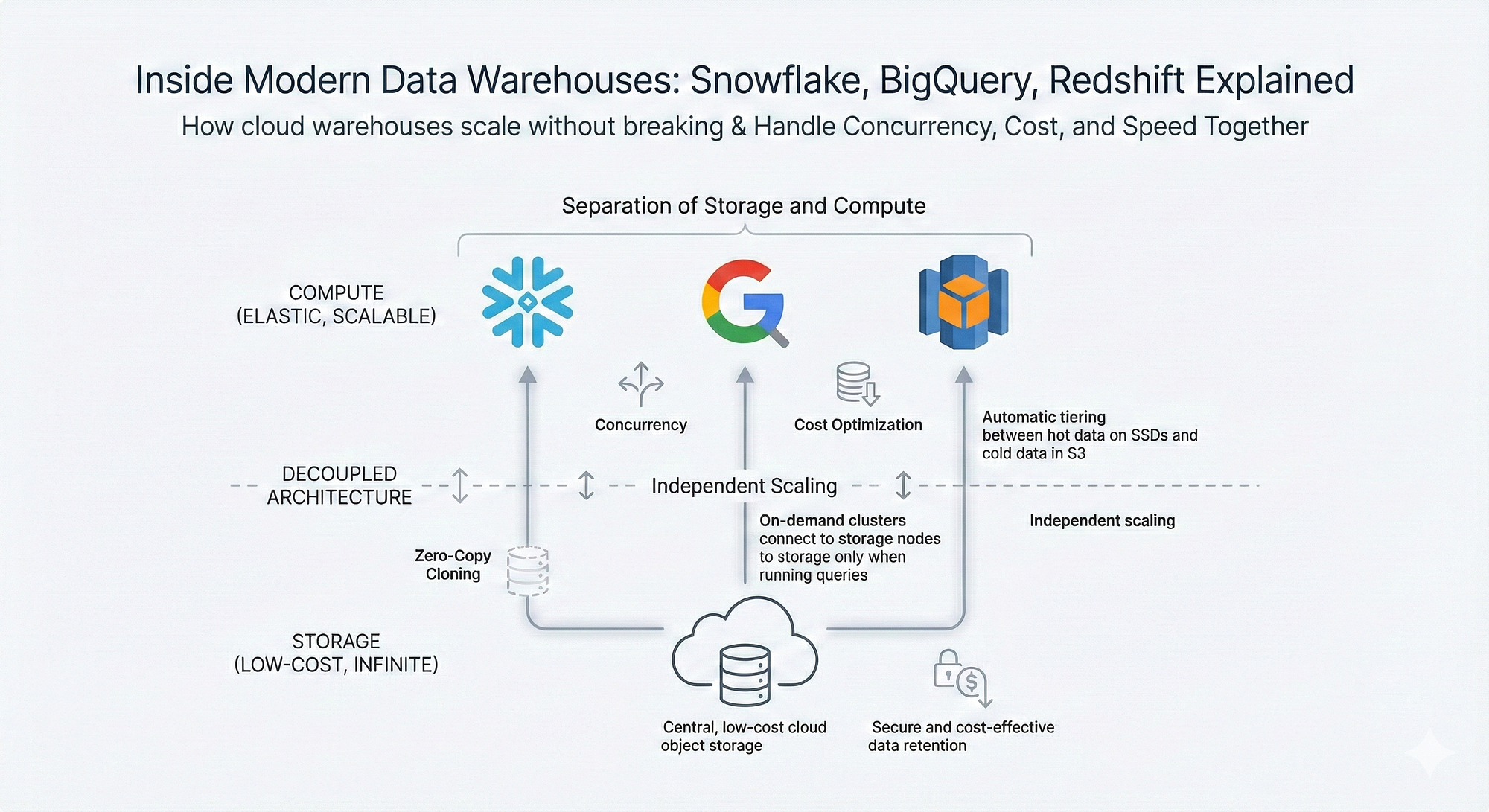
🌐 11. Data Warehousing in Cloud
Image
Image
Image
Image

🔹 Features

  • Scalability
  • Cost efficiency
  • Managed services

🔹 Examples

  • Cloud warehouses
  • Serverless systems

🧪 12. Data Warehouse Tools


  • ETL tools
  • BI tools
  • Data modeling tools

📈 13. Performance Optimization


🔹 Techniques

  • Indexing
  • Partitioning
  • Materialized views

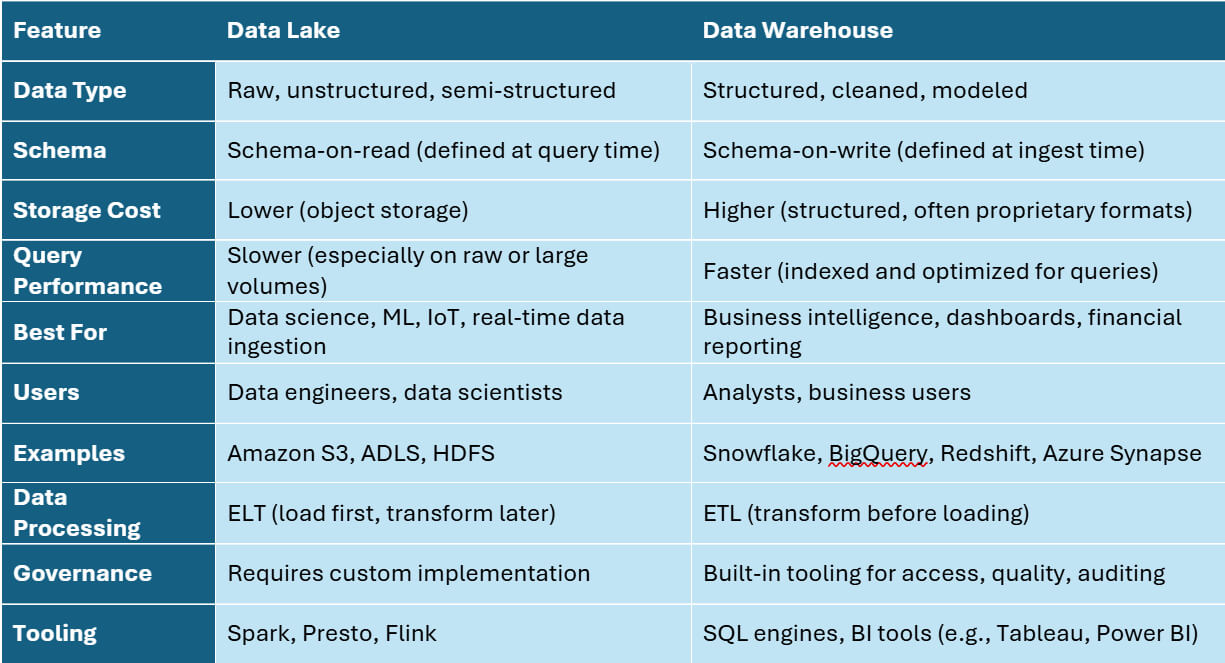
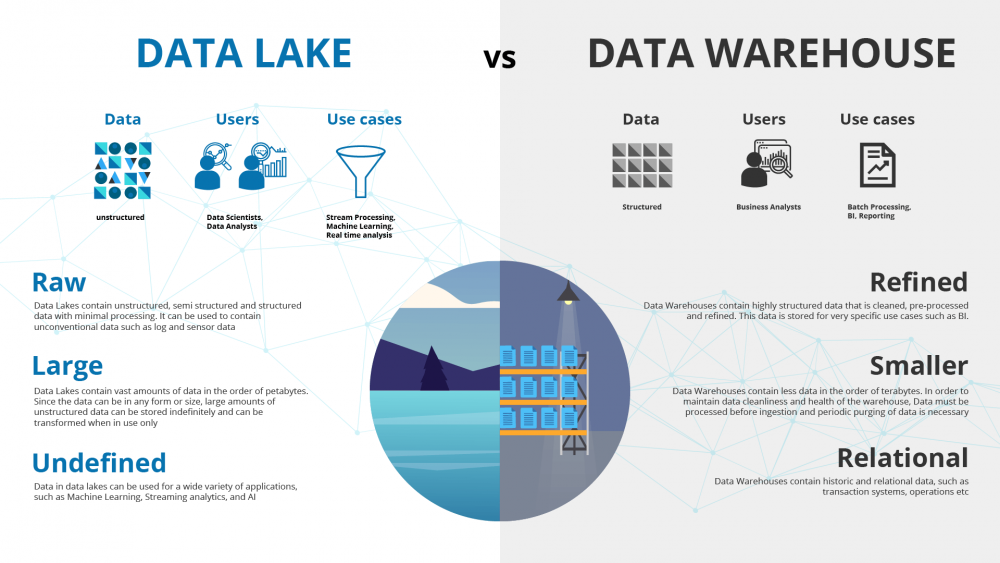
🧩 14. Data Warehouse vs Data Lake


FeatureData WarehouseData Lake
DataStructuredRaw
SchemaFixedFlexible

🔄 15. Data Pipeline


🔹 Components

  • Ingestion
  • Processing
  • Storage
  • Visualization

🧠 16. Big Data and Warehousing


  • Integration with Hadoop
  • Spark processing
  • Real-time analytics

🔐 17. Security in Data Warehousing


  • Encryption
  • Access control
  • Auditing

📊 18. Real-World Applications


🔹 Retail

  • Sales analysis

🔹 Banking

  • Risk analysis

🔹 Healthcare

  • Patient analytics

🔹 Marketing

  • Customer insights

⚖️ 19. Advantages


  • Better analytics
  • Historical insights
  • Centralized data

⚠️ 20. Limitations


  • High cost
  • Complex setup
  • Maintenance required

🔮 21. Future Trends


  • AI-driven analytics
  • Real-time warehousing
  • Data lakehouse

🏁 Conclusion

Data warehousing is a core component of modern data ecosystems, enabling organizations to transform raw data into meaningful insights. It plays a critical role in business intelligence, analytics, and strategic decision-making.

🏷️ Tags

🌐 NoSQL Databases – Complete In-Depth Guide

Image
Image
Image
Image

📘 1. Introduction to NoSQL Databases

NoSQL (Not Only SQL) databases are a class of database systems designed to handle large volumes of unstructured, semi-structured, or rapidly changing data. Unlike traditional relational databases (RDBMS), NoSQL databases do not rely on fixed table schemas.

They emerged to address the limitations of relational databases in:

  • Big data environments
  • High scalability applications
  • Real-time systems
  • Distributed architectures

🔹 What Does “NoSQL” Mean?

  • “Not Only SQL” → supports SQL-like queries in some systems
  • Focus on flexibility and scalability
  • Designed for modern applications

🔹 Why NoSQL Was Created

Traditional SQL databases struggle with:

  • Horizontal scaling
  • Handling unstructured data
  • High-speed data ingestion
  • Distributed computing

NoSQL solves these issues by:

  • Distributing data across nodes
  • Using flexible schemas
  • Optimizing for specific use cases

🧠 2. Key Characteristics of NoSQL


🔹 1. Schema Flexibility

  • No fixed schema
  • Different records can have different structures

🔹 2. Horizontal Scalability

  • Data distributed across multiple servers
  • Easily scalable

🔹 3. High Performance

  • Optimized for speed and throughput

🔹 4. Distributed Architecture

  • Built for cloud and distributed systems

🔹 5. Eventual Consistency

  • Uses BASE model instead of strict ACID

⚖️ 3. NoSQL vs SQL

FeatureSQLNoSQL
SchemaFixedFlexible
Data TypeStructuredUnstructured
ScalingVerticalHorizontal
ConsistencyStrong (ACID)Eventual (BASE)
Query LanguageSQLVaries

🧩 4. Types of NoSQL Databases

Image
Image
Image
Image

NoSQL databases are categorized into four main types:


🔹 1. Key-Value Stores

Concept:

  • Data stored as key-value pairs

Example:

{
  "user123": "Rishan"
}

Features:

  • Extremely fast
  • Simple structure

Use Cases:

  • Caching
  • Session management

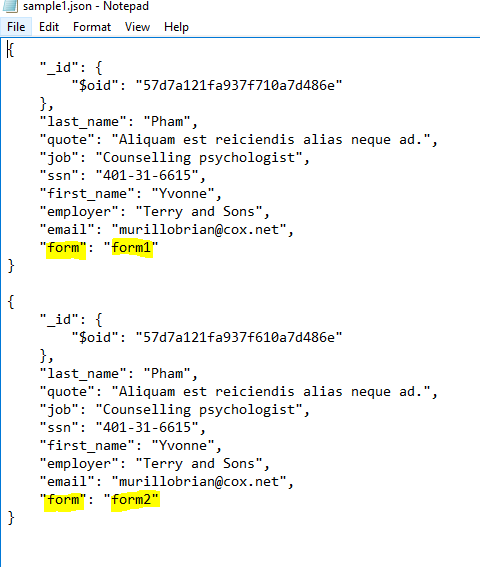
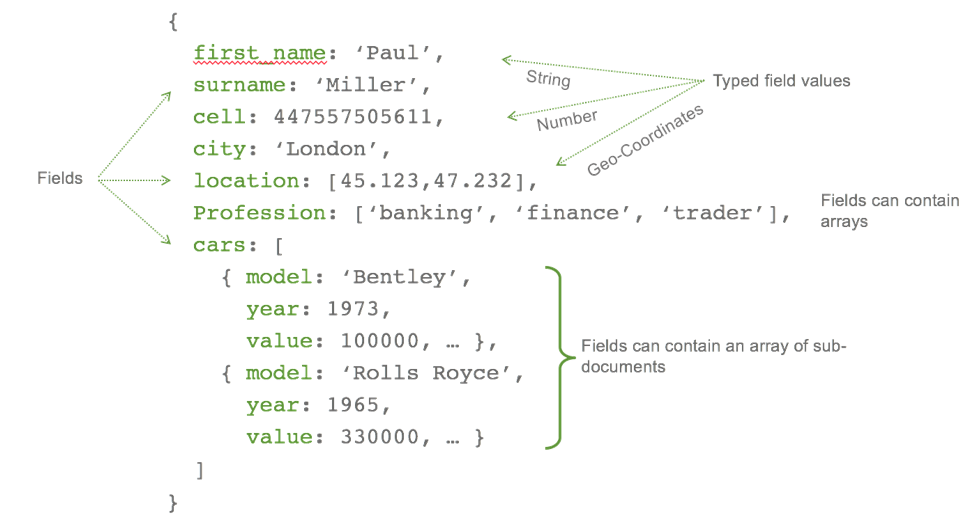
🔹 2. Document Databases

Concept:

  • Data stored in JSON-like documents

Example:

{
  "name": "Rishan",
  "age": 22,
  "skills": ["SQL", "Python"]
}

Features:

  • Flexible schema
  • Nested data

Use Cases:

  • Content management
  • Web applications

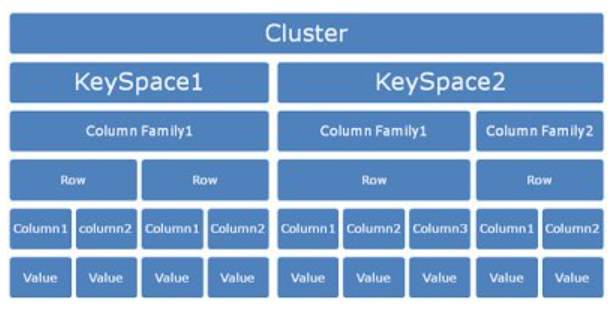
🔹 3. Column-Family Databases

Concept:

  • Data stored in columns instead of rows

Features:

  • High scalability
  • Efficient for large datasets

Use Cases:

  • Big data analytics

🔹 4. Graph Databases

Concept:

  • Data stored as nodes and edges

Features:

  • Efficient relationship handling

Use Cases:

  • Social networks
  • Recommendation systems

🏗️ 5. Data Modeling in NoSQL

Image
Image
Image
Image

🔹 Key Approaches

1. Embedding

  • Store related data together

2. Referencing

  • Use references between documents

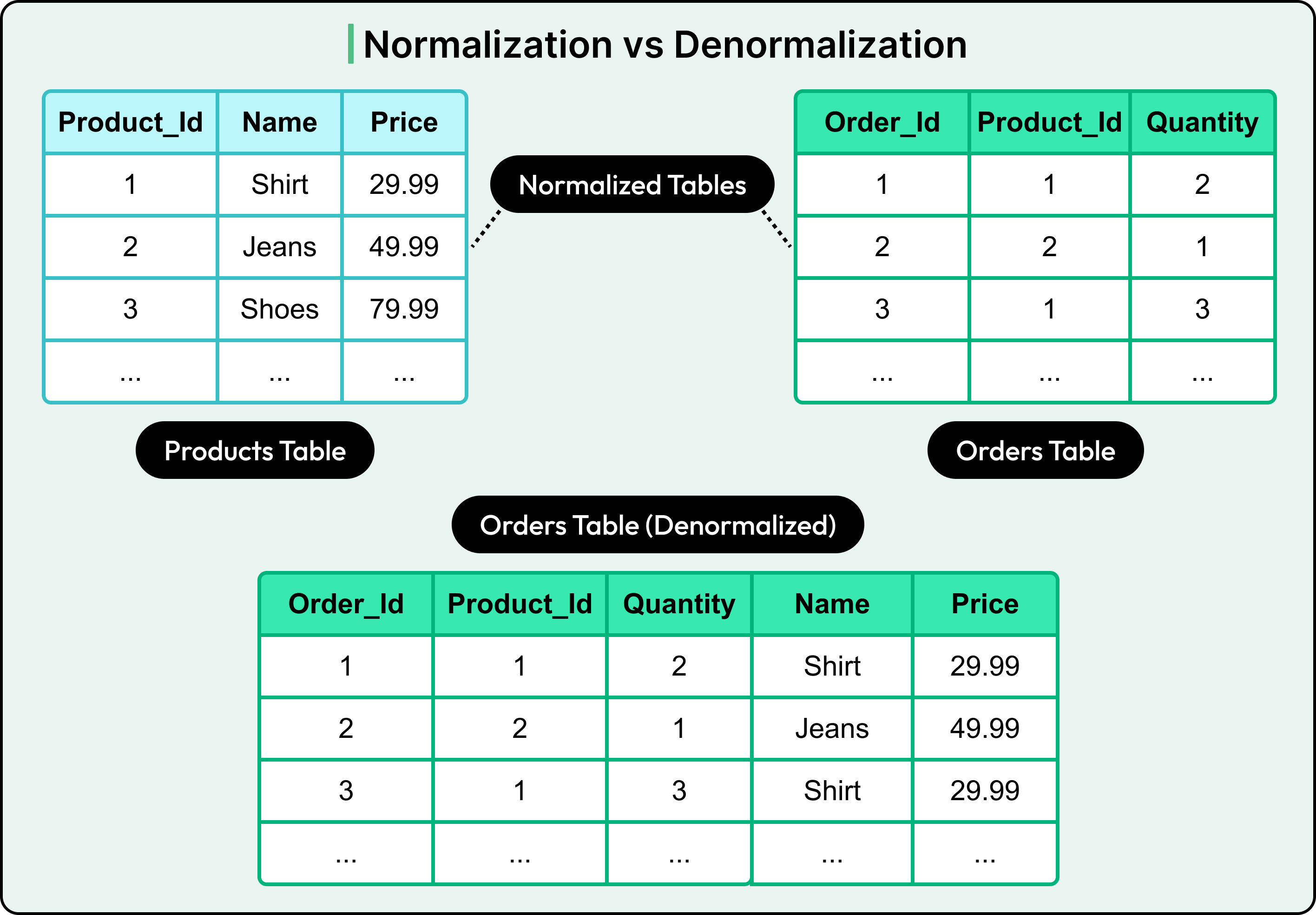
🔹 Denormalization

  • Common in NoSQL
  • Improves performance
  • Reduces joins

⚡ 6. CAP Theorem

Image
Image
Image
Image

CAP theorem states that a distributed system can only guarantee two of:

  • Consistency
  • Availability
  • Partition Tolerance

🔹 Trade-offs

  • CP (Consistency + Partition Tolerance)
  • AP (Availability + Partition Tolerance)

🔄 7. BASE Model


🔹 BASE stands for:

  • Basically Available
  • Soft state
  • Eventually consistent

🔹 Comparison with ACID

  • Less strict consistency
  • Higher scalability

🧠 8. Consistency Models


🔹 Types

  • Strong consistency
  • Eventual consistency
  • Causal consistency

🔐 9. Replication and Sharding

Image
Image
Image
Image

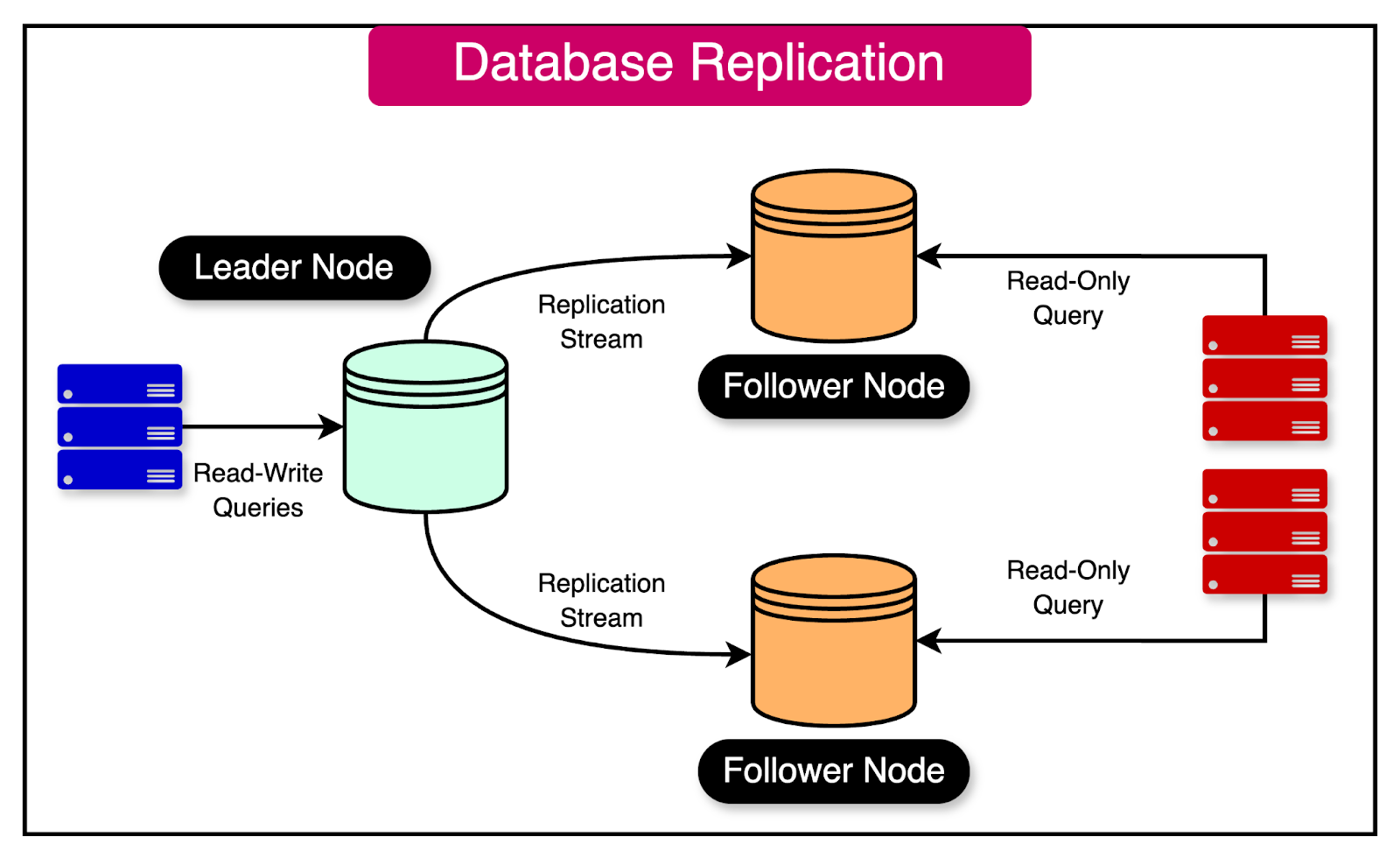
🔹 Replication

  • Copies data across nodes

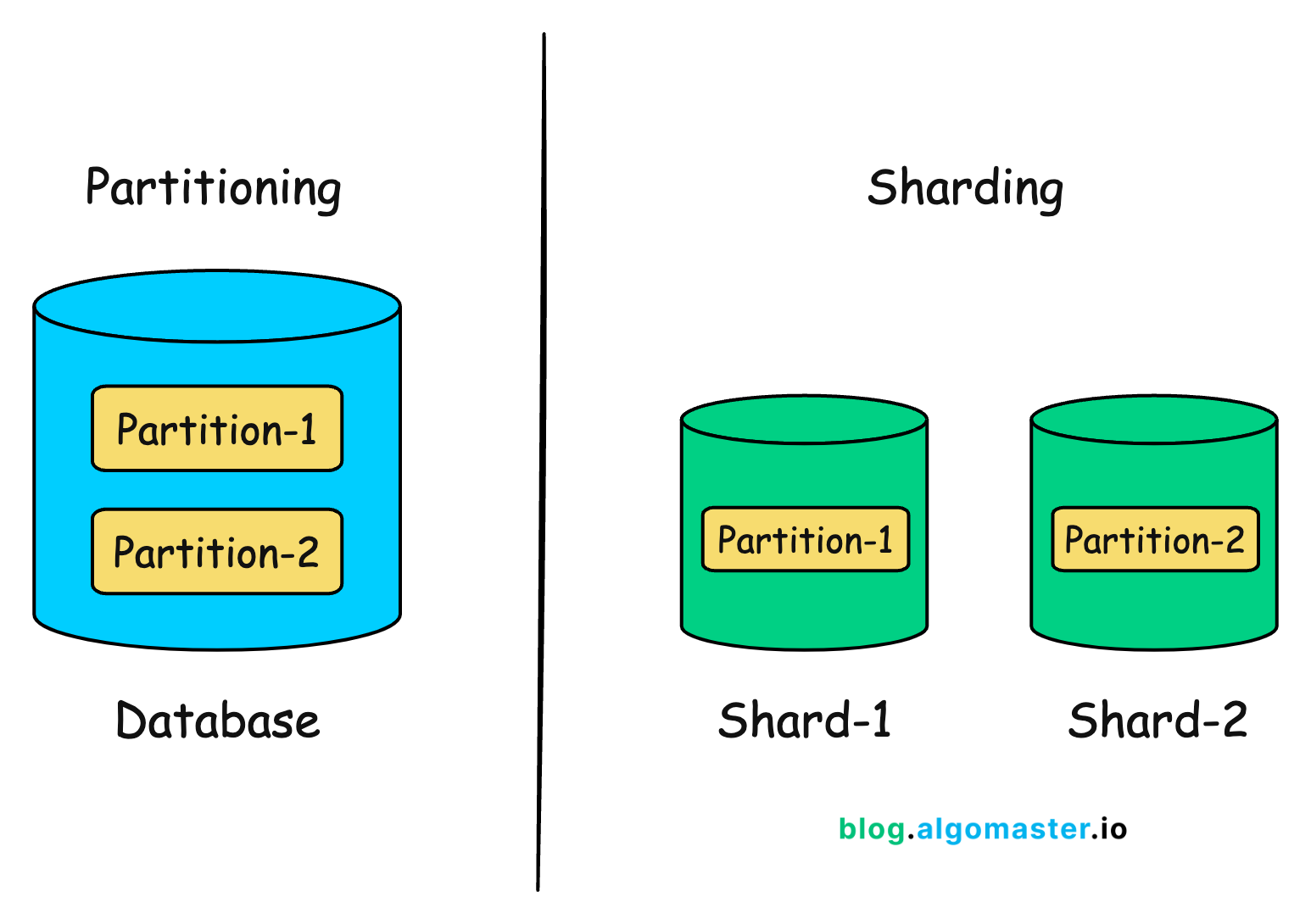
🔹 Sharding

  • Splits data into partitions

⚙️ 10. Query Mechanisms


🔹 Examples

  • Key-based retrieval
  • Document queries
  • Graph traversal

🧩 11. Indexing in NoSQL

  • Secondary indexes
  • Full-text indexes
  • Geospatial indexes

🧪 12. Transactions in NoSQL

  • Limited ACID support
  • Some databases support multi-document transactions

🌐 13. Popular NoSQL Databases


🔹 Examples

  • MongoDB (Document)
  • Cassandra (Column-family)
  • Redis (Key-value)
  • Neo4j (Graph)

📊 14. Real-World Applications


🔹 Social Media

  • User profiles
  • Feeds

🔹 E-commerce

  • Product catalogs
  • Recommendations

🔹 IoT Systems

  • Sensor data

🔹 Big Data Analytics

  • Large-scale processing

⚡ 15. Advantages of NoSQL


  • High scalability
  • Flexible schema
  • Fast performance
  • Handles big data

⚠️ 16. Limitations of NoSQL


  • Lack of standardization
  • Complex queries
  • Eventual consistency issues

🧠 17. When to Use NoSQL


  • Large-scale applications
  • Rapid development
  • Unstructured data

🏗️ 18. NoSQL in Cloud Computing


  • Managed services
  • Auto-scaling
  • High availability

🔄 19. Hybrid Databases


  • Combine SQL and NoSQL
  • Multi-model databases

🔮 20. Future of NoSQL


  • AI integration
  • Real-time analytics
  • Edge computing

🏁 Conclusion

NoSQL databases are essential for modern applications requiring scalability, flexibility, and performance. While they trade strict consistency for speed and scalability, they are ideal for handling big data and distributed systems.

Mastering NoSQL helps developers build high-performance, scalable, and resilient systems.


🏷️ Tags

🗄️ SQL (Structured Query Language)

Image
Image
Image
Image

📘 1. Introduction to SQL

SQL (Structured Query Language) is a standard programming language used to store, manipulate, and retrieve data from relational databases. It is the backbone of modern data-driven applications and is widely used in industries such as finance, healthcare, e-commerce, education, and more.

SQL was developed in the 1970s at IBM by Donald D. Chamberlin and Raymond F. Boyce. Initially called SEQUEL (Structured English Query Language), it evolved into SQL and became an international standard (ANSI/ISO).


🔹 Why SQL is Important

  • Enables efficient data management
  • Used in web applications, mobile apps, enterprise systems
  • Supports data analysis and reporting
  • Works with major database systems like:
    • MySQL
    • PostgreSQL
    • Oracle Database
    • SQL Server
    • SQLite

🔹 Characteristics of SQL

  • Declarative language (focus on what to do, not how)
  • Supports complex queries
  • Standardized (ANSI SQL)
  • Integrates with multiple programming languages
  • Supports transactions and concurrency

🧱 2. Relational Database Fundamentals

Image
Image
Image

SQL works with Relational Database Management Systems (RDBMS).

🔹 Core Concepts

1. Table

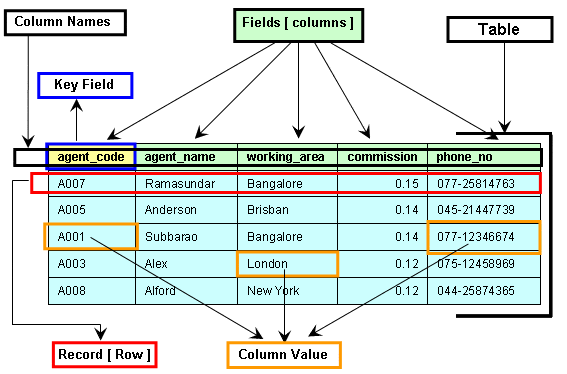
A table is a collection of related data organized in rows and columns.

2. Row (Record)

Represents a single entry.

3. Column (Field)

Represents an attribute of the data.

4. Primary Key

  • Unique identifier for each record
  • Cannot be NULL

5. Foreign Key

  • Links two tables together
  • Maintains referential integrity

6. Schema

  • Structure of the database

🔹 Example Table

IDNameAge
1John25
2Sara30

🧮 3. Types of SQL Commands

SQL commands are divided into categories:


🔹 1. DDL (Data Definition Language)

Used to define database structure.

  • CREATE
  • ALTER
  • DROP
  • TRUNCATE

Example:

CREATE TABLE Students (
    ID INT PRIMARY KEY,
    Name VARCHAR(50),
    Age INT
);

🔹 2. DML (Data Manipulation Language)

Used to manipulate data.

  • INSERT
  • UPDATE
  • DELETE
INSERT INTO Students VALUES (1, 'John', 25);

UPDATE Students SET Age = 26 WHERE ID = 1;

DELETE FROM Students WHERE ID = 1;

🔹 3. DQL (Data Query Language)

  • SELECT
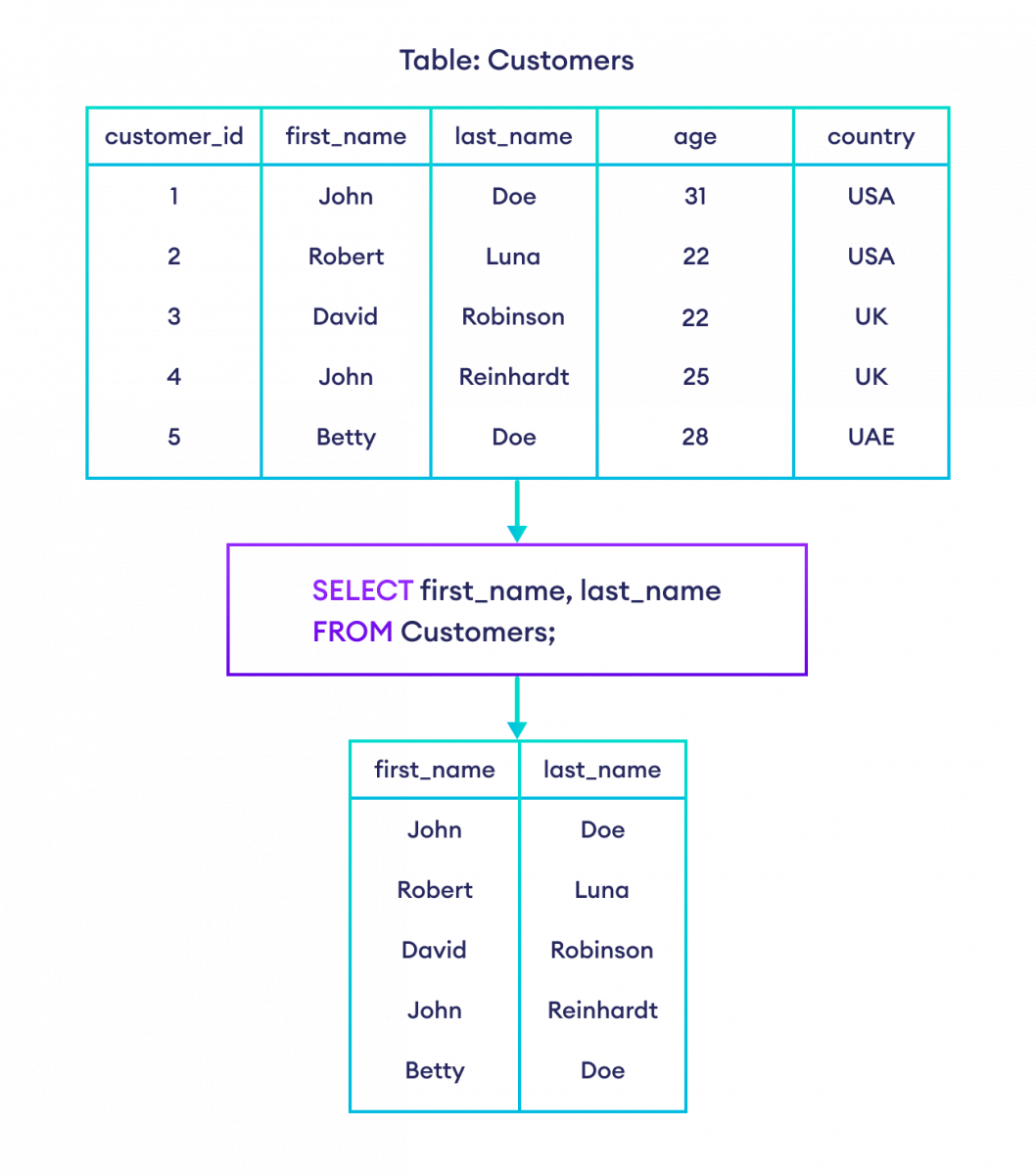
SELECT * FROM Students;

🔹 4. DCL (Data Control Language)

  • GRANT
  • REVOKE

🔹 5. TCL (Transaction Control Language)

  • COMMIT
  • ROLLBACK
  • SAVEPOINT

🔍 4. SQL Queries and Clauses

Image
Image
Image
Image

🔹 SELECT Statement

SELECT column1, column2 FROM table_name;

🔹 WHERE Clause

SELECT * FROM Students WHERE Age > 25;

🔹 ORDER BY

SELECT * FROM Students ORDER BY Age DESC;

🔹 GROUP BY

SELECT Age, COUNT(*) FROM Students GROUP BY Age;

🔹 HAVING

SELECT Age, COUNT(*) 
FROM Students 
GROUP BY Age 
HAVING COUNT(*) > 1;

🔹 DISTINCT

SELECT DISTINCT Age FROM Students;

🔗 5. SQL Joins

Image
Image
Image
Image

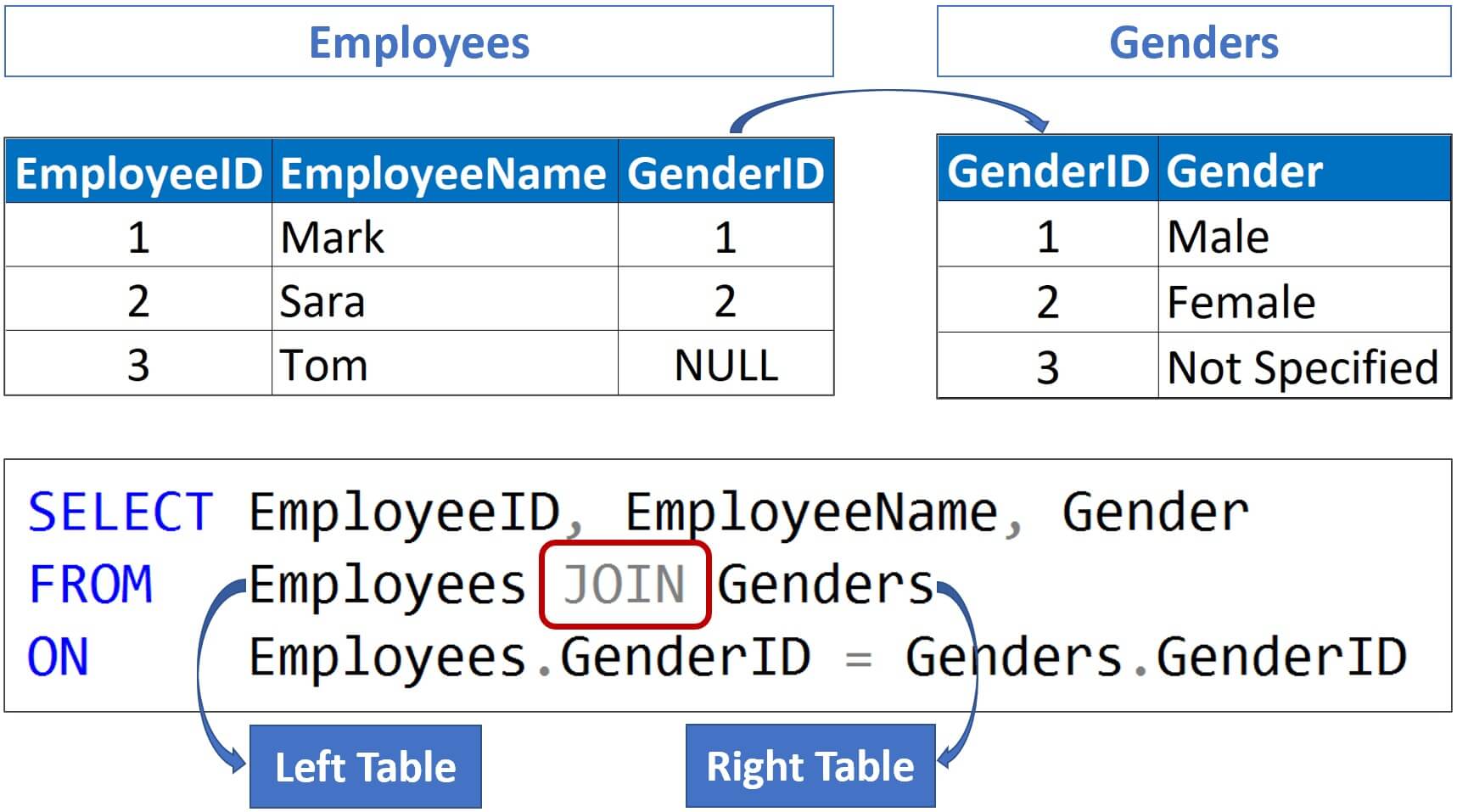
Joins combine rows from multiple tables.


🔹 Types of Joins

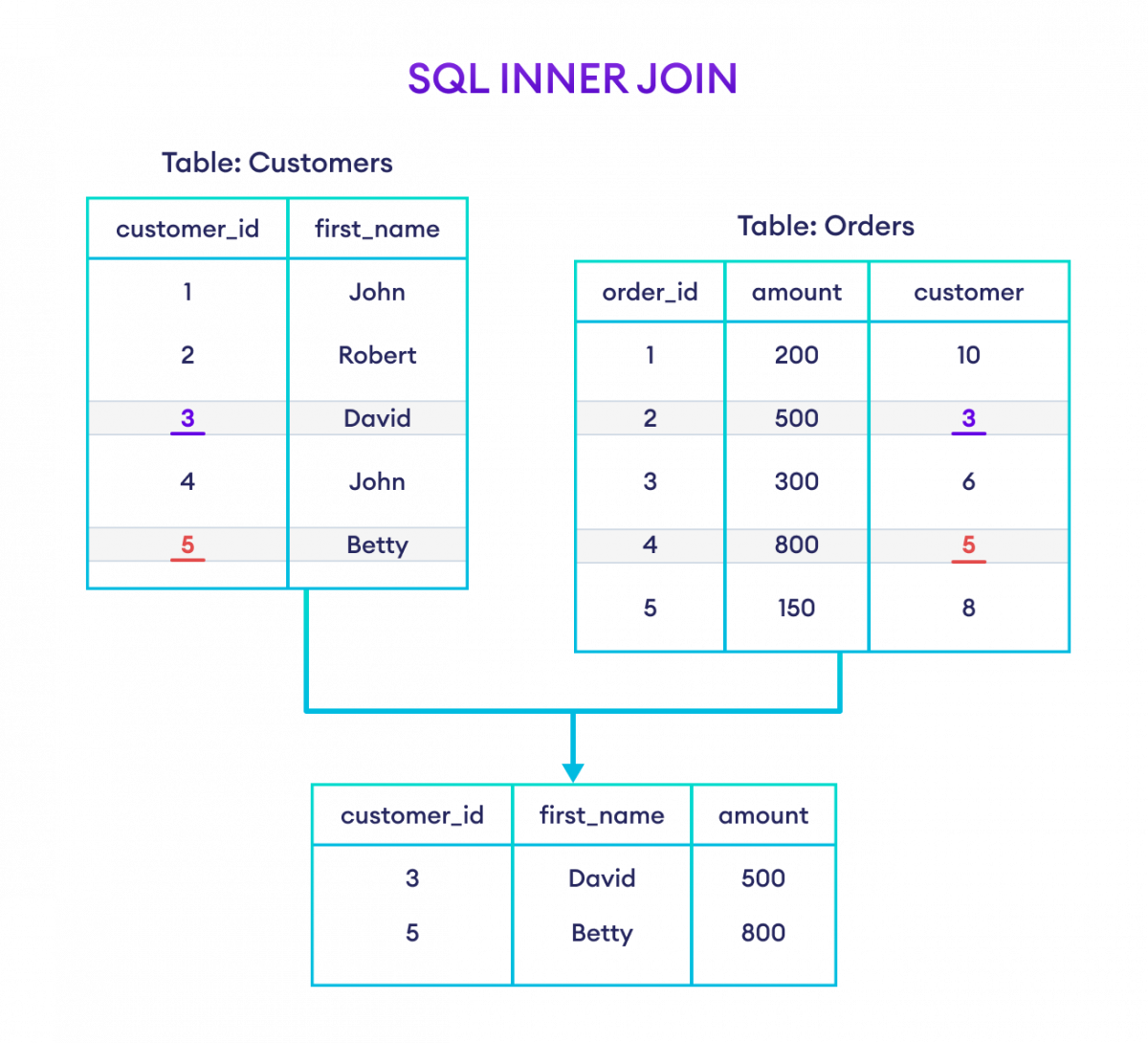
1. INNER JOIN

Returns matching rows.

SELECT * FROM A INNER JOIN B ON A.id = B.id;

2. LEFT JOIN

Returns all rows from left table.


3. RIGHT JOIN

Returns all rows from right table.


4. FULL JOIN

Returns all rows from both tables.


🧠 6. SQL Functions

🔹 Aggregate Functions

  • COUNT()
  • SUM()
  • AVG()
  • MIN()
  • MAX()
SELECT AVG(Age) FROM Students;

🔹 String Functions

  • UPPER()
  • LOWER()
  • LENGTH()

🔹 Date Functions

  • NOW()
  • CURDATE()

🏗️ 7. Constraints in SQL

Constraints enforce rules on data.

  • NOT NULL
  • UNIQUE
  • PRIMARY KEY
  • FOREIGN KEY
  • CHECK
  • DEFAULT
CREATE TABLE Users (
    ID INT PRIMARY KEY,
    Email VARCHAR(100) UNIQUE
);

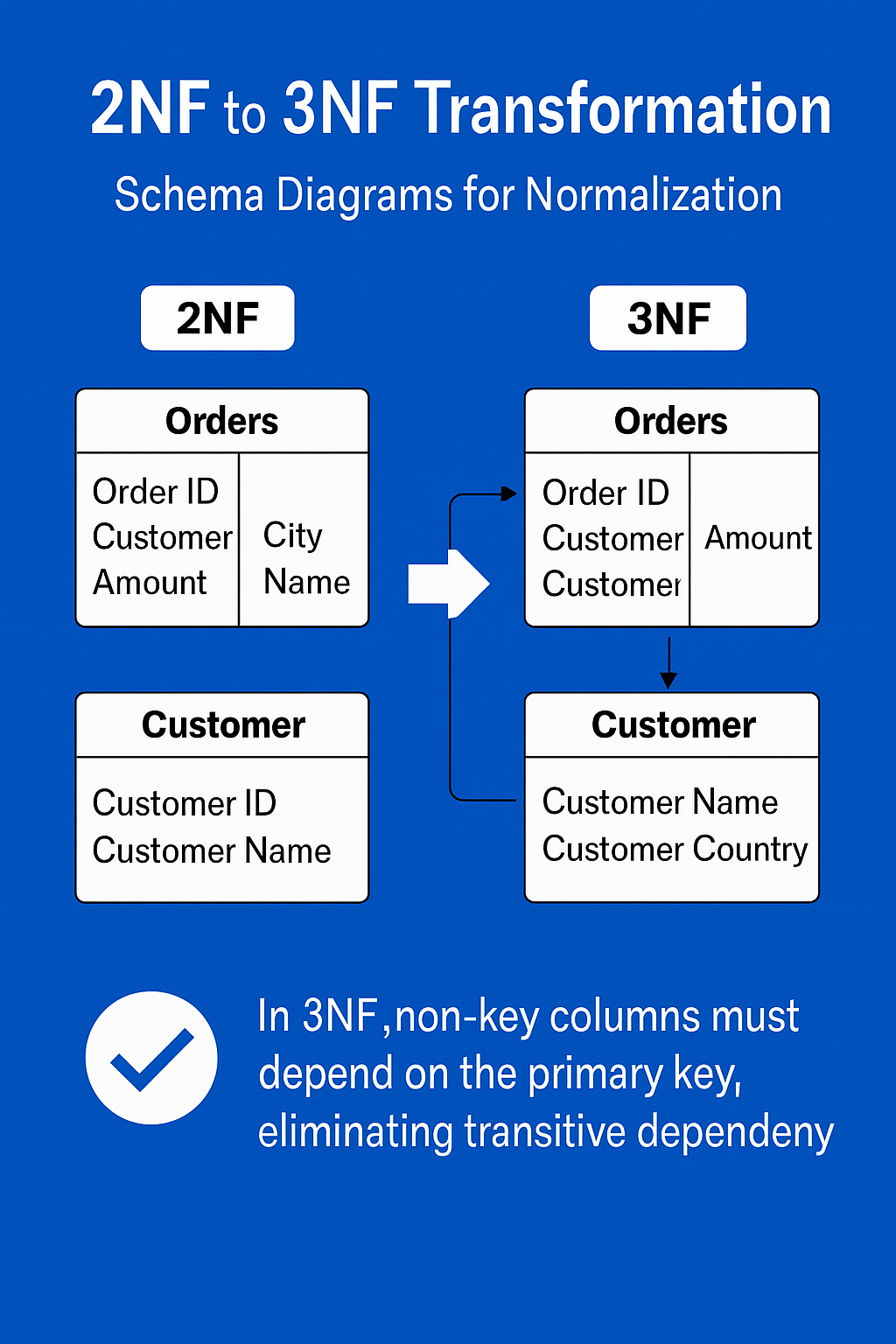
🔄 8. Normalization

Image
Image
Image
Image

Normalization reduces redundancy.

🔹 Types:

  • 1NF: Atomic values
  • 2NF: Remove partial dependency
  • 3NF: Remove transitive dependency

⚡ 9. Indexing

Indexes improve query performance.

CREATE INDEX idx_name ON Students(Name);

Types:

  • Single-column index
  • Composite index
  • Unique index

🔐 10. Transactions

A transaction is a unit of work.

Properties (ACID):

  • Atomicity
  • Consistency
  • Isolation
  • Durability

🔁 11. Subqueries

SELECT Name FROM Students
WHERE Age > (SELECT AVG(Age) FROM Students);

📊 12. Views

Virtual tables based on queries.

CREATE VIEW StudentView AS
SELECT Name FROM Students;

🧩 13. Stored Procedures

Reusable SQL code.

CREATE PROCEDURE GetStudents()
BEGIN
    SELECT * FROM Students;
END;

🔔 14. Triggers

Automatically executed events.

CREATE TRIGGER before_insert
BEFORE INSERT ON Students
FOR EACH ROW
SET NEW.Name = UPPER(NEW.Name);

🌐 15. SQL vs NoSQL

FeatureSQLNoSQL
StructureTable-basedFlexible
SchemaFixedDynamic
ScalabilityVerticalHorizontal

🧪 16. Advanced SQL Concepts

  • Window Functions (ROW_NUMBER(), RANK())
  • CTE (Common Table Expressions)
  • Recursive Queries
  • Partitioning
  • Query Optimization

📈 17. SQL Performance Optimization

  • Use indexes
  • Avoid SELECT *
  • Optimize joins
  • Use caching
  • Analyze execution plans

🧰 18. Popular SQL Databases

  • MySQL
  • PostgreSQL
  • Oracle
  • SQL Server
  • SQLite

🧑‍💻 19. Real-World Applications

  • Banking systems
  • E-commerce platforms
  • Social media
  • Data analytics
  • Inventory systems

📚 20. Advantages of SQL

  • Easy to learn
  • Powerful querying
  • High performance
  • Standardized

⚠️ 21. Limitations of SQL

  • Not ideal for unstructured data
  • Scaling challenges
  • Complex queries can be slow

🔮 22. Future of SQL

  • Integration with AI & Big Data
  • Cloud databases (AWS, Azure, GCP)
  • Real-time analytics
  • Hybrid SQL/NoSQL systems

🏁 Conclusion

SQL remains one of the most essential tools in computing. Whether you are a developer, data analyst, or engineer, mastering SQL enables you to handle data efficiently, build scalable systems, and extract meaningful insights.

🏷️ Tags