Tag Archives: Transactions

🔄 Transactions & ACID Properties

Image
Image
Image
Image

📘 1. Introduction to Transactions

A transaction in database systems is a sequence of one or more operations performed as a single logical unit of work. These operations may include:

  • Reading data
  • Writing data
  • Updating records
  • Deleting records

The key idea is simple but powerful:

👉 Either all operations succeed, or none of them do.


🔹 Real-Life Example

Consider a bank transfer:

  1. Deduct ₹1000 from Account A
  2. Add ₹1000 to Account B

If step 1 succeeds but step 2 fails, the system becomes inconsistent. Transactions prevent this by ensuring all-or-nothing execution.


🔹 Formal Definition

A transaction is:

  • A logical unit of work
  • Executed completely or not at all
  • Ensures database consistency

🧠 2. Why Transactions Are Important

Transactions are critical for:

  • Data integrity
  • Reliability
  • Consistency across operations
  • Handling system failures
  • Concurrent access management

🔹 Without Transactions

  • Partial updates
  • Data corruption
  • Lost data
  • Inconsistent state

🏗️ 3. Transaction States
Image
Image
Image
Image

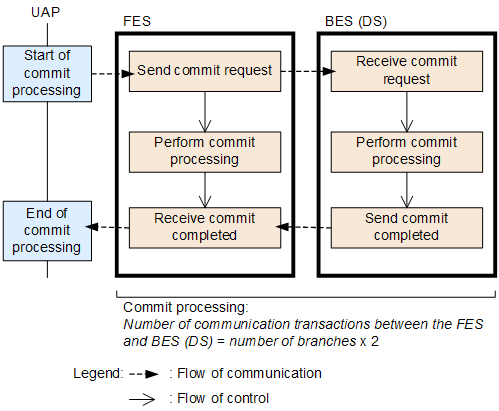
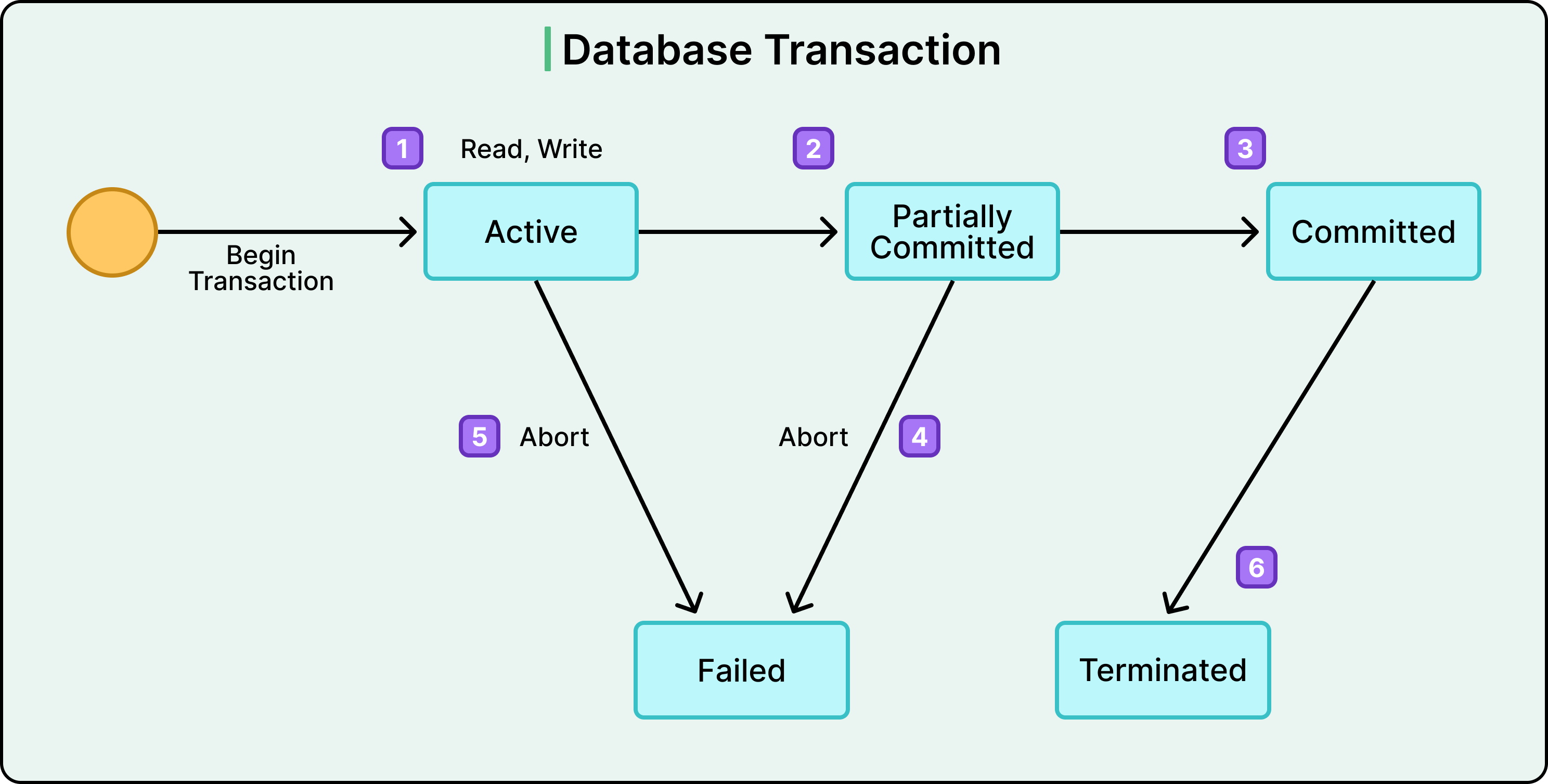
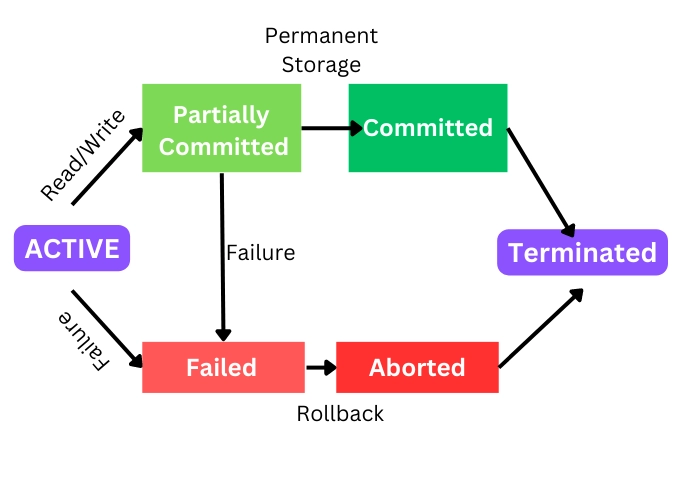
A transaction passes through several states:


🔹 1. Active

  • Transaction is executing

🔹 2. Partially Committed

  • All operations executed, waiting to commit

🔹 3. Committed

  • Changes permanently saved

🔹 4. Failed

  • Error occurs

🔹 5. Aborted

  • Rolled back to previous state

🔁 4. Transaction Operations


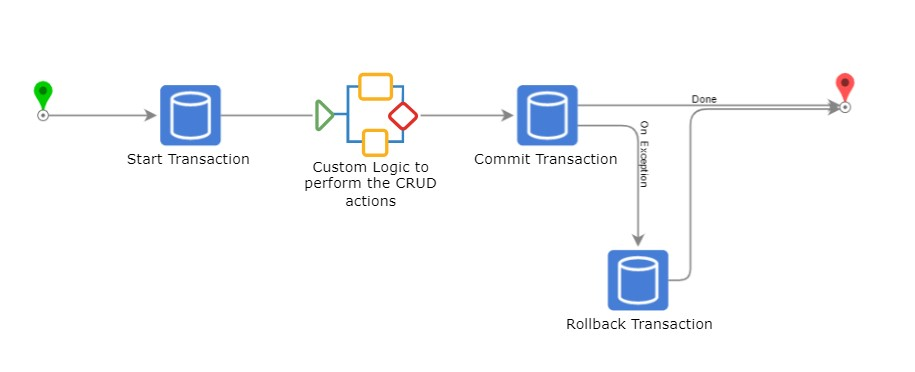
🔹 BEGIN TRANSACTION

Starts a transaction.

BEGIN;

🔹 COMMIT

Saves changes permanently.

COMMIT;

🔹 ROLLBACK

Reverts changes.

ROLLBACK;

🔹 SAVEPOINT

Creates checkpoints.

SAVEPOINT sp1;
ROLLBACK TO sp1;

⚖️ 5. ACID Properties
Image
Image
Image
Image

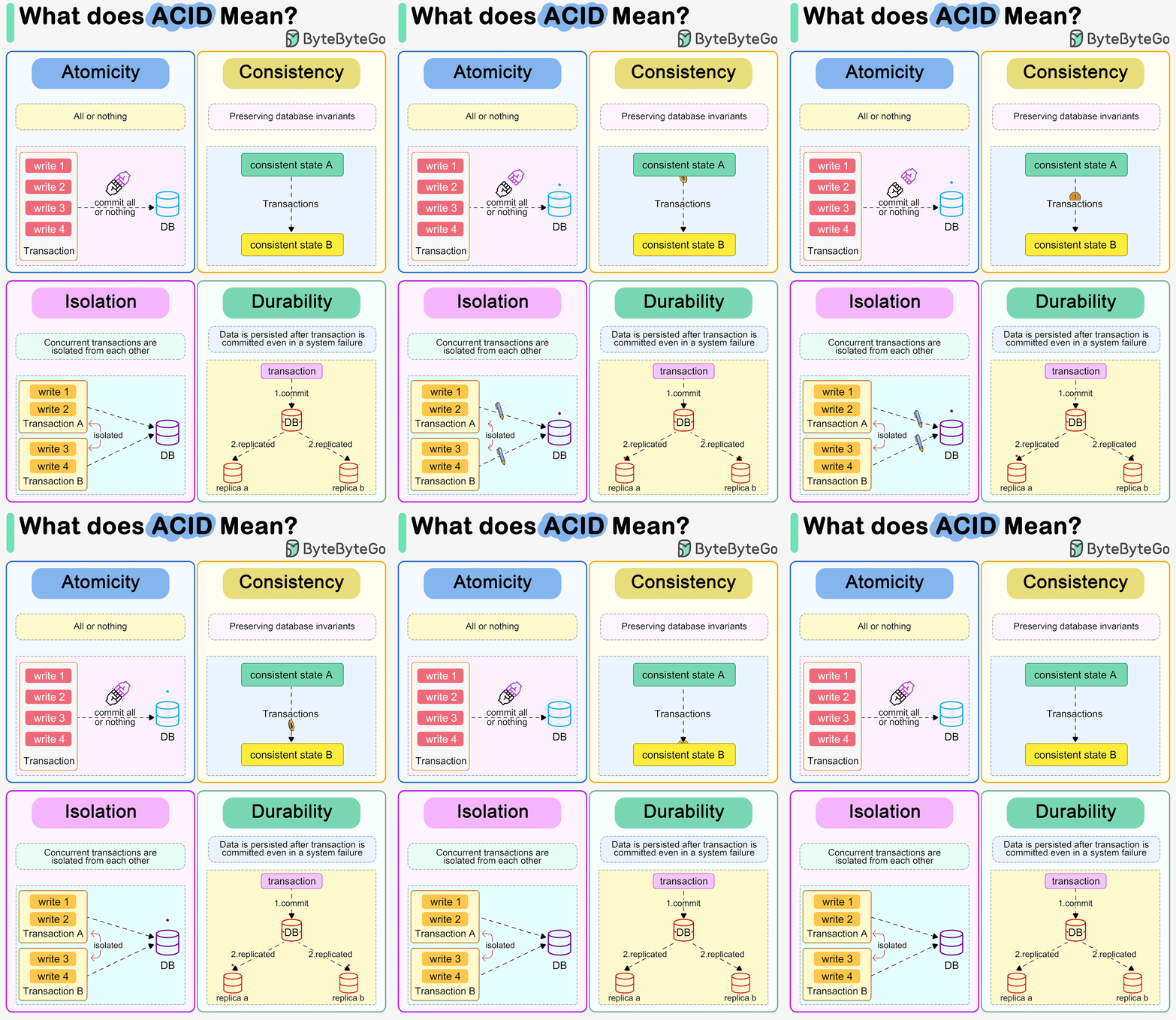
ACID properties ensure reliable transactions:


🔹 A – Atomicity

👉 All or nothing

  • If one operation fails → entire transaction fails
  • Ensures no partial updates

Example:

  • Money deducted but not added → rollback

🔹 C – Consistency

👉 Database remains valid

  • Enforces rules, constraints
  • Moves from one valid state to another

🔹 I – Isolation

👉 Transactions do not interfere

  • Concurrent transactions behave independently

🔹 D – Durability

👉 Changes are permanent

  • Even after crash, data persists

🔍 6. Atomicity in Detail

Atomicity ensures:

  • No partial execution
  • Rollback on failure

🔹 Implementation Techniques

  • Undo logs
  • Write-ahead logging (WAL)

🔹 Example

BEGIN;

UPDATE Accounts SET balance = balance - 1000 WHERE id = 1;
UPDATE Accounts SET balance = balance + 1000 WHERE id = 2;

COMMIT;

If second update fails → rollback entire transaction.


🧩 7. Consistency in Detail

Consistency ensures:

  • Constraints are maintained
  • Rules are enforced

🔹 Types of Constraints

  • Primary key
  • Foreign key
  • Check constraints

🔹 Example

  • Balance cannot be negative
  • Foreign key must exist

🔄 8. Isolation in Detail
Image
Image
Image
Image

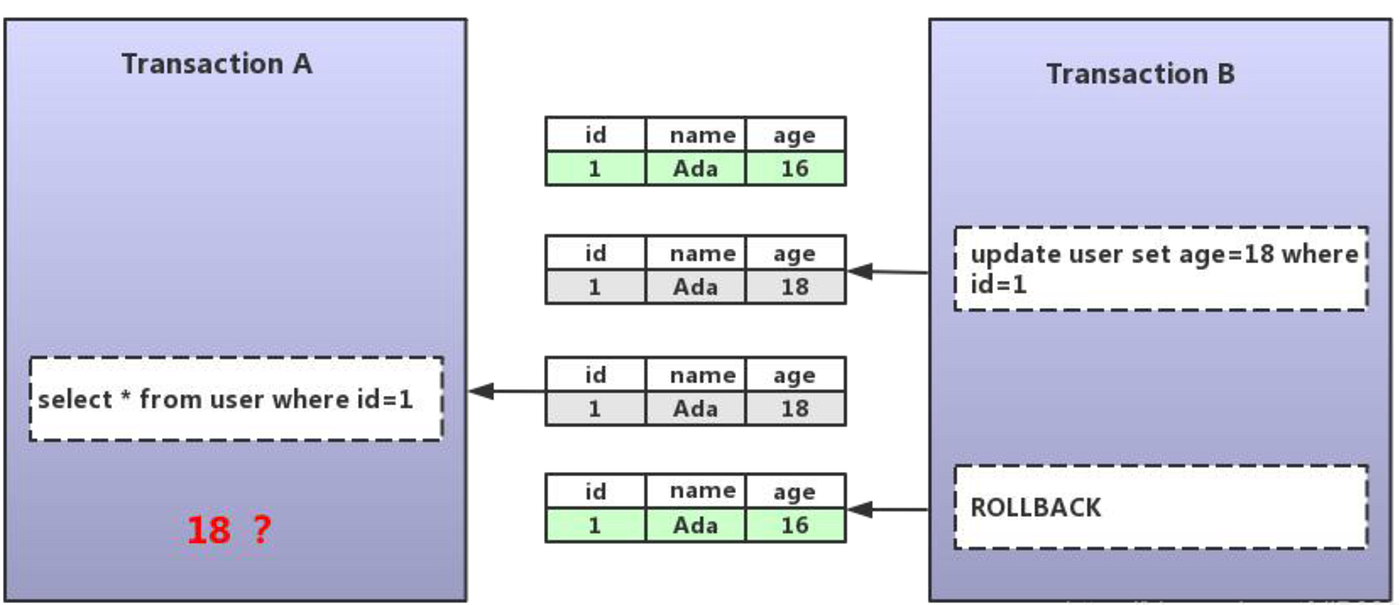
Isolation prevents interference between transactions.


🔹 Problems Without Isolation

1. Dirty Read

Reading uncommitted data


2. Non-repeatable Read

Data changes between reads


3. Phantom Read

New rows appear unexpectedly


🔹 Isolation Levels

LevelDescription
Read UncommittedLowest isolation
Read CommittedPrevents dirty reads
Repeatable ReadPrevents non-repeatable reads
SerializableHighest isolation

🔐 9. Durability in Detail

Durability ensures:

  • Data survives crashes
  • Stored permanently

🔹 Implementation

  • Transaction logs
  • Disk storage
  • Backup systems

🔹 Example

After COMMIT:

  • Power failure occurs
  • Data still exists

🧠 10. Concurrency Control
Image
Image
Image
Image

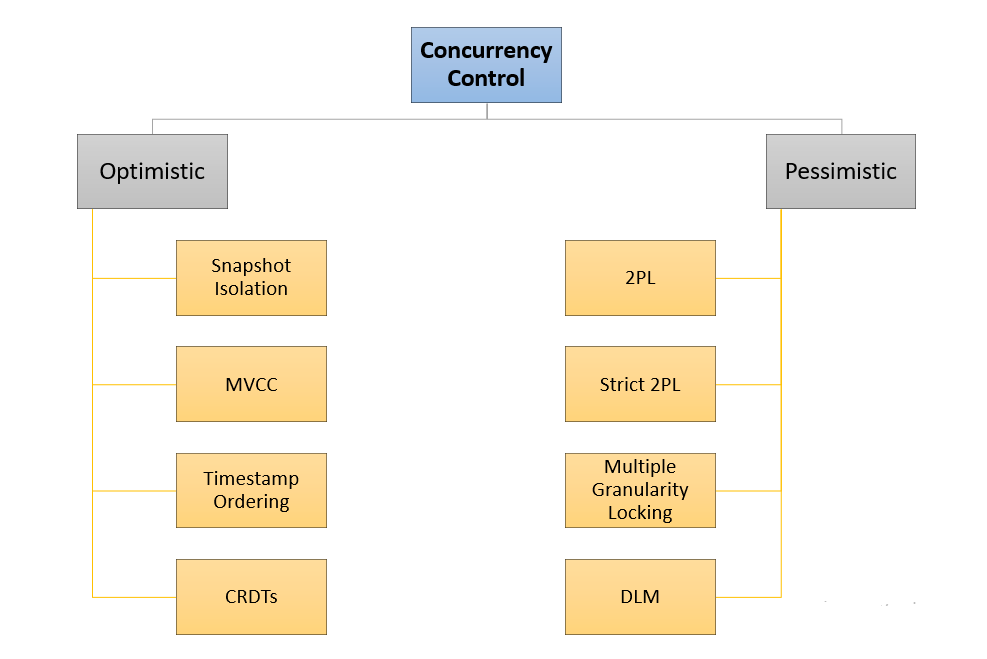
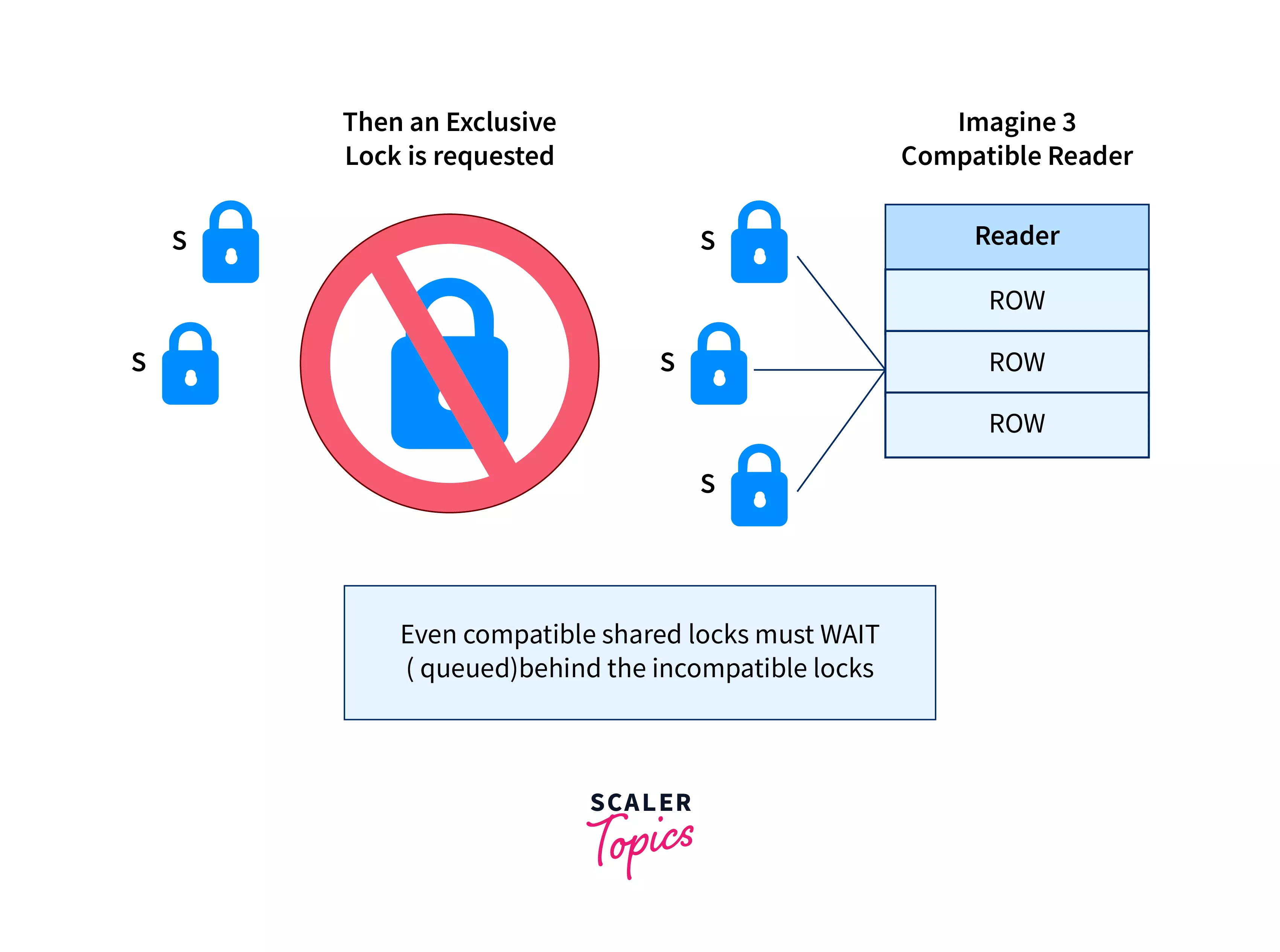
Concurrency control manages multiple transactions.


🔹 Techniques

1. Locking

  • Shared lock (read)
  • Exclusive lock (write)

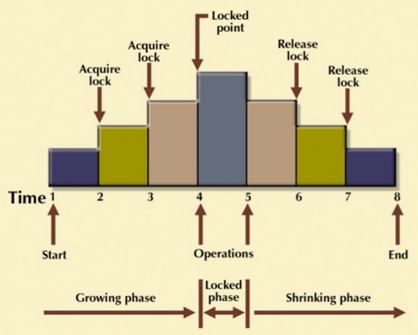
2. Two-Phase Locking (2PL)

  • Growing phase
  • Shrinking phase

3. Timestamp Ordering

  • Based on timestamps

4. MVCC (Multi-Version Concurrency Control)

  • Multiple versions of data

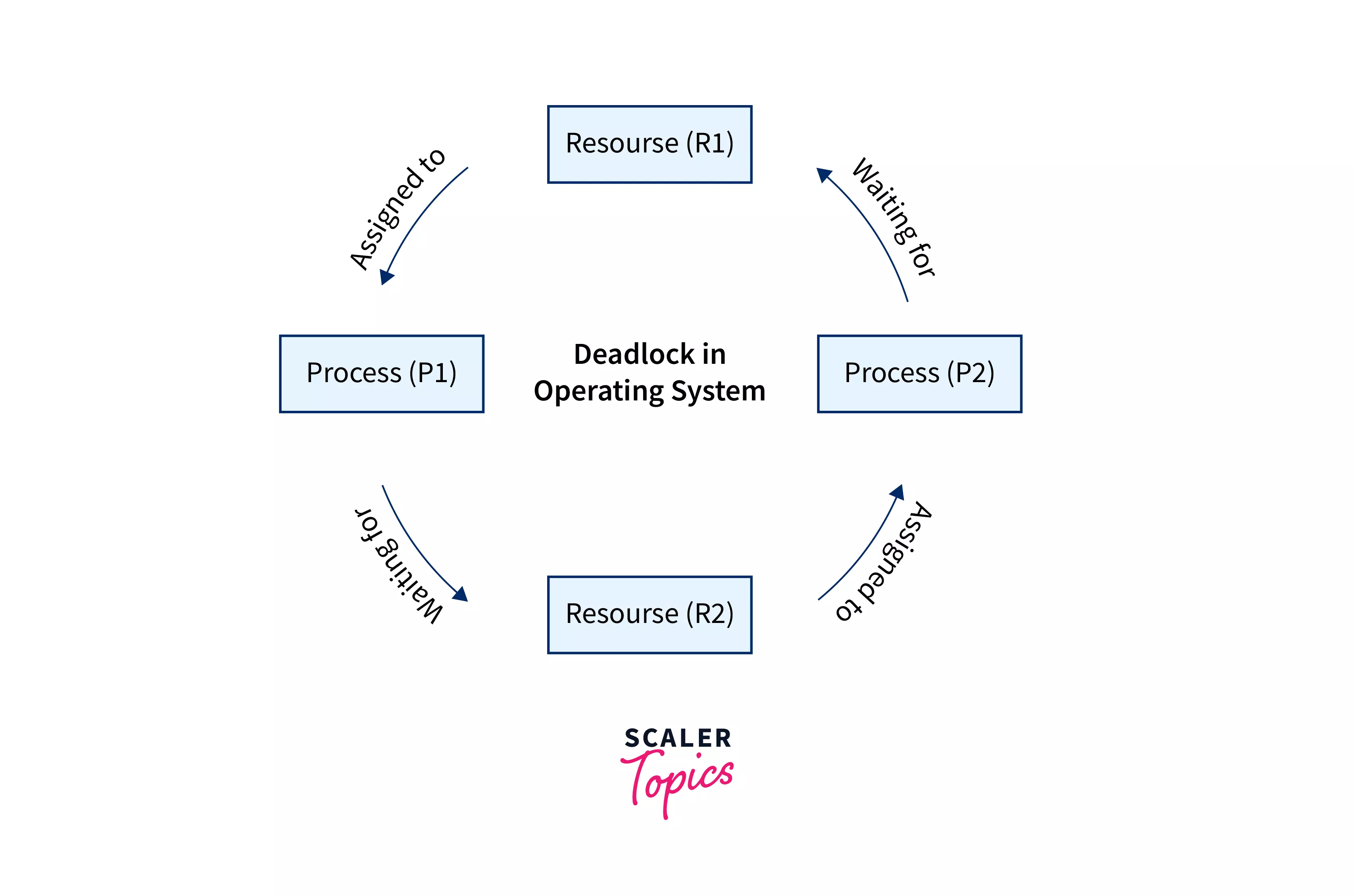
🔁 11. Deadlocks


🔹 What is Deadlock?

Two transactions wait for each other indefinitely.


🔹 Example

  • T1 locks A, needs B
  • T2 locks B, needs A

🔹 Handling Deadlocks

  • Detection
  • Prevention
  • Timeout

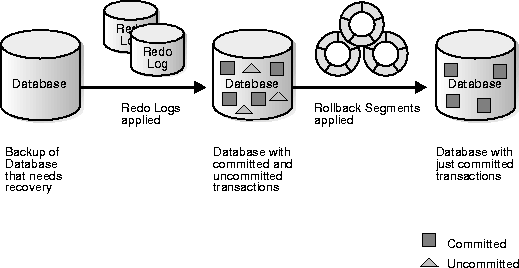
🧪 12. Logging and Recovery

Image
Image
Image
Image

🔹 Types of Logs

  • Undo log
  • Redo log

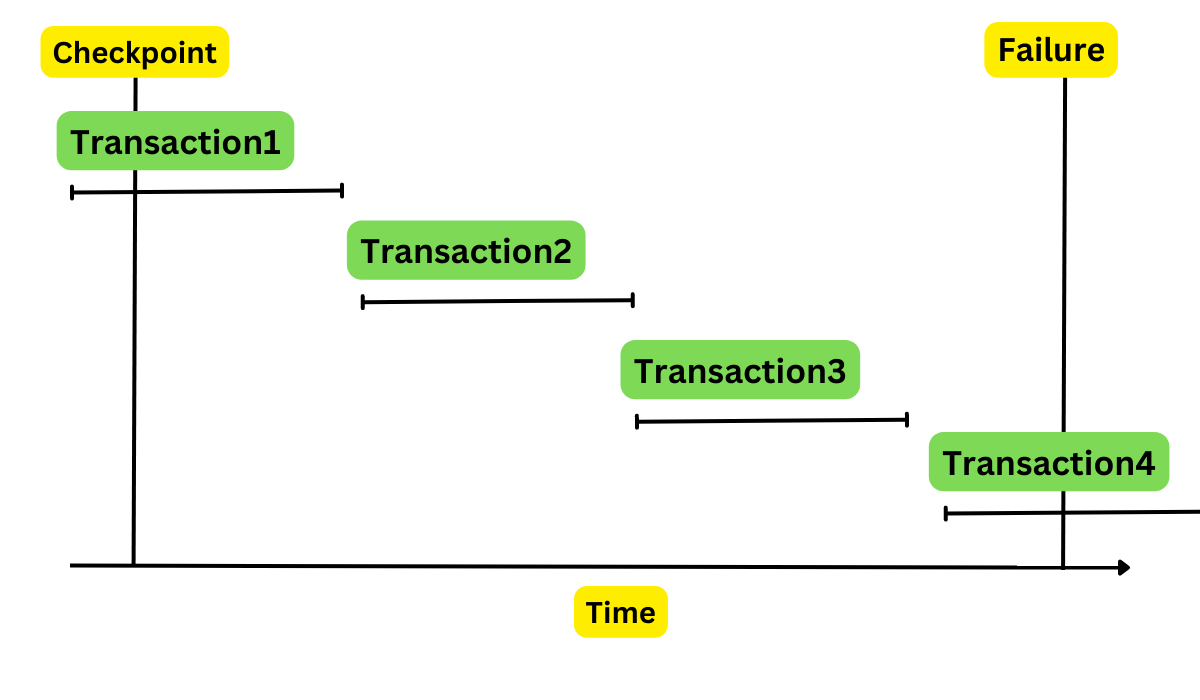
🔹 Recovery Techniques

  • Checkpointing
  • Log-based recovery

📊 13. Distributed Transactions


🔹 Challenges

  • Network failures
  • Data consistency across nodes

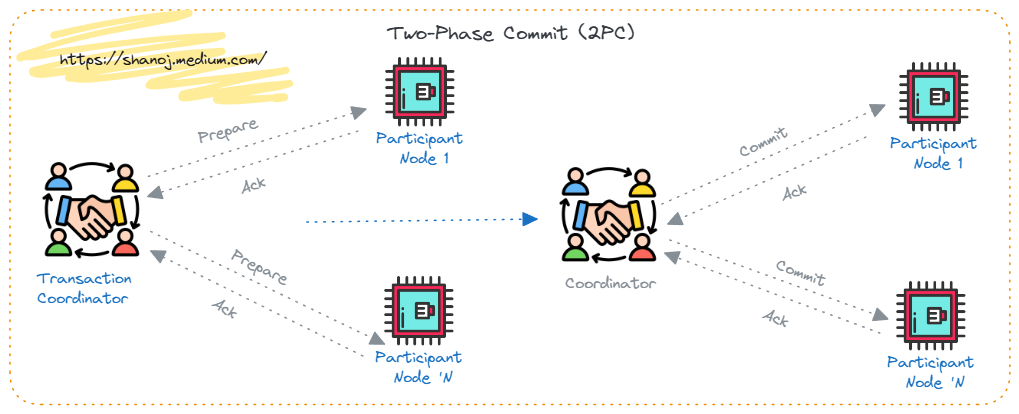
🔹 Two-Phase Commit (2PC)

  1. Prepare phase
  2. Commit phase

🔹 Three-Phase Commit (3PC)

Improved version of 2PC


🌐 14. Transactions in Modern Databases


🔹 SQL Databases

  • Strong ACID compliance

🔹 NoSQL Databases

  • Often use BASE model
    • Basically Available
    • Soft state
    • Eventually consistent

⚖️ 15. ACID vs BASE

FeatureACIDBASE
ConsistencyStrongEventual
AvailabilityModerateHigh
Use CaseBankingSocial media

📈 16. Performance Considerations

  • High isolation → slower performance
  • Low isolation → faster but risky

🔹 Trade-offs

  • Consistency vs performance
  • Isolation vs concurrency

🧩 17. Real-World Applications


🔹 Banking Systems

  • Money transfer
  • Account updates

🔹 E-commerce

  • Order processing
  • Payment transactions

🔹 Airline Booking

  • Seat reservation

🧠 18. Advanced Topics

  • Nested transactions
  • Long-running transactions
  • Savepoints
  • Distributed consensus

🏗️ 19. Best Practices

  • Keep transactions short
  • Avoid unnecessary locks
  • Use proper isolation level
  • Monitor performance

⚠️ 20. Common Issues

  • Deadlocks
  • Blocking
  • Performance bottlenecks
  • Data inconsistency

🔮 21. Future Trends

  • Cloud-native transactions
  • Distributed ACID systems
  • New consistency models

🏁 Conclusion

Transactions and ACID properties form the core foundation of reliable database systems. They ensure that even in complex, concurrent, and failure-prone environments, data remains:

  • Accurate
  • Consistent
  • Safe
  • Durable

Mastering transactions is essential for building robust applications, especially in systems where correctness is critical.

🏷️ Tags

🗄️ SQL (Structured Query Language)

Image
Image
Image
Image

📘 1. Introduction to SQL

SQL (Structured Query Language) is a standard programming language used to store, manipulate, and retrieve data from relational databases. It is the backbone of modern data-driven applications and is widely used in industries such as finance, healthcare, e-commerce, education, and more.

SQL was developed in the 1970s at IBM by Donald D. Chamberlin and Raymond F. Boyce. Initially called SEQUEL (Structured English Query Language), it evolved into SQL and became an international standard (ANSI/ISO).


🔹 Why SQL is Important

  • Enables efficient data management
  • Used in web applications, mobile apps, enterprise systems
  • Supports data analysis and reporting
  • Works with major database systems like:
    • MySQL
    • PostgreSQL
    • Oracle Database
    • SQL Server
    • SQLite

🔹 Characteristics of SQL

  • Declarative language (focus on what to do, not how)
  • Supports complex queries
  • Standardized (ANSI SQL)
  • Integrates with multiple programming languages
  • Supports transactions and concurrency

🧱 2. Relational Database Fundamentals

Image
Image
Image

SQL works with Relational Database Management Systems (RDBMS).

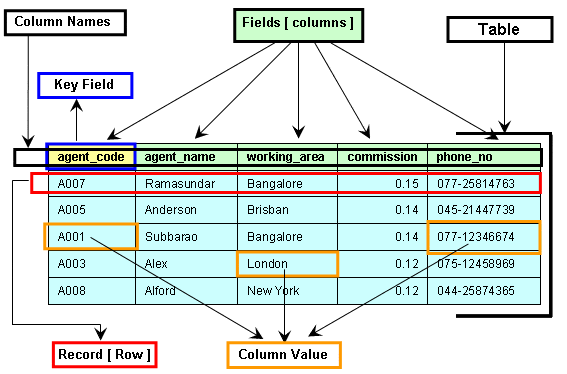
🔹 Core Concepts

1. Table

A table is a collection of related data organized in rows and columns.

2. Row (Record)

Represents a single entry.

3. Column (Field)

Represents an attribute of the data.

4. Primary Key

  • Unique identifier for each record
  • Cannot be NULL

5. Foreign Key

  • Links two tables together
  • Maintains referential integrity

6. Schema

  • Structure of the database

🔹 Example Table

IDNameAge
1John25
2Sara30

🧮 3. Types of SQL Commands

SQL commands are divided into categories:


🔹 1. DDL (Data Definition Language)

Used to define database structure.

  • CREATE
  • ALTER
  • DROP
  • TRUNCATE

Example:

CREATE TABLE Students (
    ID INT PRIMARY KEY,
    Name VARCHAR(50),
    Age INT
);

🔹 2. DML (Data Manipulation Language)

Used to manipulate data.

  • INSERT
  • UPDATE
  • DELETE
INSERT INTO Students VALUES (1, 'John', 25);

UPDATE Students SET Age = 26 WHERE ID = 1;

DELETE FROM Students WHERE ID = 1;

🔹 3. DQL (Data Query Language)

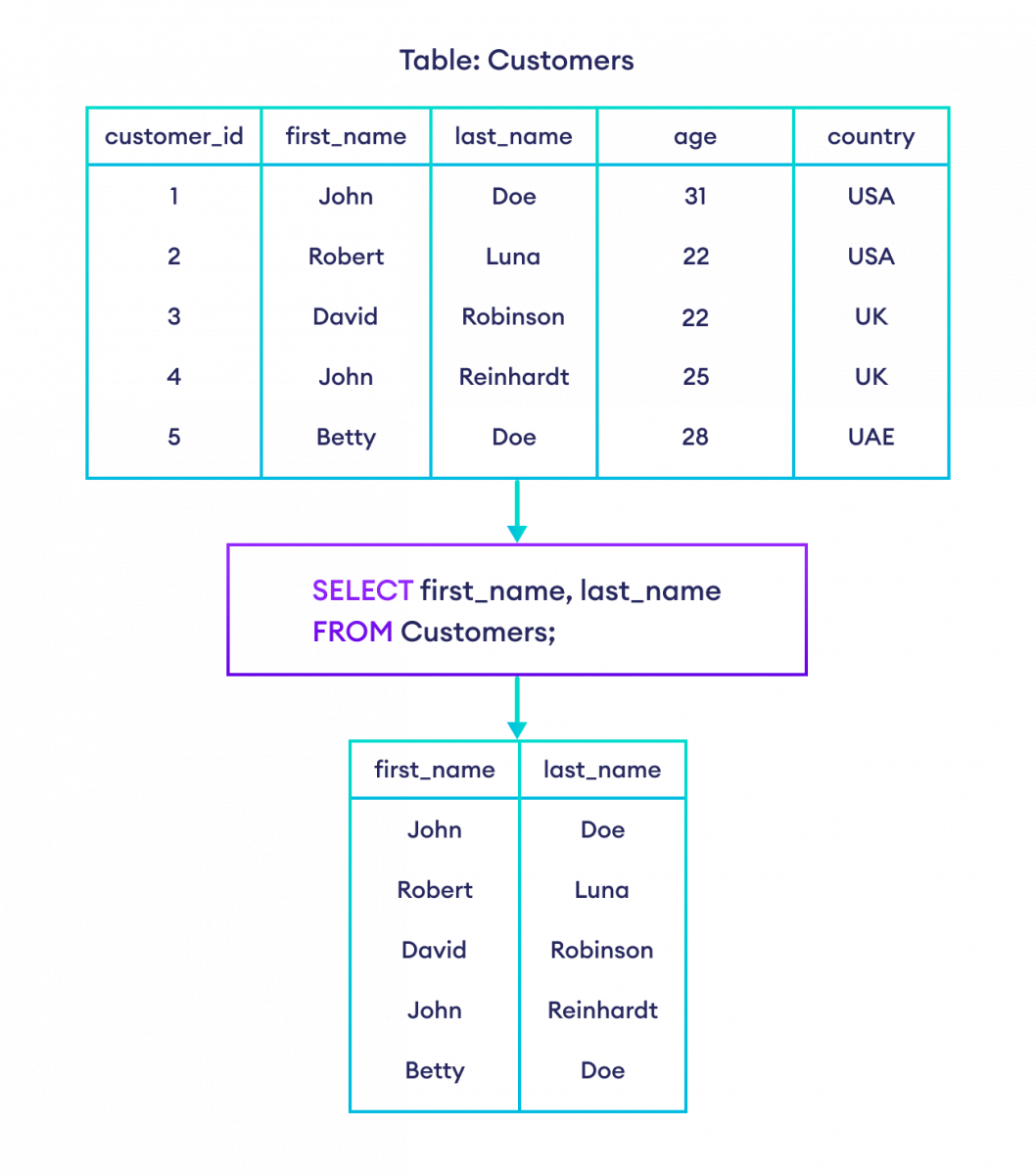
  • SELECT
SELECT * FROM Students;

🔹 4. DCL (Data Control Language)

  • GRANT
  • REVOKE

🔹 5. TCL (Transaction Control Language)

  • COMMIT
  • ROLLBACK
  • SAVEPOINT

🔍 4. SQL Queries and Clauses

Image
Image
Image
Image

🔹 SELECT Statement

SELECT column1, column2 FROM table_name;

🔹 WHERE Clause

SELECT * FROM Students WHERE Age > 25;

🔹 ORDER BY

SELECT * FROM Students ORDER BY Age DESC;

🔹 GROUP BY

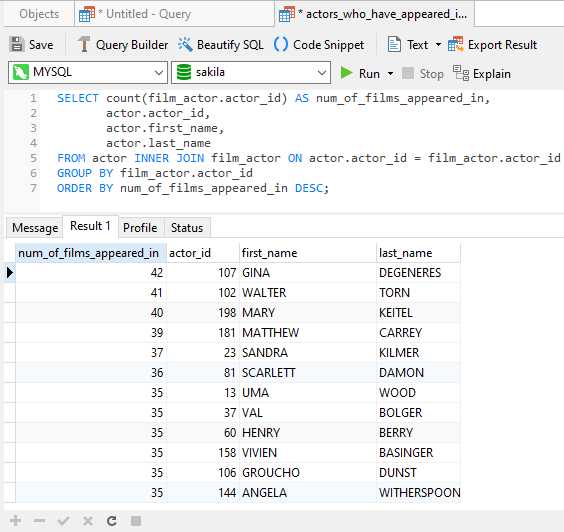
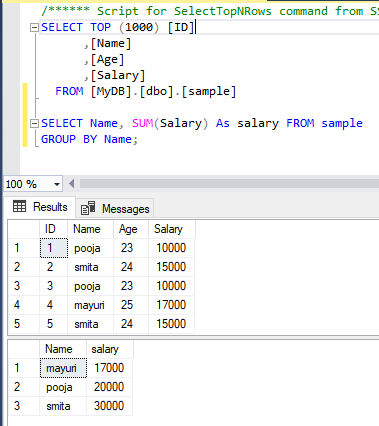
SELECT Age, COUNT(*) FROM Students GROUP BY Age;

🔹 HAVING

SELECT Age, COUNT(*) 
FROM Students 
GROUP BY Age 
HAVING COUNT(*) > 1;

🔹 DISTINCT

SELECT DISTINCT Age FROM Students;

🔗 5. SQL Joins

Image
Image
Image
Image

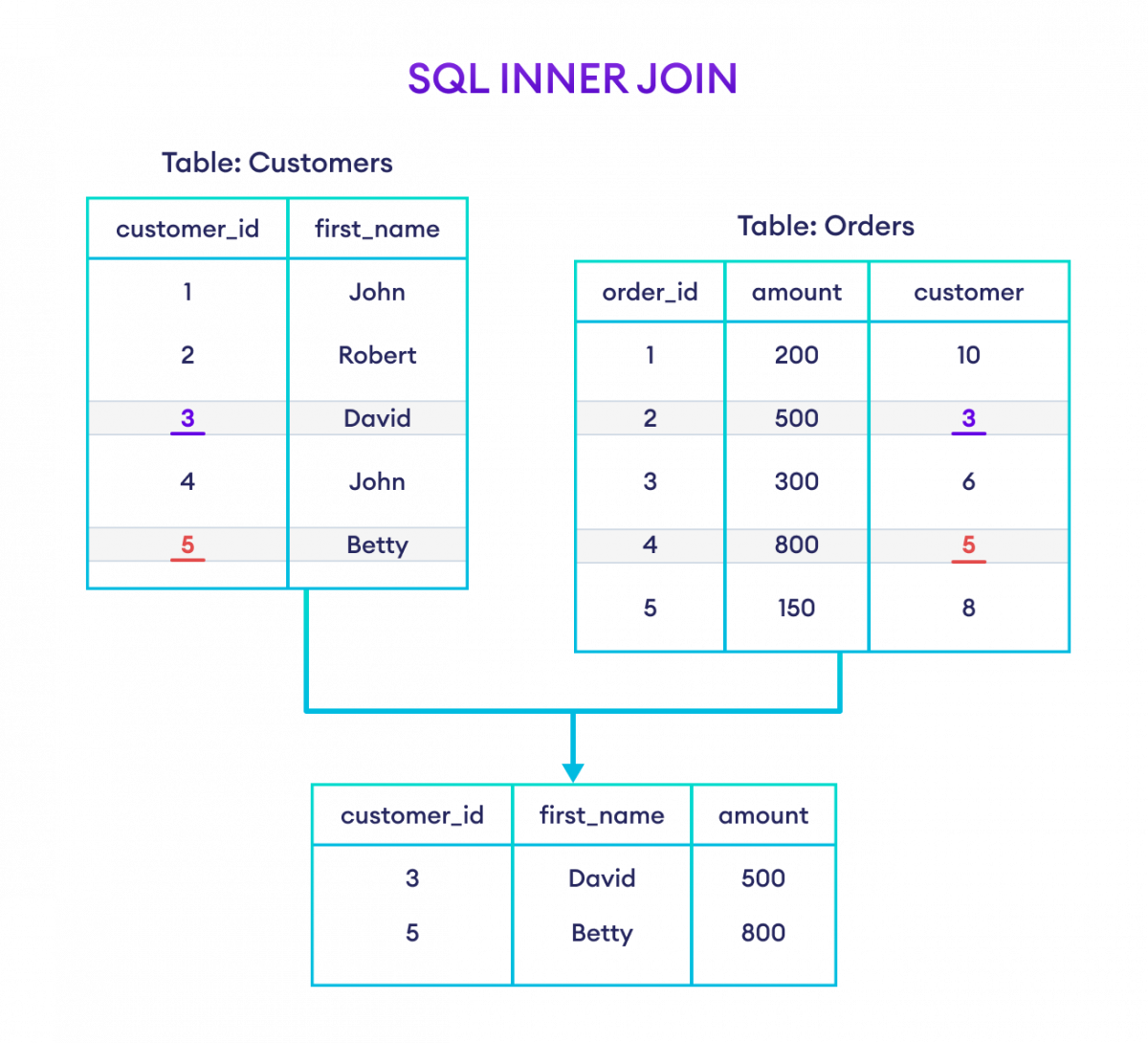
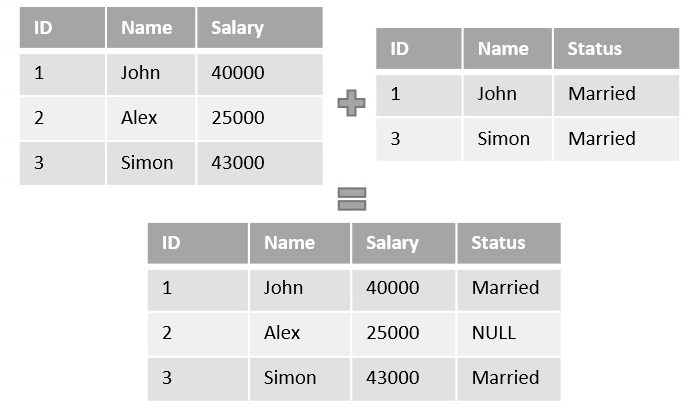
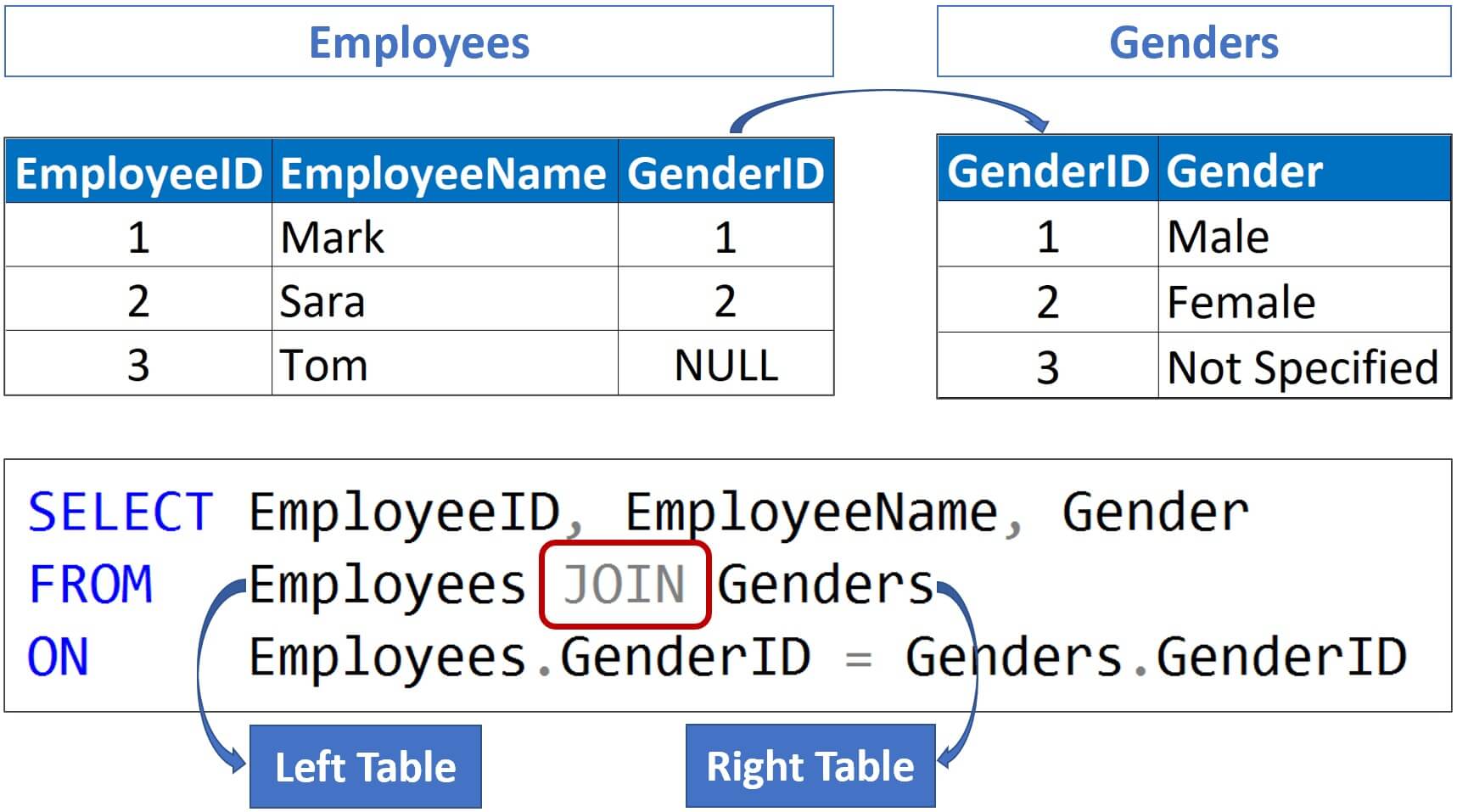
Joins combine rows from multiple tables.


🔹 Types of Joins

1. INNER JOIN

Returns matching rows.

SELECT * FROM A INNER JOIN B ON A.id = B.id;

2. LEFT JOIN

Returns all rows from left table.


3. RIGHT JOIN

Returns all rows from right table.


4. FULL JOIN

Returns all rows from both tables.


🧠 6. SQL Functions

🔹 Aggregate Functions

  • COUNT()
  • SUM()
  • AVG()
  • MIN()
  • MAX()
SELECT AVG(Age) FROM Students;

🔹 String Functions

  • UPPER()
  • LOWER()
  • LENGTH()

🔹 Date Functions

  • NOW()
  • CURDATE()

🏗️ 7. Constraints in SQL

Constraints enforce rules on data.

  • NOT NULL
  • UNIQUE
  • PRIMARY KEY
  • FOREIGN KEY
  • CHECK
  • DEFAULT
CREATE TABLE Users (
    ID INT PRIMARY KEY,
    Email VARCHAR(100) UNIQUE
);

🔄 8. Normalization

Image
Image
Image
Image

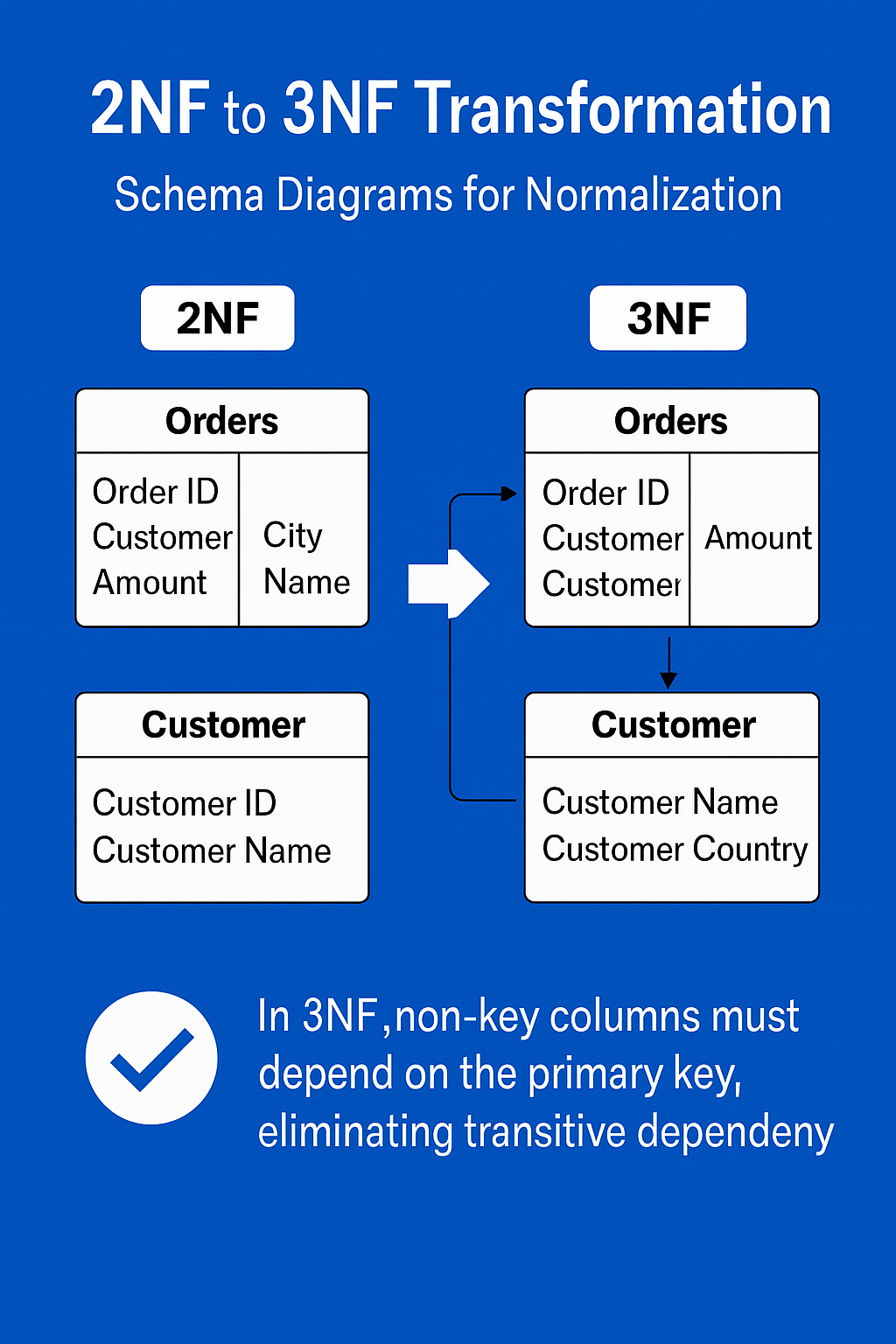
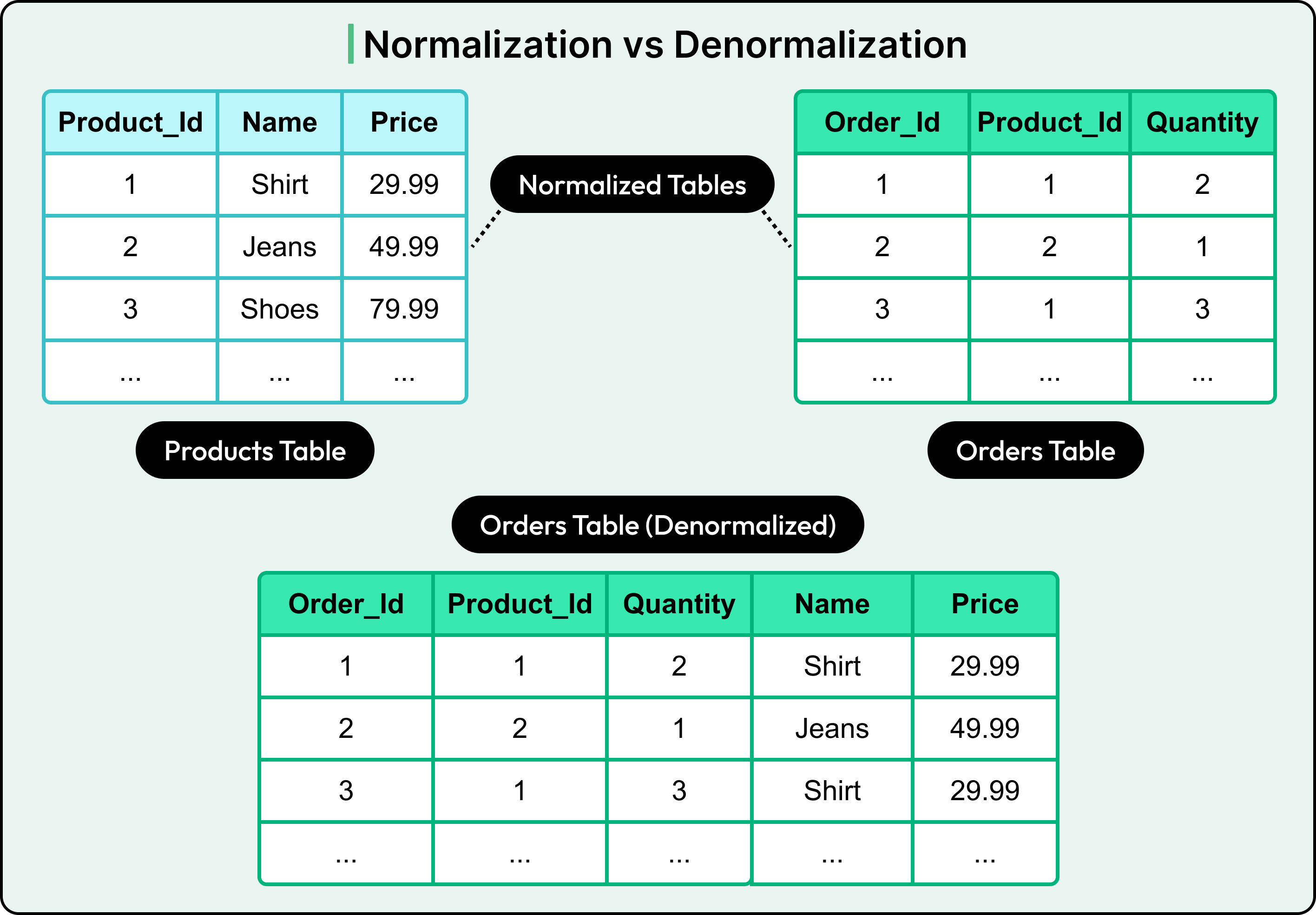
Normalization reduces redundancy.

🔹 Types:

  • 1NF: Atomic values
  • 2NF: Remove partial dependency
  • 3NF: Remove transitive dependency

⚡ 9. Indexing

Indexes improve query performance.

CREATE INDEX idx_name ON Students(Name);

Types:

  • Single-column index
  • Composite index
  • Unique index

🔐 10. Transactions

A transaction is a unit of work.

Properties (ACID):

  • Atomicity
  • Consistency
  • Isolation
  • Durability

🔁 11. Subqueries

SELECT Name FROM Students
WHERE Age > (SELECT AVG(Age) FROM Students);

📊 12. Views

Virtual tables based on queries.

CREATE VIEW StudentView AS
SELECT Name FROM Students;

🧩 13. Stored Procedures

Reusable SQL code.

CREATE PROCEDURE GetStudents()
BEGIN
    SELECT * FROM Students;
END;

🔔 14. Triggers

Automatically executed events.

CREATE TRIGGER before_insert
BEFORE INSERT ON Students
FOR EACH ROW
SET NEW.Name = UPPER(NEW.Name);

🌐 15. SQL vs NoSQL

FeatureSQLNoSQL
StructureTable-basedFlexible
SchemaFixedDynamic
ScalabilityVerticalHorizontal

🧪 16. Advanced SQL Concepts

  • Window Functions (ROW_NUMBER(), RANK())
  • CTE (Common Table Expressions)
  • Recursive Queries
  • Partitioning
  • Query Optimization

📈 17. SQL Performance Optimization

  • Use indexes
  • Avoid SELECT *
  • Optimize joins
  • Use caching
  • Analyze execution plans

🧰 18. Popular SQL Databases

  • MySQL
  • PostgreSQL
  • Oracle
  • SQL Server
  • SQLite

🧑‍💻 19. Real-World Applications

  • Banking systems
  • E-commerce platforms
  • Social media
  • Data analytics
  • Inventory systems

📚 20. Advantages of SQL

  • Easy to learn
  • Powerful querying
  • High performance
  • Standardized

⚠️ 21. Limitations of SQL

  • Not ideal for unstructured data
  • Scaling challenges
  • Complex queries can be slow

🔮 22. Future of SQL

  • Integration with AI & Big Data
  • Cloud databases (AWS, Azure, GCP)
  • Real-time analytics
  • Hybrid SQL/NoSQL systems

🏁 Conclusion

SQL remains one of the most essential tools in computing. Whether you are a developer, data analyst, or engineer, mastering SQL enables you to handle data efficiently, build scalable systems, and extract meaningful insights.


🏷️ Tags