Tag Archives: Big Data

๐Ÿข Data Warehousing

Image
Image
Image
Image

๐Ÿ“˜ 1. Introduction to Data Warehousing

A Data Warehouse is a centralized repository designed to store large volumes of structured data collected from multiple sources for the purpose of analysis, reporting, and decision-making.

Unlike operational databases (OLTP systems), which handle day-to-day transactions, data warehouses are optimized for analytical processing (OLAP).


๐Ÿ”น Definition

A data warehouse is:

A subject-oriented, integrated, time-variant, and non-volatile collection of data that supports decision-making.


๐Ÿ”น Key Characteristics

  • Subject-Oriented โ†’ Organized around business topics (sales, customers)
  • Integrated โ†’ Combines data from multiple sources
  • Time-Variant โ†’ Stores historical data
  • Non-Volatile โ†’ Data is stable (read-heavy, not frequently updated)

๐Ÿง  2. Why Data Warehousing is Important


๐Ÿ”น Business Benefits

  • Better decision-making
  • Historical trend analysis
  • Improved reporting
  • Data consistency across organization

๐Ÿ”น Problems It Solves

  • Data scattered across systems
  • Inconsistent formats
  • Slow reporting queries
  • Lack of historical insights

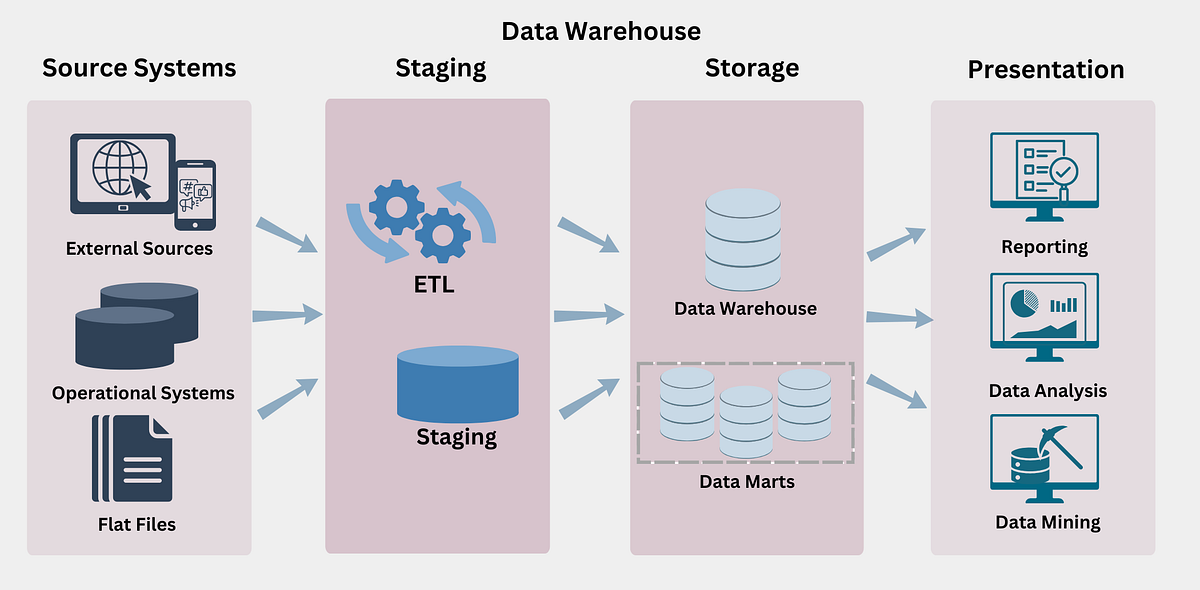
๐Ÿ—๏ธ 3. Data Warehouse Architecture

Image
Image
Image
Image

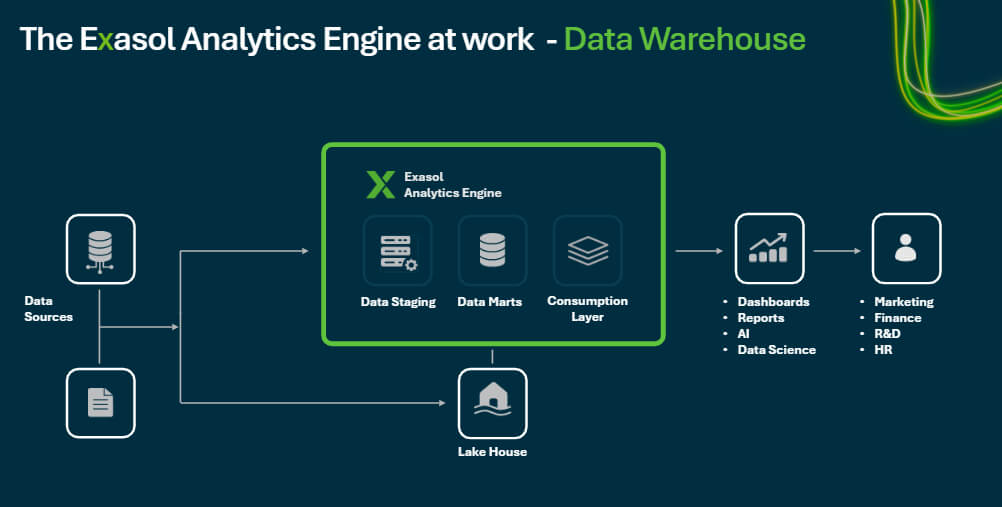
๐Ÿ”น Three-Tier Architecture

1. Bottom Tier โ€“ Data Sources

  • Operational databases
  • APIs
  • Logs
  • External data

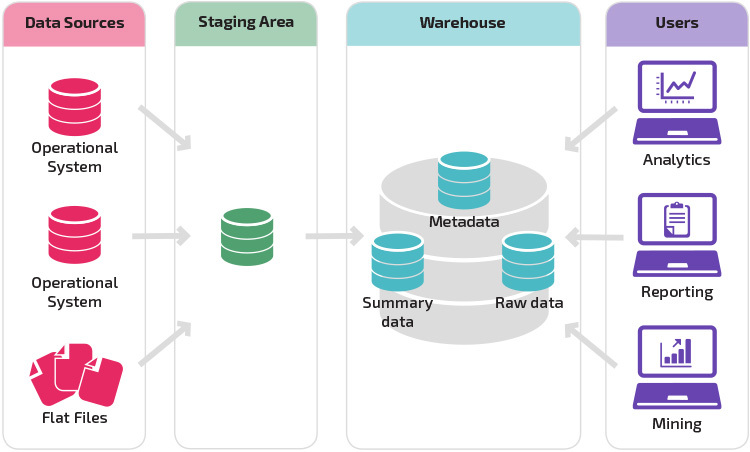
2. Middle Tier โ€“ Data Warehouse Server

  • ETL processing
  • Storage
  • Data integration

3. Top Tier โ€“ Front-End Tools

  • Reporting tools
  • Dashboards
  • BI tools

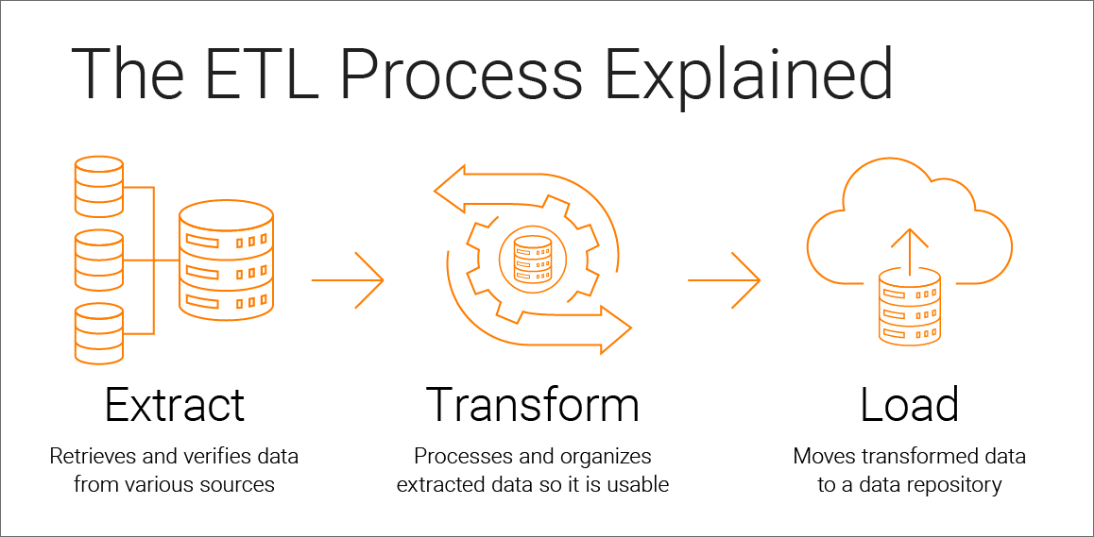
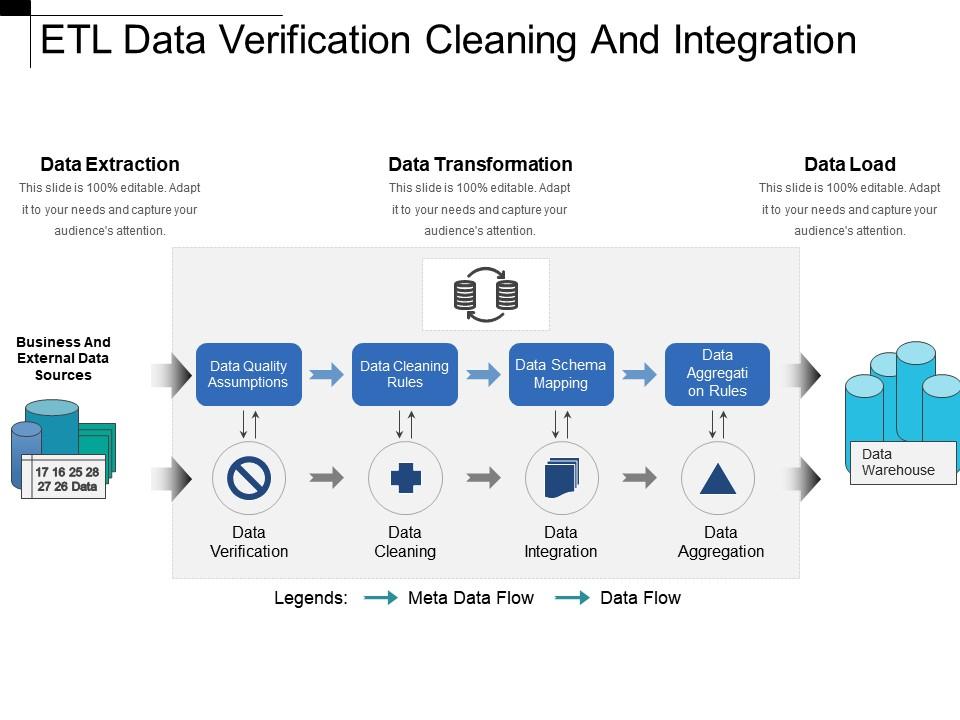
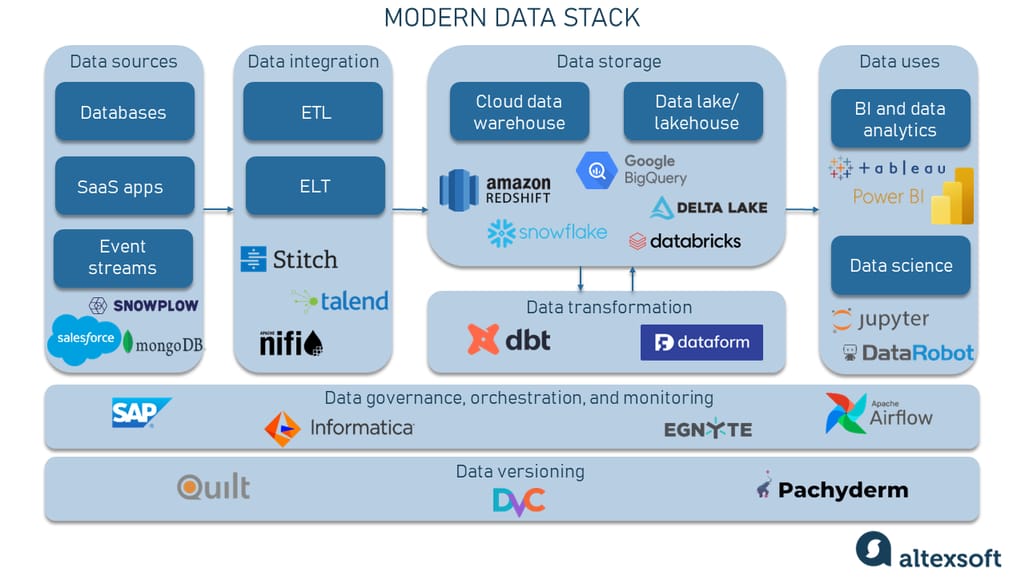
๐Ÿ”„ 4. ETL Process (Extract, Transform, Load)

Image
Image
Image
Image

๐Ÿ”น 1. Extract

  • Collect data from sources
  • Structured and unstructured

๐Ÿ”น 2. Transform

  • Clean data
  • Normalize formats
  • Apply business rules

๐Ÿ”น 3. Load

  • Store data into warehouse

๐Ÿ”น ELT (Modern Approach)

  • Load first, transform later

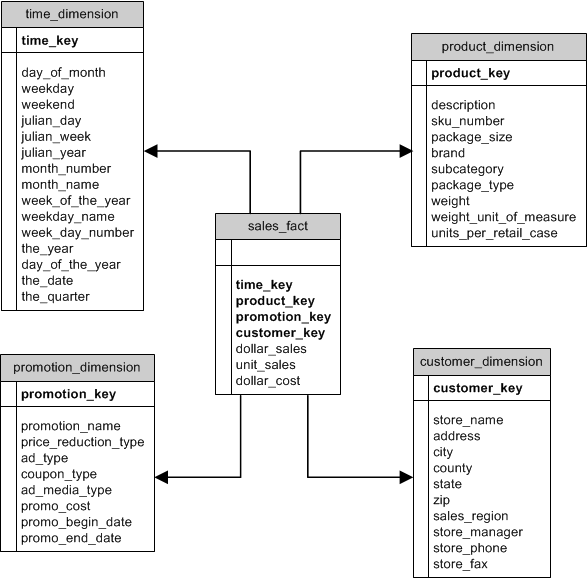
๐Ÿงฉ 5. Data Modeling in Warehousing

Image
Image
Image
Image

๐Ÿ”น Types of Models

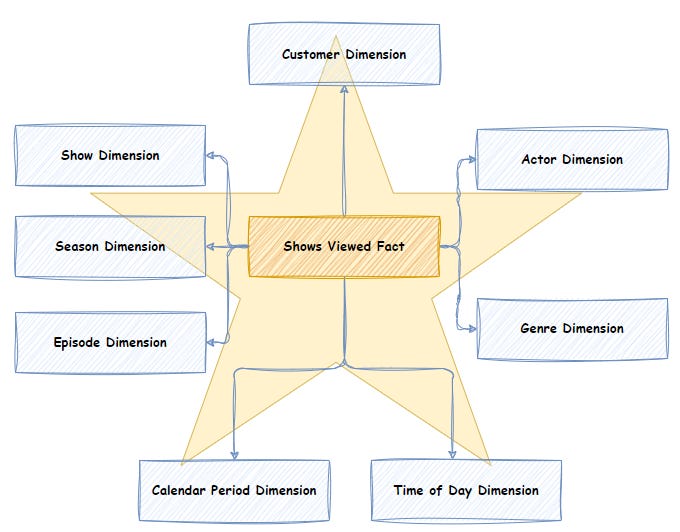
1. Star Schema โญ

  • Central fact table
  • Connected dimension tables

2. Snowflake Schema โ„๏ธ

  • Normalized dimensions
  • More complex

3. Galaxy Schema ๐ŸŒŒ

  • Multiple fact tables

๐Ÿ”น Fact vs Dimension Tables

Fact TableDimension Table
Quantitative dataDescriptive data
Sales amountCustomer info

๐Ÿ“Š 6. OLTP vs OLAP


FeatureOLTPOLAP
PurposeTransactionsAnalysis
DataCurrentHistorical
QueriesSimpleComplex

๐Ÿ”น OLAP Operations

  • Roll-up
  • Drill-down
  • Slice
  • Dice

๐Ÿง  7. Data Marts


๐Ÿ”น Definition

A data mart is a subset of a data warehouse focused on a specific department.


๐Ÿ”น Types

  • Dependent
  • Independent
  • Hybrid

โšก 8. Data Warehouse Design Approaches


๐Ÿ”น Top-Down (Inmon)

  • Build enterprise warehouse first

๐Ÿ”น Bottom-Up (Kimball)

  • Build data marts first

๐Ÿ” 9. Data Quality and Governance


๐Ÿ”น Data Quality

  • Accuracy
  • Completeness
  • Consistency

๐Ÿ”น Governance

  • Policies
  • Standards
  • Data ownership

๐Ÿ”„ 10. Data Integration


๐Ÿ”น Methods

  • ETL
  • ELT
  • Data virtualization

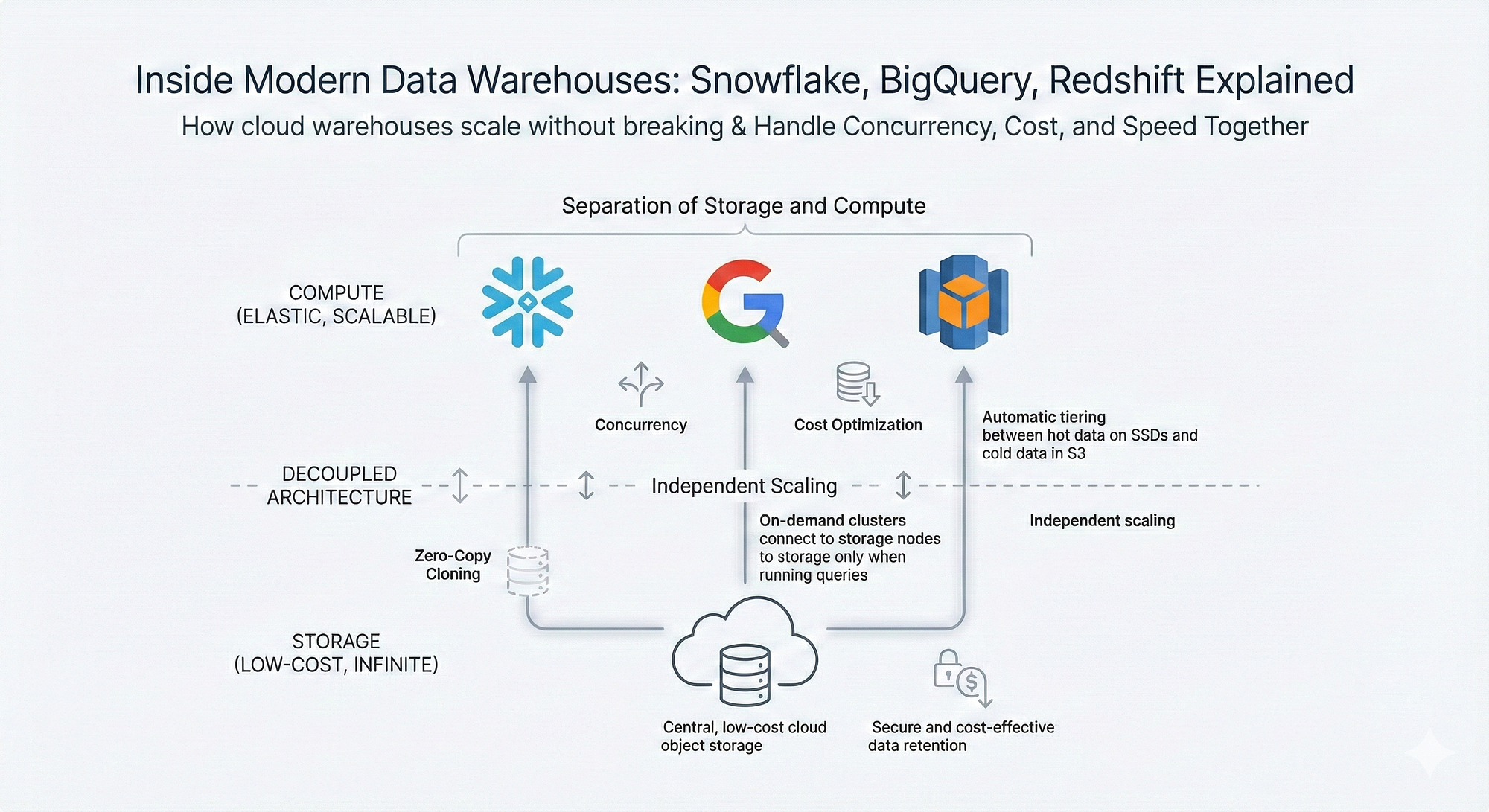
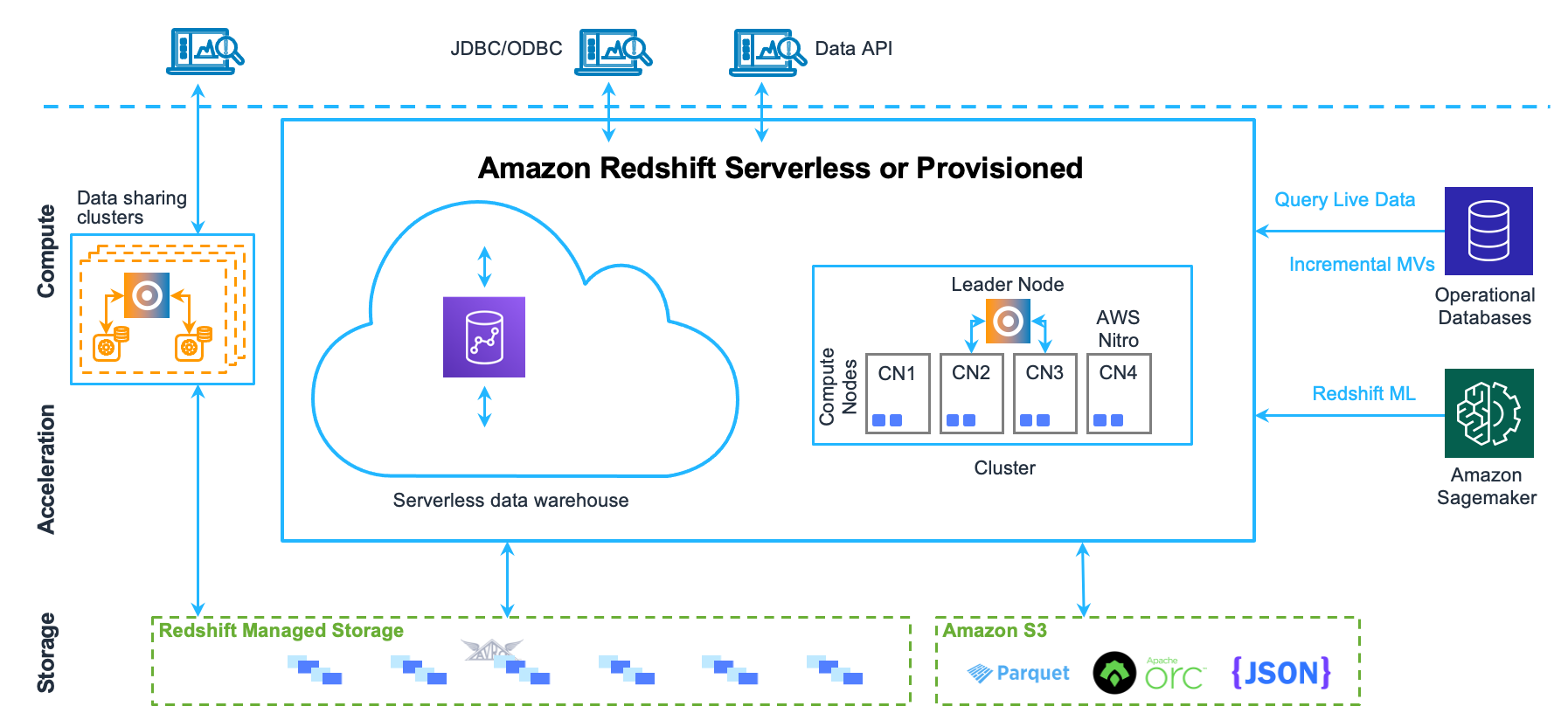
๐ŸŒ 11. Data Warehousing in Cloud

Image
Image
Image
Image

๐Ÿ”น Features

  • Scalability
  • Cost efficiency
  • Managed services

๐Ÿ”น Examples

  • Cloud warehouses
  • Serverless systems

๐Ÿงช 12. Data Warehouse Tools


  • ETL tools
  • BI tools
  • Data modeling tools

๐Ÿ“ˆ 13. Performance Optimization


๐Ÿ”น Techniques

  • Indexing
  • Partitioning
  • Materialized views

๐Ÿงฉ 14. Data Warehouse vs Data Lake


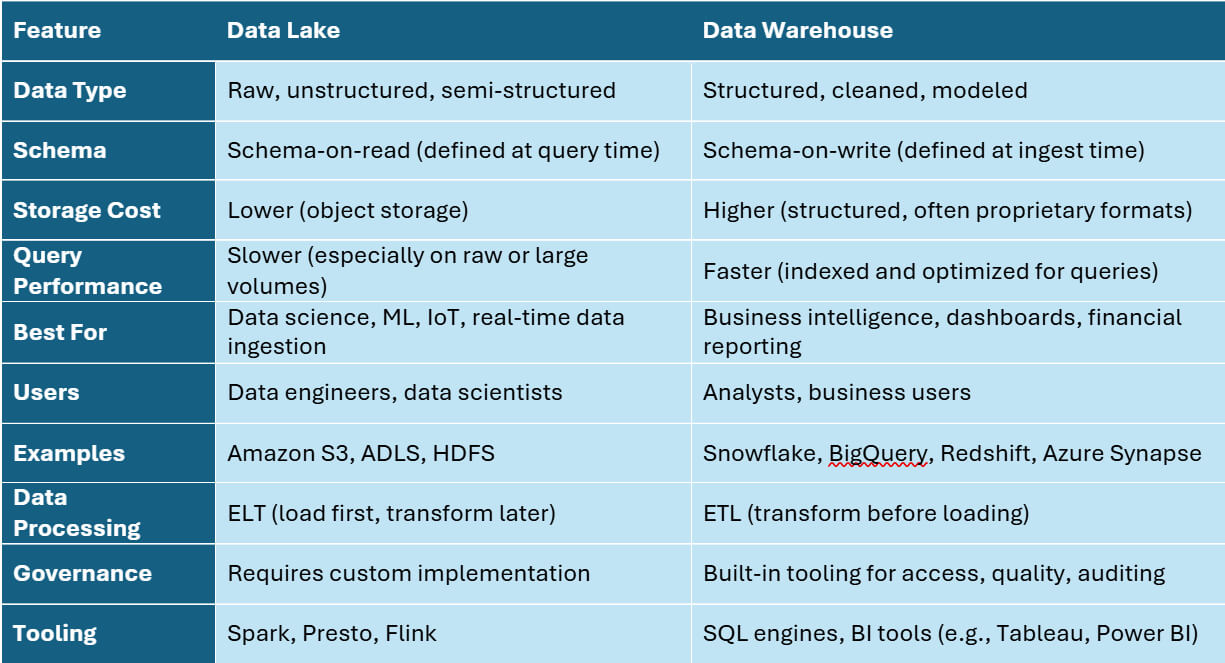
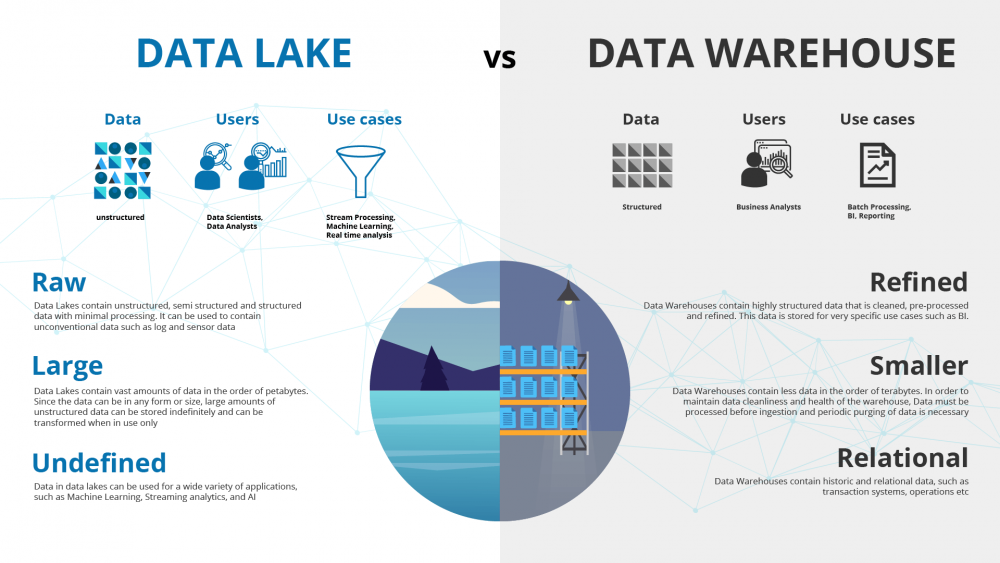
FeatureData WarehouseData Lake
DataStructuredRaw
SchemaFixedFlexible

๐Ÿ”„ 15. Data Pipeline


๐Ÿ”น Components

  • Ingestion
  • Processing
  • Storage
  • Visualization

๐Ÿง  16. Big Data and Warehousing


  • Integration with Hadoop
  • Spark processing
  • Real-time analytics

๐Ÿ” 17. Security in Data Warehousing


  • Encryption
  • Access control
  • Auditing

๐Ÿ“Š 18. Real-World Applications


๐Ÿ”น Retail

  • Sales analysis

๐Ÿ”น Banking

  • Risk analysis

๐Ÿ”น Healthcare

  • Patient analytics

๐Ÿ”น Marketing

  • Customer insights

โš–๏ธ 19. Advantages


  • Better analytics
  • Historical insights
  • Centralized data

โš ๏ธ 20. Limitations


  • High cost
  • Complex setup
  • Maintenance required

๐Ÿ”ฎ 21. Future Trends


  • AI-driven analytics
  • Real-time warehousing
  • Data lakehouse

๐Ÿ Conclusion

Data warehousing is a core component of modern data ecosystems, enabling organizations to transform raw data into meaningful insights. It plays a critical role in business intelligence, analytics, and strategic decision-making.

๐Ÿท๏ธ Tags

๐ŸŒ NoSQL Databases โ€“ Complete In-Depth Guide

Image
Image
Image
Image

๐Ÿ“˜ 1. Introduction to NoSQL Databases

NoSQL (Not Only SQL) databases are a class of database systems designed to handle large volumes of unstructured, semi-structured, or rapidly changing data. Unlike traditional relational databases (RDBMS), NoSQL databases do not rely on fixed table schemas.

They emerged to address the limitations of relational databases in:

  • Big data environments
  • High scalability applications
  • Real-time systems
  • Distributed architectures

๐Ÿ”น What Does โ€œNoSQLโ€ Mean?

  • โ€œNot Only SQLโ€ โ†’ supports SQL-like queries in some systems
  • Focus on flexibility and scalability
  • Designed for modern applications

๐Ÿ”น Why NoSQL Was Created

Traditional SQL databases struggle with:

  • Horizontal scaling
  • Handling unstructured data
  • High-speed data ingestion
  • Distributed computing

NoSQL solves these issues by:

  • Distributing data across nodes
  • Using flexible schemas
  • Optimizing for specific use cases

๐Ÿง  2. Key Characteristics of NoSQL


๐Ÿ”น 1. Schema Flexibility

  • No fixed schema
  • Different records can have different structures

๐Ÿ”น 2. Horizontal Scalability

  • Data distributed across multiple servers
  • Easily scalable

๐Ÿ”น 3. High Performance

  • Optimized for speed and throughput

๐Ÿ”น 4. Distributed Architecture

  • Built for cloud and distributed systems

๐Ÿ”น 5. Eventual Consistency

  • Uses BASE model instead of strict ACID

โš–๏ธ 3. NoSQL vs SQL

FeatureSQLNoSQL
SchemaFixedFlexible
Data TypeStructuredUnstructured
ScalingVerticalHorizontal
ConsistencyStrong (ACID)Eventual (BASE)
Query LanguageSQLVaries

๐Ÿงฉ 4. Types of NoSQL Databases

Image
Image
Image
Image

NoSQL databases are categorized into four main types:


๐Ÿ”น 1. Key-Value Stores

Concept:

  • Data stored as key-value pairs

Example:

{
  "user123": "Rishan"
}

Features:

  • Extremely fast
  • Simple structure

Use Cases:

  • Caching
  • Session management

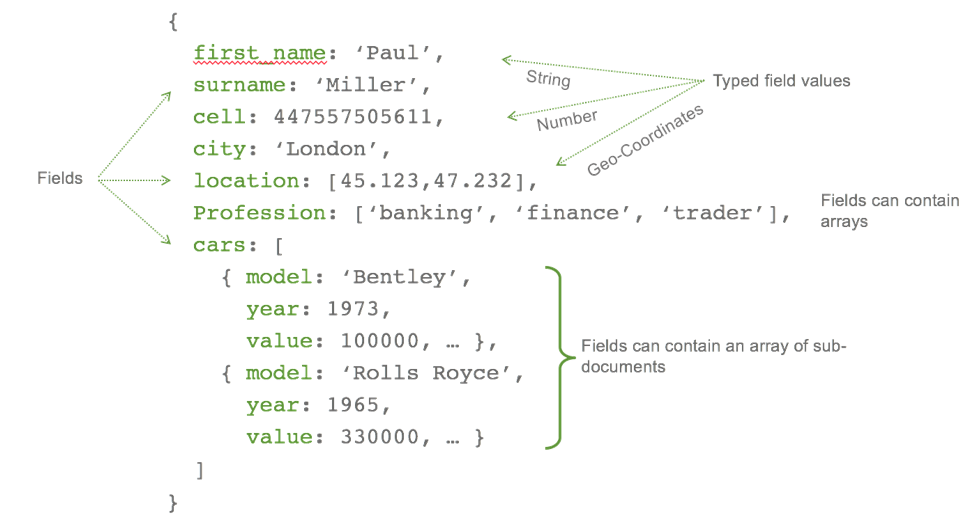
๐Ÿ”น 2. Document Databases

Concept:

  • Data stored in JSON-like documents

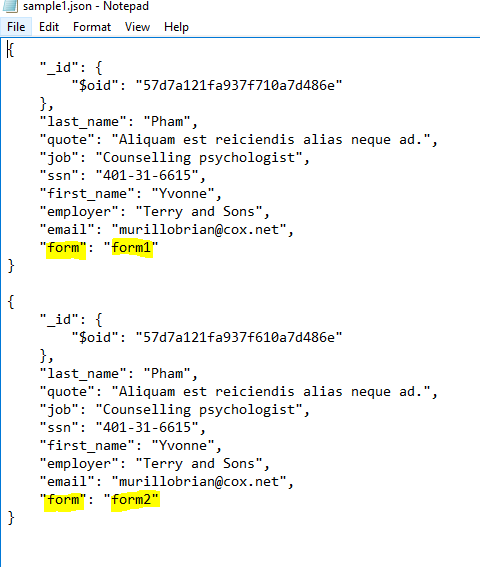
Example:

{
  "name": "Rishan",
  "age": 22,
  "skills": ["SQL", "Python"]
}

Features:

  • Flexible schema
  • Nested data

Use Cases:

  • Content management
  • Web applications

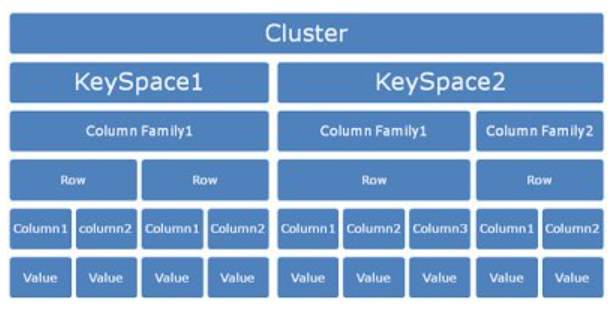
๐Ÿ”น 3. Column-Family Databases

Concept:

  • Data stored in columns instead of rows

Features:

  • High scalability
  • Efficient for large datasets

Use Cases:

  • Big data analytics

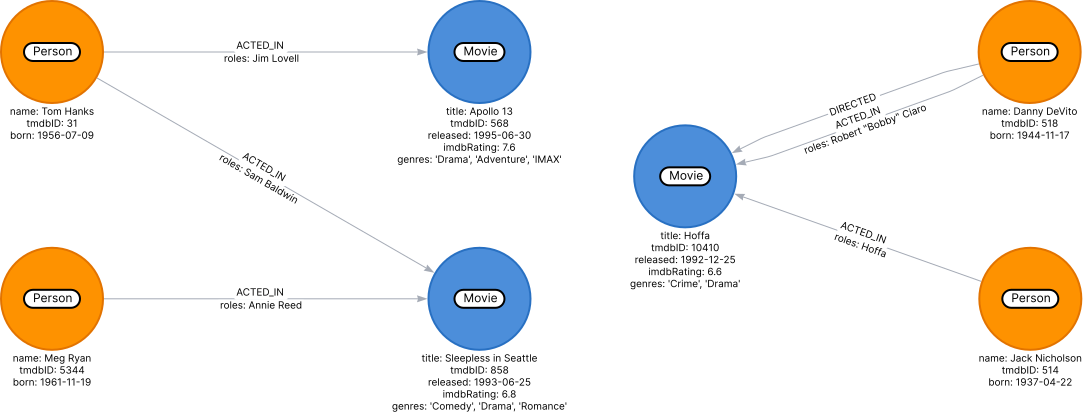
๐Ÿ”น 4. Graph Databases

Concept:

  • Data stored as nodes and edges

Features:

  • Efficient relationship handling

Use Cases:

  • Social networks
  • Recommendation systems

๐Ÿ—๏ธ 5. Data Modeling in NoSQL

Image
Image
Image
Image

๐Ÿ”น Key Approaches

1. Embedding

  • Store related data together

2. Referencing

  • Use references between documents

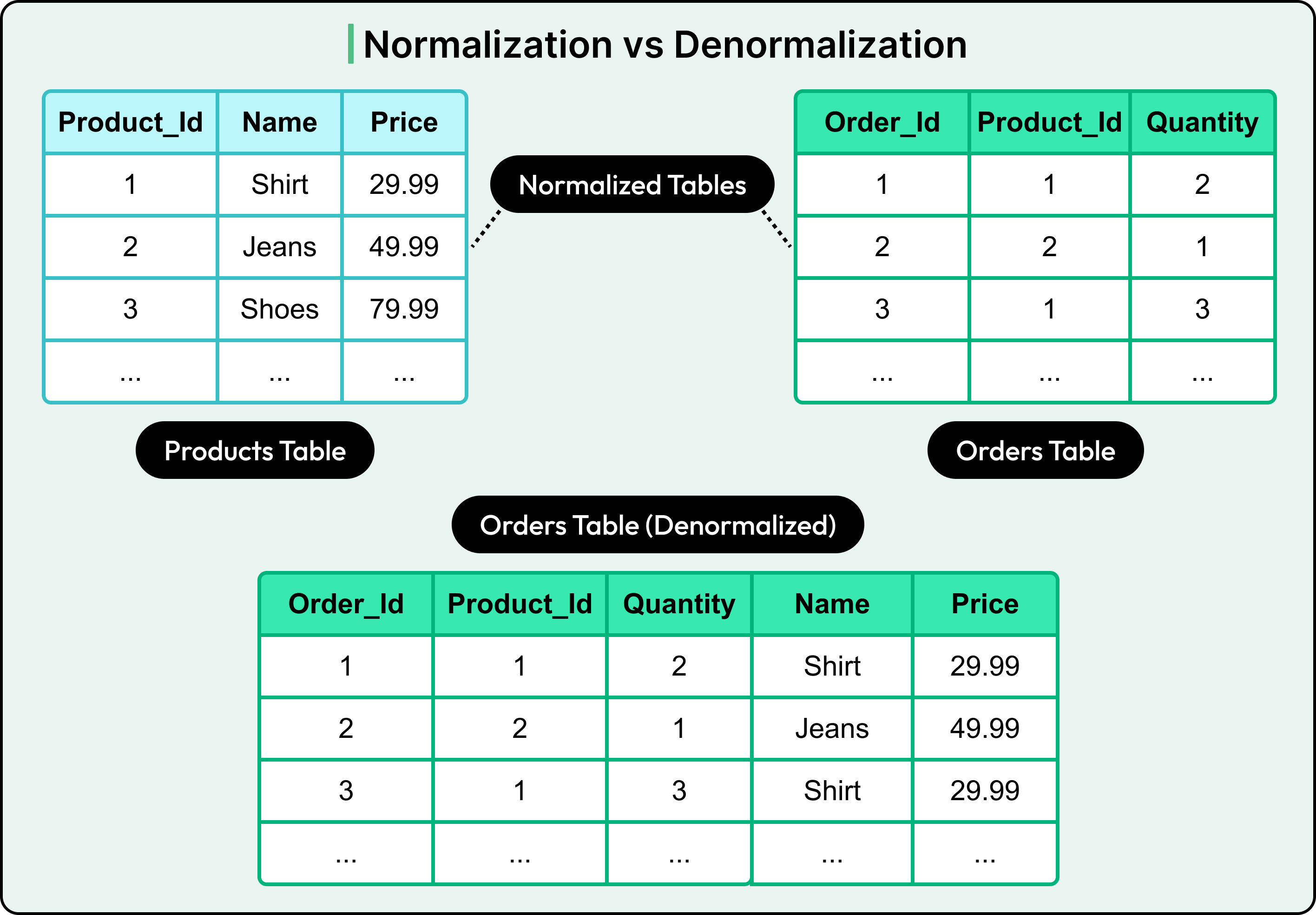
๐Ÿ”น Denormalization

  • Common in NoSQL
  • Improves performance
  • Reduces joins

โšก 6. CAP Theorem

Image
Image
Image
Image

CAP theorem states that a distributed system can only guarantee two of:

  • Consistency
  • Availability
  • Partition Tolerance

๐Ÿ”น Trade-offs

  • CP (Consistency + Partition Tolerance)
  • AP (Availability + Partition Tolerance)

๐Ÿ”„ 7. BASE Model


๐Ÿ”น BASE stands for:

  • Basically Available
  • Soft state
  • Eventually consistent

๐Ÿ”น Comparison with ACID

  • Less strict consistency
  • Higher scalability

๐Ÿง  8. Consistency Models


๐Ÿ”น Types

  • Strong consistency
  • Eventual consistency
  • Causal consistency

๐Ÿ” 9. Replication and Sharding

Image
Image
Image
Image

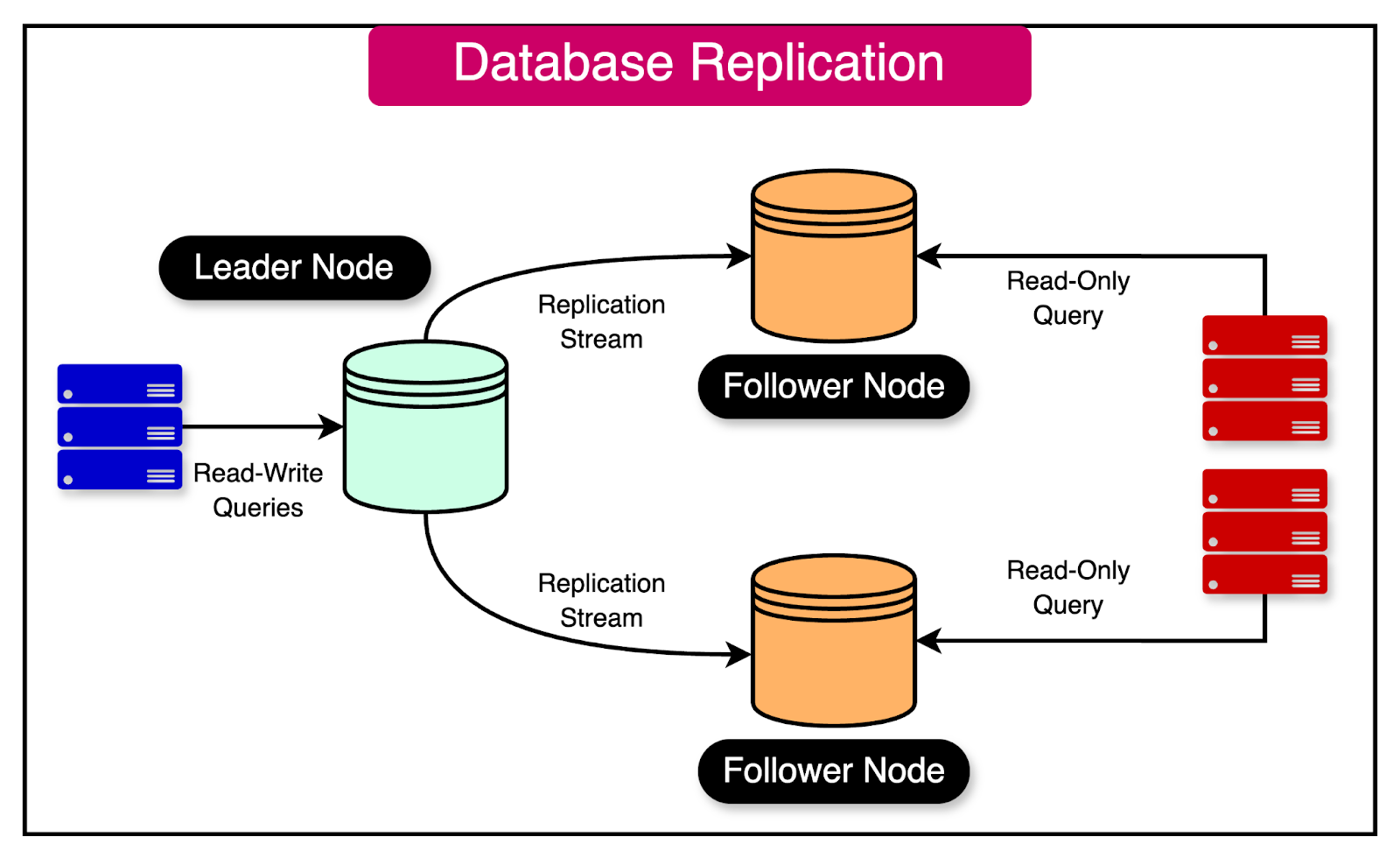
๐Ÿ”น Replication

  • Copies data across nodes

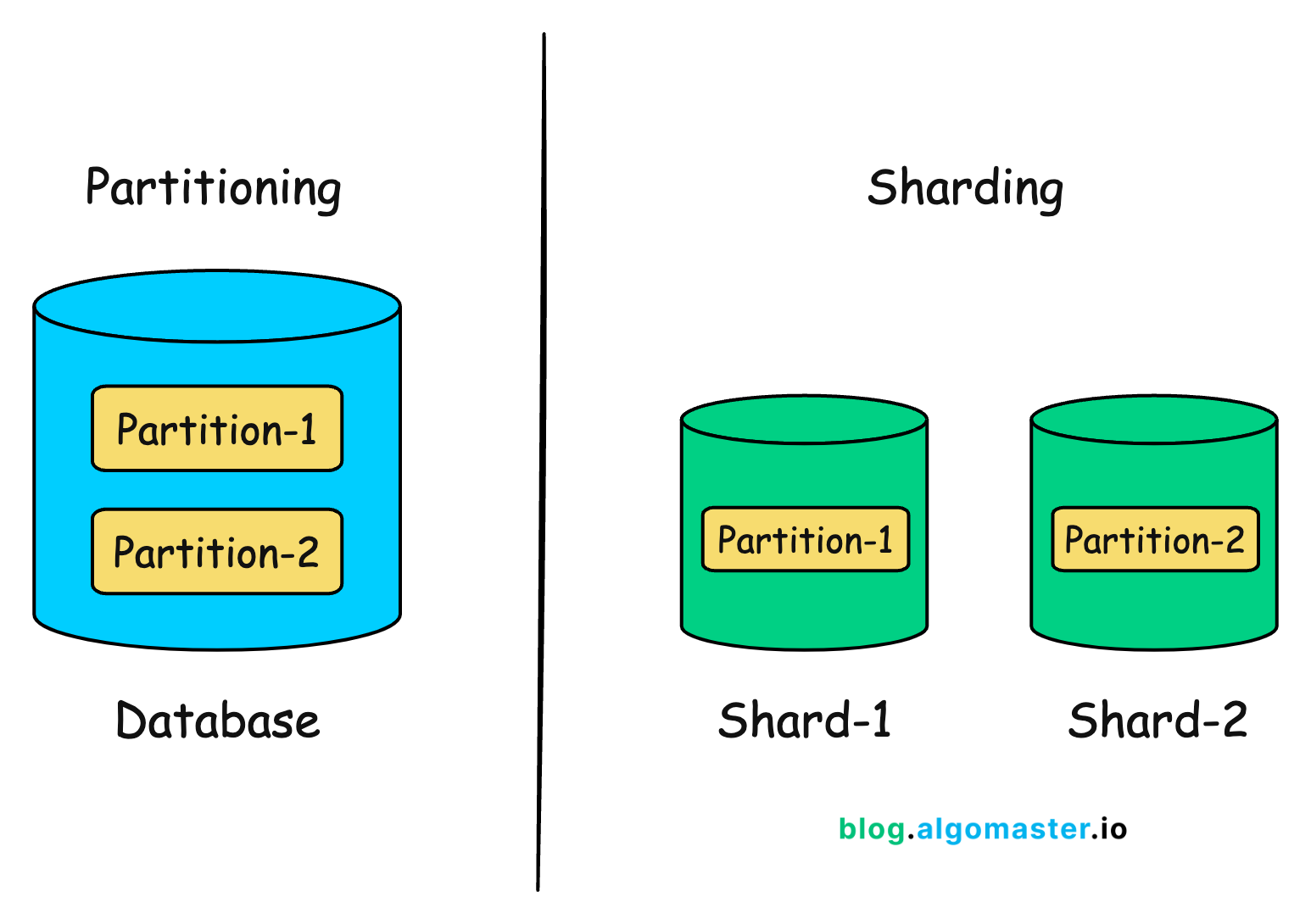
๐Ÿ”น Sharding

  • Splits data into partitions

โš™๏ธ 10. Query Mechanisms


๐Ÿ”น Examples

  • Key-based retrieval
  • Document queries
  • Graph traversal

๐Ÿงฉ 11. Indexing in NoSQL

  • Secondary indexes
  • Full-text indexes
  • Geospatial indexes

๐Ÿงช 12. Transactions in NoSQL

  • Limited ACID support
  • Some databases support multi-document transactions

๐ŸŒ 13. Popular NoSQL Databases


๐Ÿ”น Examples

  • MongoDB (Document)
  • Cassandra (Column-family)
  • Redis (Key-value)
  • Neo4j (Graph)

๐Ÿ“Š 14. Real-World Applications


๐Ÿ”น Social Media

  • User profiles
  • Feeds

๐Ÿ”น E-commerce

  • Product catalogs
  • Recommendations

๐Ÿ”น IoT Systems

  • Sensor data

๐Ÿ”น Big Data Analytics

  • Large-scale processing

โšก 15. Advantages of NoSQL


  • High scalability
  • Flexible schema
  • Fast performance
  • Handles big data

โš ๏ธ 16. Limitations of NoSQL


  • Lack of standardization
  • Complex queries
  • Eventual consistency issues

๐Ÿง  17. When to Use NoSQL


  • Large-scale applications
  • Rapid development
  • Unstructured data

๐Ÿ—๏ธ 18. NoSQL in Cloud Computing


  • Managed services
  • Auto-scaling
  • High availability

๐Ÿ”„ 19. Hybrid Databases


  • Combine SQL and NoSQL
  • Multi-model databases

๐Ÿ”ฎ 20. Future of NoSQL


  • AI integration
  • Real-time analytics
  • Edge computing

๐Ÿ Conclusion

NoSQL databases are essential for modern applications requiring scalability, flexibility, and performance. While they trade strict consistency for speed and scalability, they are ideal for handling big data and distributed systems.

Mastering NoSQL helps developers build high-performance, scalable, and resilient systems.


๐Ÿท๏ธ Tags

๐Ÿ—„๏ธ SQL (Structured Query Language)

Image
Image
Image
Image

๐Ÿ“˜ 1. Introduction to SQL

SQL (Structured Query Language) is a standard programming language used to store, manipulate, and retrieve data from relational databases. It is the backbone of modern data-driven applications and is widely used in industries such as finance, healthcare, e-commerce, education, and more.

SQL was developed in the 1970s at IBM by Donald D. Chamberlin and Raymond F. Boyce. Initially called SEQUEL (Structured English Query Language), it evolved into SQL and became an international standard (ANSI/ISO).


๐Ÿ”น Why SQL is Important

  • Enables efficient data management
  • Used in web applications, mobile apps, enterprise systems
  • Supports data analysis and reporting
  • Works with major database systems like:
    • MySQL
    • PostgreSQL
    • Oracle Database
    • SQL Server
    • SQLite

๐Ÿ”น Characteristics of SQL

  • Declarative language (focus on what to do, not how)
  • Supports complex queries
  • Standardized (ANSI SQL)
  • Integrates with multiple programming languages
  • Supports transactions and concurrency

๐Ÿงฑ 2. Relational Database Fundamentals

Image
Image
Image

SQL works with Relational Database Management Systems (RDBMS).

๐Ÿ”น Core Concepts

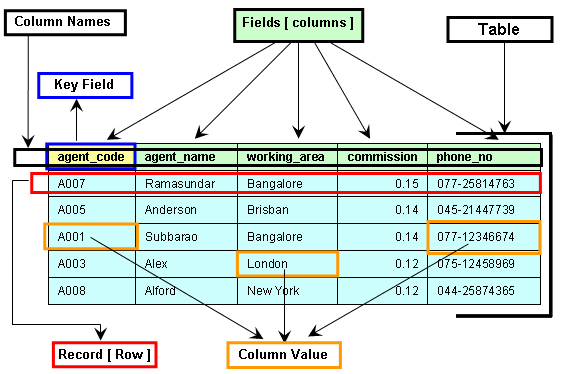
1. Table

A table is a collection of related data organized in rows and columns.

2. Row (Record)

Represents a single entry.

3. Column (Field)

Represents an attribute of the data.

4. Primary Key

  • Unique identifier for each record
  • Cannot be NULL

5. Foreign Key

  • Links two tables together
  • Maintains referential integrity

6. Schema

  • Structure of the database

๐Ÿ”น Example Table

IDNameAge
1John25
2Sara30

๐Ÿงฎ 3. Types of SQL Commands

SQL commands are divided into categories:


๐Ÿ”น 1. DDL (Data Definition Language)

Used to define database structure.

  • CREATE
  • ALTER
  • DROP
  • TRUNCATE

Example:

CREATE TABLE Students (
    ID INT PRIMARY KEY,
    Name VARCHAR(50),
    Age INT
);

๐Ÿ”น 2. DML (Data Manipulation Language)

Used to manipulate data.

  • INSERT
  • UPDATE
  • DELETE
INSERT INTO Students VALUES (1, 'John', 25);

UPDATE Students SET Age = 26 WHERE ID = 1;

DELETE FROM Students WHERE ID = 1;

๐Ÿ”น 3. DQL (Data Query Language)

  • SELECT
SELECT * FROM Students;

๐Ÿ”น 4. DCL (Data Control Language)

  • GRANT
  • REVOKE

๐Ÿ”น 5. TCL (Transaction Control Language)

  • COMMIT
  • ROLLBACK
  • SAVEPOINT

๐Ÿ” 4. SQL Queries and Clauses

Image
Image
Image
Image

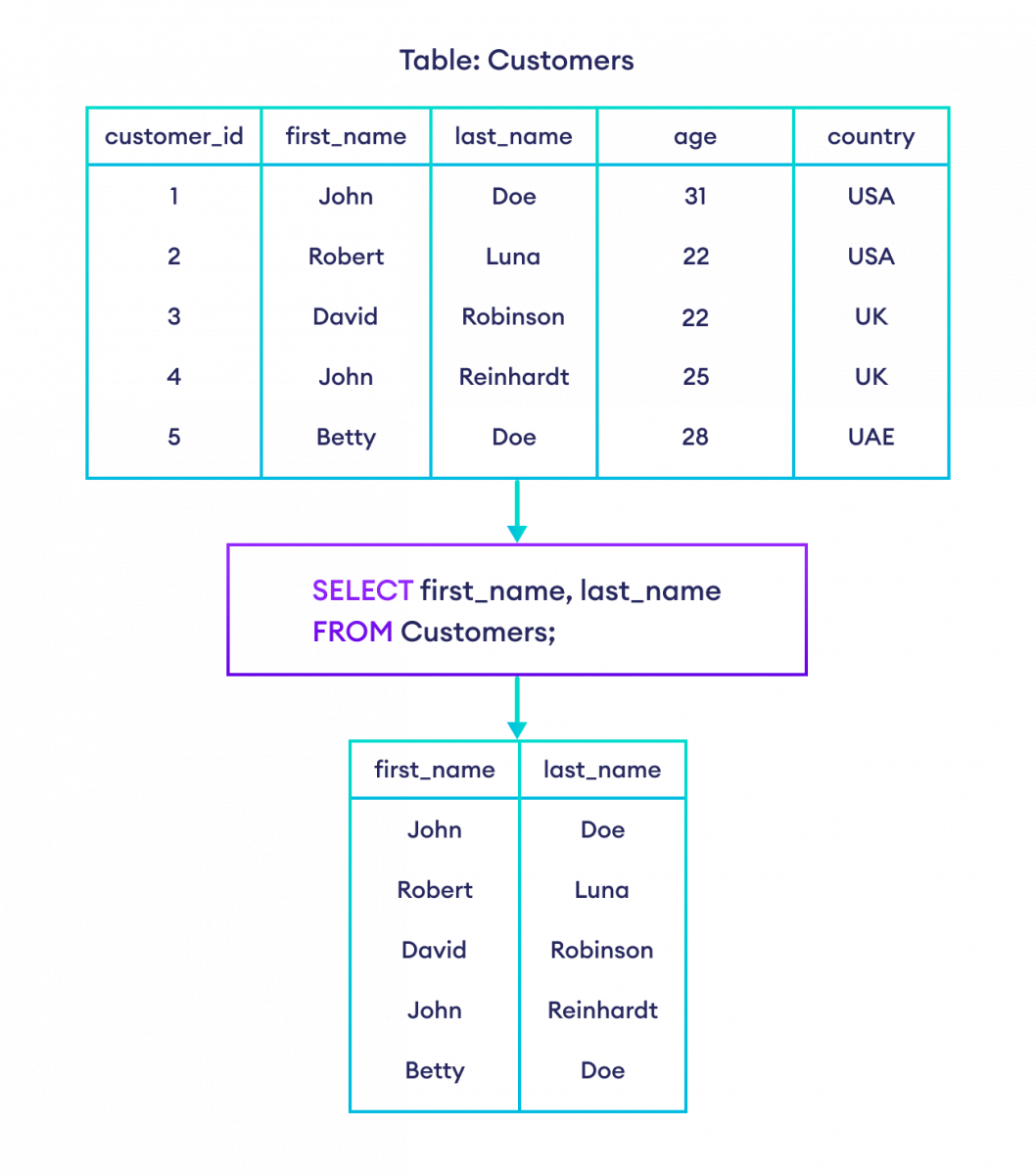
๐Ÿ”น SELECT Statement

SELECT column1, column2 FROM table_name;

๐Ÿ”น WHERE Clause

SELECT * FROM Students WHERE Age > 25;

๐Ÿ”น ORDER BY

SELECT * FROM Students ORDER BY Age DESC;

๐Ÿ”น GROUP BY

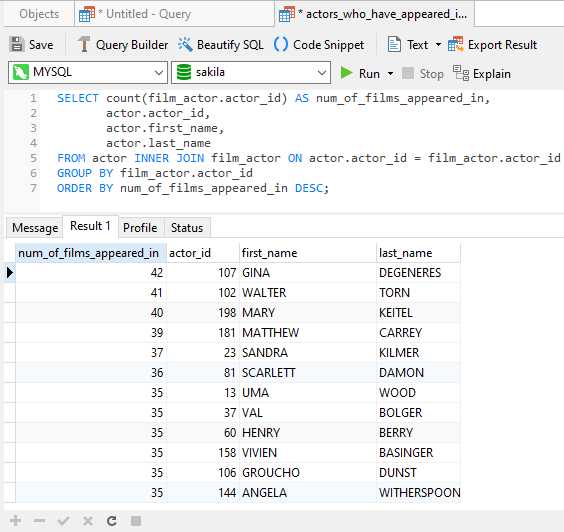
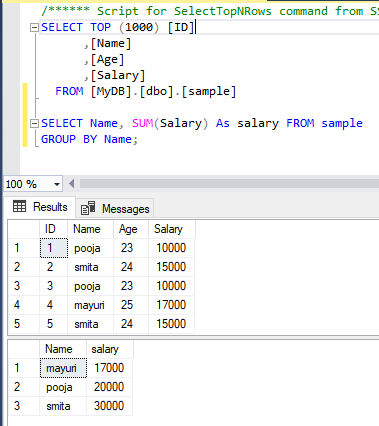
SELECT Age, COUNT(*) FROM Students GROUP BY Age;

๐Ÿ”น HAVING

SELECT Age, COUNT(*) 
FROM Students 
GROUP BY Age 
HAVING COUNT(*) > 1;

๐Ÿ”น DISTINCT

SELECT DISTINCT Age FROM Students;

๐Ÿ”— 5. SQL Joins

Image
Image
Image
Image

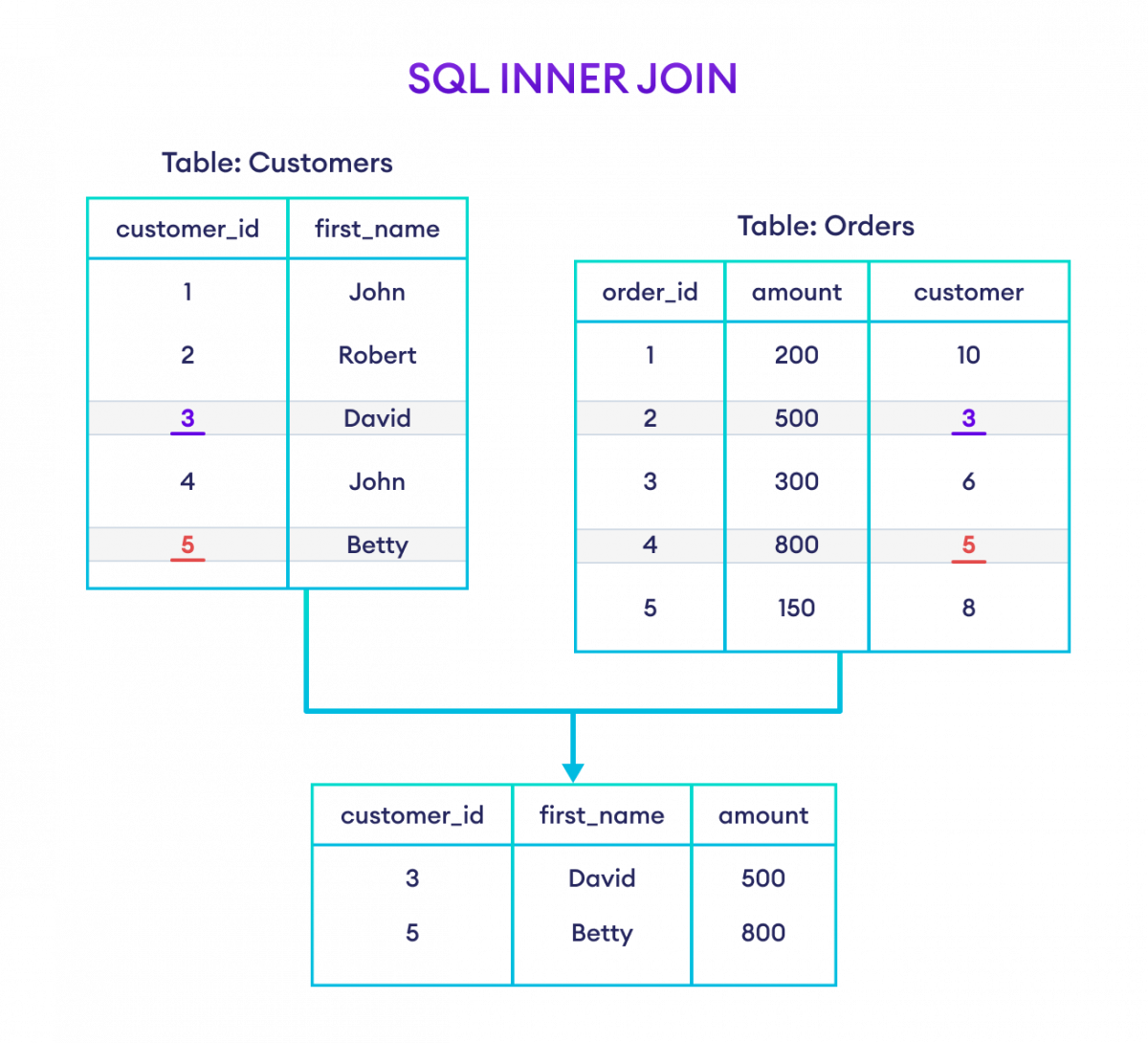
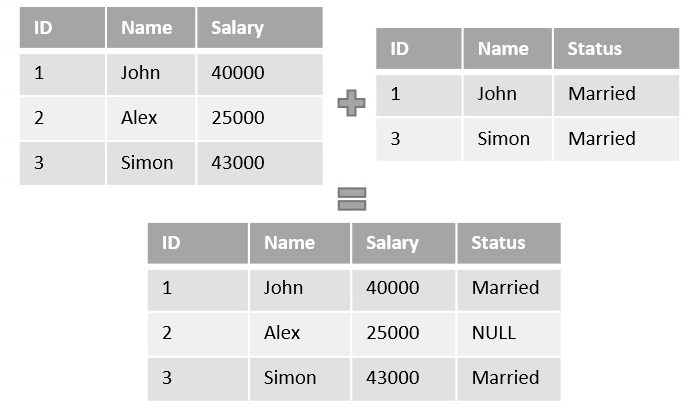
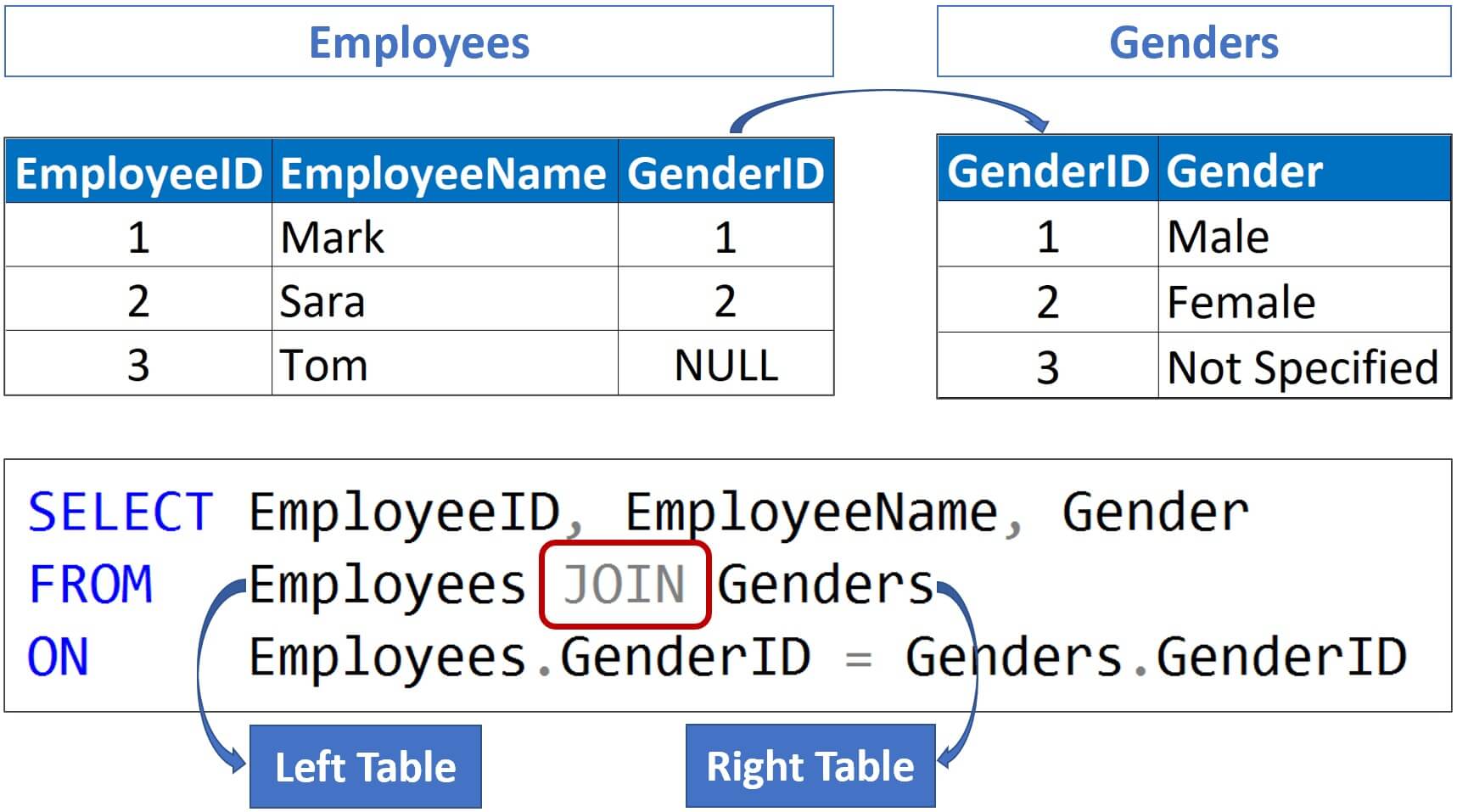
Joins combine rows from multiple tables.


๐Ÿ”น Types of Joins

1. INNER JOIN

Returns matching rows.

SELECT * FROM A INNER JOIN B ON A.id = B.id;

2. LEFT JOIN

Returns all rows from left table.


3. RIGHT JOIN

Returns all rows from right table.


4. FULL JOIN

Returns all rows from both tables.


๐Ÿง  6. SQL Functions

๐Ÿ”น Aggregate Functions

  • COUNT()
  • SUM()
  • AVG()
  • MIN()
  • MAX()
SELECT AVG(Age) FROM Students;

๐Ÿ”น String Functions

  • UPPER()
  • LOWER()
  • LENGTH()

๐Ÿ”น Date Functions

  • NOW()
  • CURDATE()

๐Ÿ—๏ธ 7. Constraints in SQL

Constraints enforce rules on data.

  • NOT NULL
  • UNIQUE
  • PRIMARY KEY
  • FOREIGN KEY
  • CHECK
  • DEFAULT
CREATE TABLE Users (
    ID INT PRIMARY KEY,
    Email VARCHAR(100) UNIQUE
);

๐Ÿ”„ 8. Normalization

Image
Image
Image
Image

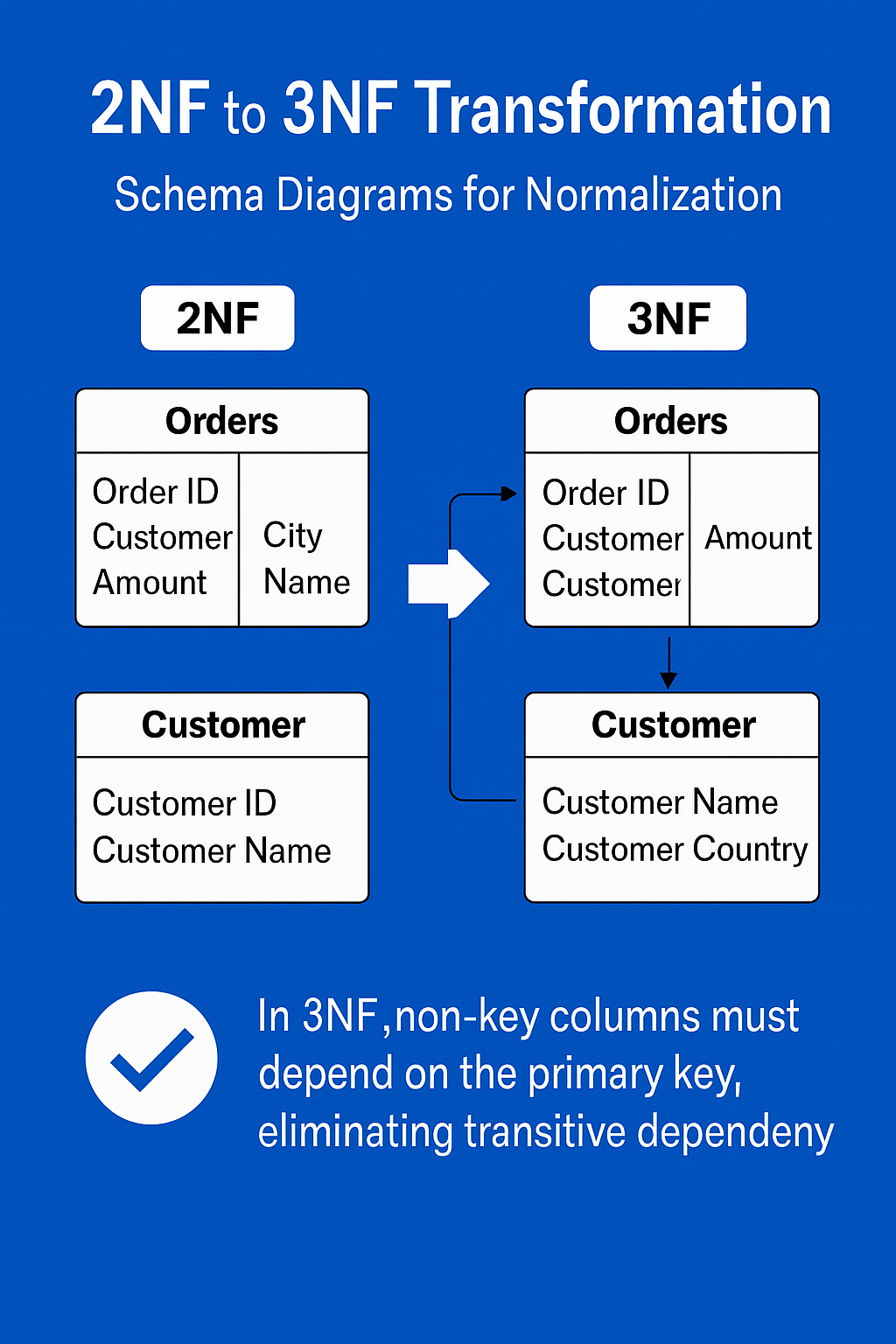
Normalization reduces redundancy.

๐Ÿ”น Types:

  • 1NF: Atomic values
  • 2NF: Remove partial dependency
  • 3NF: Remove transitive dependency

โšก 9. Indexing

Indexes improve query performance.

CREATE INDEX idx_name ON Students(Name);

Types:

  • Single-column index
  • Composite index
  • Unique index

๐Ÿ” 10. Transactions

A transaction is a unit of work.

Properties (ACID):

  • Atomicity
  • Consistency
  • Isolation
  • Durability

๐Ÿ” 11. Subqueries

SELECT Name FROM Students
WHERE Age > (SELECT AVG(Age) FROM Students);

๐Ÿ“Š 12. Views

Virtual tables based on queries.

CREATE VIEW StudentView AS
SELECT Name FROM Students;

๐Ÿงฉ 13. Stored Procedures

Reusable SQL code.

CREATE PROCEDURE GetStudents()
BEGIN
    SELECT * FROM Students;
END;

๐Ÿ”” 14. Triggers

Automatically executed events.

CREATE TRIGGER before_insert
BEFORE INSERT ON Students
FOR EACH ROW
SET NEW.Name = UPPER(NEW.Name);

๐ŸŒ 15. SQL vs NoSQL

FeatureSQLNoSQL
StructureTable-basedFlexible
SchemaFixedDynamic
ScalabilityVerticalHorizontal

๐Ÿงช 16. Advanced SQL Concepts

  • Window Functions (ROW_NUMBER(), RANK())
  • CTE (Common Table Expressions)
  • Recursive Queries
  • Partitioning
  • Query Optimization

๐Ÿ“ˆ 17. SQL Performance Optimization

  • Use indexes
  • Avoid SELECT *
  • Optimize joins
  • Use caching
  • Analyze execution plans

๐Ÿงฐ 18. Popular SQL Databases

  • MySQL
  • PostgreSQL
  • Oracle
  • SQL Server
  • SQLite

๐Ÿง‘โ€๐Ÿ’ป 19. Real-World Applications

  • Banking systems
  • E-commerce platforms
  • Social media
  • Data analytics
  • Inventory systems

๐Ÿ“š 20. Advantages of SQL

  • Easy to learn
  • Powerful querying
  • High performance
  • Standardized

โš ๏ธ 21. Limitations of SQL

  • Not ideal for unstructured data
  • Scaling challenges
  • Complex queries can be slow

๐Ÿ”ฎ 22. Future of SQL

  • Integration with AI & Big Data
  • Cloud databases (AWS, Azure, GCP)
  • Real-time analytics
  • Hybrid SQL/NoSQL systems

๐Ÿ Conclusion

SQL remains one of the most essential tools in computing. Whether you are a developer, data analyst, or engineer, mastering SQL enables you to handle data efficiently, build scalable systems, and extract meaningful insights.

๐Ÿท๏ธ Tags