Tag Archives: Query Optimization

๐Ÿ—๏ธ Database Design

Image
Image
Image
Image

๐Ÿ“˜ 1. Introduction to Database Design

Database Design is the structured process of organizing data into a model that efficiently supports storage, retrieval, and manipulation. It defines how data is stored, how different data elements relate to each other, and how users interact with the database.

A well-designed database ensures:

  • High performance โšก
  • Data consistency โœ”๏ธ
  • Scalability ๐Ÿ“ˆ
  • Security ๐Ÿ”
  • Maintainability ๐Ÿ› ๏ธ

Database design is the foundation of all data-driven systems, including:

  • Web applications
  • Mobile apps
  • Enterprise software
  • Banking systems
  • AI and analytics platforms

๐Ÿง  2. Importance of Database Design

๐Ÿ”น Why It Matters

Poor database design leads to:

  • Data redundancy
  • Inconsistent data
  • Slow queries
  • Difficult maintenance
  • Scalability issues

Good database design provides:

  • Efficient data access
  • Reduced duplication
  • Logical organization
  • Improved data integrity

๐Ÿ›๏ธ 3. Types of Database Design

Image
Image
Image
Image

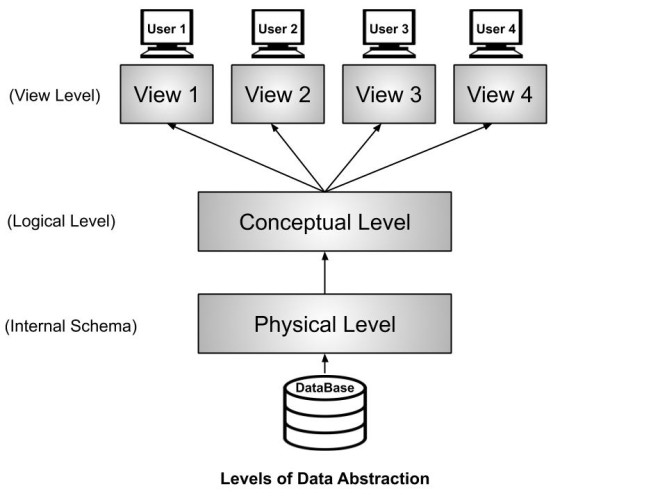
Database design is typically divided into three levels:


๐Ÿ”น 1. Conceptual Design

  • High-level design
  • Focuses on what data is needed
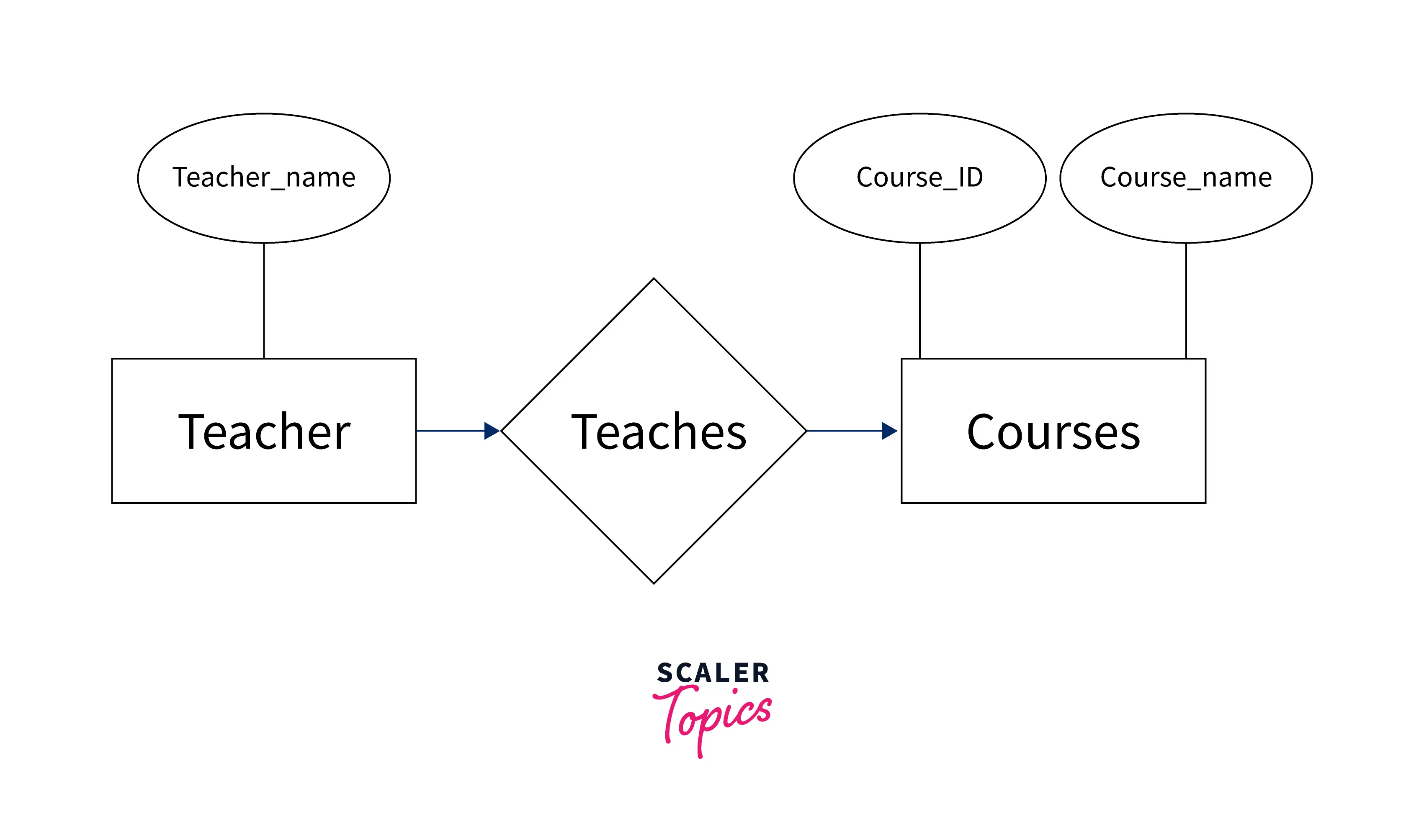
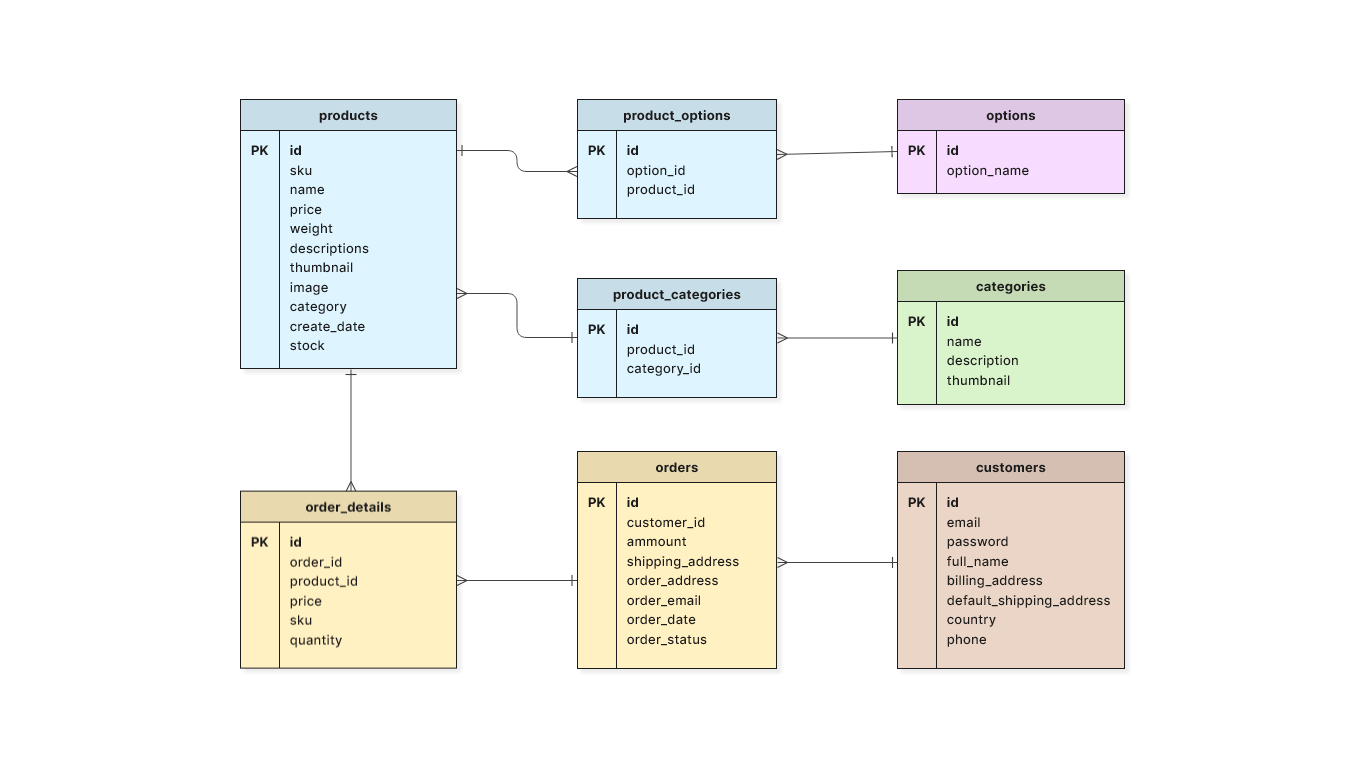
  • Uses Entity-Relationship Diagrams (ERD)

Example:

  • Entities: Student, Course
  • Relationship: Enrollment

๐Ÿ”น 2. Logical Design

  • Defines structure without implementation details
  • Includes tables, columns, keys

๐Ÿ”น 3. Physical Design

  • Actual implementation in DBMS
  • Includes indexing, storage, partitioning

๐Ÿงฉ 4. Data Modeling

Image
Image
Image
Image

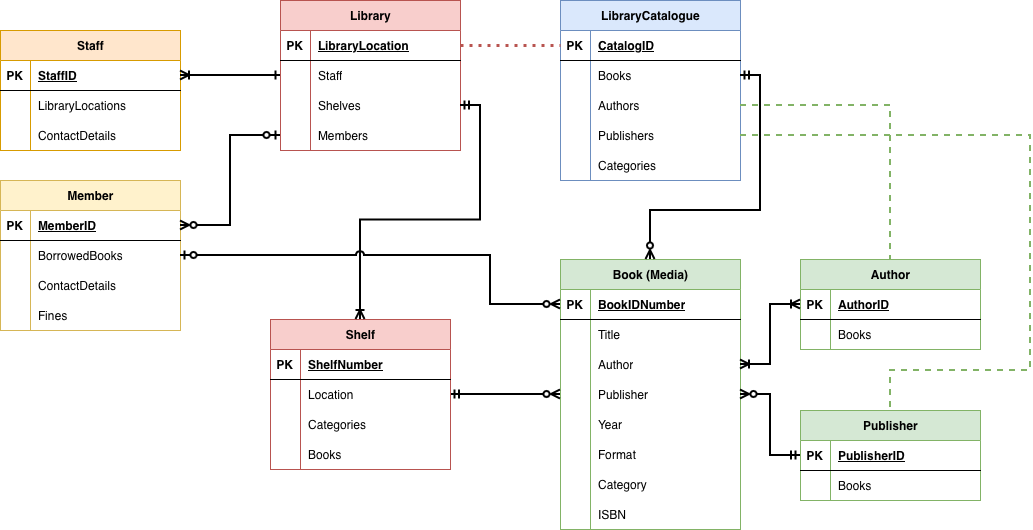
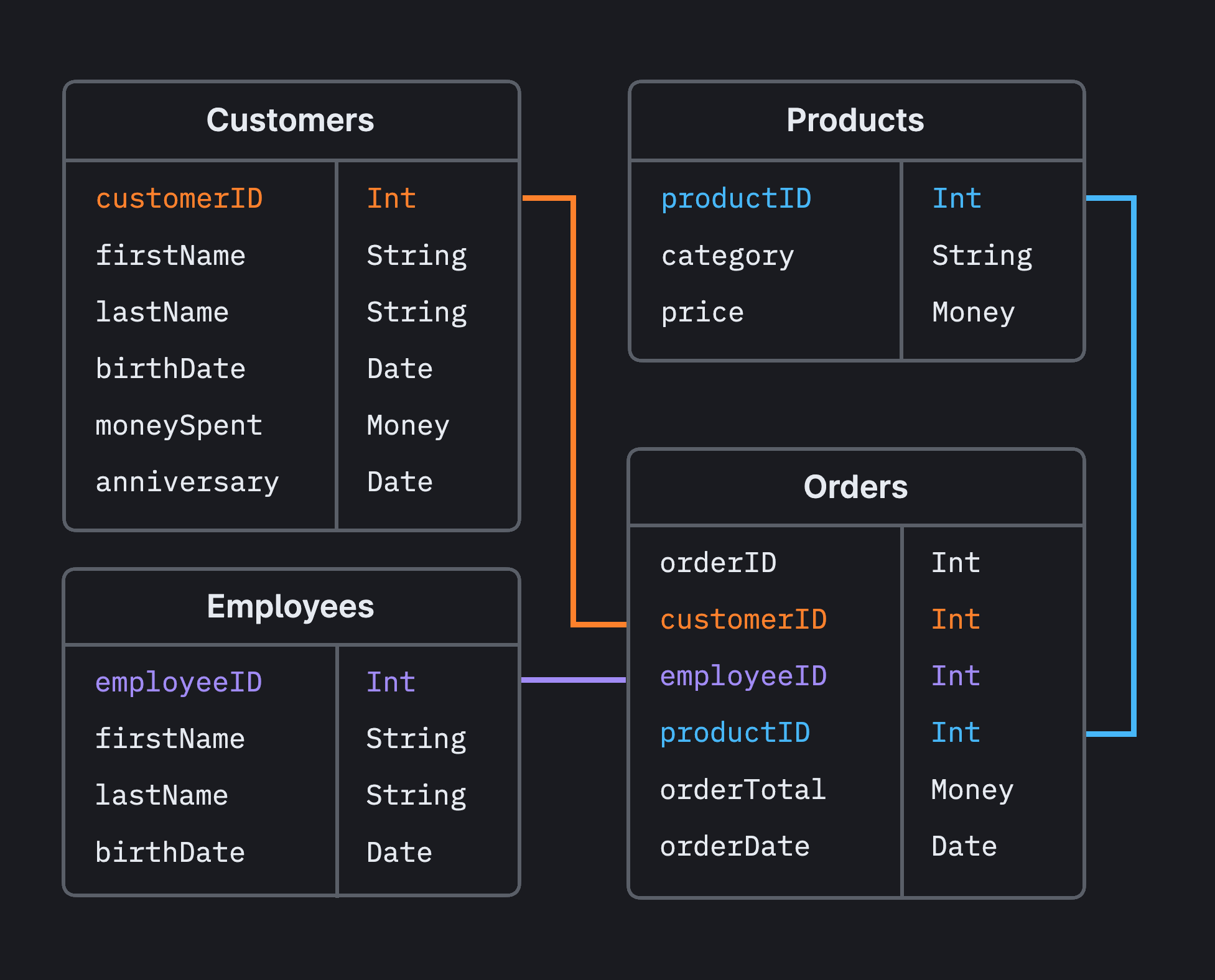
Data modeling is the process of creating a data structure.


๐Ÿ”น Components of Data Modeling

1. Entities

Objects in the system (e.g., User, Product)

2. Attributes

Properties of entities (e.g., Name, Price)

3. Relationships

Connections between entities


๐Ÿ”น Types of Relationships

  • One-to-One (1:1)
  • One-to-Many (1:N)
  • Many-to-Many (M:N)

๐Ÿ”‘ 5. Keys in Database Design

Keys uniquely identify records and define relationships.


๐Ÿ”น Types of Keys

  • Primary Key โ€“ Unique identifier
  • Foreign Key โ€“ Links tables
  • Candidate Key โ€“ Possible primary keys
  • Composite Key โ€“ Combination of columns
  • Super Key โ€“ Set of attributes that uniquely identify

๐Ÿงฑ 6. Normalization

Image
Image
Image
Image

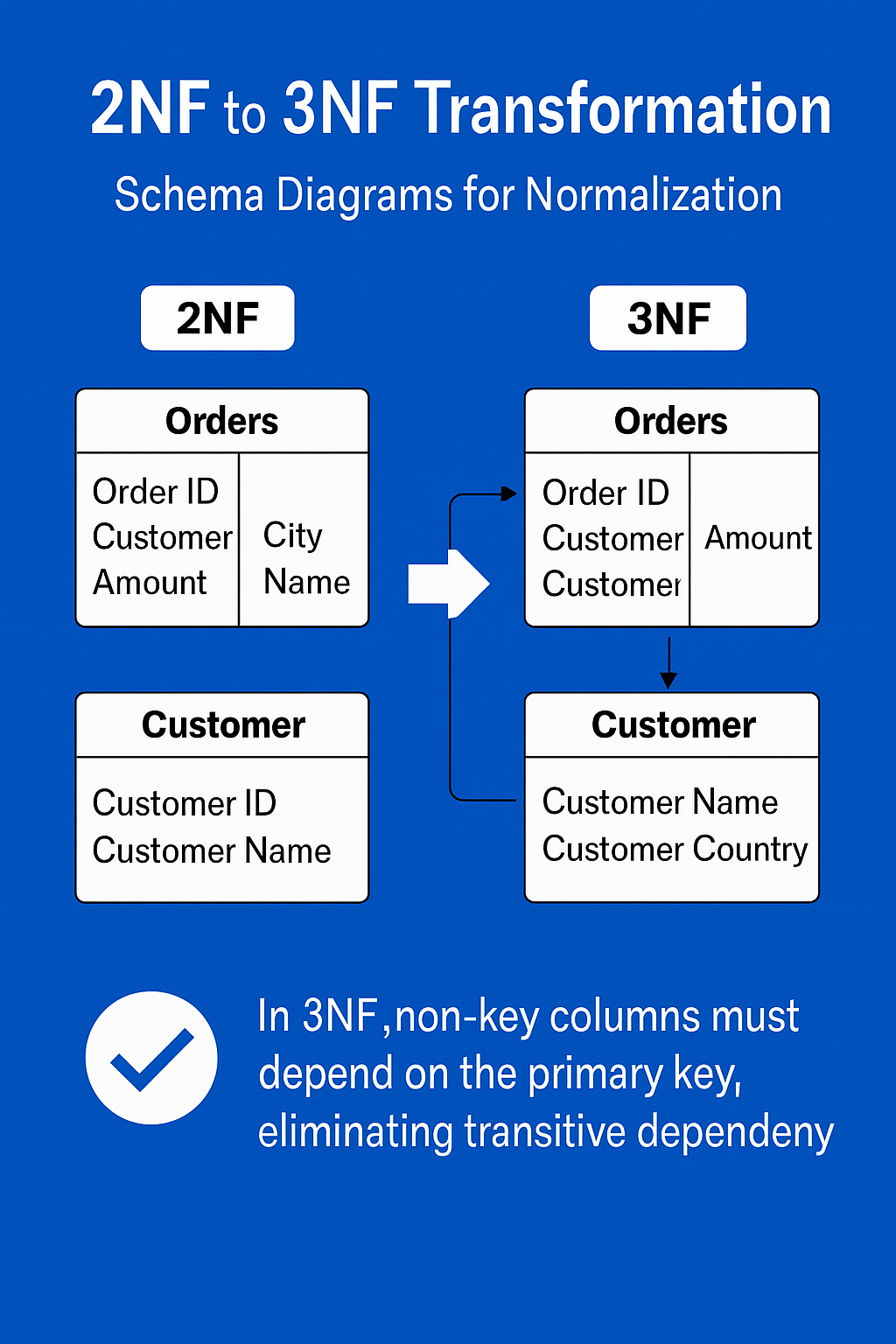
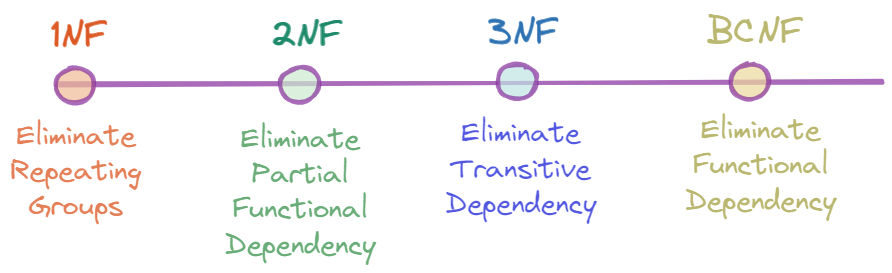
Normalization organizes data to reduce redundancy.


๐Ÿ”น Normal Forms

1NF (First Normal Form)

  • Atomic values
  • No repeating groups

2NF (Second Normal Form)

  • Remove partial dependencies

3NF (Third Normal Form)

  • Remove transitive dependencies

BCNF (Boyce-Codd Normal Form)

  • Stronger version of 3NF

๐Ÿ”น Benefits

  • Eliminates redundancy
  • Improves consistency
  • Simplifies updates

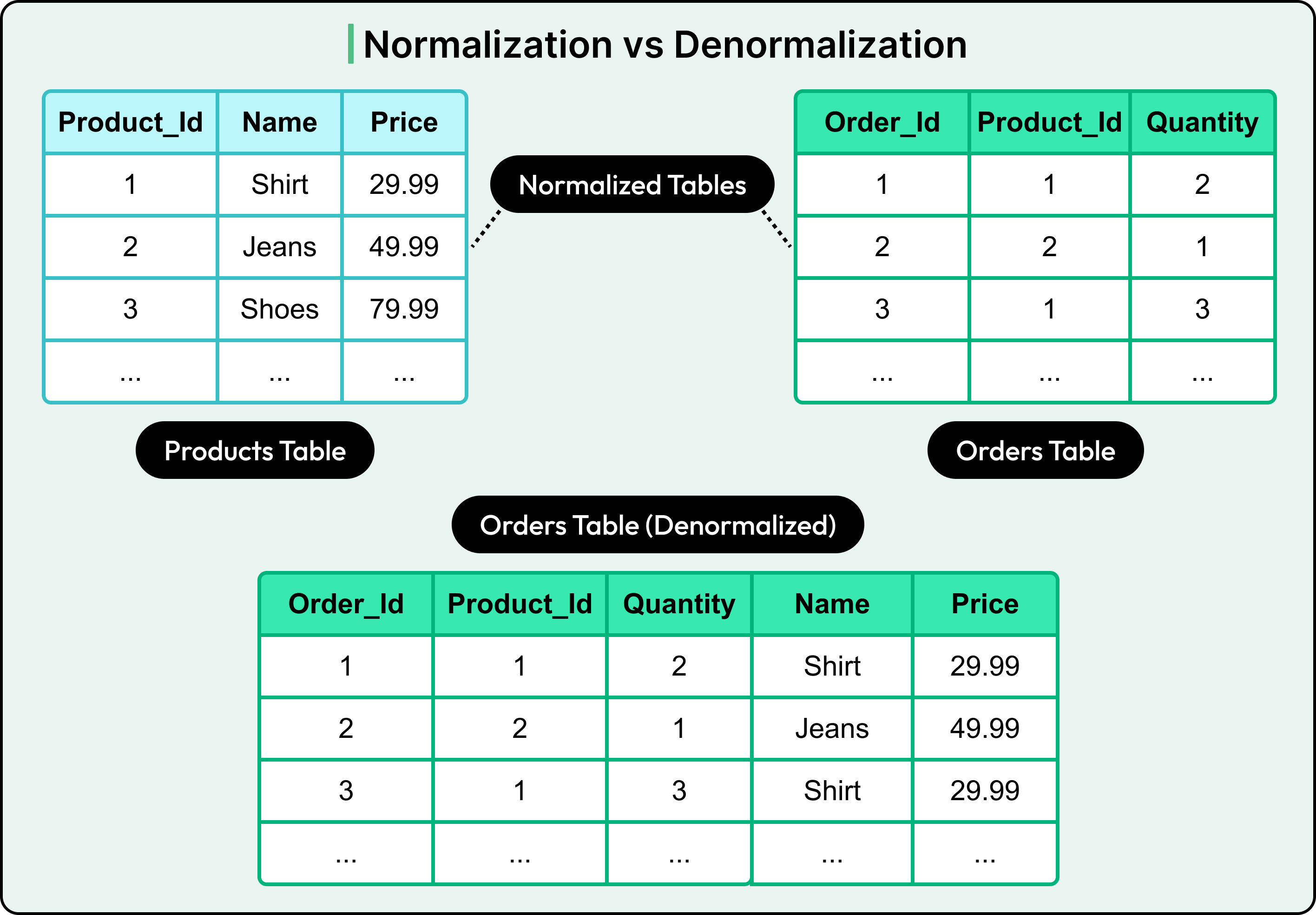
๐Ÿ”„ 7. Denormalization

Sometimes normalization is reversed for performance.

๐Ÿ”น Why Denormalize?

  • Faster reads
  • Reduced joins
  • Better performance in analytics

๐Ÿ”น Trade-offs

  • Data redundancy
  • Increased storage
  • Complex updates

๐Ÿงฎ 8. Constraints and Integrity

๐Ÿ”น Types of Constraints

  • NOT NULL
  • UNIQUE
  • PRIMARY KEY
  • FOREIGN KEY
  • CHECK

๐Ÿ”น Types of Integrity

  • Entity Integrity
  • Referential Integrity
  • Domain Integrity

๐Ÿ“Š 9. Indexing

Image
Image
Image
Image

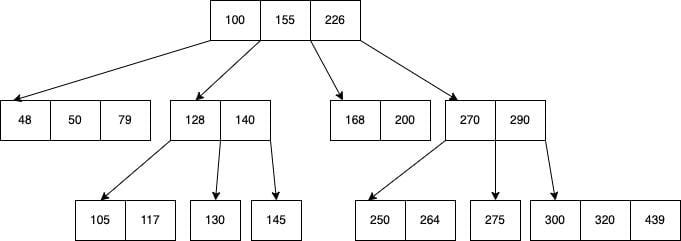
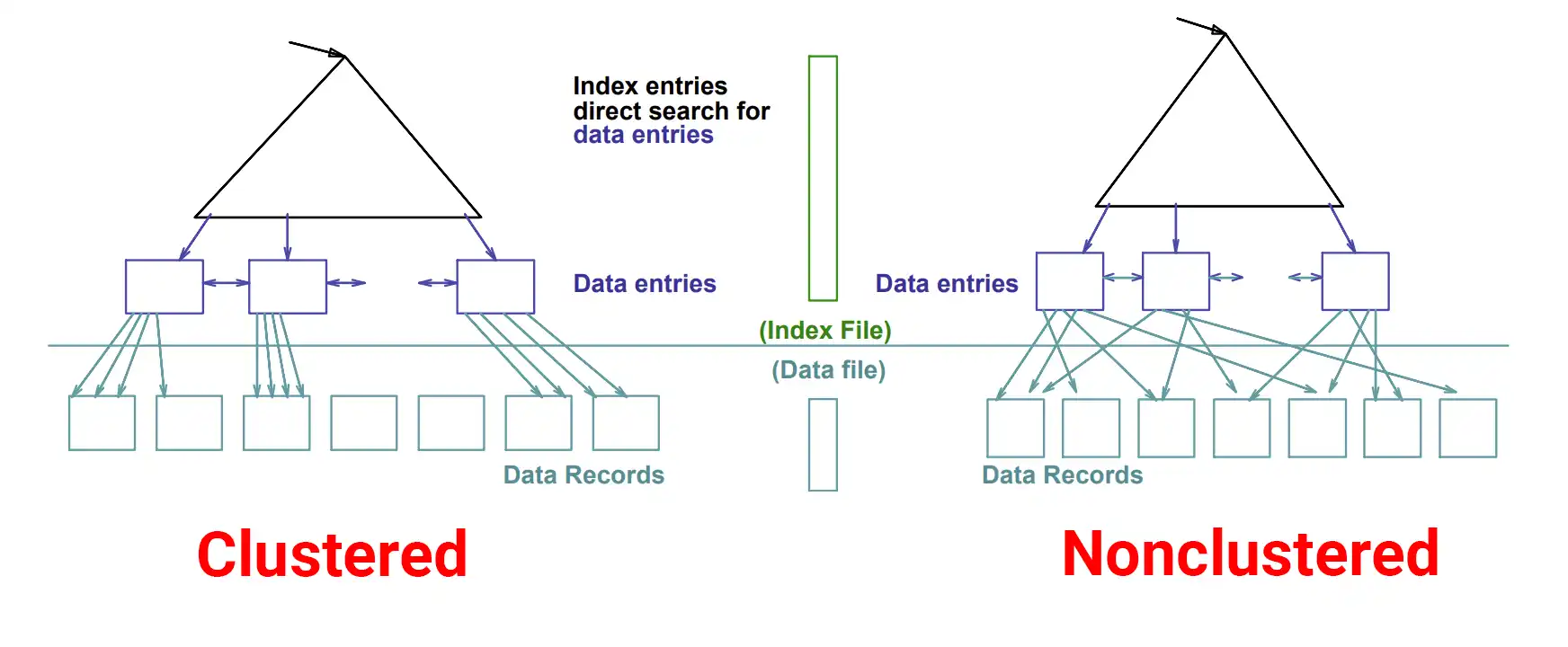
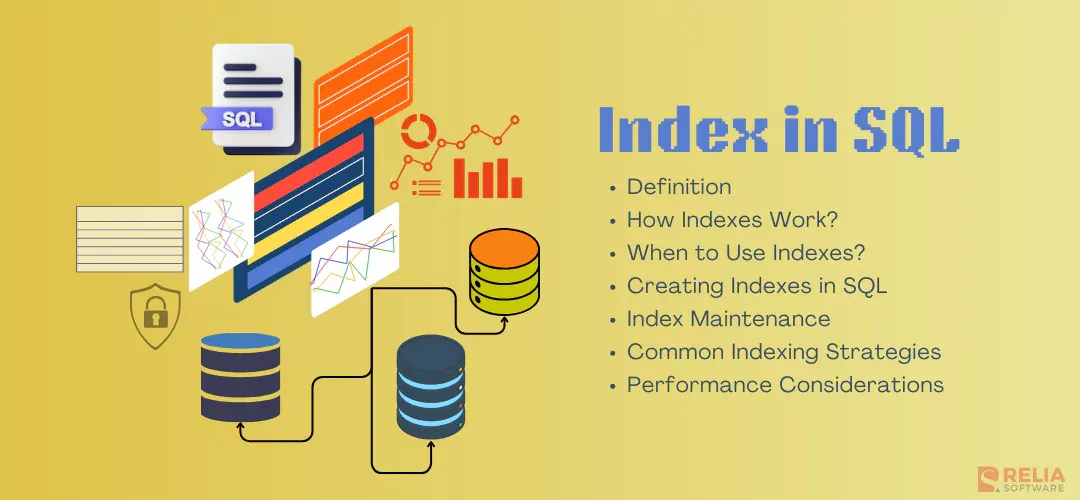
Indexes speed up data retrieval.


๐Ÿ”น Types of Indexes

  • Clustered Index
  • Non-clustered Index
  • Composite Index
  • Unique Index

๐Ÿ”น Advantages

  • Faster queries
  • Efficient searching

๐Ÿ”น Disadvantages

  • Extra storage
  • Slower inserts/updates

๐Ÿง  10. Relationships in Depth

๐Ÿ”น One-to-One

Example: User โ†” Profile

๐Ÿ”น One-to-Many

Example: Customer โ†’ Orders

๐Ÿ”น Many-to-Many

Example: Students โ†” Courses

Requires a junction table


๐Ÿ—๏ธ 11. Schema Design

A schema defines database structure.


๐Ÿ”น Types of Schema

  • Star Schema โญ
  • Snowflake Schema โ„๏ธ
  • Flat Schema

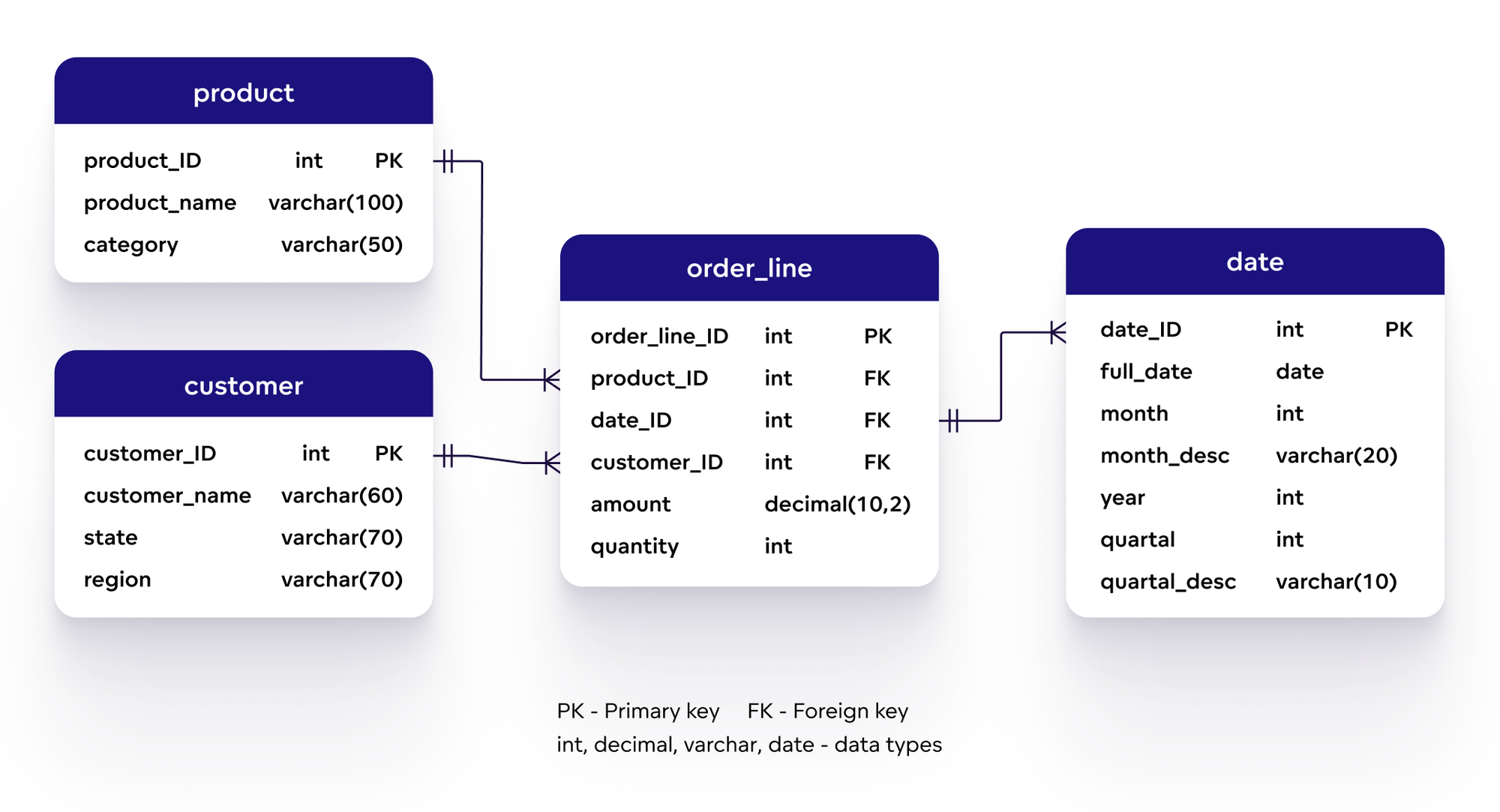
๐Ÿ”น Star Schema

  • Central fact table
  • Connected dimension tables

๐Ÿ”น Snowflake Schema

  • Normalized version of star schema

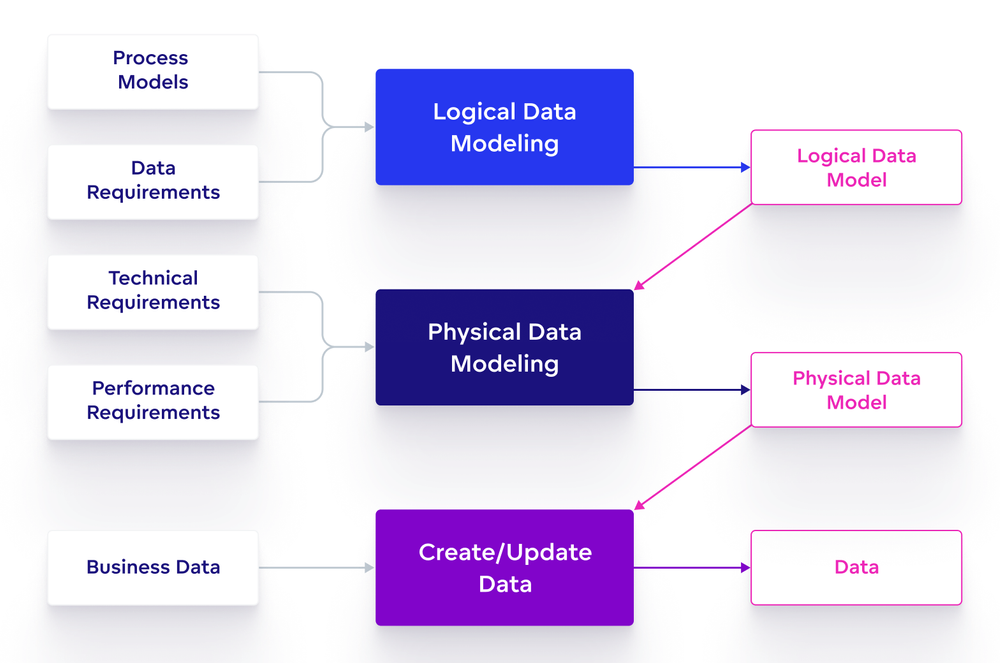
๐Ÿ“ฆ 12. Database Design Process

Image
Image
Image
Image

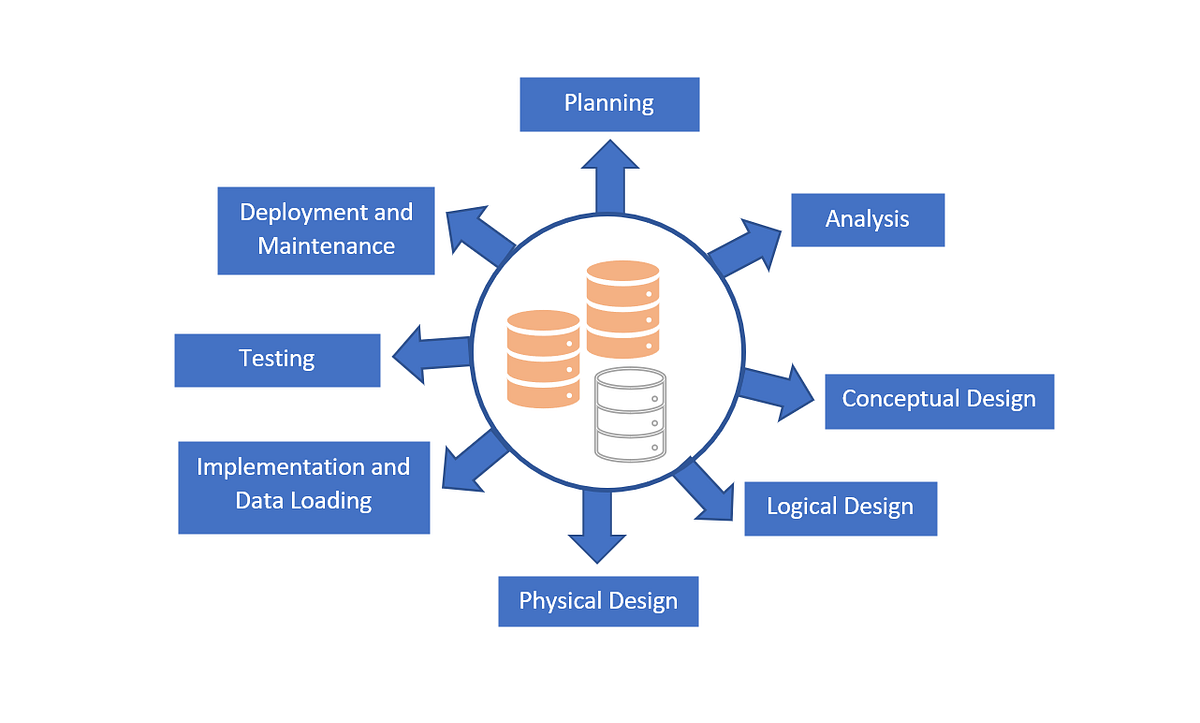
๐Ÿ”น Steps

  1. Requirement Analysis
  2. Conceptual Design
  3. Logical Design
  4. Normalization
  5. Physical Design
  6. Implementation
  7. Testing
  8. Maintenance

๐Ÿ” 13. Security in Database Design

  • Authentication
  • Authorization
  • Encryption
  • Data masking

๐Ÿ”น Best Practices

  • Use least privilege
  • Encrypt sensitive data
  • Regular backups

โšก 14. Performance Optimization

  • Proper indexing
  • Query optimization
  • Caching
  • Partitioning

๐Ÿงฉ 15. Transactions and ACID

๐Ÿ”น ACID Properties

  • Atomicity
  • Consistency
  • Isolation
  • Durability

๐ŸŒ 16. Distributed Database Design

Image
Image
Image
Image

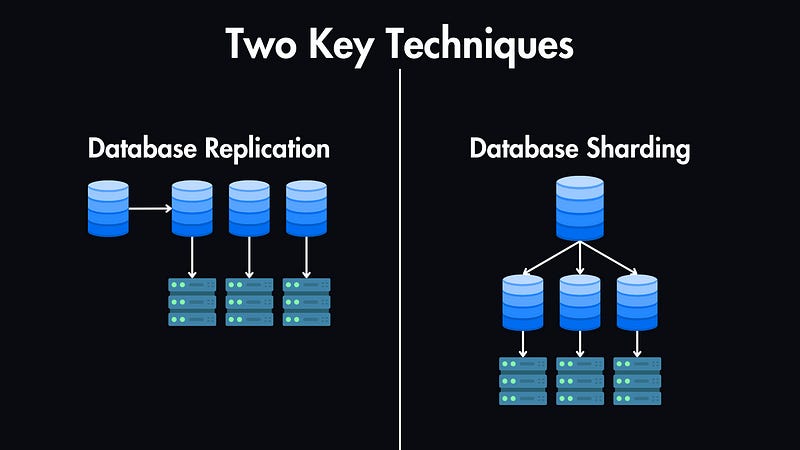
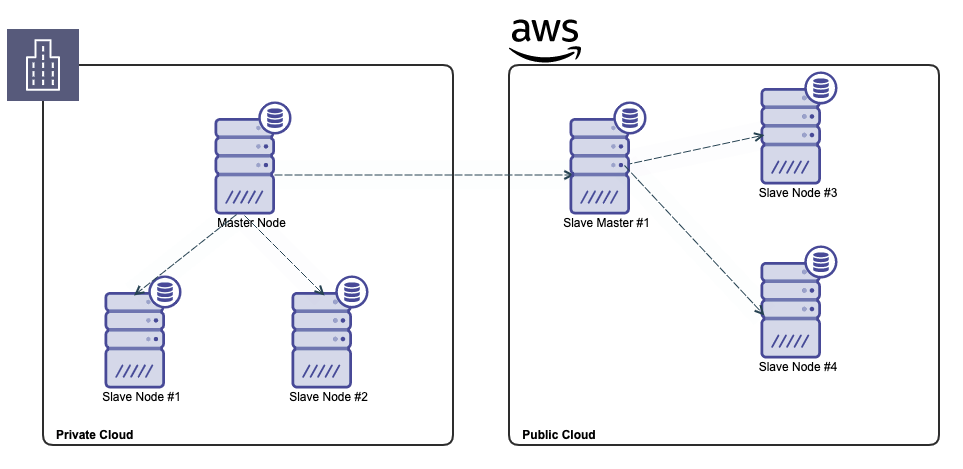
๐Ÿ”น Techniques

  • Sharding
  • Replication
  • Partitioning

๐Ÿ”„ 17. NoSQL vs Relational Design

FeatureRelationalNoSQL
SchemaFixedFlexible
ScalingVerticalHorizontal
Use CaseStructured dataBig data

๐Ÿงช 18. Advanced Concepts

  • Data Warehousing
  • OLAP vs OLTP
  • Materialized Views
  • Event Sourcing
  • CQRS

๐Ÿ“ˆ 19. Real-World Example

๐Ÿ”น E-commerce Database

Tables:

  • Users
  • Products
  • Orders
  • Payments

Relationships:

  • User โ†’ Orders (1:N)
  • Orders โ†’ Products (M:N)

๐Ÿงฐ 20. Tools for Database Design

  • ER modeling tools
  • SQL-based tools
  • Cloud DB tools

๐Ÿ“š 21. Advantages of Good Design

  • Scalability
  • Performance
  • Data integrity
  • Flexibility

โš ๏ธ 22. Common Mistakes

  • Poor normalization
  • Over-indexing
  • Ignoring scalability
  • Weak constraints

๐Ÿ”ฎ 23. Future Trends

  • Cloud-native databases
  • AI-driven optimization
  • Serverless databases
  • Multi-model databases

๐Ÿ Conclusion

Database design is a critical skill in modern computing. A well-designed database ensures that systems are efficient, scalable, and reliable. Whether you’re building a simple app or a complex enterprise system, mastering database design principles will help you create robust and high-performing solutions.
๐Ÿท๏ธ Tags

๐Ÿ—„๏ธ SQL (Structured Query Language)

Image
Image
Image
Image

๐Ÿ“˜ 1. Introduction to SQL

SQL (Structured Query Language) is a standard programming language used to store, manipulate, and retrieve data from relational databases. It is the backbone of modern data-driven applications and is widely used in industries such as finance, healthcare, e-commerce, education, and more.

SQL was developed in the 1970s at IBM by Donald D. Chamberlin and Raymond F. Boyce. Initially called SEQUEL (Structured English Query Language), it evolved into SQL and became an international standard (ANSI/ISO).


๐Ÿ”น Why SQL is Important

  • Enables efficient data management
  • Used in web applications, mobile apps, enterprise systems
  • Supports data analysis and reporting
  • Works with major database systems like:
    • MySQL
    • PostgreSQL
    • Oracle Database
    • SQL Server
    • SQLite

๐Ÿ”น Characteristics of SQL

  • Declarative language (focus on what to do, not how)
  • Supports complex queries
  • Standardized (ANSI SQL)
  • Integrates with multiple programming languages
  • Supports transactions and concurrency

๐Ÿงฑ 2. Relational Database Fundamentals

Image
Image
Image

SQL works with Relational Database Management Systems (RDBMS).

๐Ÿ”น Core Concepts

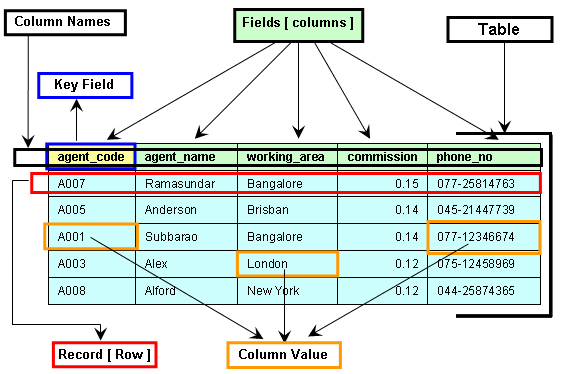
1. Table

A table is a collection of related data organized in rows and columns.

2. Row (Record)

Represents a single entry.

3. Column (Field)

Represents an attribute of the data.

4. Primary Key

  • Unique identifier for each record
  • Cannot be NULL

5. Foreign Key

  • Links two tables together
  • Maintains referential integrity

6. Schema

  • Structure of the database

๐Ÿ”น Example Table

IDNameAge
1John25
2Sara30

๐Ÿงฎ 3. Types of SQL Commands

SQL commands are divided into categories:


๐Ÿ”น 1. DDL (Data Definition Language)

Used to define database structure.

  • CREATE
  • ALTER
  • DROP
  • TRUNCATE

Example:

CREATE TABLE Students (
    ID INT PRIMARY KEY,
    Name VARCHAR(50),
    Age INT
);

๐Ÿ”น 2. DML (Data Manipulation Language)

Used to manipulate data.

  • INSERT
  • UPDATE
  • DELETE
INSERT INTO Students VALUES (1, 'John', 25);

UPDATE Students SET Age = 26 WHERE ID = 1;

DELETE FROM Students WHERE ID = 1;

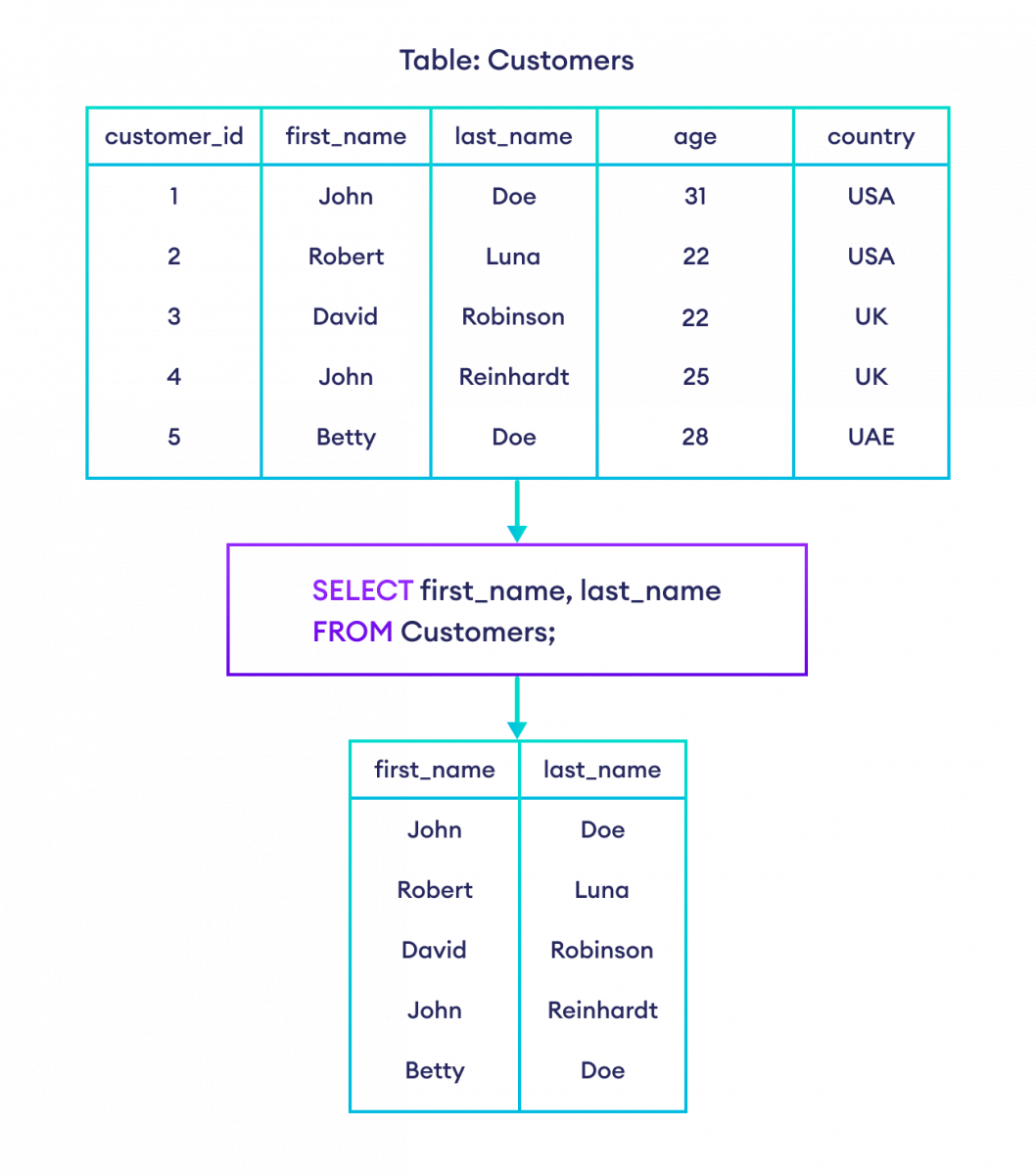
๐Ÿ”น 3. DQL (Data Query Language)

  • SELECT
SELECT * FROM Students;

๐Ÿ”น 4. DCL (Data Control Language)

  • GRANT
  • REVOKE

๐Ÿ”น 5. TCL (Transaction Control Language)

  • COMMIT
  • ROLLBACK
  • SAVEPOINT

๐Ÿ” 4. SQL Queries and Clauses

Image
Image
Image
Image

๐Ÿ”น SELECT Statement

SELECT column1, column2 FROM table_name;

๐Ÿ”น WHERE Clause

SELECT * FROM Students WHERE Age > 25;

๐Ÿ”น ORDER BY

SELECT * FROM Students ORDER BY Age DESC;

๐Ÿ”น GROUP BY

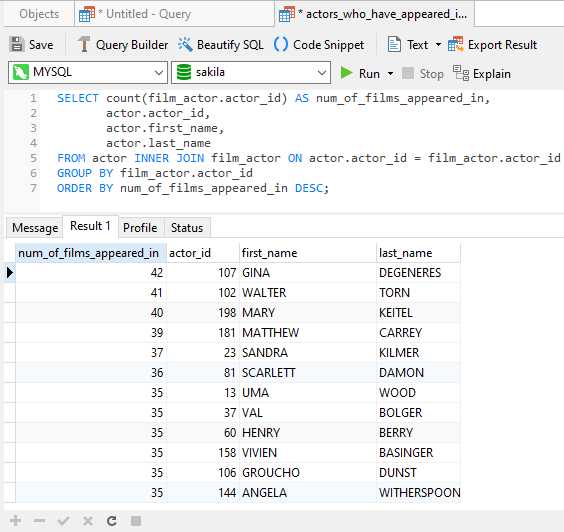
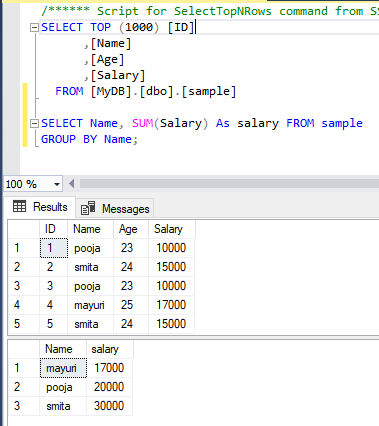
SELECT Age, COUNT(*) FROM Students GROUP BY Age;

๐Ÿ”น HAVING

SELECT Age, COUNT(*) 
FROM Students 
GROUP BY Age 
HAVING COUNT(*) > 1;

๐Ÿ”น DISTINCT

SELECT DISTINCT Age FROM Students;

๐Ÿ”— 5. SQL Joins

Image
Image
Image
Image

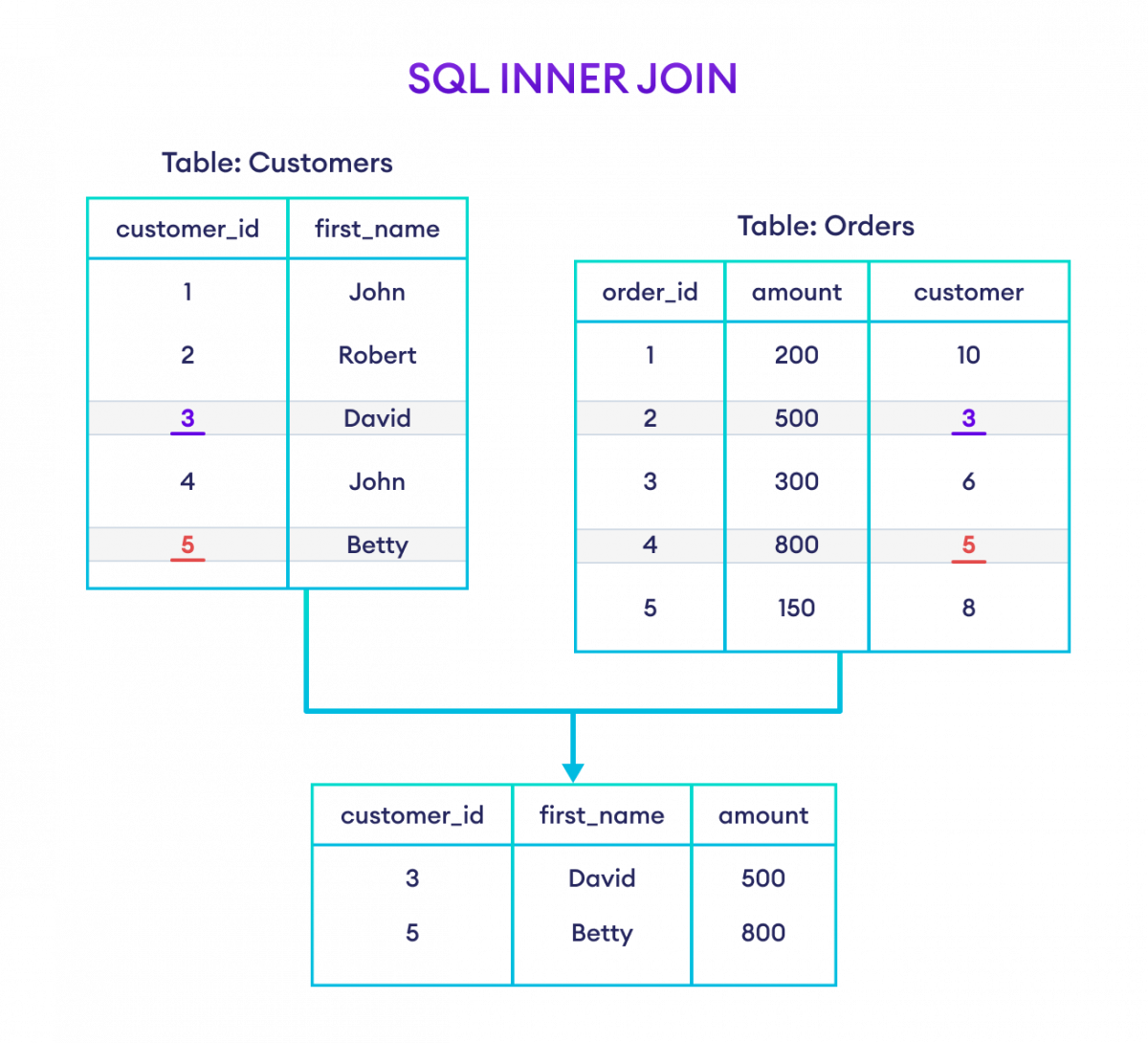
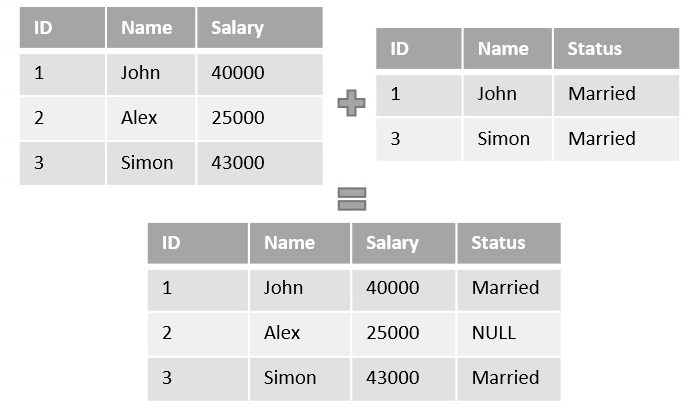
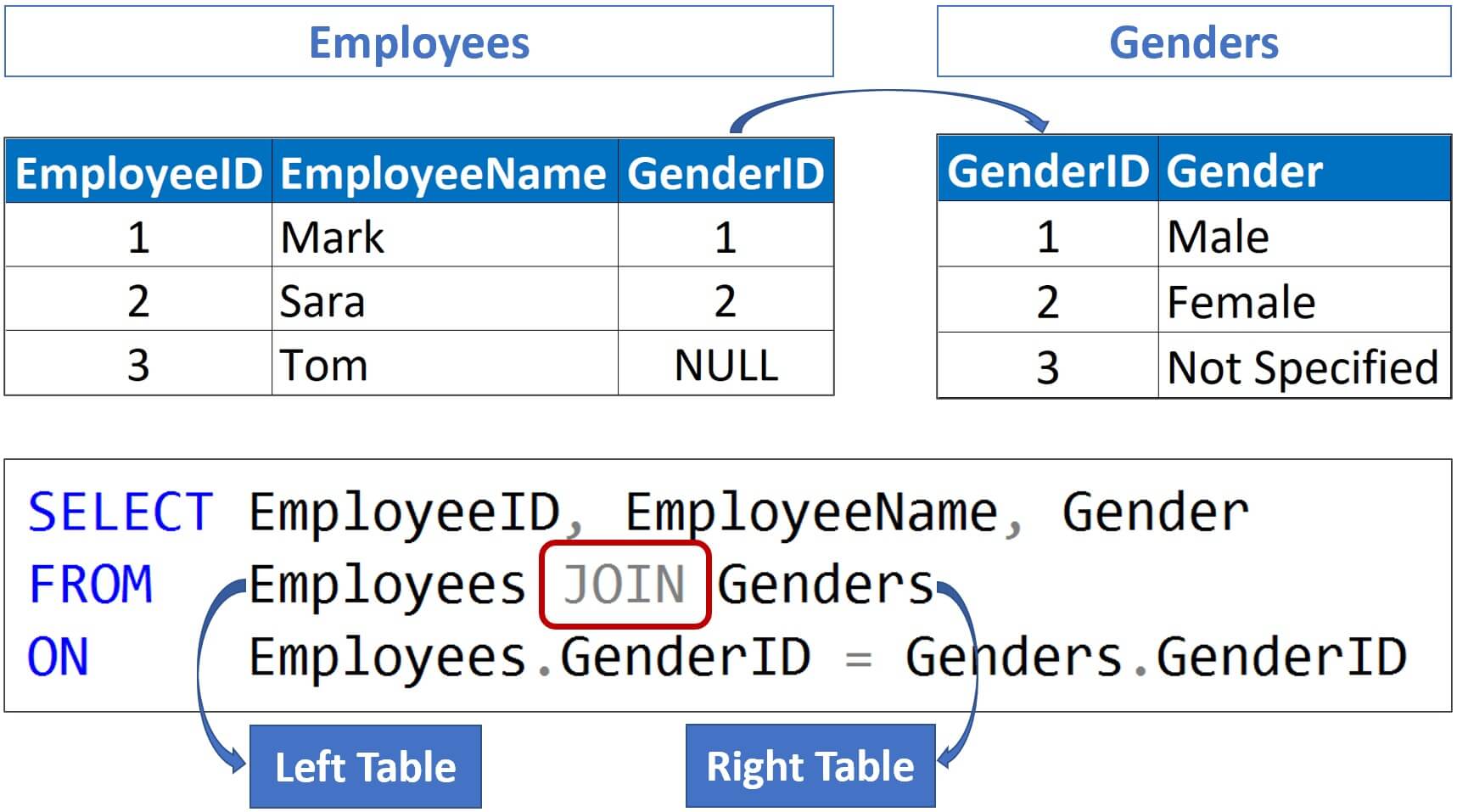
Joins combine rows from multiple tables.


๐Ÿ”น Types of Joins

1. INNER JOIN

Returns matching rows.

SELECT * FROM A INNER JOIN B ON A.id = B.id;

2. LEFT JOIN

Returns all rows from left table.


3. RIGHT JOIN

Returns all rows from right table.


4. FULL JOIN

Returns all rows from both tables.


๐Ÿง  6. SQL Functions

๐Ÿ”น Aggregate Functions

  • COUNT()
  • SUM()
  • AVG()
  • MIN()
  • MAX()
SELECT AVG(Age) FROM Students;

๐Ÿ”น String Functions

  • UPPER()
  • LOWER()
  • LENGTH()

๐Ÿ”น Date Functions

  • NOW()
  • CURDATE()

๐Ÿ—๏ธ 7. Constraints in SQL

Constraints enforce rules on data.

  • NOT NULL
  • UNIQUE
  • PRIMARY KEY
  • FOREIGN KEY
  • CHECK
  • DEFAULT
CREATE TABLE Users (
    ID INT PRIMARY KEY,
    Email VARCHAR(100) UNIQUE
);

๐Ÿ”„ 8. Normalization

Image
Image
Image
Image

Normalization reduces redundancy.

๐Ÿ”น Types:

  • 1NF: Atomic values
  • 2NF: Remove partial dependency
  • 3NF: Remove transitive dependency

โšก 9. Indexing

Indexes improve query performance.

CREATE INDEX idx_name ON Students(Name);

Types:

  • Single-column index
  • Composite index
  • Unique index

๐Ÿ” 10. Transactions

A transaction is a unit of work.

Properties (ACID):

  • Atomicity
  • Consistency
  • Isolation
  • Durability

๐Ÿ” 11. Subqueries

SELECT Name FROM Students
WHERE Age > (SELECT AVG(Age) FROM Students);

๐Ÿ“Š 12. Views

Virtual tables based on queries.

CREATE VIEW StudentView AS
SELECT Name FROM Students;

๐Ÿงฉ 13. Stored Procedures

Reusable SQL code.

CREATE PROCEDURE GetStudents()
BEGIN
    SELECT * FROM Students;
END;

๐Ÿ”” 14. Triggers

Automatically executed events.

CREATE TRIGGER before_insert
BEFORE INSERT ON Students
FOR EACH ROW
SET NEW.Name = UPPER(NEW.Name);

๐ŸŒ 15. SQL vs NoSQL

FeatureSQLNoSQL
StructureTable-basedFlexible
SchemaFixedDynamic
ScalabilityVerticalHorizontal

๐Ÿงช 16. Advanced SQL Concepts

  • Window Functions (ROW_NUMBER(), RANK())
  • CTE (Common Table Expressions)
  • Recursive Queries
  • Partitioning
  • Query Optimization

๐Ÿ“ˆ 17. SQL Performance Optimization

  • Use indexes
  • Avoid SELECT *
  • Optimize joins
  • Use caching
  • Analyze execution plans

๐Ÿงฐ 18. Popular SQL Databases

  • MySQL
  • PostgreSQL
  • Oracle
  • SQL Server
  • SQLite

๐Ÿง‘โ€๐Ÿ’ป 19. Real-World Applications

  • Banking systems
  • E-commerce platforms
  • Social media
  • Data analytics
  • Inventory systems

๐Ÿ“š 20. Advantages of SQL

  • Easy to learn
  • Powerful querying
  • High performance
  • Standardized

โš ๏ธ 21. Limitations of SQL

  • Not ideal for unstructured data
  • Scaling challenges
  • Complex queries can be slow

๐Ÿ”ฎ 22. Future of SQL

  • Integration with AI & Big Data
  • Cloud databases (AWS, Azure, GCP)
  • Real-time analytics
  • Hybrid SQL/NoSQL systems

๐Ÿ Conclusion

SQL remains one of the most essential tools in computing. Whether you are a developer, data analyst, or engineer, mastering SQL enables you to handle data efficiently, build scalable systems, and extract meaningful insights.


๐Ÿท๏ธ Tags