Tag Archives: Edge Computing

๐Ÿ–ฅ๏ธ Virtualization


๐ŸŒ Introduction to Virtualization

Image
Image
Image
Image

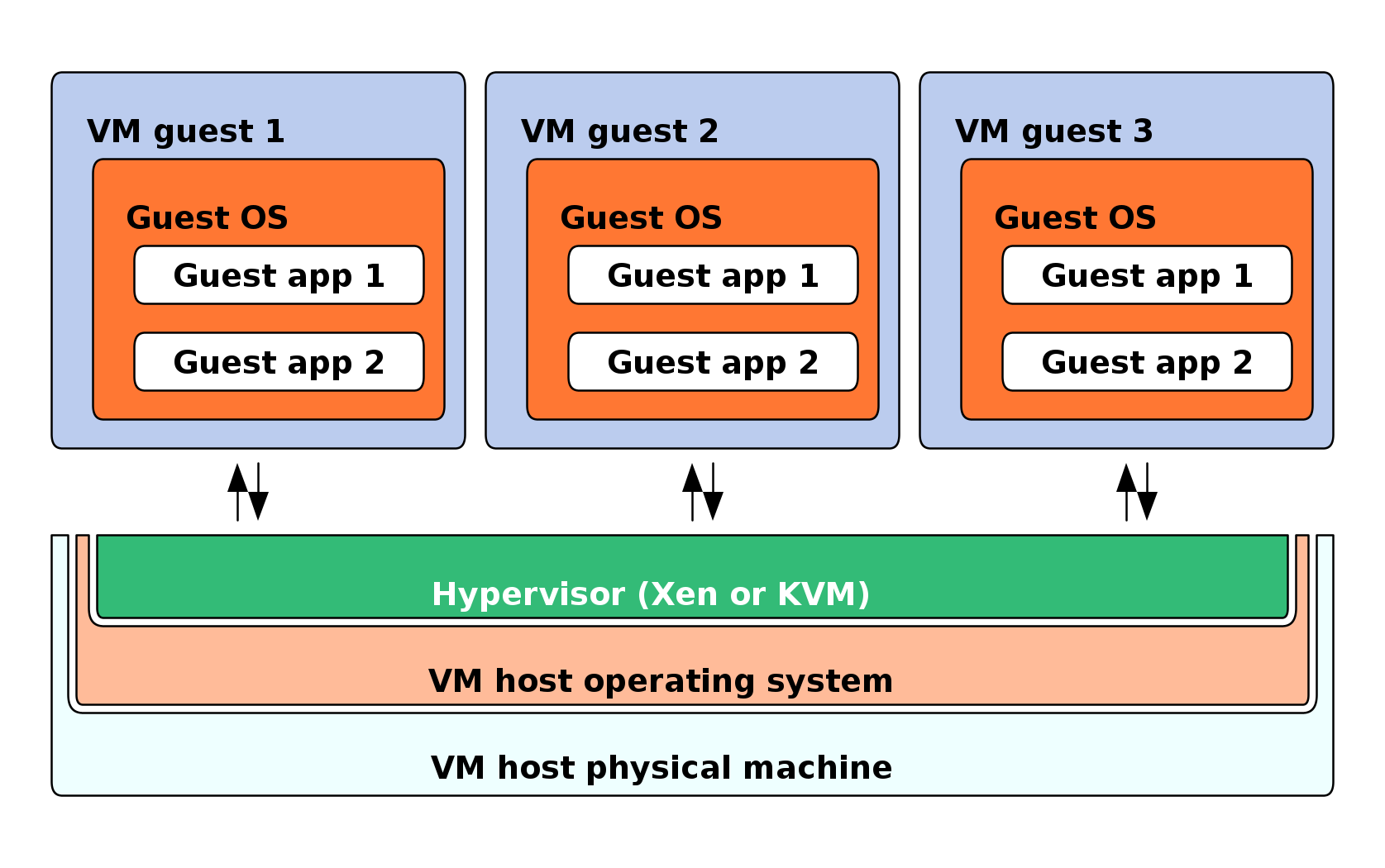
Virtualization is a technology that allows a single physical computer system to run multiple virtual environments (virtual machines) simultaneously. It abstracts hardware resources such as CPU, memory, and storage and allocates them efficiently among multiple users or systems.

In simple terms:

Virtualization = creating virtual versions of physical resources

These virtual versions behave like real systems but operate within a controlled environment.


๐Ÿง  Importance of Virtualization

  • Efficient resource utilization
  • Cost reduction (less hardware required)
  • Scalability and flexibility
  • Isolation and security
  • Foundation of cloud computing

๐Ÿงฉ Basic Concepts of Virtualization


๐Ÿ’ก What is a Virtual Machine (VM)?

Image
Image
Image
Image

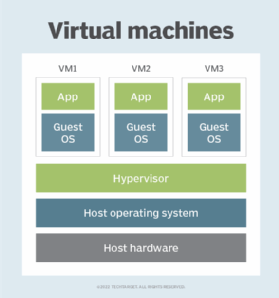
A Virtual Machine (VM) is a software-based emulation of a physical computer.

Components:

  • Virtual CPU
  • Virtual RAM
  • Virtual storage
  • Guest operating system

โš™๏ธ What is a Hypervisor?

Image
Image
Image
Image

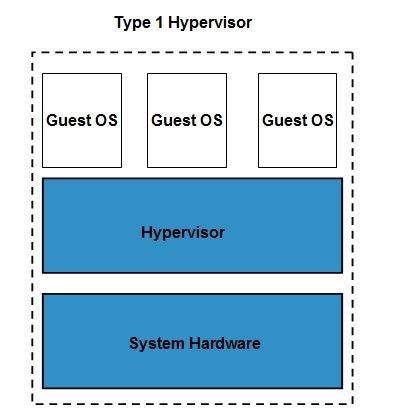
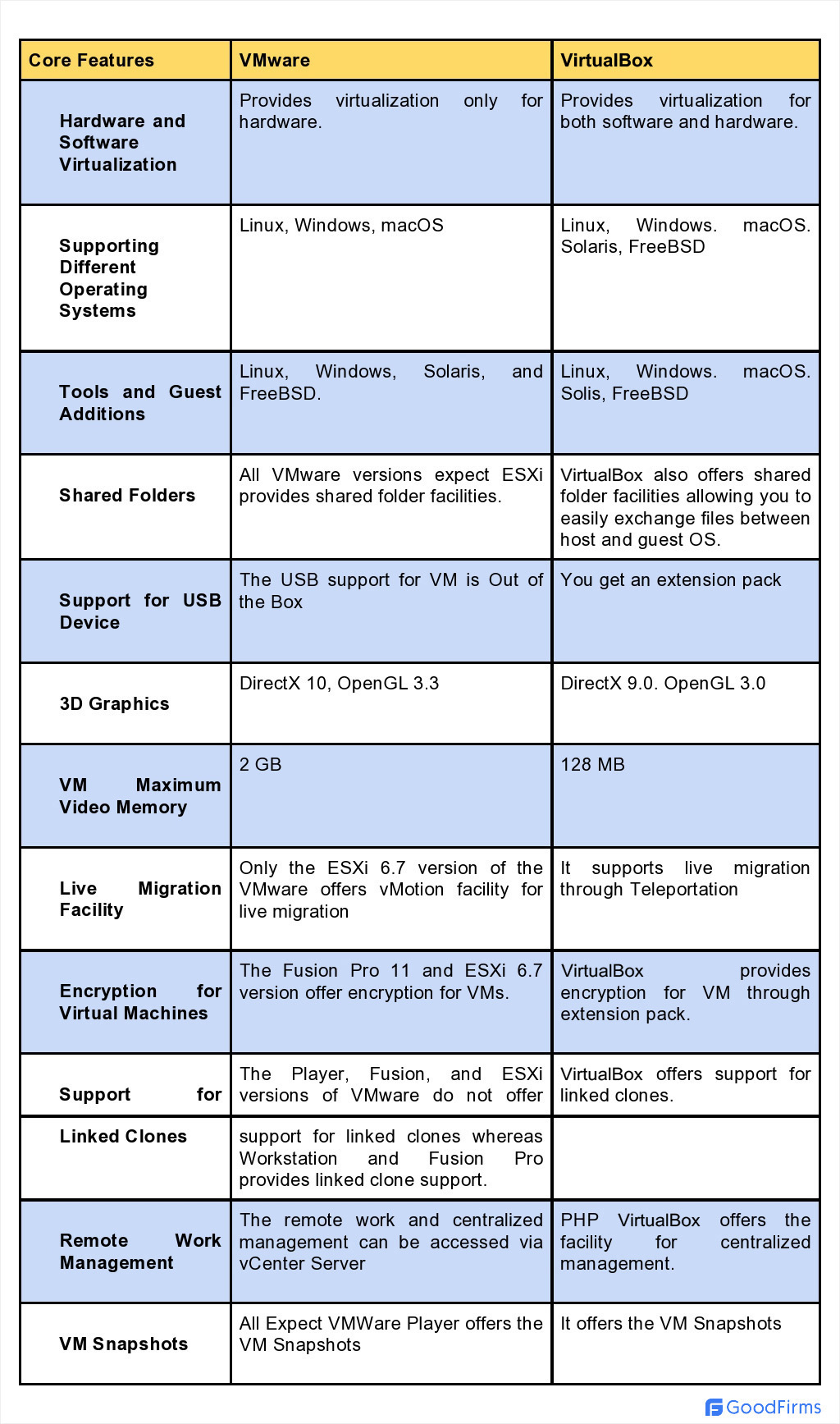
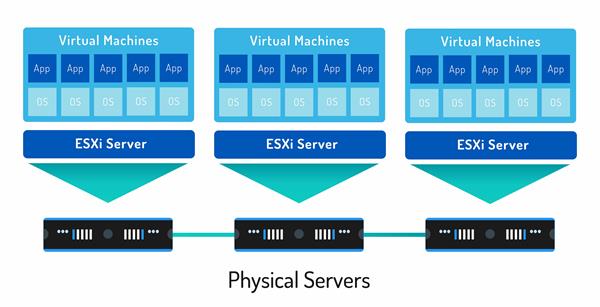
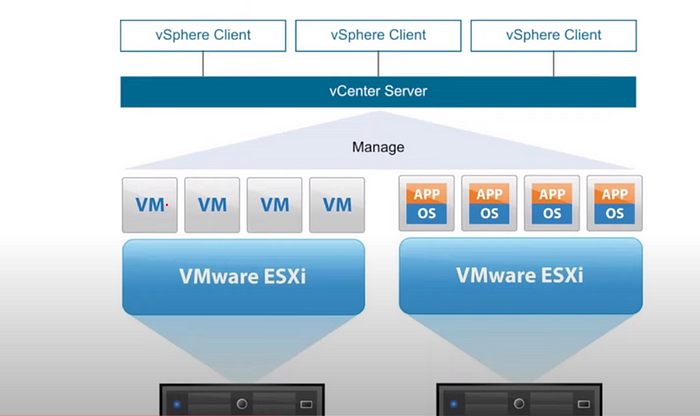
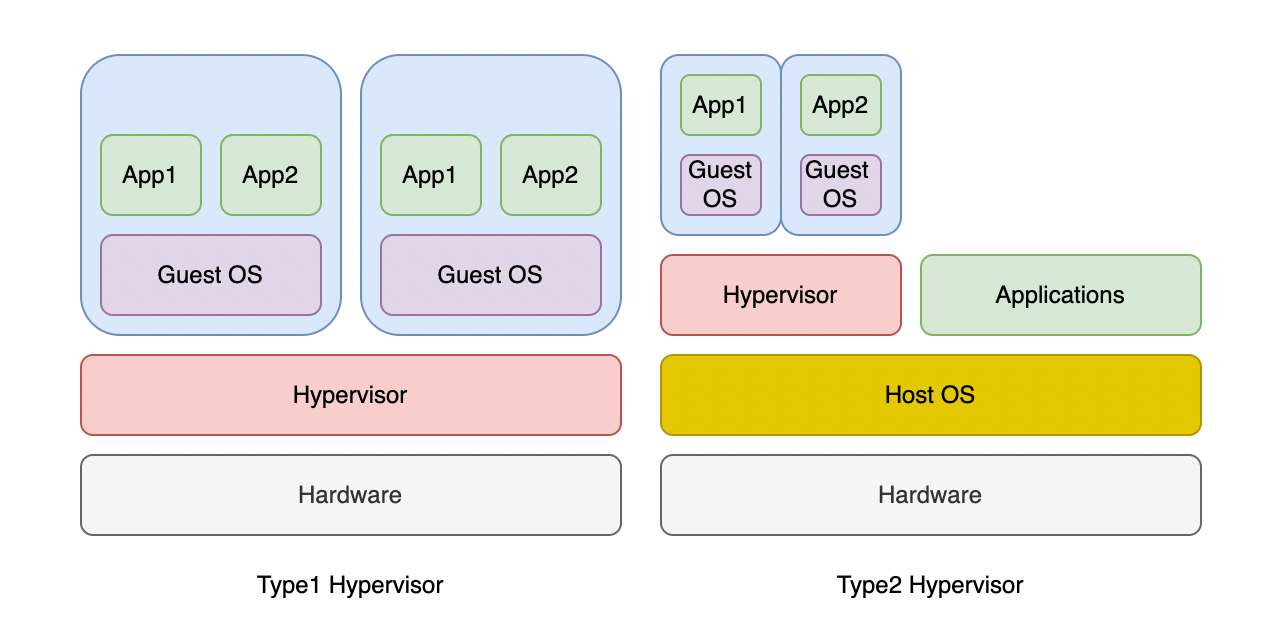
A hypervisor is software that manages virtual machines.

Types:

๐Ÿ”น Type 1 (Bare-metal)

  • Runs directly on hardware
  • Example: VMware ESXi

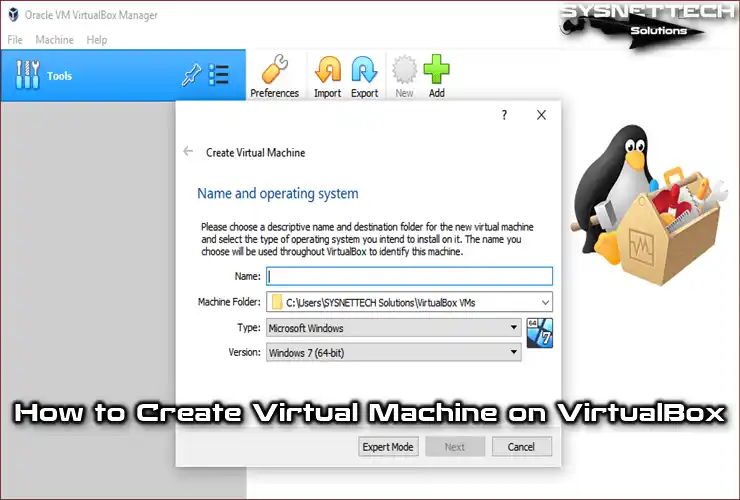
๐Ÿ”น Type 2 (Hosted)

  • Runs on an OS
  • Example: VirtualBox

๐Ÿง  Types of Virtualization


๐Ÿ–ฅ๏ธ 1. Server Virtualization

Image
Image
Image
Image
  • Divides one server into multiple virtual servers

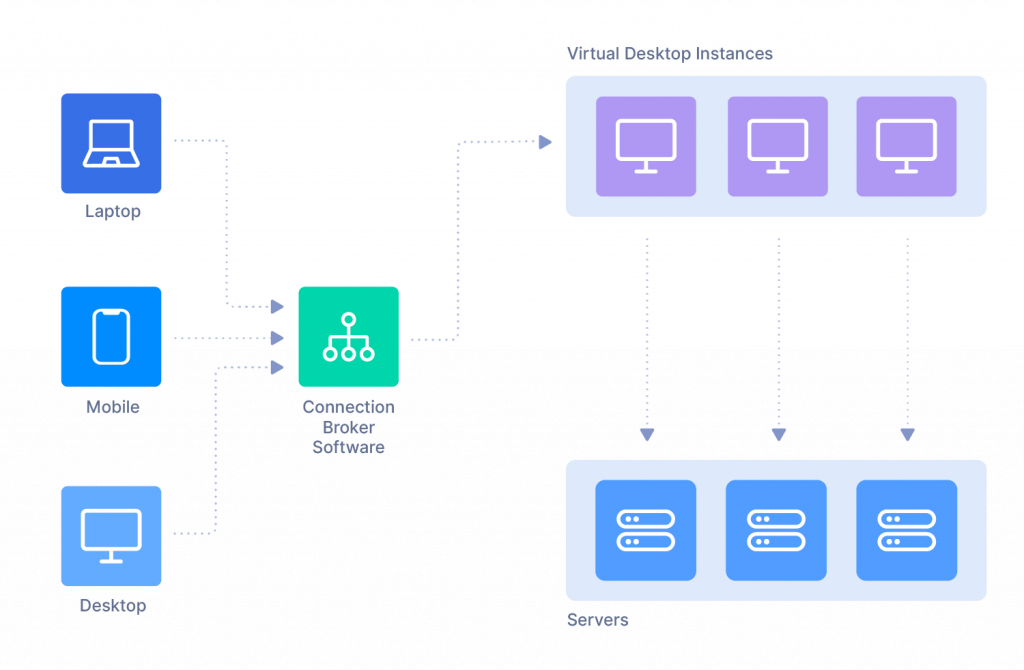
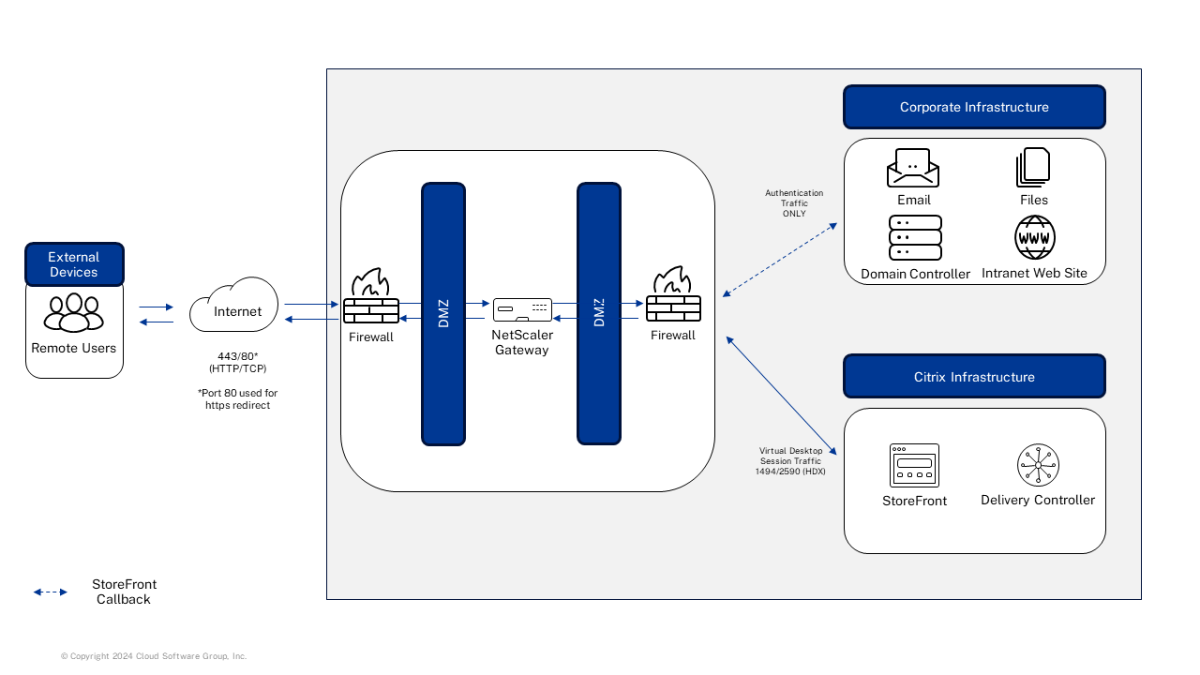
๐Ÿ’ป 2. Desktop Virtualization

Image
Image
Image
Image
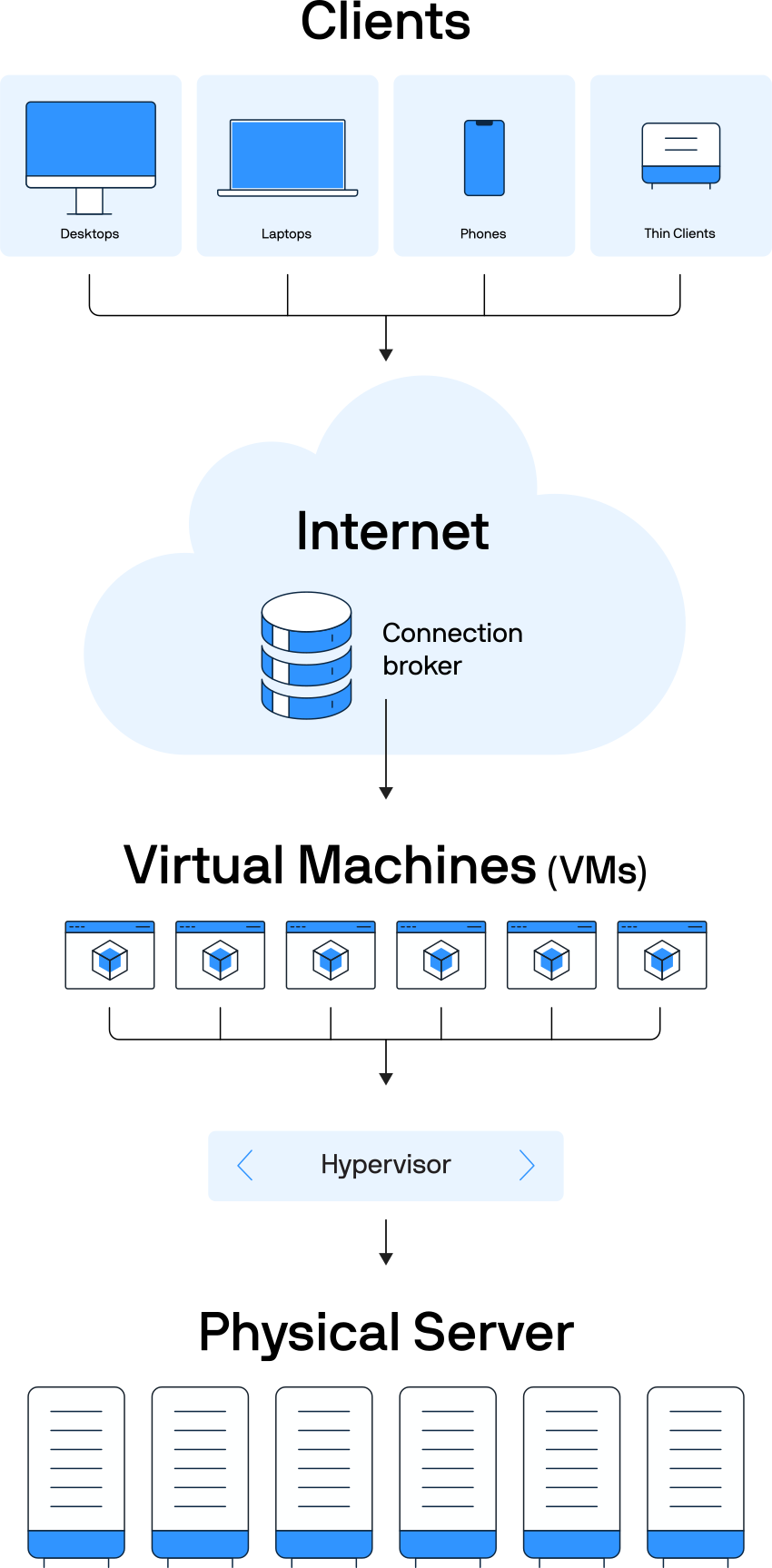
  • Users access desktops remotely

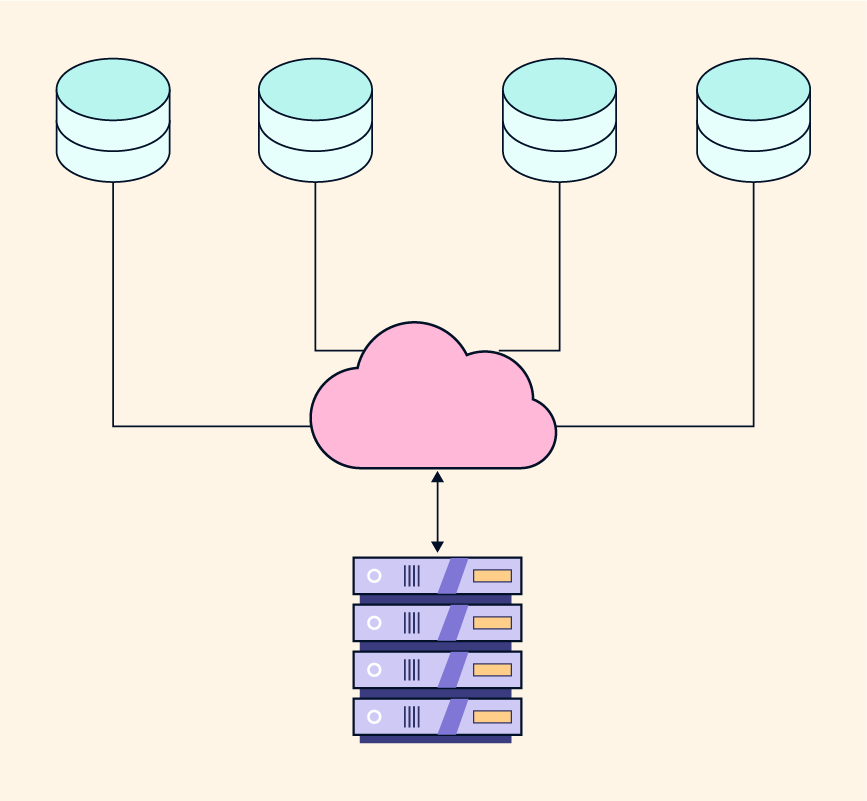
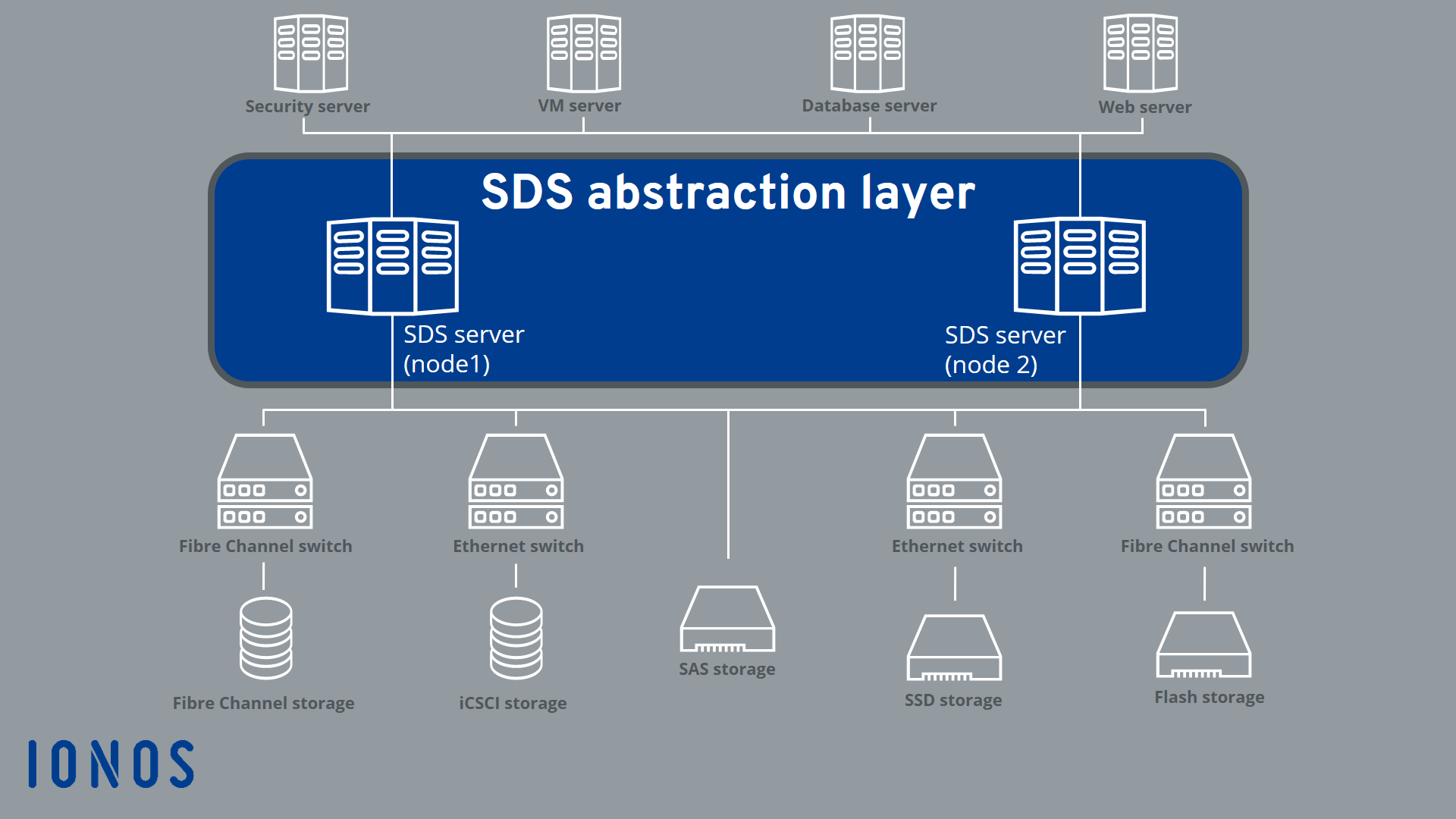
๐Ÿ“ฆ 3. Storage Virtualization

Image
Image
Image
Image
  • Combines multiple storage devices

๐ŸŒ 4. Network Virtualization

Image
Image
Image
Image
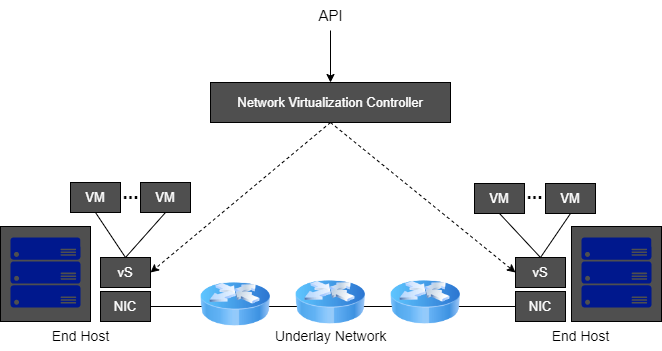
  • Creates virtual networks

๐Ÿง  5. Application Virtualization

Image
Image
Image
Image
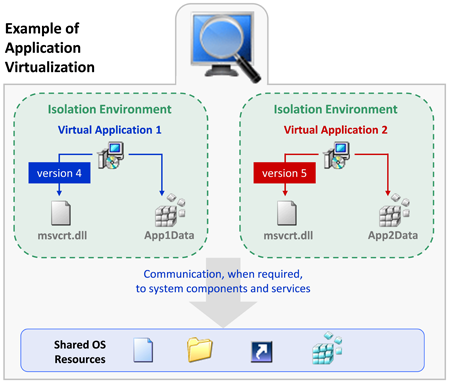
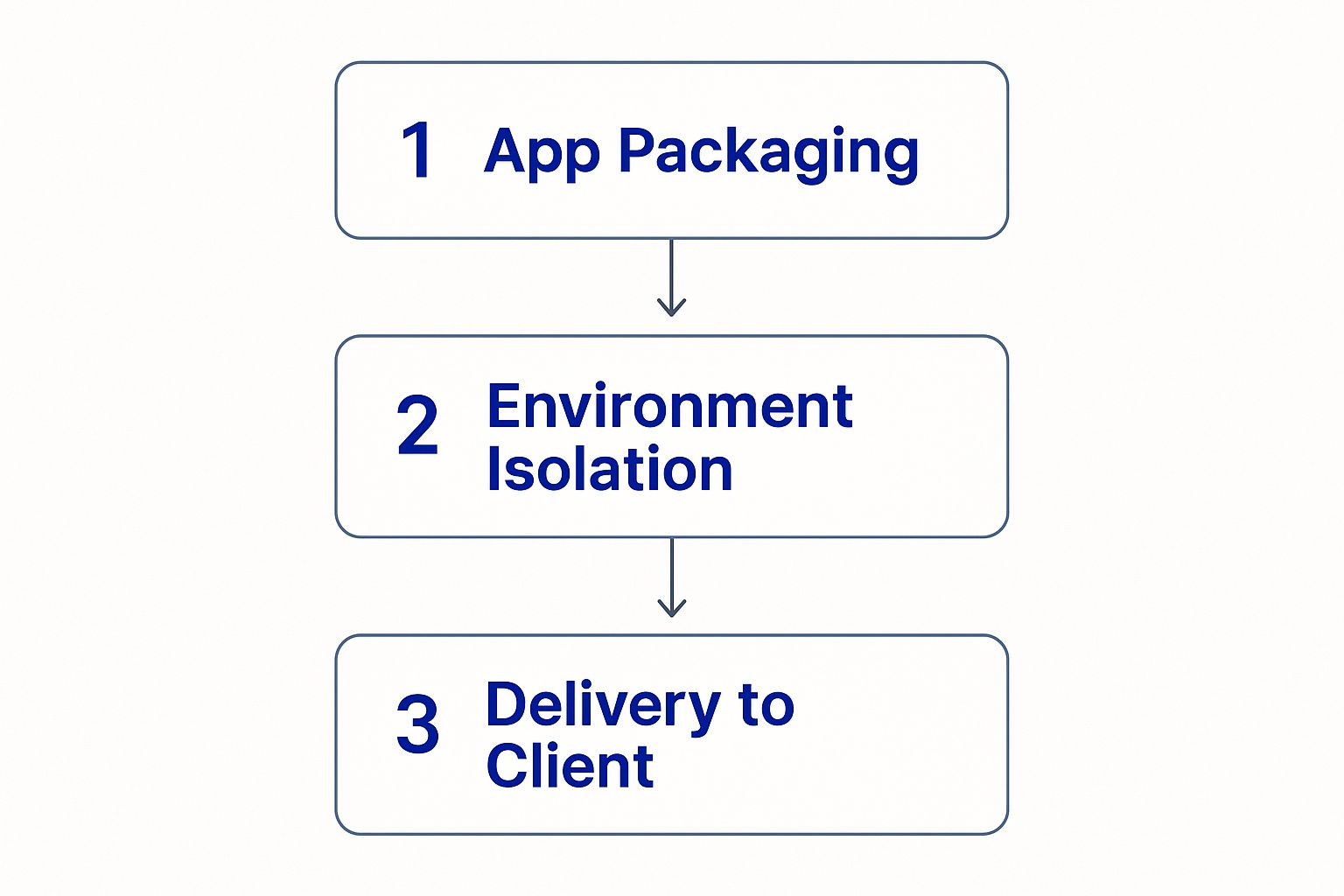
  • Runs applications without installing them

๐Ÿ“ฆ 6. Containerization

Image
Image
Image
Image
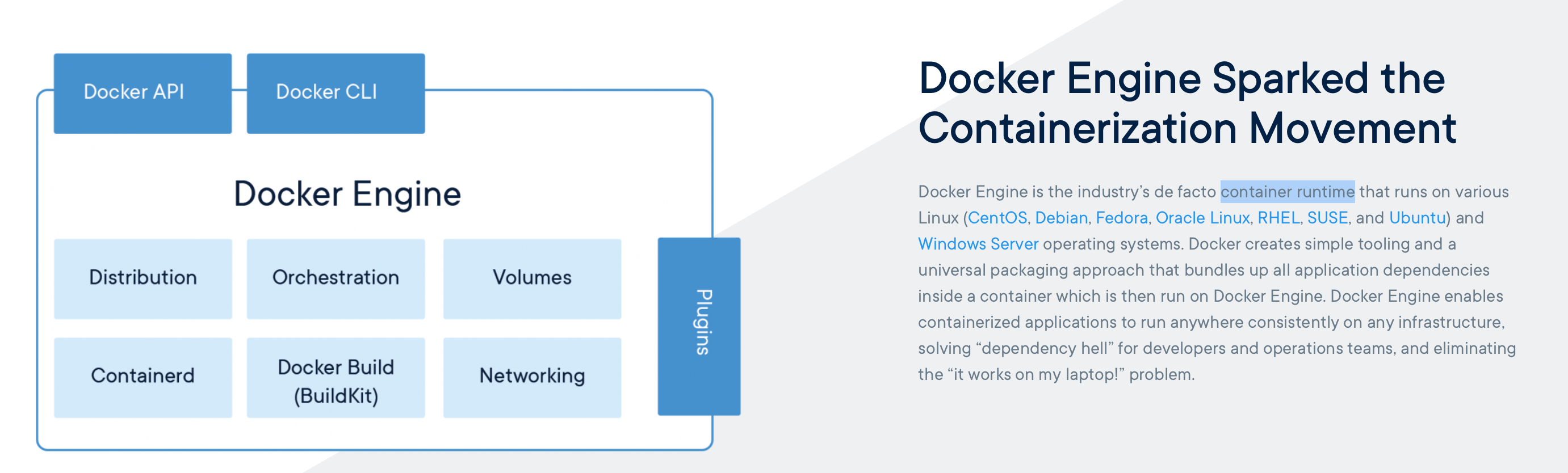
  • Lightweight virtualization
  • Uses shared OS kernel

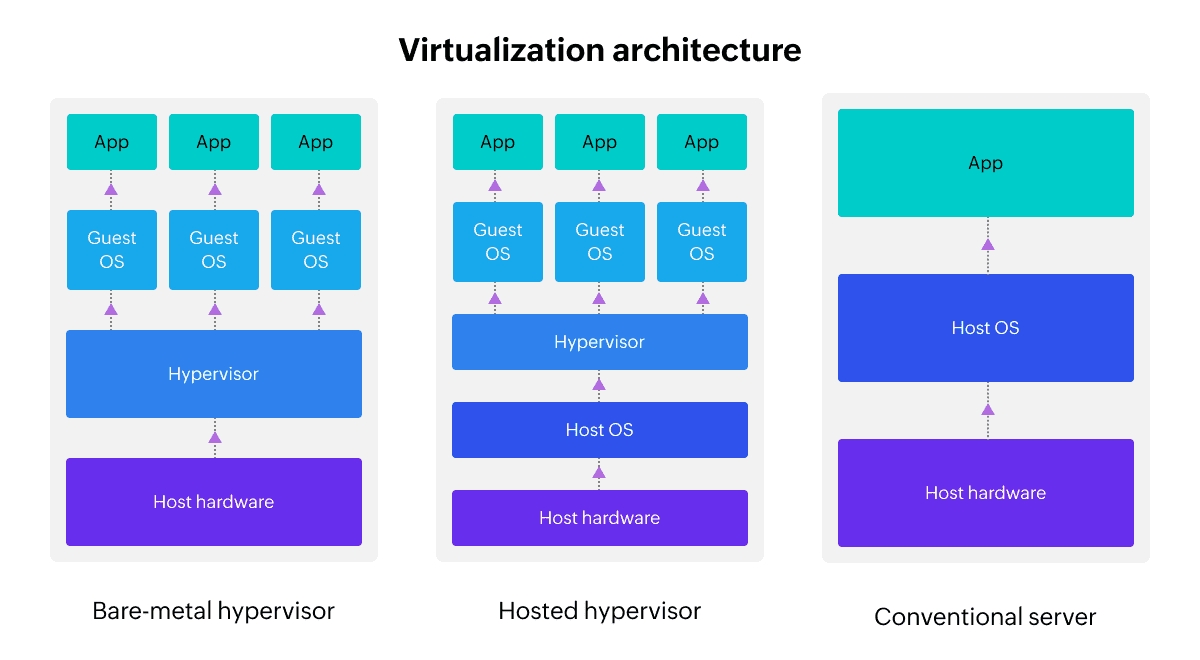
โš™๏ธ Virtualization Architecture


๐Ÿงฉ Layers:

Image
Image
Image
Image
  1. Physical hardware
  2. Hypervisor
  3. Virtual machines
  4. Applications

๐Ÿ”„ Full Virtualization vs Para-Virtualization


โš–๏ธ Comparison:

FeatureFull VirtualizationPara-Virtualization
OS modificationNot requiredRequired
PerformanceModerateHigh
ComplexityLowHigh

๐Ÿง  Virtualization in Cloud Computing


โ˜๏ธ Cloud Models

Image
Image
Image
Image

๐Ÿ”น IaaS (Infrastructure as a Service)

  • Virtual machines

๐Ÿ”น PaaS (Platform as a Service)

  • Development platforms

๐Ÿ”น SaaS (Software as a Service)

  • Applications over internet

๐Ÿ” Security in Virtualization


๐Ÿ›ก๏ธ Features:

Image
Image
Image
Image
  • Isolation between VMs
  • Sandboxing
  • Secure hypervisor

โš ๏ธ Risks:

  • VM escape
  • Resource sharing vulnerabilities

โš™๏ธ Resource Management


๐Ÿง  Techniques:

  • CPU scheduling
  • Memory allocation
  • Storage management

๐Ÿ”„ Live Migration


๐Ÿ” Concept

Image
Image
Image
Image
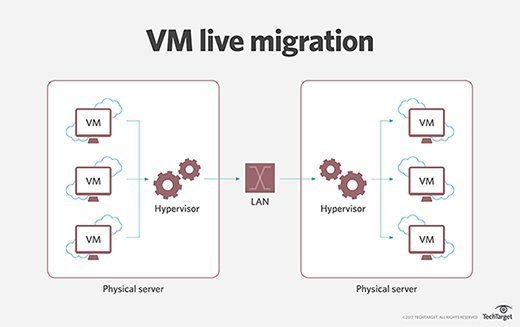
  • Moving VMs between hosts without downtime

๐Ÿง  Snapshots and Cloning


๐Ÿ“ธ Snapshot:

  • Saves VM state

๐Ÿ“‹ Cloning:

  • Creates duplicate VM

โšก Advantages of Virtualization

  • Cost efficiency
  • Scalability
  • Flexibility
  • Disaster recovery

โš ๏ธ Limitations

  • Performance overhead
  • Complexity
  • Security risks

๐Ÿš€ Emerging Trends

Image
Image
Image
Image
  • Edge virtualization
  • Serverless computing
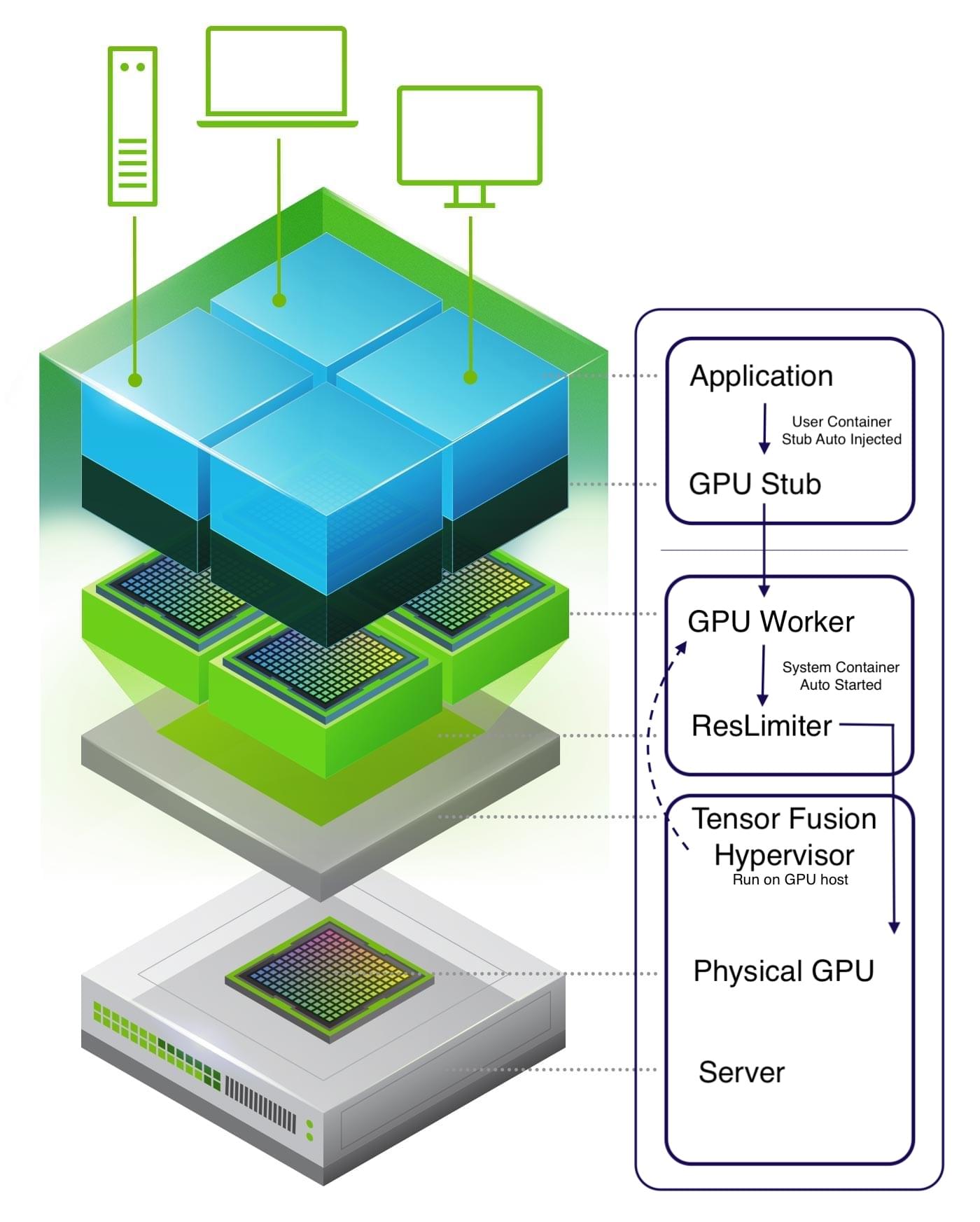
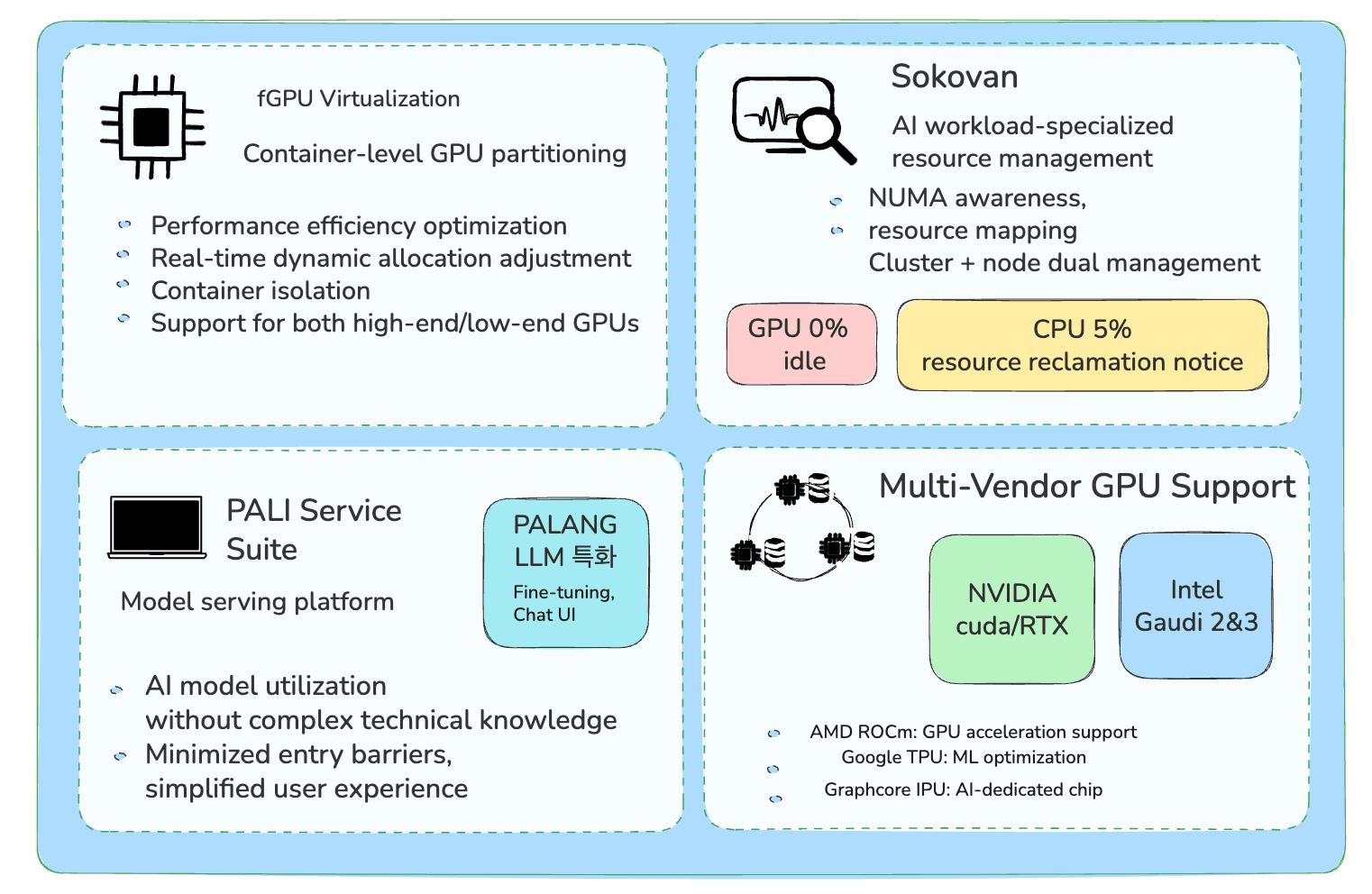
  • GPU virtualization
  • Hybrid cloud

๐Ÿง  Virtualization vs Containerization


โš–๏ธ Comparison:

FeatureVirtualizationContainerization
OSSeparate OSShared OS
SizeLargeSmall
SpeedSlowerFaster

๐Ÿงพ Conclusion

Virtualization is a key technology in modern computing, enabling:

  • Efficient use of resources
  • Cloud computing infrastructure
  • Flexible and scalable systems

It plays a critical role in:

  • Data centers
  • Cloud platforms
  • DevOps environments

Understanding virtualization is essential for:

  • System administrators
  • Developers
  • Cloud engineers

๐Ÿท๏ธ Tags

๐Ÿ–ฅ๏ธ Basic Computer Architecture โ€“ Complete Detailed Guide


๐Ÿงฉ Overview of Computer Architecture

Image
Image
Image
Image

Computer architecture refers to the design, structure, and functional behavior of a computer system. It defines how different components of a computerโ€”such as the CPU, memory, and input/output devicesโ€”interact with each other to execute programs.

At its core, computer architecture answers three main questions:
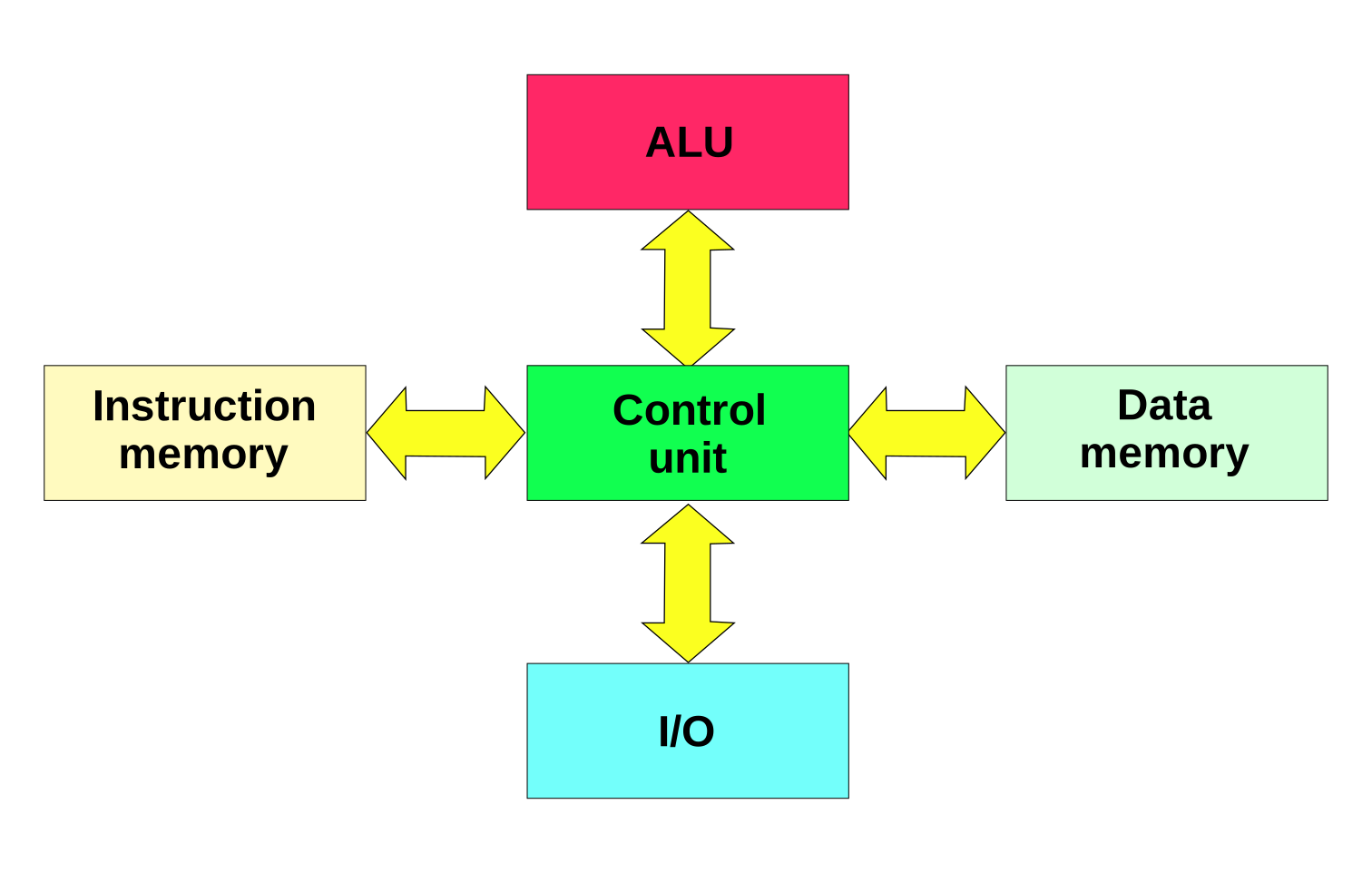
  1. What does the system do? (Functionality)
  2. How is it organized? (Structure)
  3. How does it operate? (Behavior)

The architecture of a computer is usually divided into:

  • Instruction Set Architecture (ISA) โ€“ Interface between hardware and software
  • Microarchitecture โ€“ Internal implementation of the processor
  • System Design โ€“ Integration of hardware components

๐Ÿง  Historical Background

1. Early Computing Machines

Image
Image
Image
Image

The development of computer architecture began with early mechanical devices:

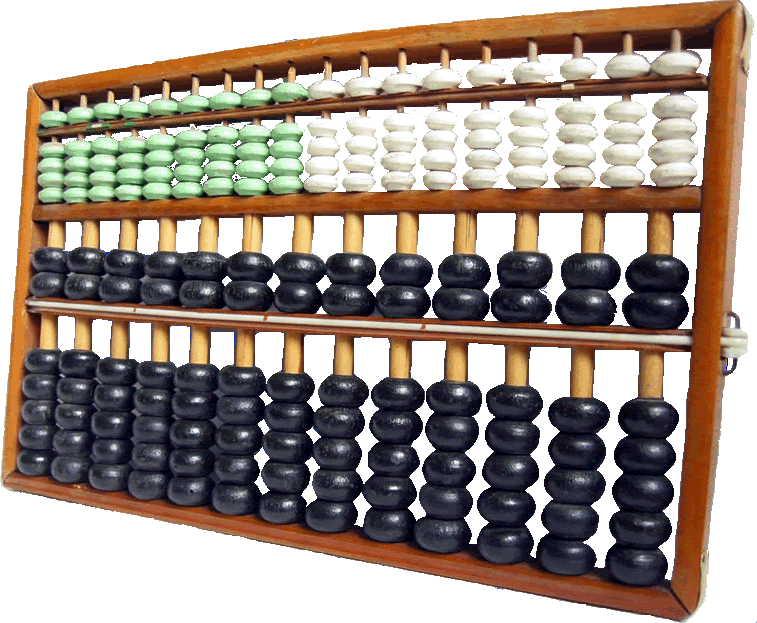
  • Abacus โ€“ First counting tool
  • Analytical Engine (Charles Babbage) โ€“ Concept of programmable machines
  • ENIAC โ€“ First electronic general-purpose computer

2. Von Neumann Architecture

Image
Image
Image
Image

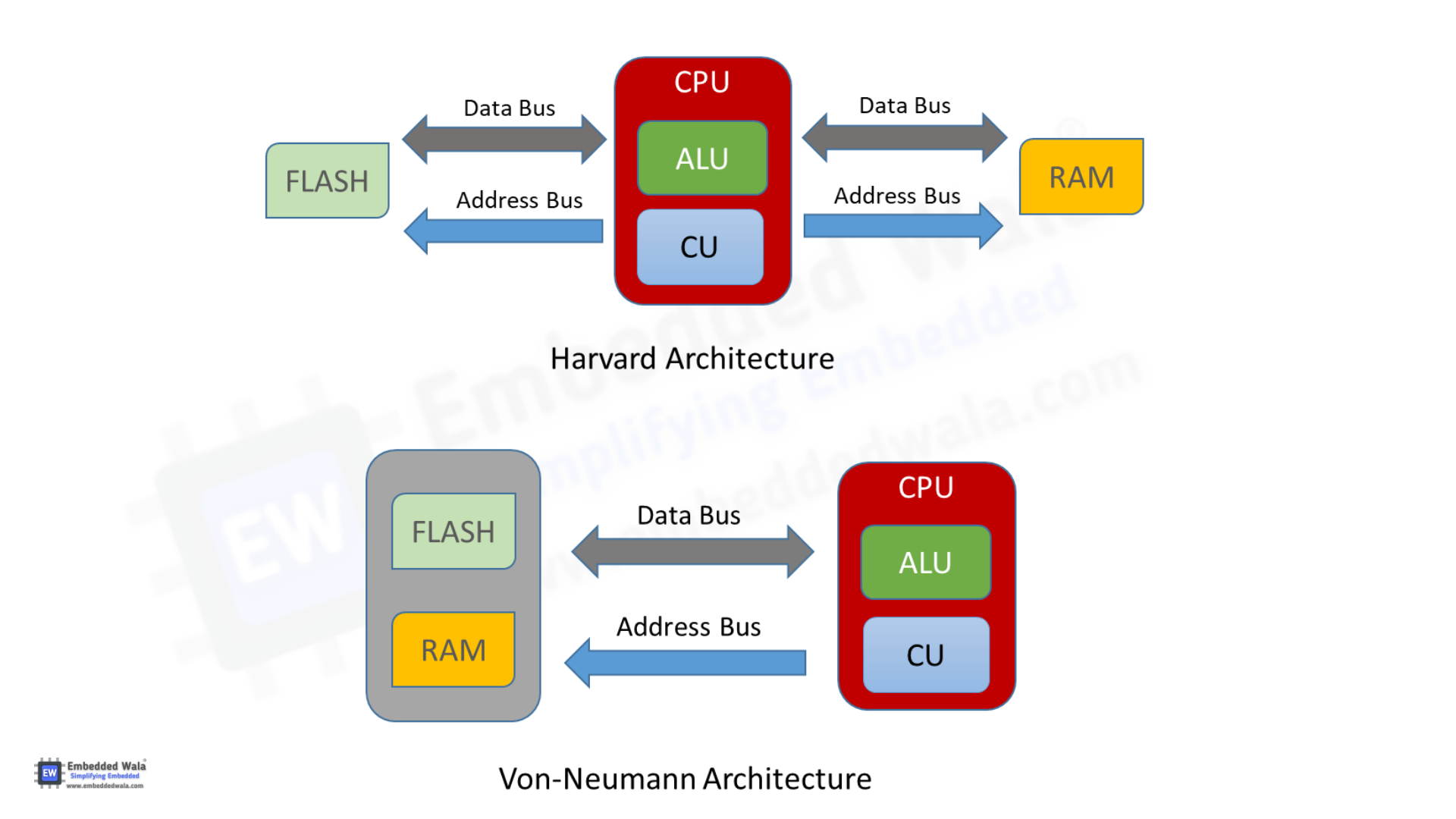
The Von Neumann architecture is the foundation of modern computers. It introduced the stored-program concept, where instructions and data are stored in the same memory.

Key components:

  • Central Processing Unit (CPU)
  • Memory
  • Input/Output devices
  • Bus system

โš™๏ธ Core Components of Computer Architecture


1. Central Processing Unit (CPU)

Image
Image
Image
Image

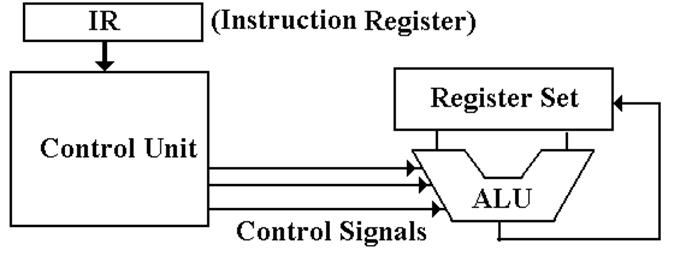
The CPU is the brain of the computer, responsible for executing instructions.

Components of CPU:

a. Arithmetic Logic Unit (ALU)
  • Performs arithmetic operations: addition, subtraction
  • Performs logical operations: AND, OR, NOT
  • Executes comparisons
b. Control Unit (CU)
  • Directs operations of the processor
  • Fetches instructions from memory
  • Decodes and executes them
c. Registers
  • Small, fast storage locations inside CPU
  • Examples:
    • Program Counter (PC)
    • Instruction Register (IR)
    • Accumulator

2. Memory Unit

Image
Image
Image
Image

Memory stores data and instructions.

Types of Memory:

a. Primary Memory
  • RAM (Random Access Memory) โ€“ Volatile
  • ROM (Read Only Memory) โ€“ Non-volatile
b. Secondary Memory
  • Hard Disk, SSD, Optical Disks
  • Permanent storage
c. Cache Memory
  • High-speed memory
  • Located close to CPU
  • Improves performance

3. Input and Output Units

Image
Image
Image
Image

Input Devices:

  • Keyboard
  • Mouse
  • Scanner

Output Devices:

  • Monitor
  • Printer
  • Speakers

These units enable communication between user and computer.


4. Bus System

Image
Image
Image
Image

The bus is a communication system that transfers data between components.

Types of Buses:

  • Data Bus โ€“ Transfers data
  • Address Bus โ€“ Carries memory addresses
  • Control Bus โ€“ Sends control signals

๐Ÿ”„ Instruction Cycle (Fetch-Decode-Execute)

Image
Image
Image
Image

The CPU processes instructions in a cycle:

  1. Fetch โ€“ Retrieve instruction from memory
  2. Decode โ€“ Interpret instruction
  3. Execute โ€“ Perform operation

This cycle repeats continuously.


๐Ÿงฎ Instruction Set Architecture (ISA)

ISA defines:

  • Instruction formats
  • Addressing modes
  • Data types
  • Registers

Examples:

  • RISC (Reduced Instruction Set Computer)
  • CISC (Complex Instruction Set Computer)

โšก RISC vs CISC Architecture

Image
Image
Image
Image
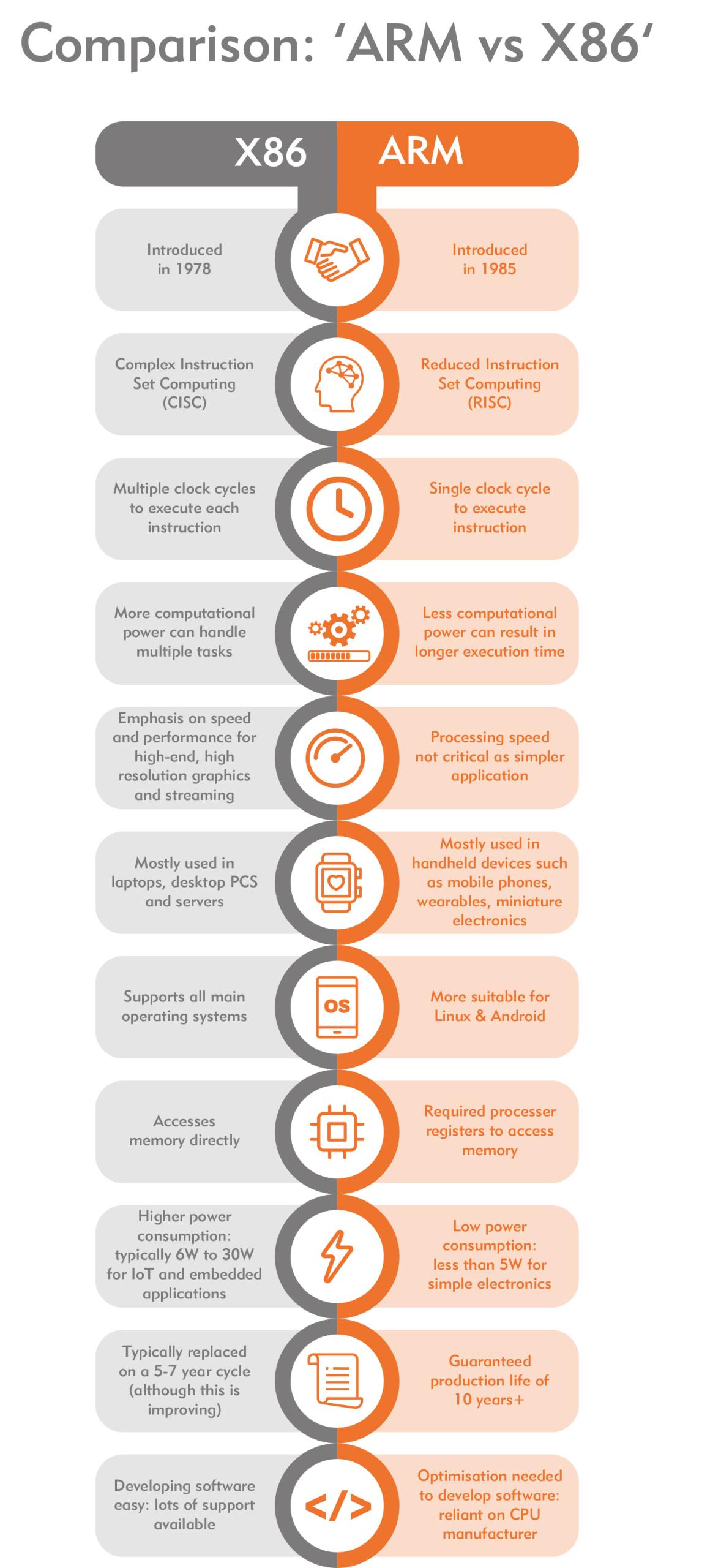
FeatureRISCCISC
InstructionsSimpleComplex
ExecutionFastSlower
ExamplesARMx86

๐Ÿง  Memory Hierarchy

Memory is organized based on speed and cost:

  1. Registers (fastest)
  2. Cache
  3. RAM
  4. Secondary Storage (slowest)

Key principle:

Faster memory is more expensive and smaller.


โš™๏ธ Microarchitecture

Microarchitecture refers to:

  • Internal design of CPU
  • Pipelining
  • Superscalar execution
  • Branch prediction

๐Ÿ” Pipelining

Image
Image
Image
Image

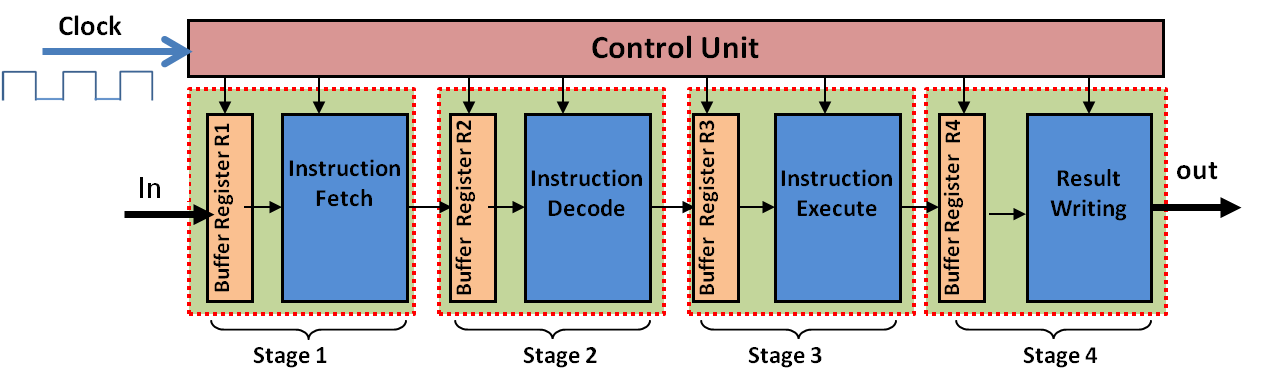
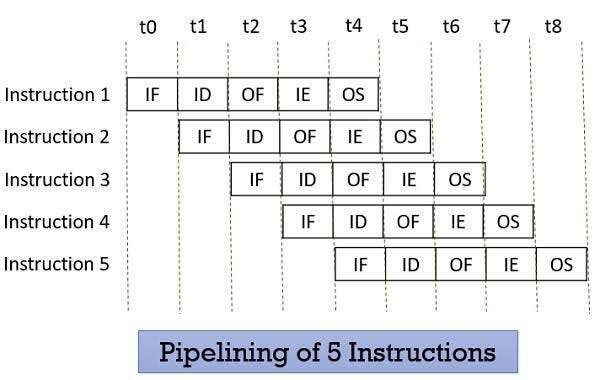
Pipelining improves performance by overlapping instruction execution.

Stages:

  • Fetch
  • Decode
  • Execute
  • Memory
  • Write-back

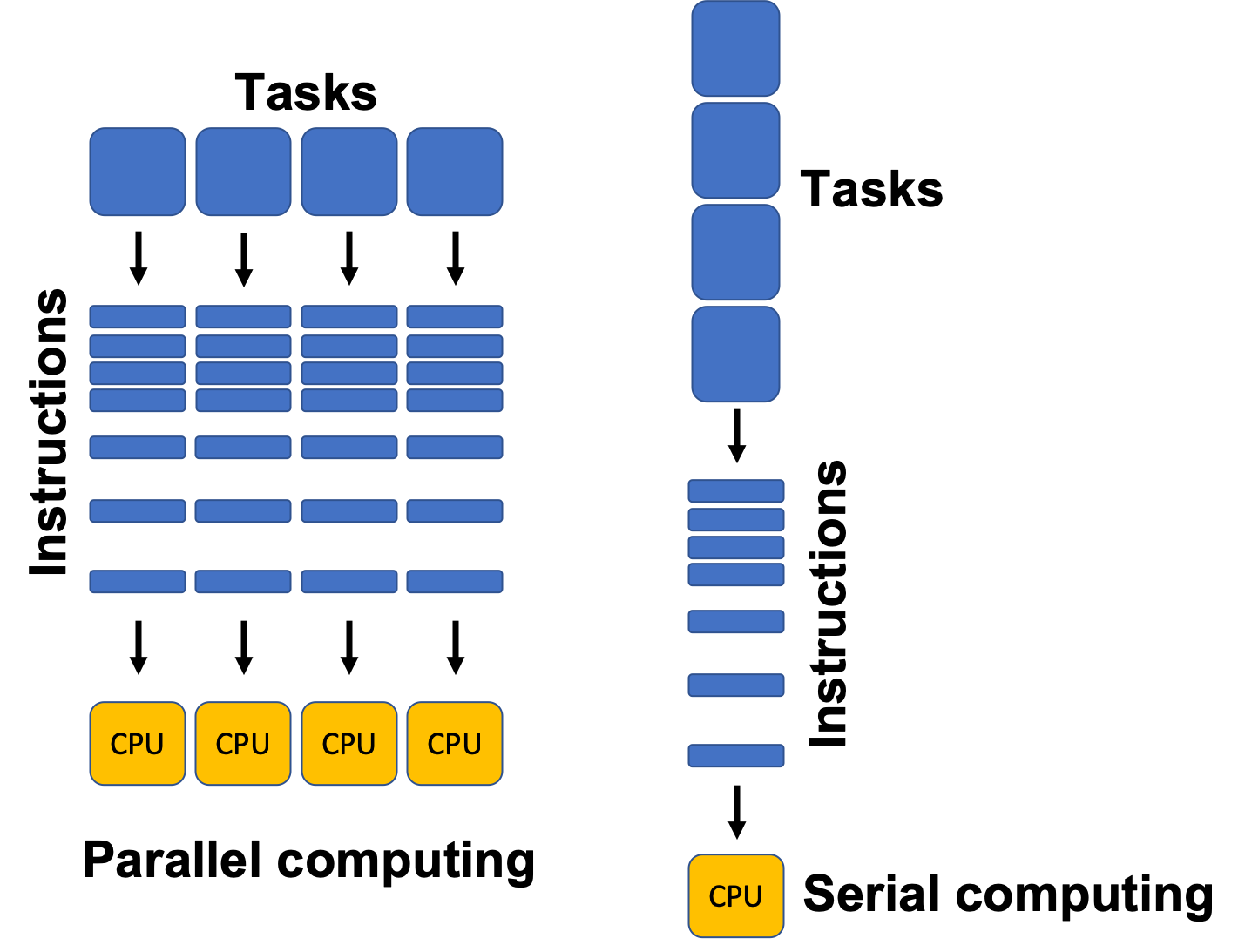
๐Ÿงฉ Parallelism in Architecture

Types:

  • Instruction-Level Parallelism (ILP)
  • Data-Level Parallelism (DLP)
  • Thread-Level Parallelism (TLP)

Examples:

  • Multi-core processors
  • GPUs

๐Ÿ–ฅ๏ธ Types of Computer Architectures


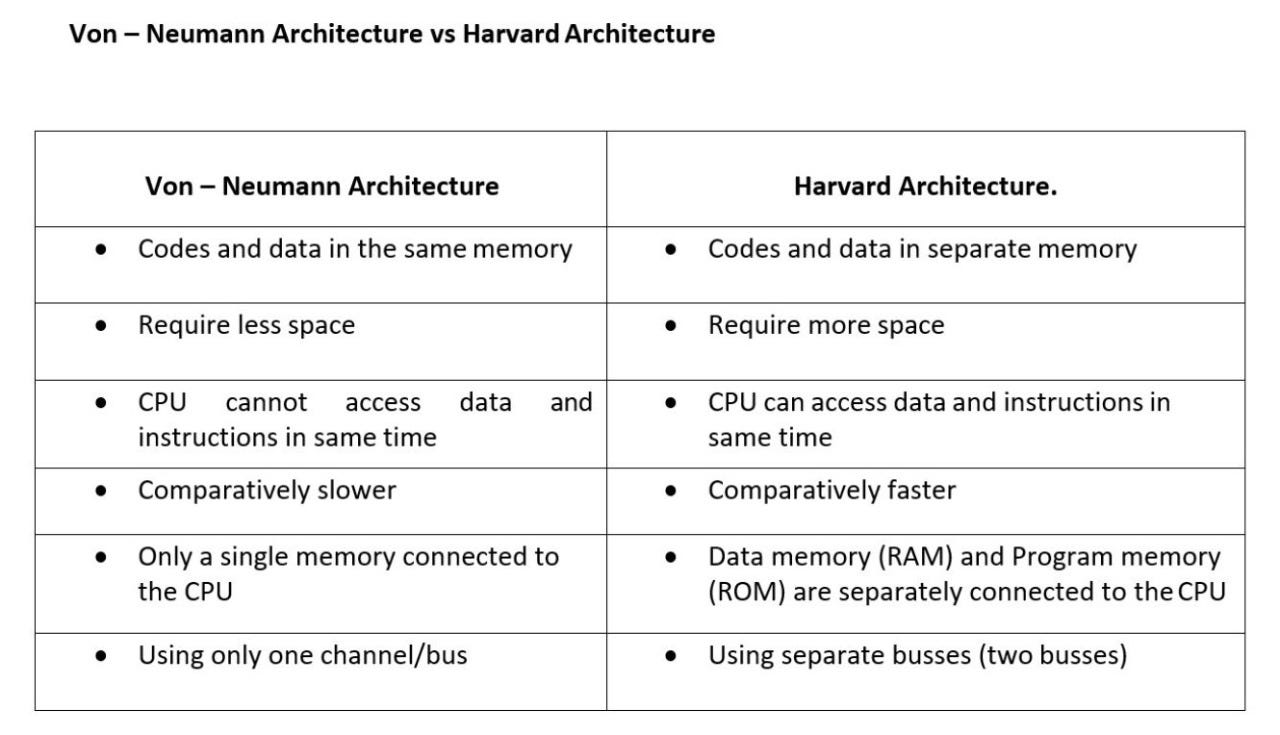
1. Von Neumann Architecture

  • Single memory for data and instructions
  • Simpler design
  • Bottleneck issue

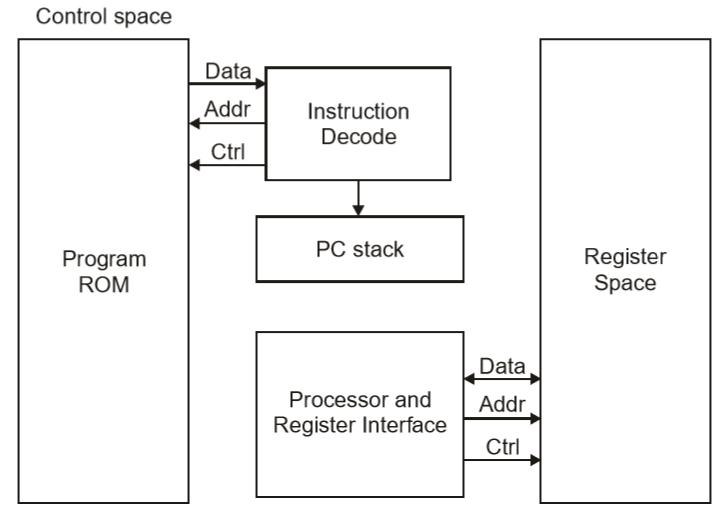
2. Harvard Architecture

Image
Image
Image
Image
  • Separate memory for data and instructions
  • Faster access
  • Used in embedded systems

๐Ÿงฎ Addressing Modes

Defines how operands are accessed:

  • Immediate
  • Direct
  • Indirect
  • Indexed
  • Register

โšก Performance Metrics


1. Clock Speed

  • Measured in GHz
  • Determines how many cycles per second

2. Throughput

  • Number of tasks per unit time

3. Latency

  • Time taken to execute a task

๐Ÿ” Control Signals and Timing

  • Control unit generates signals
  • Synchronization through clock pulses
  • Ensures proper sequencing

๐Ÿง  Registers in Detail

Types:

  • General-purpose registers
  • Special-purpose registers:
    • Program Counter
    • Stack Pointer
    • Status Register

๐Ÿ“ฆ Cache Memory Levels

  • L1 Cache โ€“ fastest, smallest
  • L2 Cache โ€“ larger, slower
  • L3 Cache โ€“ shared among cores

๐Ÿงฉ Multiprocessing and Multicore Systems

Image
Image
Image
Image
  • Multiple processors or cores
  • Improves performance and multitasking

๐Ÿ”„ Interrupts in Computer Architecture

  • Signals from devices to CPU
  • Types:
    • Hardware interrupts
    • Software interrupts

๐Ÿงฎ Input/Output Organization

Methods:

  • Programmed I/O
  • Interrupt-driven I/O
  • Direct Memory Access (DMA)

๐Ÿ” Bus Arbitration

  • Determines which device controls the bus
  • Methods:
    • Centralized
    • Distributed

๐Ÿง  Evolution of Computer Architecture


Generations:

  1. Vacuum Tubes
  2. Transistors
  3. Integrated Circuits
  4. Microprocessors
  5. AI-based architectures

โš™๏ธ Modern Trends in Computer Architecture

Image
Image
Image
Image
  • Quantum Computing
  • Neuromorphic Computing
  • Edge Computing
  • Cloud Computing

๐Ÿงพ Advantages of Computer Architecture Design

  • Efficient processing
  • Scalability
  • Flexibility
  • Optimization of resources

โš ๏ธ Limitations

  • Complexity
  • Cost
  • Power consumption
  • Heat generation

๐Ÿง  Conclusion

Basic computer architecture forms the foundation of all computing systems. From simple machines to modern AI-powered systems, understanding architecture helps in:

  • Designing efficient systems
  • Improving performance
  • Building advanced technologies

It connects hardware and software, enabling computers to solve complex problems efficiently.


๐Ÿท๏ธ Tags