Tag Archives: Multiprocessing

⚙️ Process Management


🌐 Introduction to Process Management
Image
Image
Image

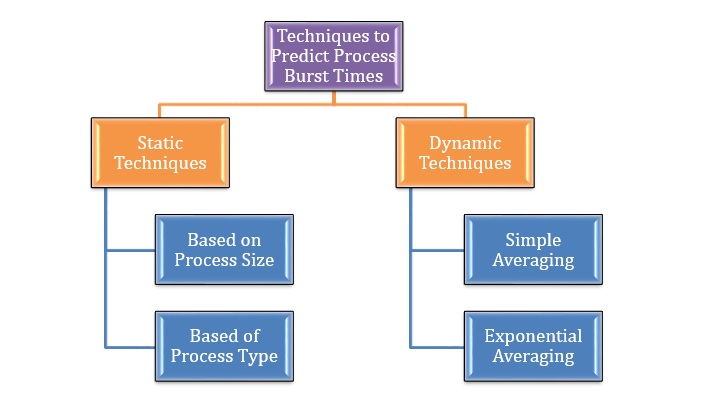
Process Management is a fundamental function of an operating system (OS) that handles the creation, scheduling, execution, and termination of processes. It ensures that multiple programs can run efficiently and concurrently on a computer system.

In simple terms:

Process management = controlling and coordinating program execution

A process is a program in execution, including its code, data, and state.


🧠 Importance of Process Management

  • Enables multitasking
  • Optimizes CPU utilization
  • Ensures fair resource allocation
  • Maintains system stability
  • Improves performance

🧩 Basic Concepts


📄 Program vs Process

FeatureProgramProcess
DefinitionStatic codeExecuting program
StatePassiveActive
Example.exe fileRunning application

🔁 Process States

Image
Image
Image

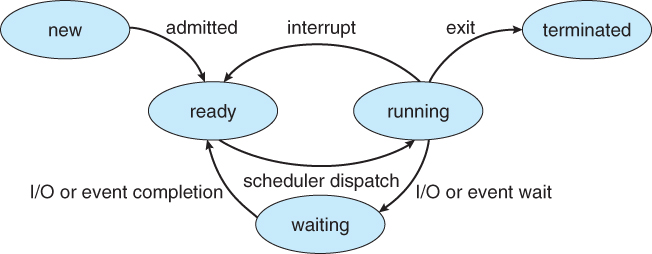
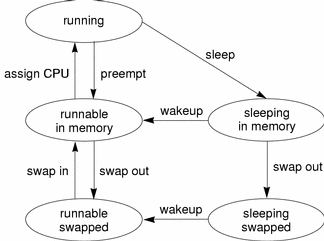
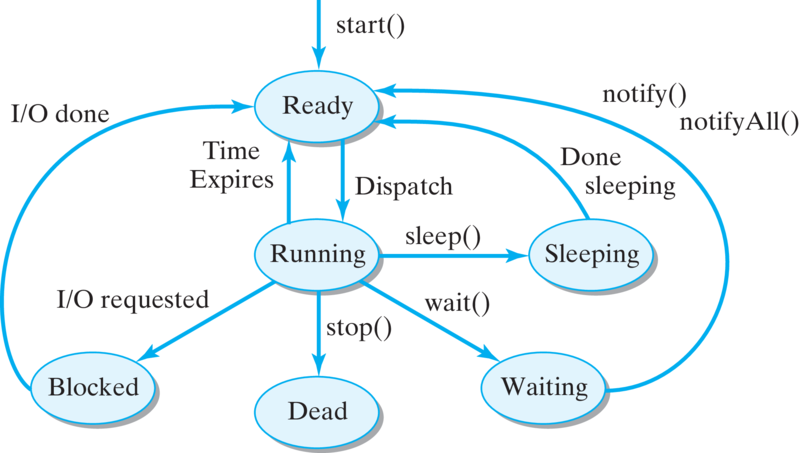
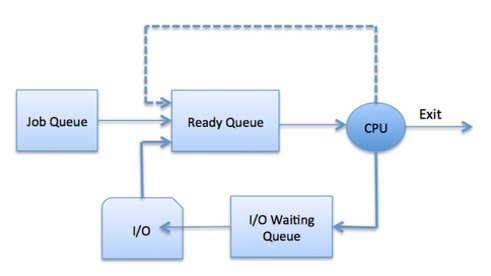
A process moves through different states:

  1. New – Being created
  2. Ready – Waiting for CPU
  3. Running – Executing
  4. Waiting (Blocked) – Waiting for I/O
  5. Terminated – Finished execution

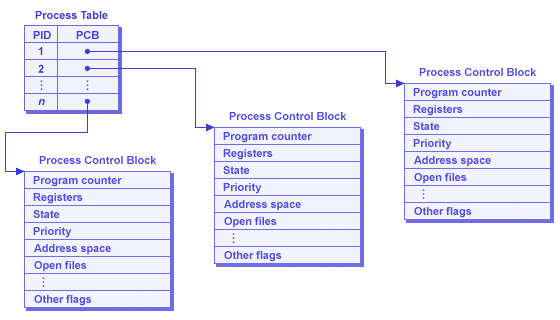
🧠 Process Control Block (PCB)
Image
Image

PCB stores process information:

  • Process ID (PID)
  • Process state
  • CPU registers
  • Memory allocation
  • Scheduling information

⚙️ Process Scheduling


🧠 What is Scheduling?
Image
Image
Image
Image

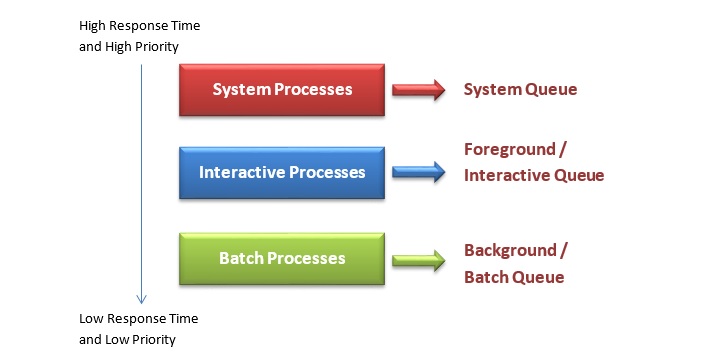
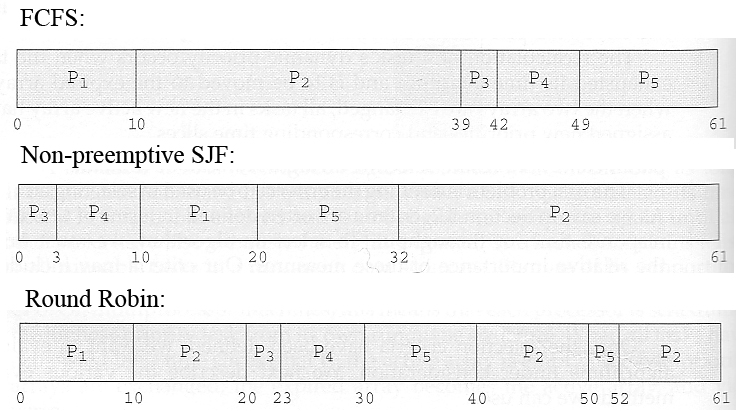
Scheduling determines which process gets CPU time.


🔁 Types of Schedulers

  1. Long-term scheduler – selects processes
  2. Short-term scheduler – allocates CPU
  3. Medium-term scheduler – swaps processes

⚡ Scheduling Algorithms


🔹 1. First Come First Serve (FCFS)

Image
  • Processes executed in arrival order

🔹 2. Shortest Job First (SJF)
Image
Image
  • Shortest execution time first

🔹 3. Round Robin (RR)

Image
Image
  • Time-sharing system
  • Each process gets fixed time slice

🔹 4. Priority Scheduling

Image
Image
Image
  • Processes executed based on priority

⚖️ Scheduling Criteria

  • CPU utilization
  • Throughput
  • Turnaround time
  • Waiting time
  • Response time

🔄 Process Synchronization


🧠 Concept
Image
Image
Image
Image

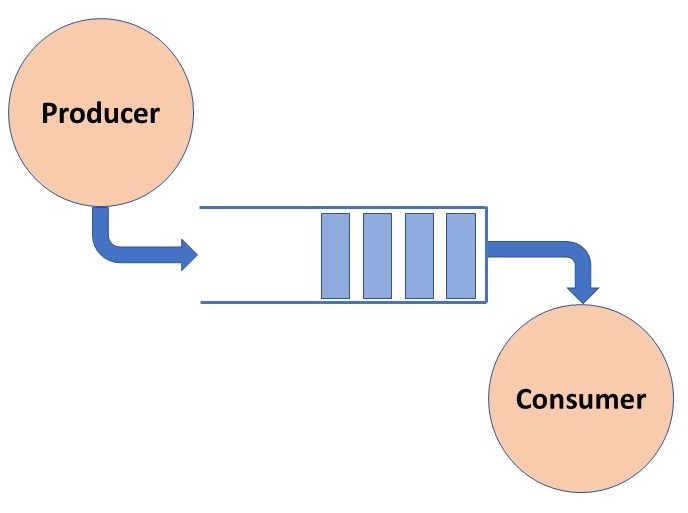
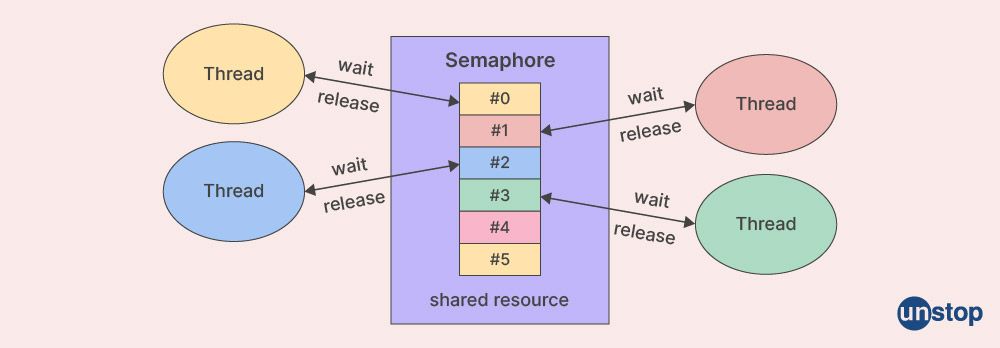
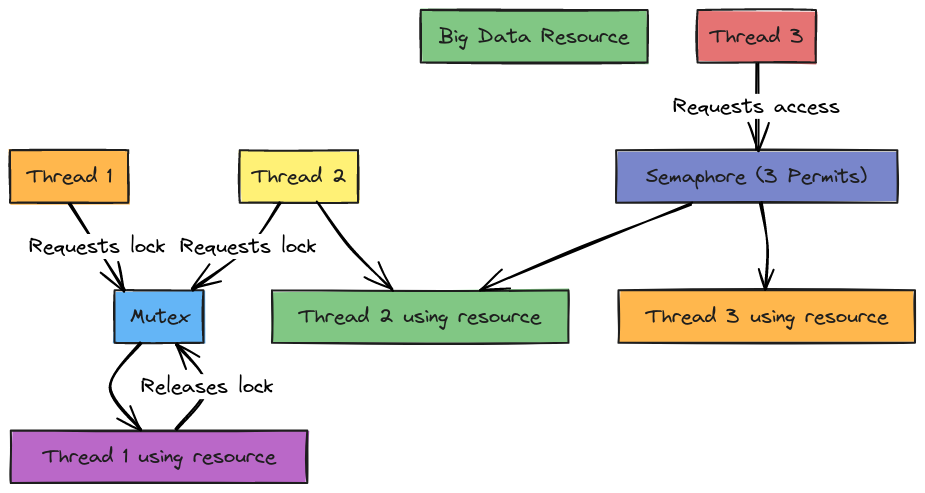
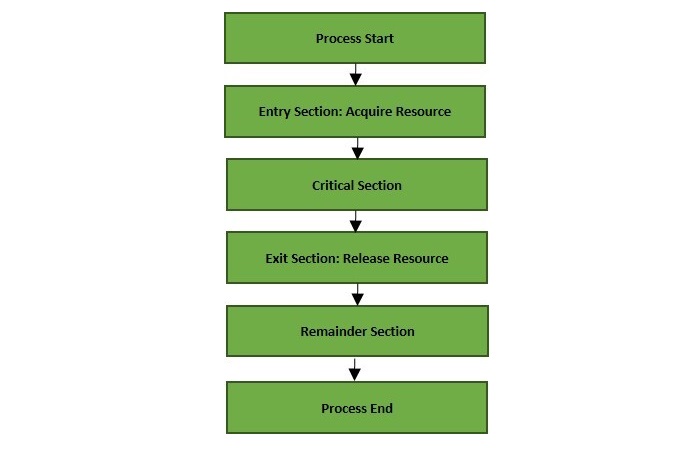
Ensures safe access to shared resources.


⚠️ Critical Section Problem

  • Section where shared data is accessed

🔒 Solutions:

  • Mutex locks
  • Semaphores
  • Monitors

⚠️ Deadlocks


🧠 Definition

Image
Image
Image
Image

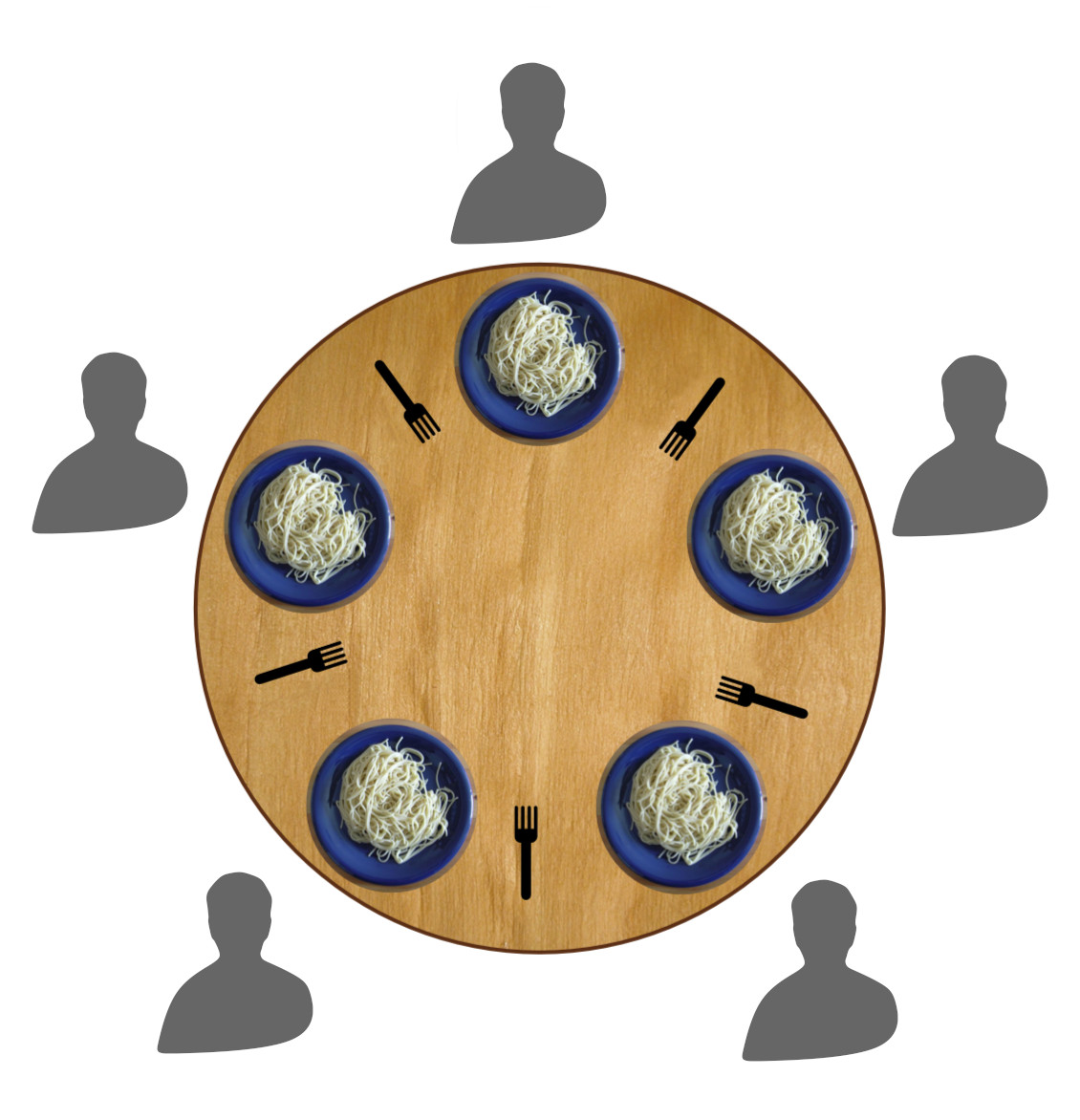
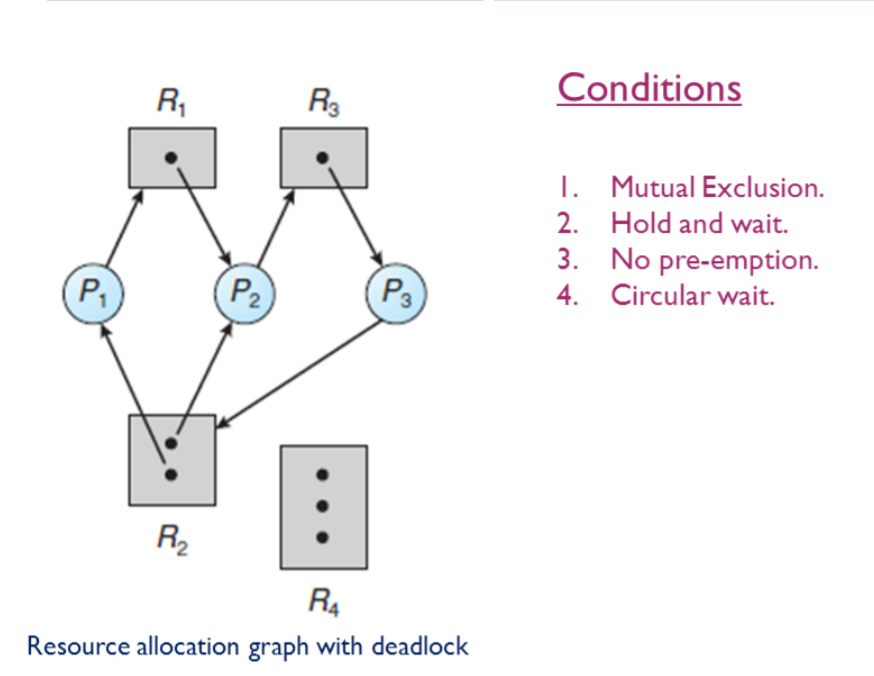
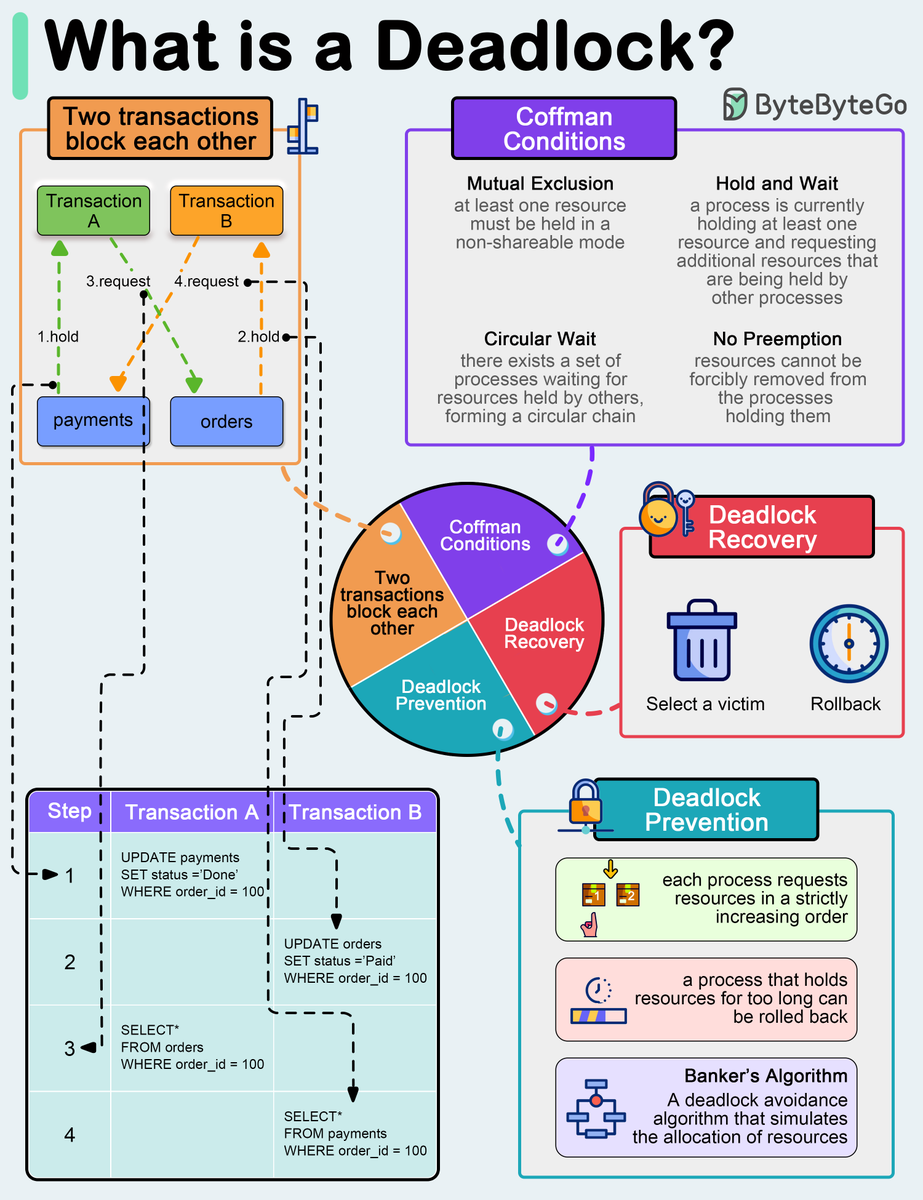
Deadlock occurs when processes wait indefinitely.


🔑 Conditions:

  1. Mutual exclusion
  2. Hold and wait
  3. No preemption
  4. Circular wait

🔄 Handling Deadlocks:

  • Prevention
  • Avoidance
  • Detection and recovery

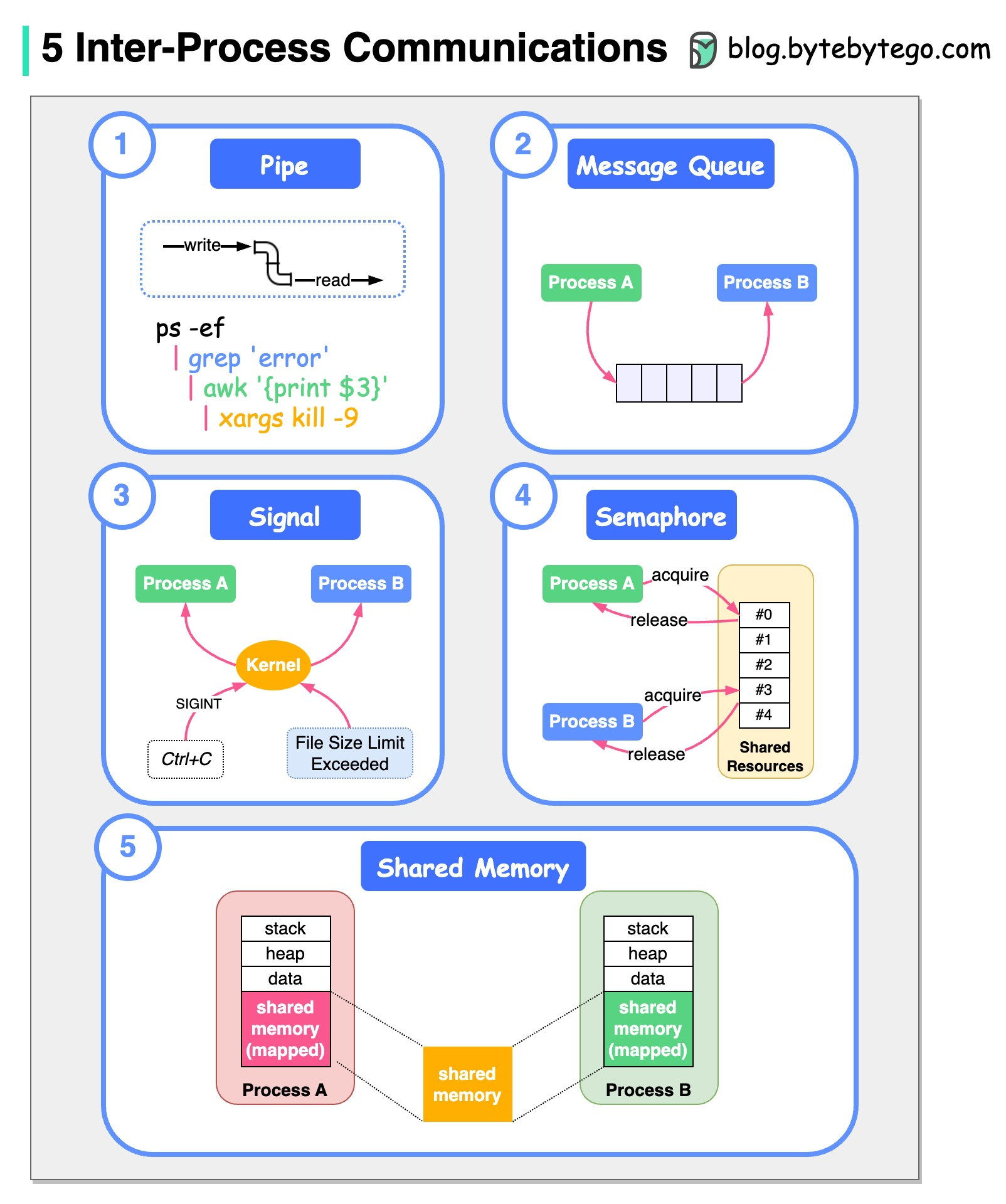
🔁 Inter-Process Communication (IPC)


📡 Methods
Image
Image
Image
  • Shared memory
  • Message passing
  • Pipes
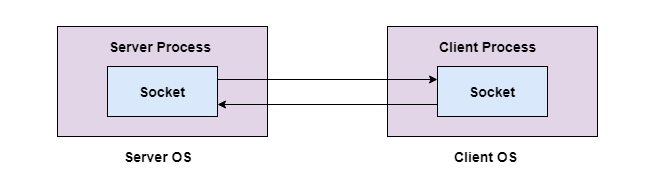
  • Sockets

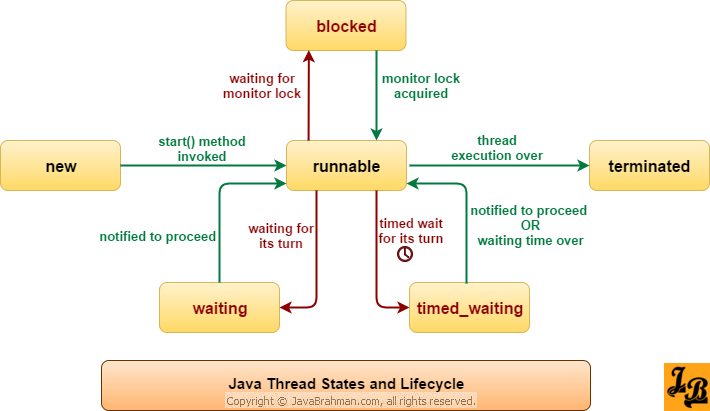
🧠 Threads and Multithreading


🔹 Threads
Image
Image
  • Lightweight processes
  • Share memory

⚡ Benefits:

  • Faster execution
  • Better resource utilization

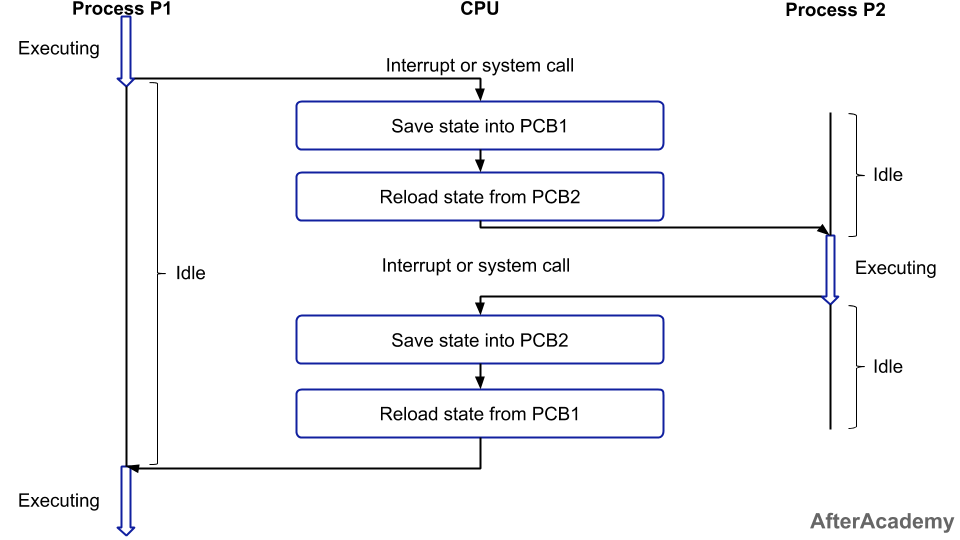
🔄 Context Switching


🧠 Concept
Image
Image
Image
Image
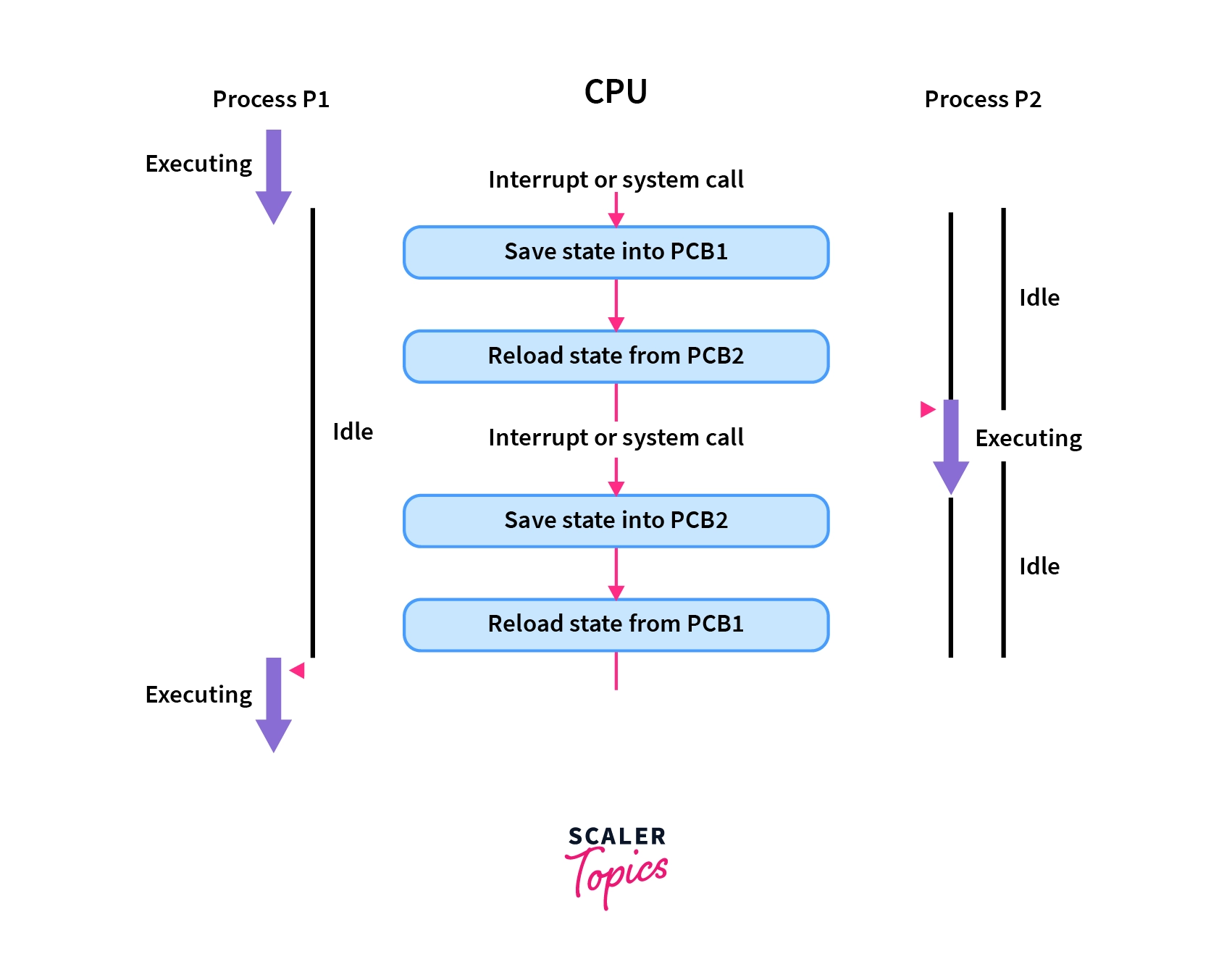
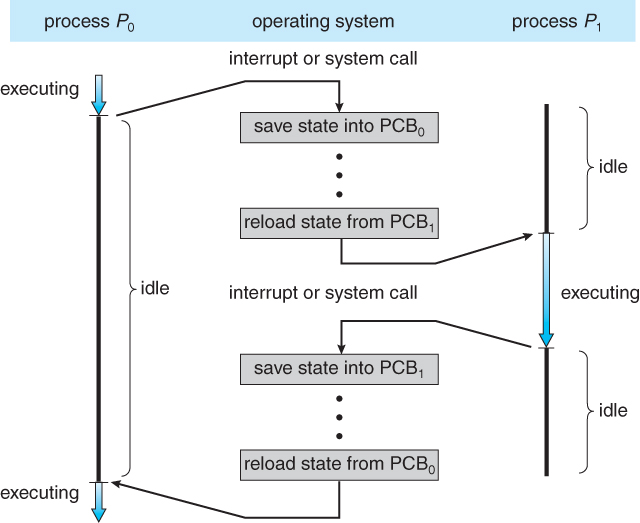
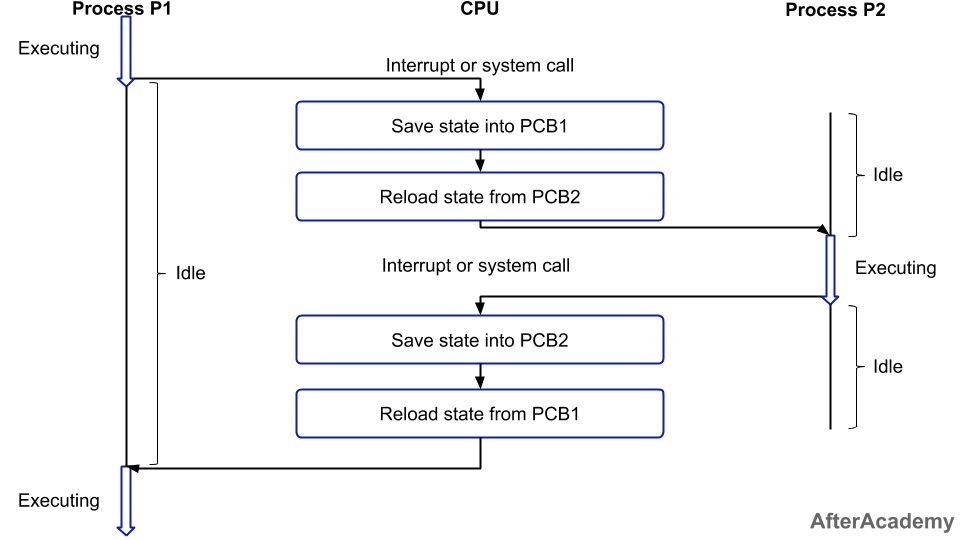
  • CPU switches between processes
  • Saves and loads state

🧩 Process vs Thread

FeatureProcessThread
MemorySeparateShared
OverheadHighLow
SpeedSlowerFaster

⚙️ Multiprocessing


🧠 Concept

Image
Image
Image
Image
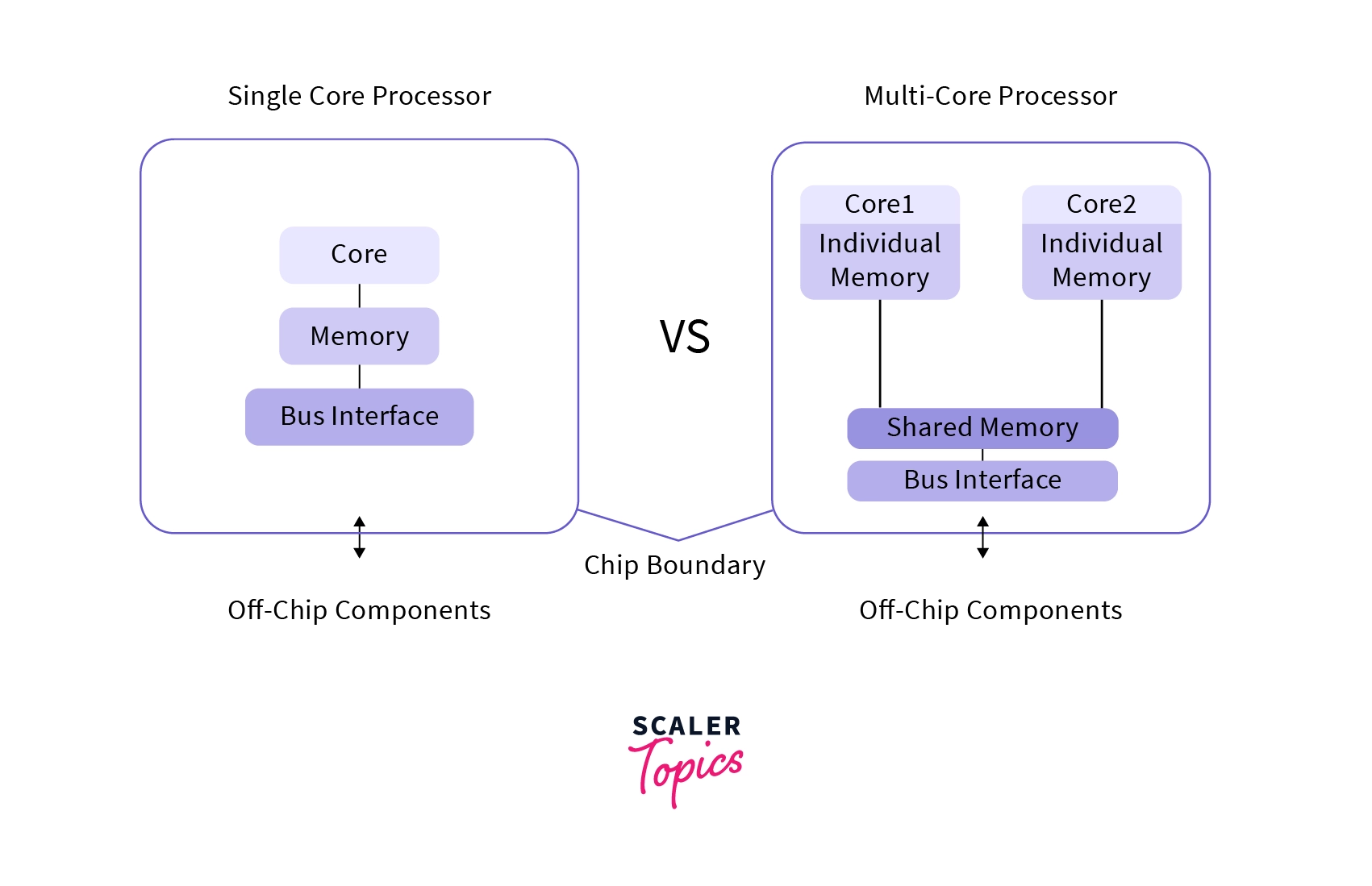
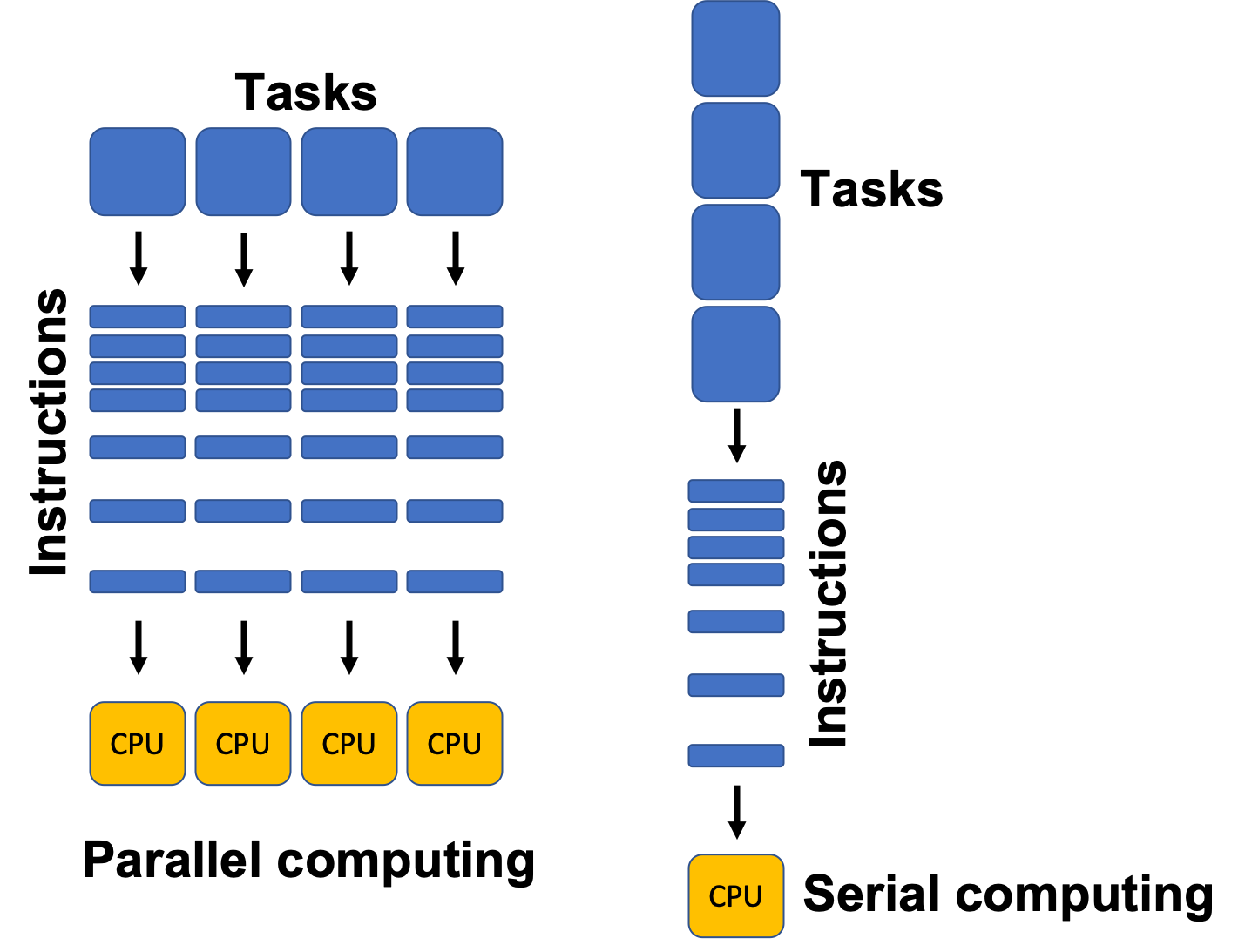
  • Multiple CPUs/cores
  • Parallel execution

🧠 Real-Time Process Management


⚡ Types:

  • Hard real-time
  • Soft real-time

Used in:

  • Robotics
  • Embedded systems

🔐 Process Security


🛡️ Features:

  • Access control
  • Isolation
  • Sandboxing

⚡ Performance Optimization

  • Efficient scheduling
  • Load balancing
  • Minimizing context switches

⚠️ Challenges

  • Deadlocks
  • Starvation
  • Race conditions

🚀 Modern Trends

Image
Image
Image
Image
  • Containerization
  • Virtualization
  • Cloud computing
  • Microservices

🧾 Conclusion

Process management is a core function of operating systems that ensures efficient execution of programs. It enables:

  • Multitasking
  • Resource sharing
  • System stability

Understanding process management is essential for:

  • OS design
  • Software development
  • Performance optimization

🏷️ Tags

🖥️ Basic Computer Architecture – Complete Detailed Guide


🧩 Overview of Computer Architecture

Image
Image
Image
Image

Computer architecture refers to the design, structure, and functional behavior of a computer system. It defines how different components of a computer—such as the CPU, memory, and input/output devices—interact with each other to execute programs.

At its core, computer architecture answers three main questions:

  1. What does the system do? (Functionality)
  2. How is it organized? (Structure)
  3. How does it operate? (Behavior)

The architecture of a computer is usually divided into:

  • Instruction Set Architecture (ISA) – Interface between hardware and software
  • Microarchitecture – Internal implementation of the processor
  • System Design – Integration of hardware components

🧠 Historical Background

1. Early Computing Machines

Image
Image
Image
Image

The development of computer architecture began with early mechanical devices:

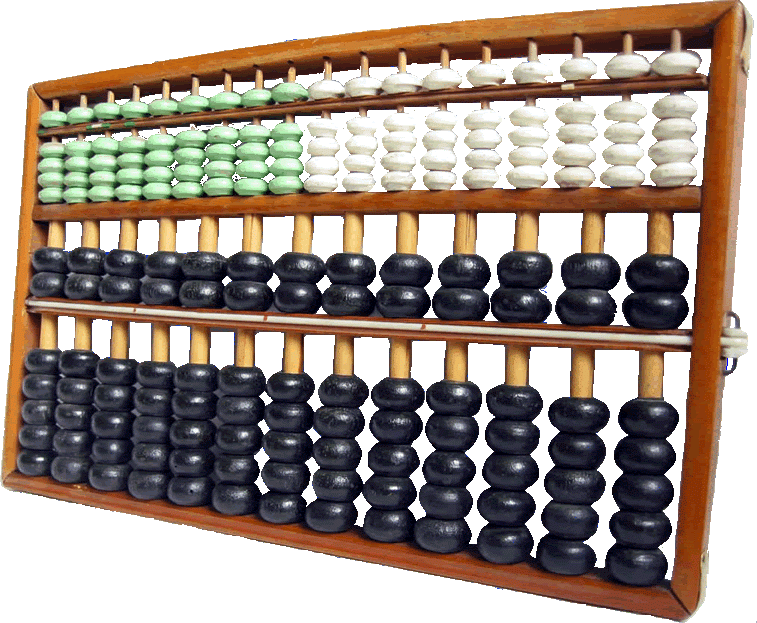
  • Abacus – First counting tool
  • Analytical Engine (Charles Babbage) – Concept of programmable machines
  • ENIAC – First electronic general-purpose computer

2. Von Neumann Architecture

Image
Image
Image
Image

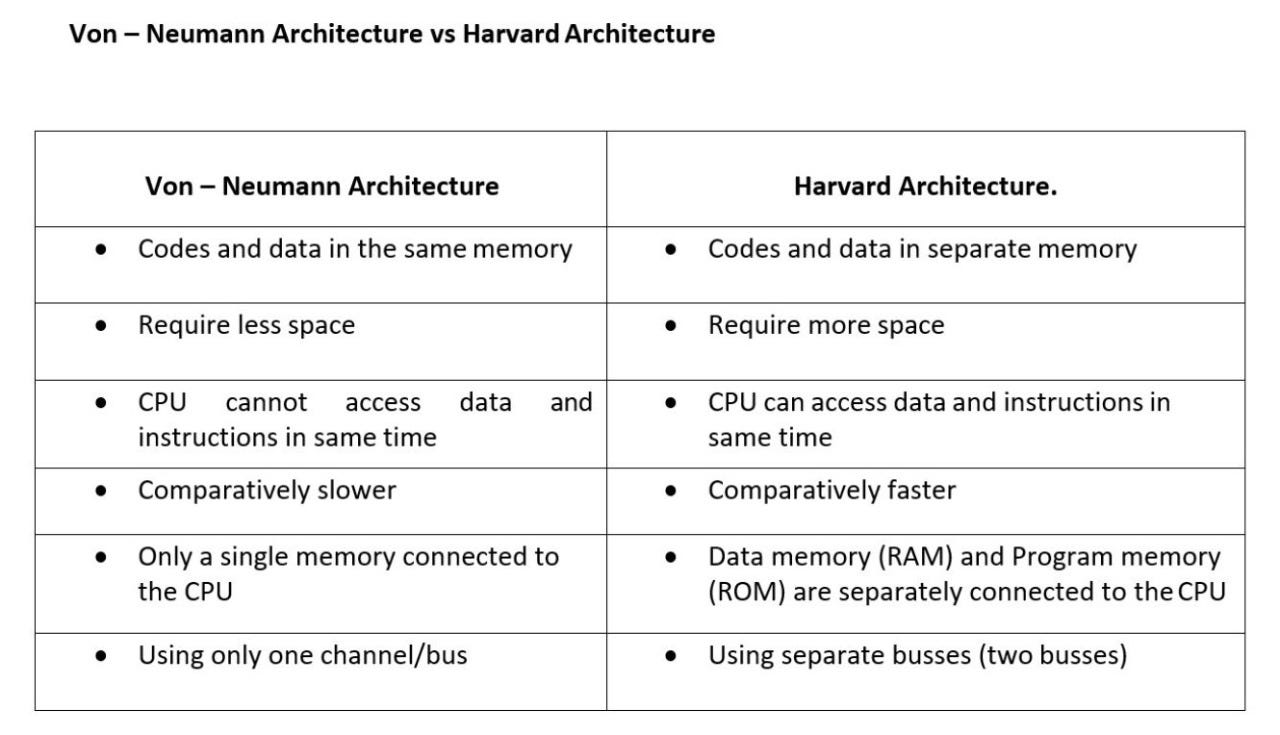
The Von Neumann architecture is the foundation of modern computers. It introduced the stored-program concept, where instructions and data are stored in the same memory.

Key components:

  • Central Processing Unit (CPU)
  • Memory
  • Input/Output devices
  • Bus system

⚙️ Core Components of Computer Architecture


1. Central Processing Unit (CPU)

Image
Image
Image
Image

The CPU is the brain of the computer, responsible for executing instructions.

Components of CPU:

a. Arithmetic Logic Unit (ALU)
  • Performs arithmetic operations: addition, subtraction
  • Performs logical operations: AND, OR, NOT
  • Executes comparisons
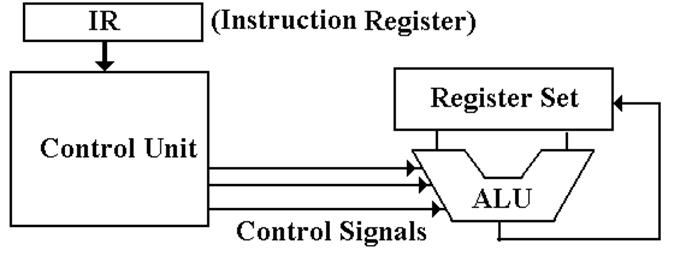
b. Control Unit (CU)
  • Directs operations of the processor
  • Fetches instructions from memory
  • Decodes and executes them
c. Registers
  • Small, fast storage locations inside CPU
  • Examples:
    • Program Counter (PC)
    • Instruction Register (IR)
    • Accumulator

2. Memory Unit

Image
Image
Image
Image

Memory stores data and instructions.

Types of Memory:

a. Primary Memory
  • RAM (Random Access Memory) – Volatile
  • ROM (Read Only Memory) – Non-volatile
b. Secondary Memory
  • Hard Disk, SSD, Optical Disks
  • Permanent storage
c. Cache Memory
  • High-speed memory
  • Located close to CPU
  • Improves performance

3. Input and Output Units

Image
Image
Image
Image

Input Devices:

  • Keyboard
  • Mouse
  • Scanner

Output Devices:

  • Monitor
  • Printer
  • Speakers

These units enable communication between user and computer.


4. Bus System

Image
Image
Image
Image

The bus is a communication system that transfers data between components.

Types of Buses:

  • Data Bus – Transfers data
  • Address Bus – Carries memory addresses
  • Control Bus – Sends control signals

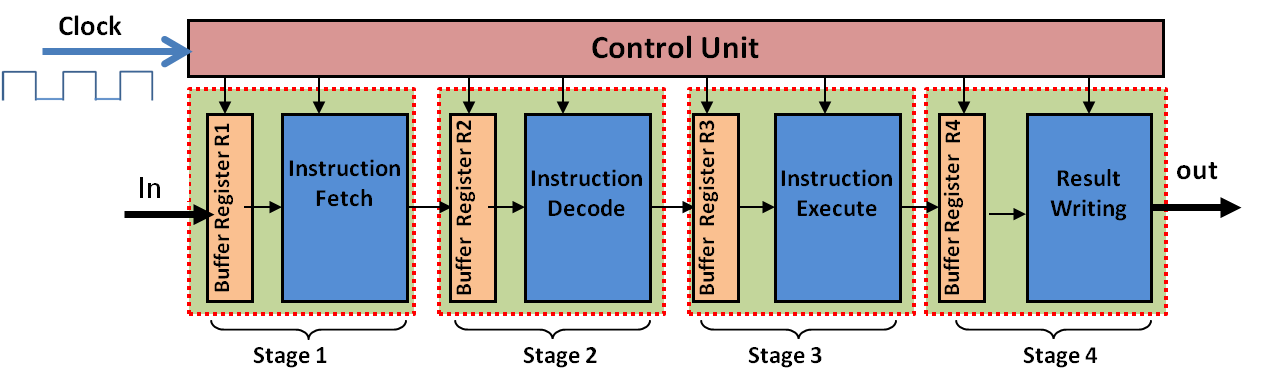
🔄 Instruction Cycle (Fetch-Decode-Execute)

Image
Image
Image
Image

The CPU processes instructions in a cycle:

  1. Fetch – Retrieve instruction from memory
  2. Decode – Interpret instruction
  3. Execute – Perform operation

This cycle repeats continuously.


🧮 Instruction Set Architecture (ISA)

ISA defines:

  • Instruction formats
  • Addressing modes
  • Data types
  • Registers

Examples:

  • RISC (Reduced Instruction Set Computer)
  • CISC (Complex Instruction Set Computer)

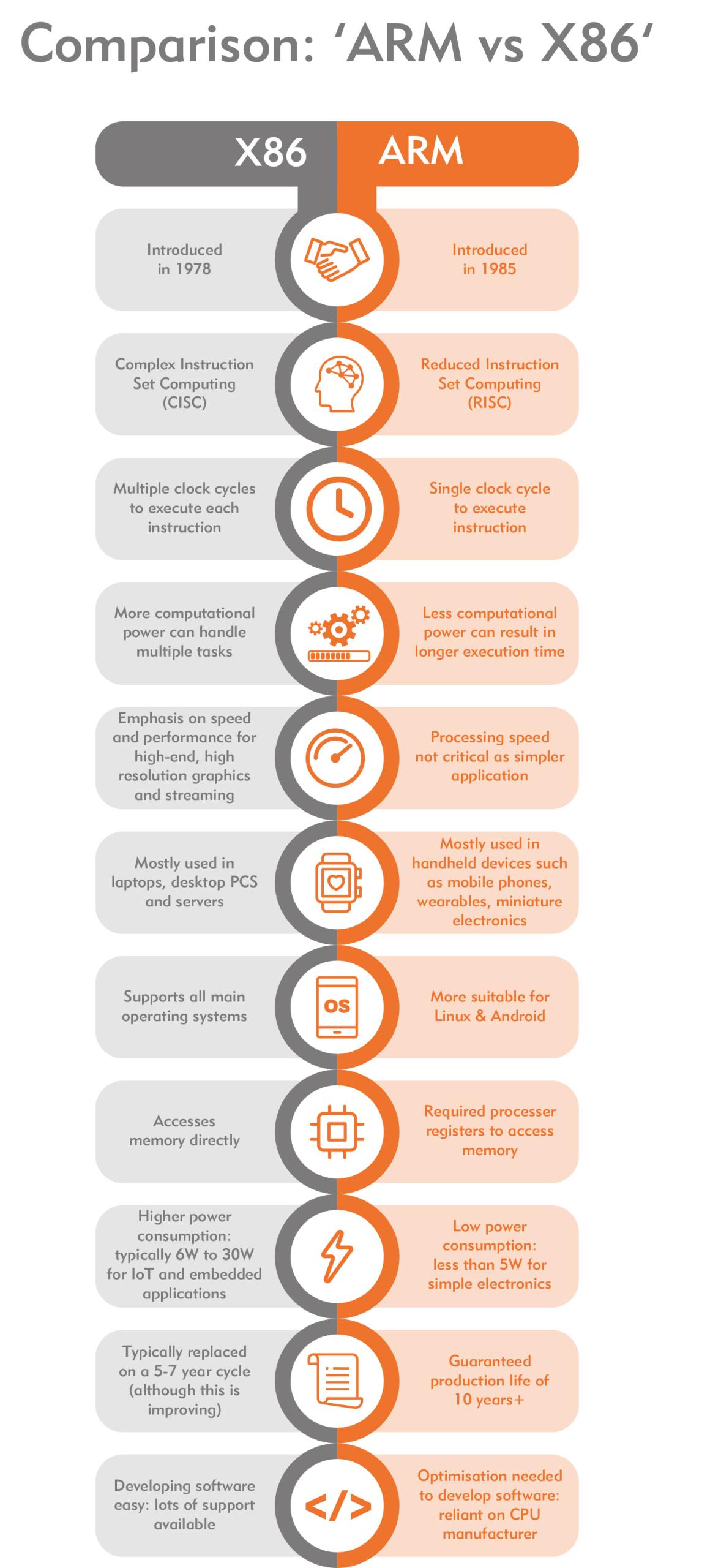
⚡ RISC vs CISC Architecture

Image
Image
Image
Image
FeatureRISCCISC
InstructionsSimpleComplex
ExecutionFastSlower
ExamplesARMx86

🧠 Memory Hierarchy

Memory is organized based on speed and cost:

  1. Registers (fastest)
  2. Cache
  3. RAM
  4. Secondary Storage (slowest)

Key principle:

Faster memory is more expensive and smaller.


⚙️ Microarchitecture

Microarchitecture refers to:

  • Internal design of CPU
  • Pipelining
  • Superscalar execution
  • Branch prediction

🔁 Pipelining

Image
Image
Image
Image

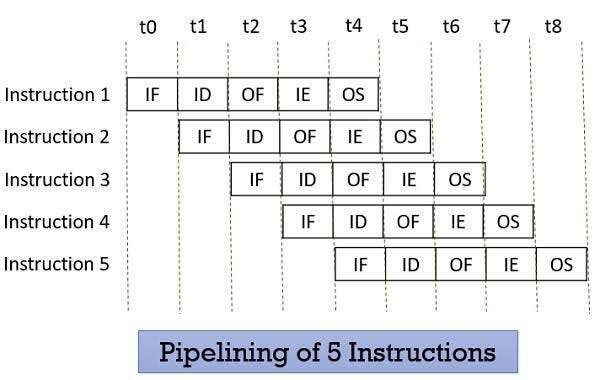
Pipelining improves performance by overlapping instruction execution.

Stages:

  • Fetch
  • Decode
  • Execute
  • Memory
  • Write-back

🧩 Parallelism in Architecture

Types:

  • Instruction-Level Parallelism (ILP)
  • Data-Level Parallelism (DLP)
  • Thread-Level Parallelism (TLP)

Examples:

  • Multi-core processors
  • GPUs

🖥️ Types of Computer Architectures


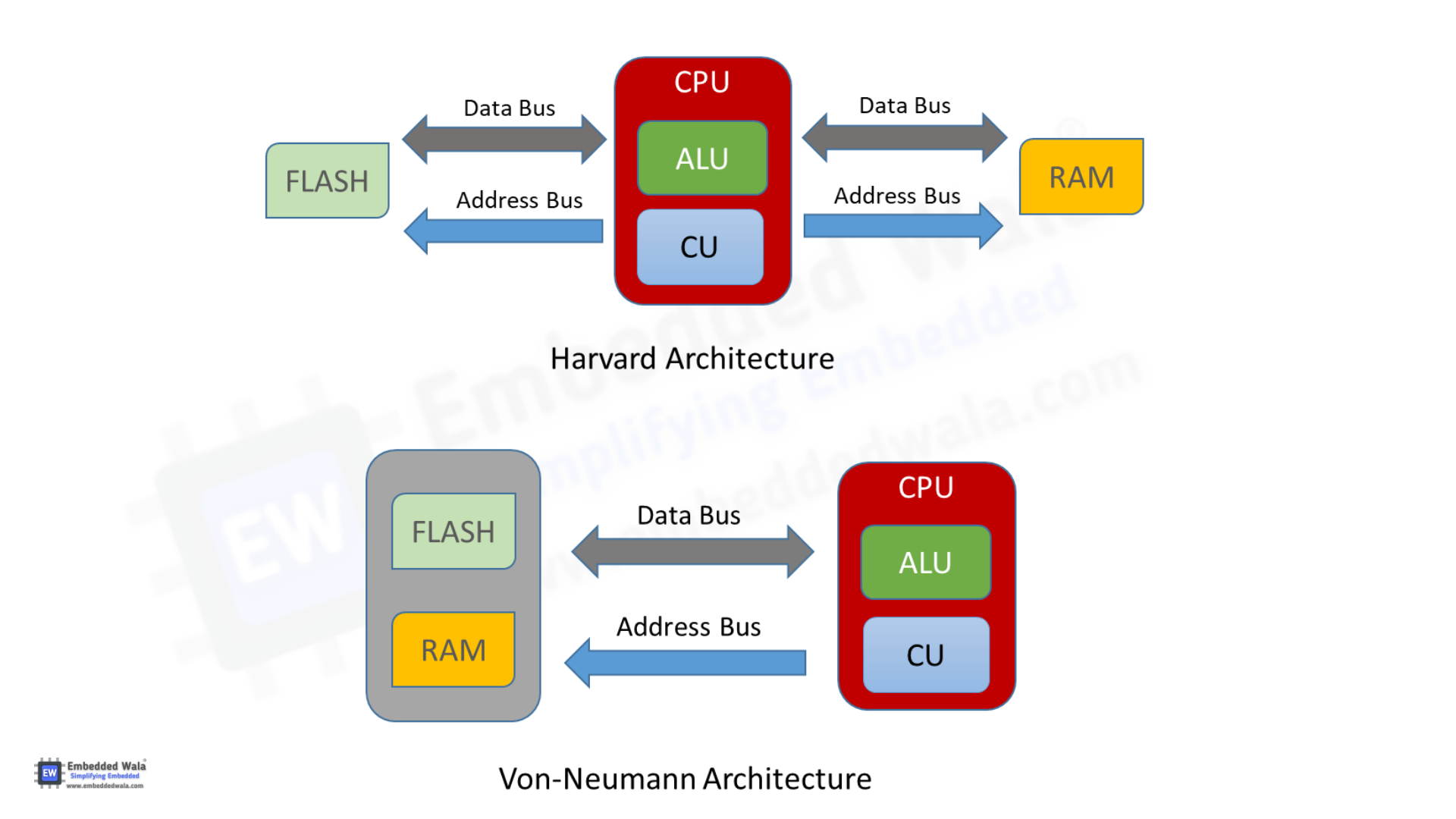
1. Von Neumann Architecture

  • Single memory for data and instructions
  • Simpler design
  • Bottleneck issue

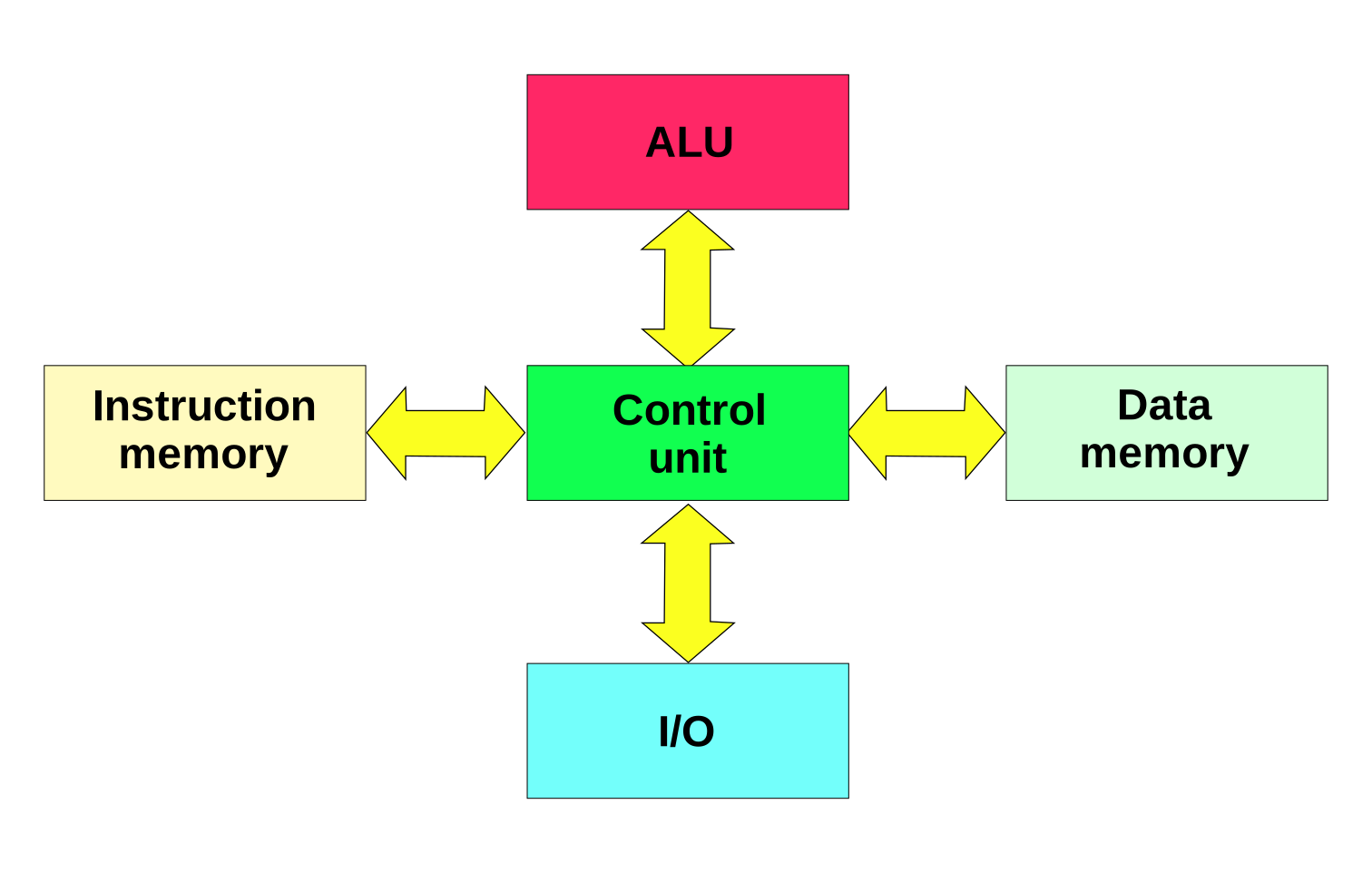
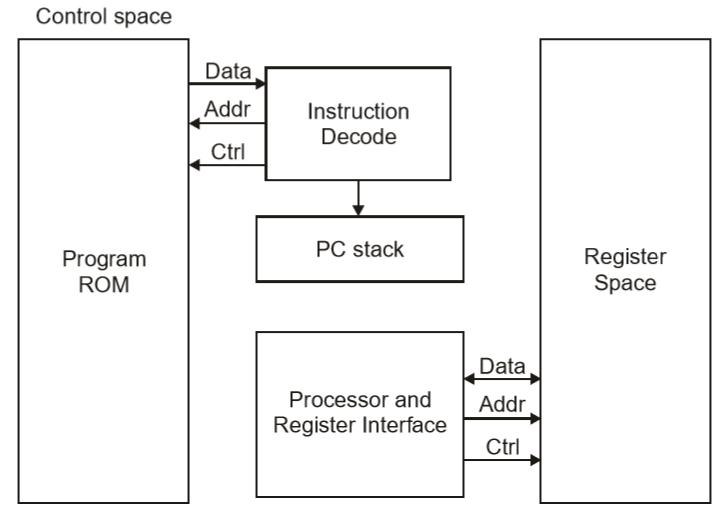
2. Harvard Architecture

Image
Image
Image
Image
  • Separate memory for data and instructions
  • Faster access
  • Used in embedded systems

🧮 Addressing Modes

Defines how operands are accessed:

  • Immediate
  • Direct
  • Indirect
  • Indexed
  • Register

⚡ Performance Metrics


1. Clock Speed

  • Measured in GHz
  • Determines how many cycles per second

2. Throughput

  • Number of tasks per unit time

3. Latency

  • Time taken to execute a task

🔐 Control Signals and Timing

  • Control unit generates signals
  • Synchronization through clock pulses
  • Ensures proper sequencing

🧠 Registers in Detail

Types:

  • General-purpose registers
  • Special-purpose registers:
    • Program Counter
    • Stack Pointer
    • Status Register

📦 Cache Memory Levels

  • L1 Cache – fastest, smallest
  • L2 Cache – larger, slower
  • L3 Cache – shared among cores

🧩 Multiprocessing and Multicore Systems

Image
Image
Image
Image
  • Multiple processors or cores
  • Improves performance and multitasking

🔄 Interrupts in Computer Architecture

  • Signals from devices to CPU
  • Types:
    • Hardware interrupts
    • Software interrupts

🧮 Input/Output Organization

Methods:

  • Programmed I/O
  • Interrupt-driven I/O
  • Direct Memory Access (DMA)

🔐 Bus Arbitration

  • Determines which device controls the bus
  • Methods:
    • Centralized
    • Distributed

🧠 Evolution of Computer Architecture


Generations:

  1. Vacuum Tubes
  2. Transistors
  3. Integrated Circuits
  4. Microprocessors
  5. AI-based architectures

⚙️ Modern Trends in Computer Architecture

Image
Image
Image
Image
  • Quantum Computing
  • Neuromorphic Computing
  • Edge Computing
  • Cloud Computing

🧾 Advantages of Computer Architecture Design

  • Efficient processing
  • Scalability
  • Flexibility
  • Optimization of resources

⚠️ Limitations

  • Complexity
  • Cost
  • Power consumption
  • Heat generation

🧠 Conclusion

Basic computer architecture forms the foundation of all computing systems. From simple machines to modern AI-powered systems, understanding architecture helps in:
  • Designing efficient systems
  • Improving performance
  • Building advanced technologies

It connects hardware and software, enabling computers to solve complex problems efficiently.


🏷️ Tags